


Cloud Delivery Models Powerpoint Presentation Slides




Try Before you Buy Download Free Sample Product
 Impress Your
 Audience
 100%
100% Editable
 Save Hours
 of Time


Cloud computing is a burgeoning industry that enables businesses to move away from on premise IT infrastructure and instead depend on internet-based services. Check out our efficiently designed Cloud Delivery Models template that gives a brief idea about cloud service provider companies, an overview of cloud computing, architecture and types, etc. In this presentation, we have covered how different industries utilize cloud computing, standard cloud service models such as infrastructure as a service IaaS, platform as a service PaaS, and software as a service SaaS. In addition, this PPT contains the introduction of IaaS, its characteristics, types of IaaS environments, service provided by service providers, pros and cons, reasons to choose the IaaS model, and top service providers for IaaS. Also, the presentation includes the PaaS introduction, types, elements included in PaaS, and SaaS introduction and types of SaaS solutions. Furthermore, this template compares three cloud service models, namely IaaS, PaaS, and SaaS, and provides a checklist to implement each model. Lastly, this Cloud-based Services deck comprises a 30-60-90 days plan and a roadmap to implement cloud service models in the organization. Get access to this 100 percent editable template now.
People who downloaded this PowerPoint presentation also viewed the following :
Content of this Powerpoint Presentation
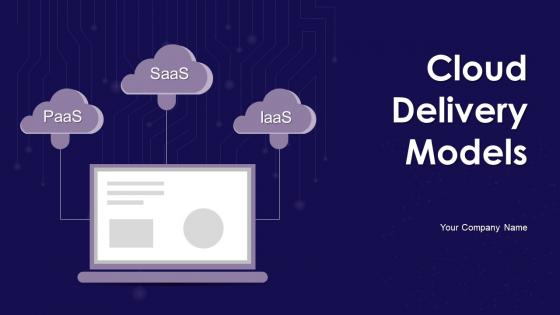
Slide 1: This slide introduces Cloud Delivery Models. State your company name and begin.
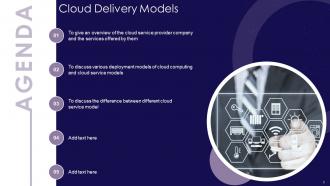
Slide 2: This slide states Agenda of the presentation.
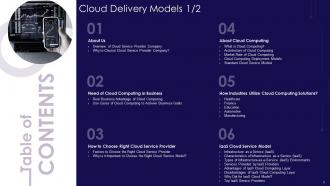
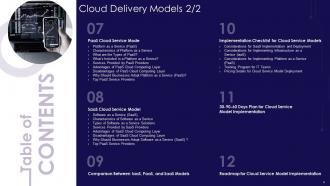
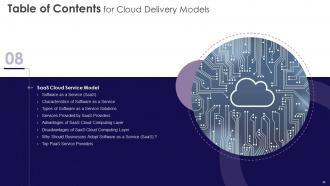
Slide 3: This slide presents Table of Content for the presentation.
Slide 4: This is another slide continuing Table of Content for the presentation.
Slide 5: This slide highlights title for topics that are to be covered next in the template.
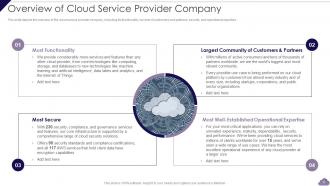
Slide 6: This slide shows overview of the cloud service provider company, including its functionality, number of customers and partners.
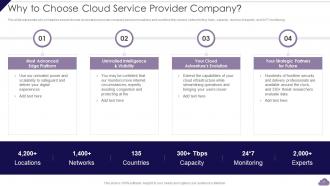
Slide 7: This slide represents why companies should choose cloud service provider company based on locations and countries they served.
Slide 8: This slide highlights title for topics that are to be covered next in the template.
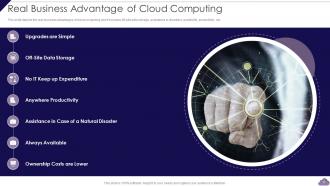
Slide 9: This slide shows Real Business Advantage of Cloud Computing.
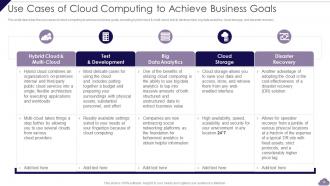
Slide 10: This slide displays Use Cases of Cloud Computing to Achieve Business Goals.
Slide 11: This slide highlights title for topics that are to be covered next in the template.
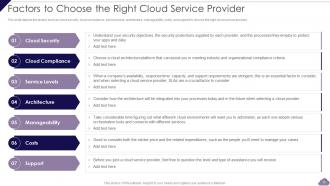
Slide 12: This slide shows Factors to Choose the Right Cloud Service Provider.
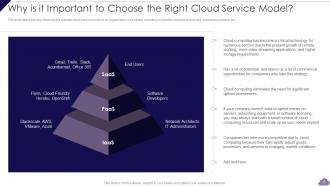
Slide 13: This slide presents Why is it Important to Choose the Right Cloud Service Model.
Slide 14: This slide highlights title for topics that are to be covered next in the template.
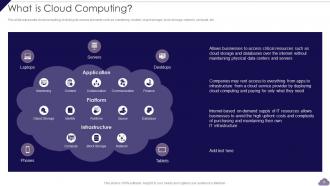
Slide 15: This slide represents cloud computing, including its various elements such as monitoring, content, etc.
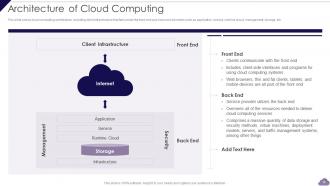
Slide 16: This slide shows cloud computing architecture, including client infrastructure that falls under the front end and back end.
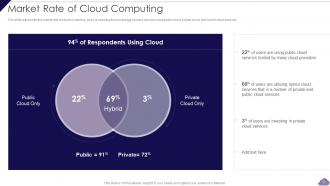
Slide 17: This slide represents the market rate of cloud computing, and it is showing the percentage of users who are using public cloud.
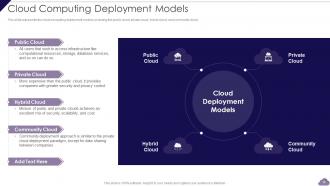
Slide 18: This slide presents cloud computing deployment models, including the public cloud, private cloud, hybrid cloud, etc.
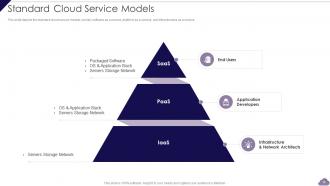
Slide 19: This slide shows standard cloud service models, namely software as a service, platform as a service, and infrastructure as a service.
Slide 20: This slide highlights title for topics that are to be covered next in the template.
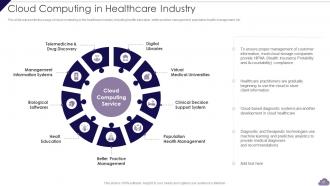
Slide 21: This slide represents the usage of cloud computing in the healthcare industry.
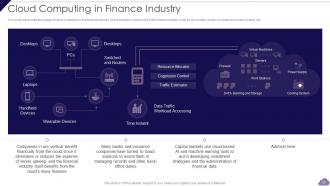
Slide 22: This slide displays the usage of cloud computing in the finance industry, and it provides many tools for the finance industry.
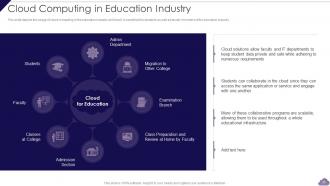
Slide 23: This slide depicts the usage of cloud computing in the education industry and how it is beneficial for students.
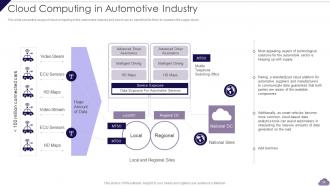
Slide 24: This slide shows the usage of cloud computing in the automotive industry and how it can be beneficial for them.
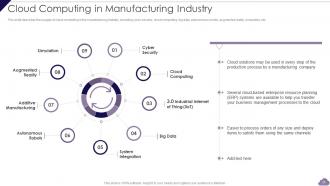
Slide 25: This slide displays Cloud Computing in Manufacturing Industry.
Slide 26: This slide highlights title for topics that are to be covered next in the template.
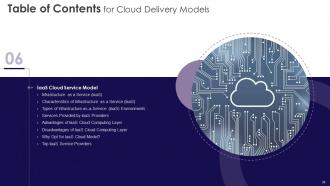
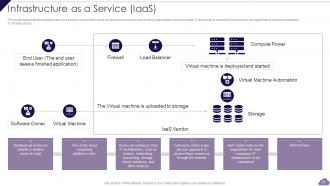
Slide 27: This slide represents the infrastructure as a service model of the cloud computing service.
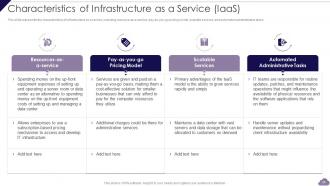
Slide 28: This slide presents the characteristics of infrastructure as a service, including resource-as-a-service, pay-as-you-go, etc.
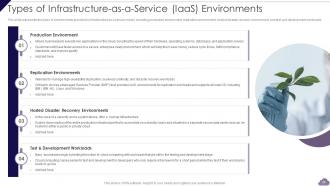
Slide 29: This slide displays the types of environments provided in infrastructure as a service model.
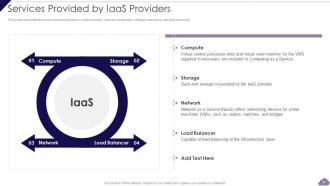
Slide 30: This slide shows various services provided by IaaS providers, such as computation, storage, networking, and load balancing.
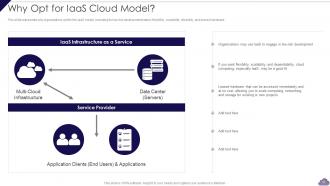
Slide 31: This slide represents why organizations opt for the IaaS model, including its low-risk development nature, flexibility, etc.
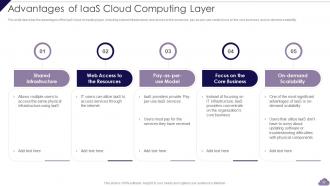
Slide 32: This slide describes the advantages of the IaaS cloud computing layer, including shared infrastructure, web access, etc.
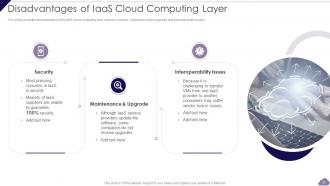
Slide 33: This slide presents Disadvantages of IaaS Cloud Computing Layer.
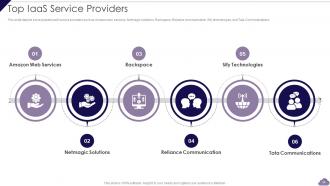
Slide 34: This slide depicts some popular IaaS service providers such as Amazon web services, Netmagic solutions, Rackspace, etc.
Slide 35: This slide highlights title for topics that are to be covered next in the template.
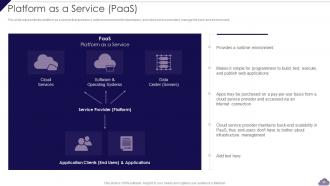
Slide 36: This slide shows platform as a service that provides a runtime environment to developers.
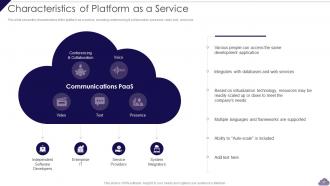
Slide 37: This slide shows the characteristics of the platform as a service, including conferencing & collaboration, presence, video, etc.
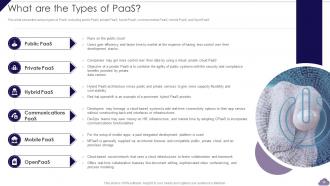
Slide 38: This slide presents the various types of PaaS, including public PaaS, private PaaS, hybrid PaaS, etc.
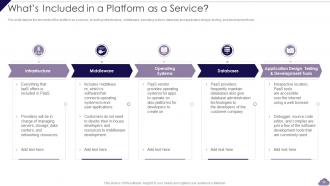
Slide 39: This slide depicts the elements of the platform as a service, including infrastructure, middleware, operating system, etc.
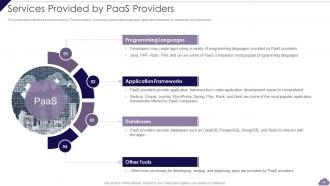
Slide 40: This slide represents the service provided by PaaS providers, including programming languages, application frameworks, etc.
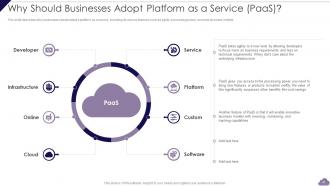
Slide 41: This slide describes why businesses should adopt a platform as a service, including its various features.
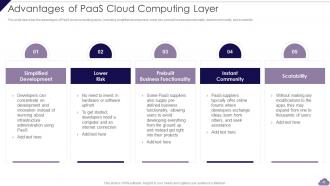
Slide 42: This slide shows Advantages of PaaS Cloud Computing Layer.
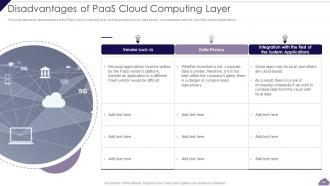
Slide 43: This slide presents Disadvantages of PaaS Cloud Computing Layer.
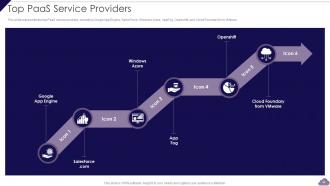
Slide 44: This slide represents the top PaaS service provides, including Google App Engine, SalesForce, etc.
Slide 45: This slide highlights title for topics that are to be covered next in the template.
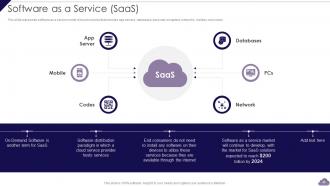
Slide 46: This slide displays software as a service model of cloud services that includes app servers, databases, personal computers, etc.
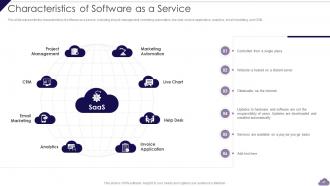
Slide 47: This slide represents the characteristics of software as a service, including project management, marketing automation, etc.
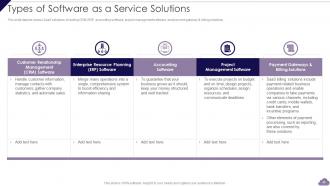
Slide 48: This slide presents Types of Software as a Service Solutions.
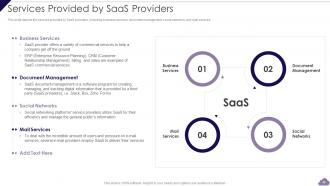
Slide 49: This slide depicts the services provided by SaaS providers, including business services, document management, etc.
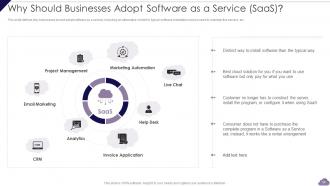
Slide 50: This slide defines why businesses should adopt software as a service.
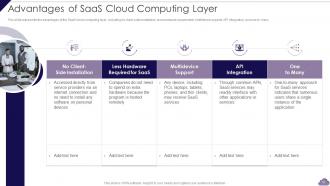
Slide 51: This slide represents the advantages of the SaaS cloud computing layer.
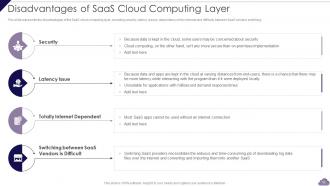
Slide 52: This slide shows Disadvantages of SaaS Cloud Computing Layer.
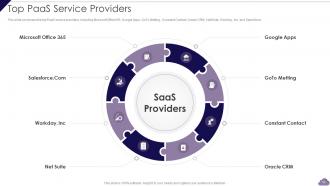
Slide 53: This slide comprises the top PaaS service providers, including Microsoft Office365, Google Apps, GoTo Metting, etc.
Slide 54: This slide highlights title for topics that are to be covered next in the template.
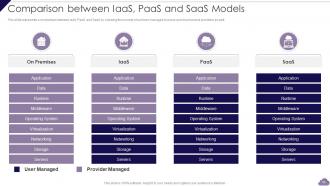
Slide 55: This slide represents a comparison between IaaS, PaaS, and SaaS by showing the number of services.
Slide 56: This slide highlights title for topics that are to be covered next in the template.
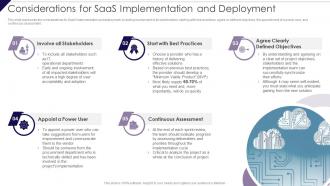
Slide 57: This slide represents the considerations for SaaS implementation and deployment, including involvement of all stakeholders.
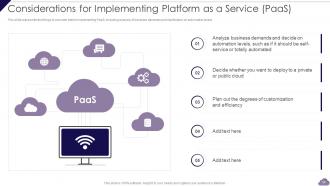
Slide 58: This slide presents the things to consider before implementing PaaS, including analysis of business demands.
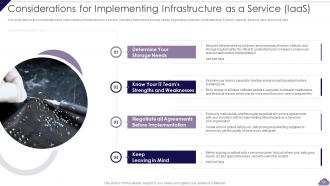
Slide 59: This slide shows Considerations for Implementing Infrastructure as a Service (IaaS).
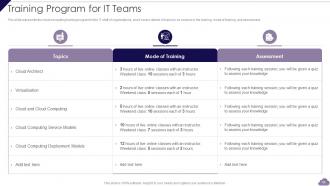
Slide 60: This slide represents the cloud computing training program for the IT staff of organizations.
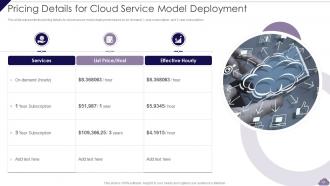
Slide 61: This slide shows Pricing Details for Cloud Service Model Deployment.
Slide 62: This slide highlights title for topics that are to be covered next in the template.
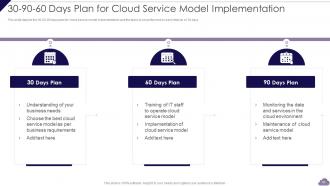
Slide 63: This slide depicts the 30-60-90 days plan for cloud service model implementation.
Slide 64: This slide highlights title for topics that are to be covered next in the template.
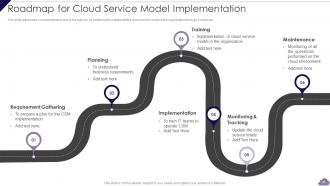
Slide 65: This slide represents a comprehensive view of the tasks to be performed to implement the cloud service model.
Slide 66: This slide contains all the icons used in this presentation.
Slide 67: This slide is titled as Additional Slides for moving forward.
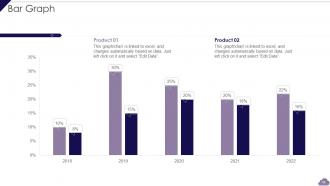
Slide 68: This slide presents Bar chart with two products comparison.
Slide 69: This slide shows Post It Notes. Post your important notes here.
Slide 70: This is Our Goal slide. State your firm's goals here.
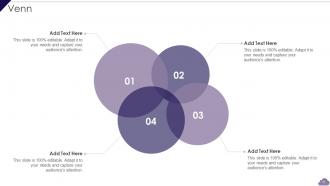
Slide 71: This slide depicts Venn diagram with text boxes.
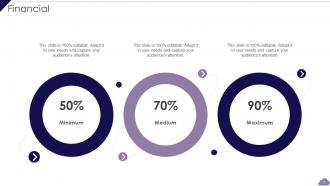
Slide 72: This is a Financial slide. Show your finance related stuff here.
Slide 73: This is Our Target slide. State your targets here.
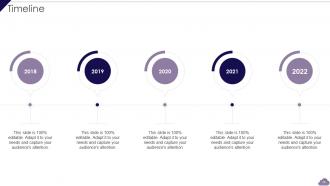
Slide 74: This is a Timeline slide. Show data related to time intervals here.
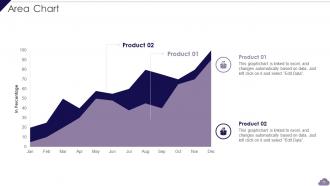
Slide 75: This slide depicts Area chart with two products comparison.
Slide 76: This is a Thank You slide with address, contact numbers and email address.
Cloud Delivery Models Powerpoint Presentation Slides with all 81 slides:
Use our Cloud Delivery Models Powerpoint Presentation Slides to effectively help you save your valuable time. They are readymade to fit into any presentation structure.





FAQs for Cloud Delivery Models
So basically it's about who owns the servers. Public cloud means you're sharing Amazon or Microsoft's computers with everyone else - cheaper but you can't really customize much. Private cloud? That's all yours, way more control and security, but damn expensive. Most companies I know just do hybrid though - keep the secret stuff on private servers and throw everything else on public cloud. Really depends on your budget and how paranoid you are about security. What kind of data are you guys dealing with?
So basically it's all about how much security stuff you want to handle yourself vs. letting them deal with it. IaaS means you're stuck managing everything - OS updates, app security, encrypting data, all that fun stuff. PaaS is more like splitting duties where you worry about your app and they handle the platform side. SaaS? You're pretty much trusting them with your whole digital life, which honestly makes compliance people break out in cold sweats. If you've got strict requirements around where your data lives or specific encryption needs, you'll probably want IaaS since it gives you the most wiggle room to actually meet those standards.
Honestly, go private cloud if you're dealing with really sensitive stuff - healthcare records, financial data, that kind of thing. Some compliance requirements are just too strict for public cloud. Yeah, it costs more and you'll have way more to manage, but sometimes you need that total control over your data. I mean, sharing infrastructure with random companies isn't always ideal. Makes sense if your workloads are pretty predictable too and you've got the budget for dedicated resources. Really comes down to whether your security needs justify the extra headache and cost.
Honestly, hybrid cloud gets expensive fast - you're stuck paying for your own servers AND cloud bills. Upfront you'll drop serious cash on hardware, then there's maintenance, specialized IT people, integration headaches... the whole nine yards. Cloud costs can spiral too if you're not careful. But look, I've seen companies actually save money when they get smart about it - keep your steady workloads running on your own stuff, then only pay for cloud when you need that extra capacity. First thing though? Figure out what you're spending now before you do anything else.
So the cloud model you pick really affects how fast your stuff runs. With IaaS you get total control over performance tweaking, but man, that's a lot more work on your end. PaaS is nice because it handles scaling automatically - though you might bump into platform limits eventually. SaaS is obviously the easiest since they manage everything, but you're basically stuck with whatever performance they give you. I'd say just pick based on what your team can actually handle infrastructure-wise. No point choosing something that'll stress everyone out, you know?
So multi-cloud is basically spreading your stuff across different providers instead of going all-in on one. AWS for compute power, Google's AI tools, Azure if you're heavy on Microsoft - you get the idea. Yeah, it's definitely trickier to manage than sticking with one provider, but honestly the flexibility makes it worth the headache. You're not stuck with whatever pricing one company throws at you, plus if AWS goes down (rare but happens), you've got backup options. Compliance stuff gets easier too since different regions have different rules. I'd start with just two providers though - don't overcomplicate things right off the bat.
IaaS gives you the best uptime guarantees - usually 99.9% or higher since they're just worried about keeping servers running. But everything else breaks? That's on you. PaaS gets trickier because they cover the platform AND infrastructure, so SLAs might dip a bit lower. Plus when stuff goes wrong, good luck figuring out if it's your code or their platform that's the problem. SaaS has the most complete coverage but honestly, the terms are usually pretty restrictive. Oh and definitely check what actually gets you compensated - some of that fine print is wild.
Dude, standardization is your best friend here - trust me on this one. Tag everything consistently across providers so you actually know what's eating your budget. I learned this the hard way when AWS hit me with a surprise $800 bill last month. Infrastructure as code keeps your deployments from turning into a mess, and cross-cloud monitoring dashboards are clutch. Set up automated alerts for costs because manual tracking is honestly a joke. Governance policies sound boring but they'll save your sanity. Pick one approach and stick with it religiously.
Honestly, first thing I'd do is map out what you've got now and figure out what actually needs to move to the cloud vs staying put. Look at stuff like how sensitive your data is, compliance headaches, whether you need to scale quickly - oh and your team's comfort level with cloud tech matters way more than people think. Don't get sucked into just comparing sticker prices either. Those monthly bills add up fast. Create some kind of scoring sheet for IaaS vs PaaS vs SaaS based on what matters to you. Then test it out with something that won't break everything if it goes sideways.
Healthcare, finance, government - those are the big ones that need private clouds. HIPAA compliance is no joke, and banks can't mess around with SOX regulations either. Manufacturing companies use them too because they're paranoid about trade secrets (rightfully so tbh). Legal firms are another obvious pick. Basically, if you're sitting in meetings where someone goes "we absolutely cannot put this data anywhere public," that's your answer right there. You need the budget though - dedicated infrastructure isn't cheap. But if you're handling sensitive stuff and have compliance requirements breathing down your neck, private cloud starts making real sense pretty quickly.
Honestly, cloud models are perfect for disaster recovery. Your data gets spread across different regions automatically, so when your main site crashes, you're not stuck digging through old backup tapes. With IaaS you can get new servers running in minutes - pretty wild compared to the old days. SaaS apps are already built to handle outages anyway. The money part is smart too since you only pay during actual emergencies instead of maintaining expensive backup systems year-round. I'd start by figuring out which systems you absolutely can't lose, then see what cloud options could replace them fastest.
Honestly, AI and ML are crushing it right now - the auto-scaling stuff is getting scary smart. Edge computing's huge too since you're processing way closer to users, which is perfect for hybrid setups. Serverless feels like it's everywhere (I swear every vendor won't shut up about their version), but it actually does change how you think about costs. Kubernetes keeps evolving too - container orchestration is getting pretty wild. Oh, and don't lock yourself into just one thing. Mix and match based on what you're actually running. That's where the magic happens.
Honestly, your industry rules pretty much decide this for you. Healthcare and finance? You're probably looking at private or hybrid cloud since you need that tight control. Public cloud works too if your provider has the right certs, but man, the compliance paperwork is brutal. I'd start by writing down all your regulatory stuff first - then see which model actually lets you audit and govern things properly. Some regulations are way more flexible than others, so it really depends on what you're dealing with specifically.
Honestly, the worst part is usually getting everyone on board - people hate change. Data security freaks management out too, which I get. Integration with your current systems? Total nightmare most of the time. Oh and cloud costs can get crazy fast if you're not watching them closely. Migration downtime sucks but it's gonna happen. Start with something small that won't break everything if it goes wrong. Get security involved from day one or they'll make your life hell later. Budget way more time for training than you think you need - seriously, like double it.
Honestly, cloud stuff has been a lifesaver for remote work. Your team can jump into the same files and apps from literally anywhere - no more "sorry, that's on my work computer" excuses. Google Workspace and Slack automatically keep everyone synced up, which is nice. If you're doing heavy-duty projects, IaaS gives you extra computing muscle when you need it. PaaS is more for app development (probably not your thing unless you're coding). The whole point is killing those annoying access issues. Oh, and definitely check what your company allows first - some places get weird about which cloud tools you can use.
-
“I required a slide for a board meeting and was so satisfied with the final result !! So much went into designing the slide and the communication was amazing! Can’t wait to have my next slide!”
-
I am so thankful for all of the templates I've found on your site. They have saved me hours every week and helped make my presentations come alive. Keep up with these amazing product releases!