


Cloud Architecture Review Powerpoint Presentation Slides




Try Before you Buy Download Free Sample Product
 Impress Your
 Audience
 100%
100% Editable
 Save Hours
 of Time


How should companies review their cloud infrastructure performance This PPT presentation offers a framework for the company to analyze new technology. It also covers cloud Technology and security analysis and the assessment of cloud storage threats. Here is a professionally designed Cloud Architecture Review template that will help clients mitigate the vulnerability of their enterprise and reduce the internal capital burden. It also covers a description of how to manage the organizations complexity with third-party providers host and the solutions for the cloud-based application framework with third-party providers host such as infrastructure as a service IaaS cloud service providers. It also includes the need to conduct a cloud architecture review to address a specific issue in an enterprise cloud environment, along with the current state assessment criteria. It is essential to take frequent looks at your design operations to support your businesss evolution over time. Here it covers the requirements to set priorities in cloud infrastructure review for newer teams implementing full architectures for the first time. It also covers the guide to set standards after getting a clear picture of the cloud infrastructure and computing software. Get access now.
People who downloaded this PowerPoint presentation also viewed the following :
Content of this Powerpoint Presentation
Slide 1: This slide introduces Cloud Architecture Review. State Your Company Name and begin.
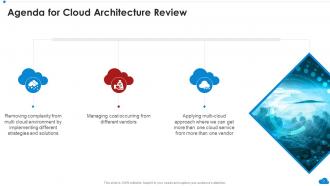
Slide 2: This slide states Agenda of the presentation.
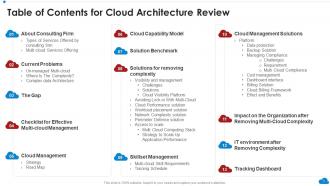
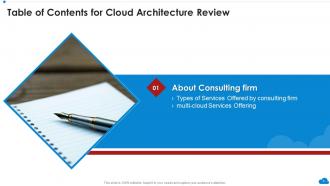
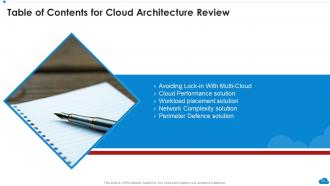
Slide 3: This slide presents Table of Content for the presentation.
Slide 4: This slide highlights title for topics that are to be covered next in the template.
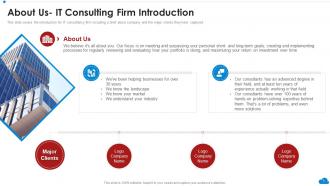
Slide 5: This slide covers the introduction for IT consultancy firm.
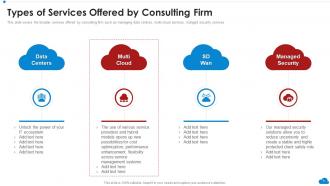
Slide 6: This slide displays Types of Services Offered by Consulting Firm.
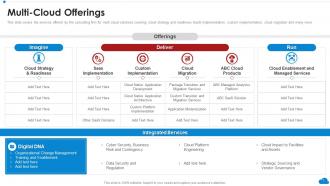
Slide 7: This slide represents services offered by the consulting firm for multi cloud solutions.
Slide 8: This slide highlights title for topics that are to be covered next in the template.
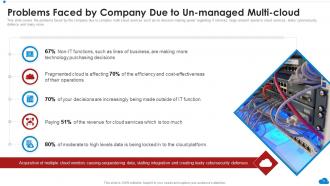
Slide 9: This slide showcases Problems Faced by Company Due to Un-managed Multi-cloud.
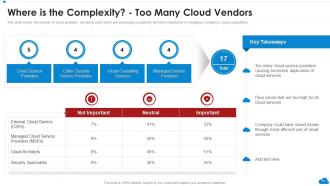
Slide 10: This slide covers the number of cloud providers being used.
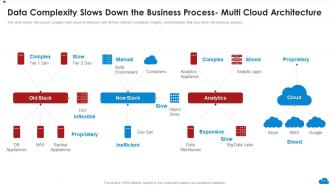
Slide 11: This slide shows complex multi-cloud architecture with all their inherent complexity.
Slide 12: This slide highlights title for topics that are to be covered next in the template.
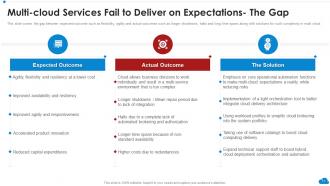
Slide 13: This slide covers the gap between expected outcome.
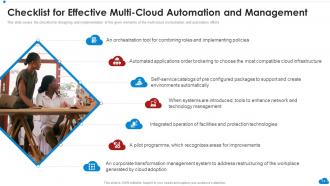
Slide 14: This slide presents Checklist for Effective Multi-cloud Automation and Management.
Slide 15: This slide highlights title for topics that are to be covered next in the template.
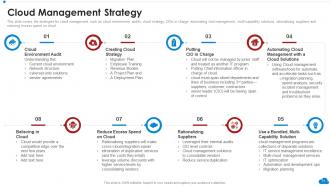
Slide 16: This slide displays the strategies for cloud management.
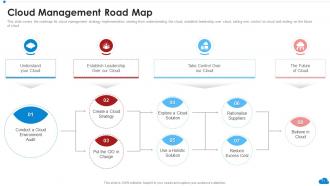
Slide 17: This slide represents roadmap for cloud management strategy implementation.
Slide 18: This slide highlights title for topics that are to be covered next in the template.
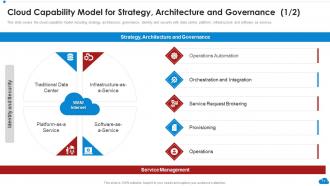
Slide 19: This slide showcases cloud capability model including strategy, architecture, governance, etc.
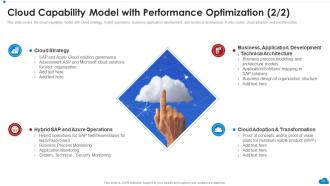
Slide 20: This slide shows cloud capability model with cloud strategy, hybrid operations, etc.
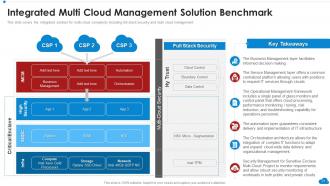
Slide 21: This slide presents Integrated Multi Cloud Management Solution Benchmark.
Slide 22: This slide highlights title for topics that are to be covered next in the template.
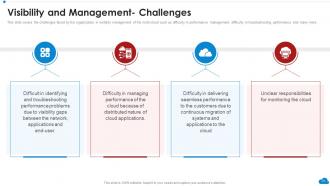
Slide 23: This slide displays challenges faced by the organization in visibility management.
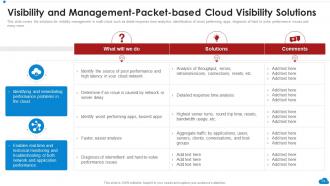
Slide 24: This slide represents Visibility and Management-Packet-based Cloud Visibility Solutions.
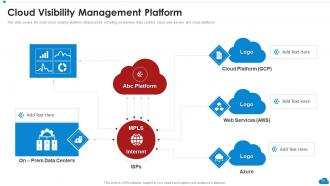
Slide 25: This slide showcases Cloud Visibility Management Platform.
Slide 26: This slide highlights title for topics that are to be covered next in the template.
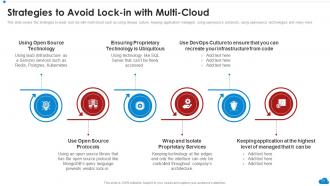
Slide 27: This slide shows Strategies to Avoid Lock-in with Multi-Cloud.
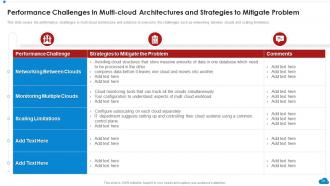
Slide 28: This slide presents Performance Challenges in Multi-cloud Architectures and Strategies to Mitigate Problem.
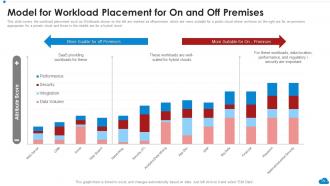
Slide 29: This slide displays Model for Workload Placement for On and Off Premises.
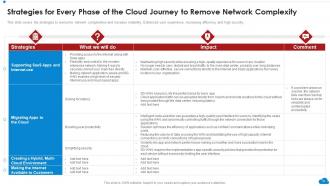
Slide 30: This slide represents Strategies for Every Phase of the Cloud Journey to Remove Network Complexity.
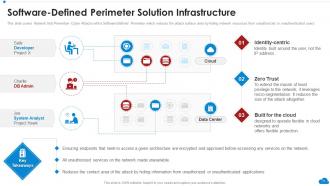
Slide 31: This slide showcases Software-Defined Perimeter Solution Infrastructure.
Slide 32: This slide highlights title for topics that are to be covered next in the template.
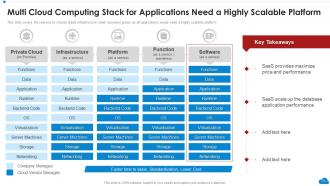
Slide 33: This slide shows Multi Cloud Computing Stack for Applications Need a Highly Scalable Platform.
Slide 35: This slide highlights title for topics that are to be covered next in the template.
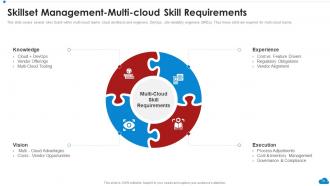
Slide 36: This slide presents Skillset Management-Multi-cloud Skill Requirements.
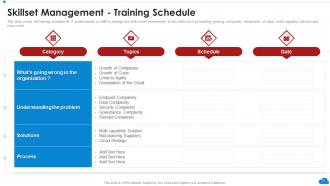
Slide 37: This slide displays Skillset Management-Training Schedule.
Slide 38: This slide highlights title for topics that are to be covered next in the template.
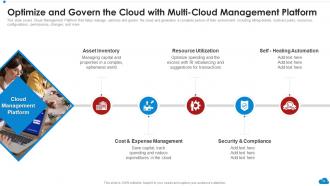
Slide 39: This slide represents Optimize and Govern the Cloud with Multi-Cloud Management Platform.
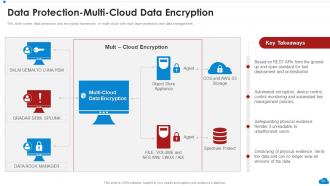
Slide 40: This slide showcases Data Protection-Multi-Cloud Data Encryption.
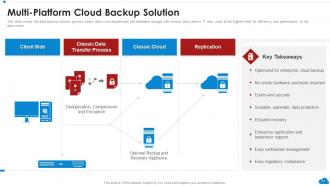
Slide 41: This slide shows data backup solution process where data is Accessible.
Slide 42: This slide highlights title for topics that are to be covered next in the template.
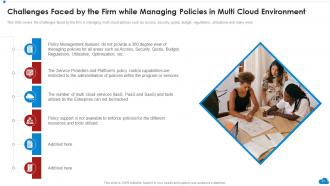
Slide 43: This slide presents Challenges Faced by the Firm while Managing Policies in Multi Cloud Environment.
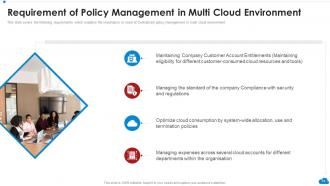
Slide 44: This slide displays Requirement of Policy Management in Multi Cloud Environment.
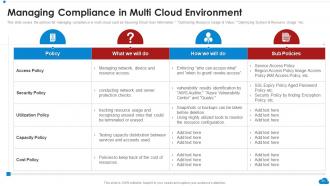
Slide 45: This slide represents Managing Compliance in Multi Cloud Environment.
Slide 46: This slide highlights title for topics that are to be covered next in the template.
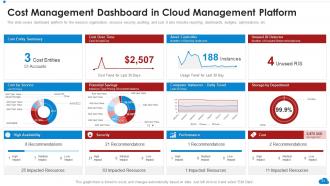
Slide 47: This slide showcases Cost Management Dashboard in Cloud Management Platform.
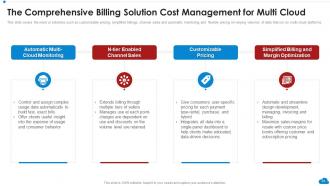
Slide 48: This slide shows Comprehensive Billing Solution Cost Management for Multi Cloud.
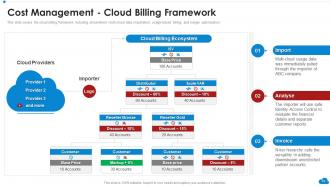
Slide 49: This slide presents Cost Management - Cloud Billing Framework.
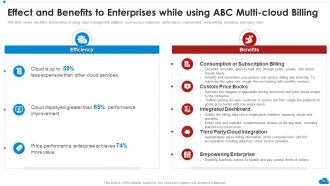
Slide 50: This slide displays Effect and Benefits to Enterprises while using ABC Multi-cloud Billing.
Slide 51: This slide highlights title for topics that are to be covered next in the template.
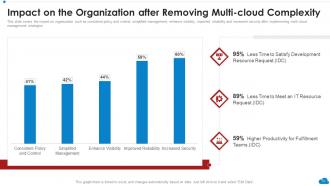
Slide 52: This slide represents Impact on the Organization after Removing Multi-cloud Complexity.
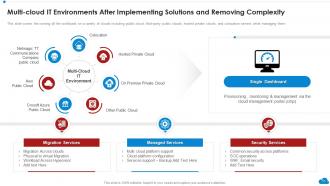
Slide 53: This slide showcases Multi-cloud IT Environments after Implementing Solutions and Removing Complexity.
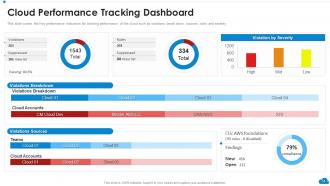
Slide 54: This slide shows Cloud Performance Tracking Dashboard.
Slide 55: This slide displays Icons for Cloud Architecture Review.
Slide 56: This slide is titled as Additional Slides for moving forward.
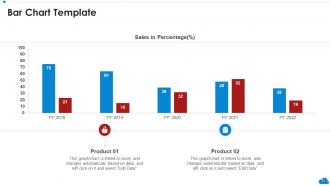
Slide 57: This slide presents Bar chart with two products comparison.
Slide 58: This is About Us slide to show company specifications etc.
Slide 59: This is Our Team slide with names and designation.
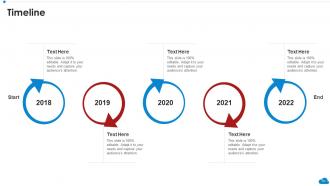
Slide 60: This is a Timeline slide. Show data related to time intervals here.
Slide 61: This slide contains Puzzle with related icons and text.
Slide 62: This slide depicts Venn diagram with text boxes.
Slide 63: This slide presents Roadmap with additional textboxes.
Slide 64: This is Our Target slide. State your targets here.
Slide 65: This slide shows Post It Notes. Post your important notes here.
Slide 66: This is a Thank You slide with address, contact numbers and email address.
Cloud Architecture Review Powerpoint Presentation Slides with all 71 slides:
Use our Cloud Architecture Review Powerpoint Presentation Slides to effectively help you save your valuable time. They are readymade to fit into any presentation structure.






FAQs for Cloud Architecture Review
Honestly, just focus on three things: scalability, reliability, and security. Don't just buy bigger servers when you hit limits - scale horizontally instead, it's way cheaper. Build everything expecting it'll break because cloud stuff always does. Redundancy is your friend here. Security needs to be built in from the start, not slapped on later when you realize you screwed up. Oh, and keep your services loosely coupled so you can actually deploy without breaking everything else. Start with getting one service really solid before you go crazy with microservices - trust me on that one.
So microservices are basically about splitting your app into smaller, independent pieces instead of having one giant codebase. Each piece does its own thing and you can deploy them separately - super helpful when stuff breaks. You'll need containers and API gateways to make everything talk to each other properly. Honestly, the orchestration gets pretty messy, but the flexibility is worth it IMO. My advice? Don't go crazy right away. Try splitting into maybe 2-3 services first to see how it feels before you go full microservices mode.
Yeah, the big win is avoiding vendor lock-in - you can use AWS for compute, Google for AI stuff, Azure for enterprise things. Better redundancy too, and you can pit them against each other on pricing. But man, it gets messy quick. Now you're juggling multiple billing systems, different security setups, various toolsets. Your team needs to know all these platforms, which costs a fortune and good luck finding people. Oh, and connecting everything between clouds? Total pain. I'd say start small - maybe just use one for backup while keeping your main stuff somewhere else.
So basically, IaaS means you're handling everything - networking, storage, all that server stuff. It's like building from the ground up. PaaS takes care of most of that headache for you, so you can focus on your actual app instead of managing infrastructure. With SaaS you're just plugging into what someone else already built. Honestly, I'd say pick based on how much time you have and what your team actually knows. If you need to ship something quickly, don't torture yourself with IaaS - that's way too much work just to get features out the door.
Zero-trust is your best friend here - don't trust anything by default. Encrypt literally everything, both stored data and stuff moving around. MFA on every single account, no exceptions (I got burned skipping this once, ugh). Set up IAM roles but keep permissions super tight - only give people what they actually need. Oh and audit those permissions regularly because they get messy fast. Turn on logging for all your services, patch stuff promptly, and segment your network so critical systems stay isolated. Honestly though? Start with a security assessment first - figure out your biggest vulnerabilities and tackle those.
Right-size your stuff first - everyone goes way overboard with provisioning. Auto-scaling helps match actual demand, and reserved instances are solid for predictable workloads. Spot instances work great for anything non-critical. Storage tiering saves a ton - just auto-move old data to cold storage. But honestly? The easiest win is turning off dev/test environments when they're not being used. It's ridiculous how much that alone saves. Set up cost alerts so you don't get slammed with surprise bills. Oh, and audit regularly to kill those zombie instances that are just sitting there burning cash for no reason.
Dude, containers are a total game changer. They package your app with everything it needs, so it runs the same everywhere - no more "works on my machine" BS. Way lighter than VMs too. Docker's probably your best starting point if you haven't messed with it yet. The coolest part? You can scale each service separately instead of your whole monolith. Deployments get way faster. Your DevOps people will actually thank you for once lol. Microservices without containers is honestly just painful at this point.
Microservices with containers are honestly where it's at - breaks everything into manageable chunks that scale independently. Auto-scaling groups handle the heavy lifting so your infrastructure adapts automatically. Kubernetes has a brutal learning curve but pays off big time once you get it. Build stateless services when you can. Managed stuff like RDS and Lambda cuts down on all the ops headaches you'd otherwise deal with. Load balancing is crucial too. Oh, and multi-region deployments if you want real bulletproof setup. I'd start with migrating just one service first, see how it goes, then move the rest piece by piece.
Honestly, start with figuring out what data you're actually dealing with - like what's sensitive vs just regular stuff. That's gonna drive everything else. Where does it live physically? Some compliance rules are weirdly picky about that. Back it up across regions, encrypt everything moving around and sitting still. Access controls are huge though - the cloud makes it SO easy to accidentally leave doors wide open. Get your permissions locked down right away, not later when you realize someone can see everything. Oh and map out how your data flows first, then build around that. Way easier than trying to bolt security on afterward.
Oh man, serverless is wild - you basically stop worrying about servers altogether and just write functions that fire when stuff happens. Your app automatically scales up when it's busy, scales down when it's not. I love that you only pay for what you actually use instead of some server just sitting there burning money. You end up breaking everything into these smaller functions rather than one giant app, which honestly makes updates way easier since you can change one piece without breaking everything else. Takes some getting used to but it's pretty freeing once you wrap your head around it.
Start with whatever your cloud provider gives you - CloudWatch for AWS, Azure Monitor, or Google's Stackdriver. Prometheus is great for collecting metrics, and honestly Grafana makes the prettiest dashboards (I kind of geek out over those). Terraform's become the go-to for infrastructure as code, which you'll definitely want. Oh, and don't skip logging - ELK stack or Splunk will save your butt when things break. I'd say begin with the native cloud tools first. You can always add the fancy stuff later when your setup gets messier.
So cloud-native stuff gets built specifically for the cloud from scratch. Traditional architecture? That's more like dragging your old office setup into a new building - it works but feels clunky. Microservices and containers are huge with cloud-native because they scale automatically when traffic goes crazy. Traditional apps are usually these massive monoliths that are a pain to update. Oh, and cloud-native assumes everything's gonna break eventually, so it builds that resilience in upfront. Honestly, if you're starting something new, just go cloud-native. You'll save yourself so many headaches later when you need to grow fast.
Look, compliance isn't something you tack on later - it shapes your entire cloud setup from the start. Data residency rules decide where your stuff can live. Encryption and access controls? Non-negotiable. GDPR, HIPAA, SOX all have their own quirks but they'll all mess with your architecture decisions if you ignore them. Your cloud provider's certs help (thank god), but you're still on the hook for configuring everything right. Honestly, just map out your regulatory requirements against your components early - saves you from wanting to burn it all down later.
Start with Infrastructure as Code right away - Terraform or CloudFormation will save you so much headache later. Most teams screw this up by bolting on CI/CD afterward instead of building it into the architecture from the beginning. You'll want centralized logging and monitoring baked in too. Containers and microservices work great here, but honestly don't go overboard if your app doesn't need it. Oh, and treat everything like code instead of clicking around in consoles. Version control is your friend. The whole point is making deployments boring and predictable.
First things first - spread your stuff across multiple zones and regions so you're not screwed if one area goes down. Automated backups are clutch, but seriously test them regularly. I've watched so many people discover their backups were garbage during an actual emergency. Multi-cloud can help but honestly gets messy to manage. Set up monitoring with automatic failover, and use infrastructure as code so you can rebuild fast. Oh, and actually practice your disaster recovery - like quarterly drills. Nobody wants to figure out their plan doesn't work when everything's on fire.
-
Helpful product design for delivering presentation.
-
Wonderful templates design to use in business meetings.