

Cloud Computing Powerpoint Ppt Template Bundles




Try Before you Buy Download Free Sample Product
 Impress Your
 Audience
 100%
100% Editable
 Save Hours
 of Time


Our Cloud Computing Powerpoint Ppt Template Bundles are topically designed to provide an attractive backdrop to any subject. Use them to look like a presentation pro.
People who downloaded this PowerPoint presentation also viewed the following :
Cloud Computing Powerpoint Ppt Template Bundles with all 22 slides:
Use our Cloud Computing Powerpoint Ppt Template Bundles to effectively help you save your valuable time. They are readymade to fit into any presentation structure.





FAQs for Cloud Computing Powerpoint
Honestly, the money stuff is huge - you'll ditch those crazy upfront hardware costs for predictable monthly bills instead. Your team can work from literally anywhere (COVID proved how clutch that was). Automatic backups happen without you thinking about it, plus the security is way better than what most small businesses can pull off on their own. When you need to grow or shrink, it happens instantly. No new servers to buy or anything. Best part though? All the tech headaches become someone else's problem. I'd probably start small - maybe just cloud storage or email hosting first.
Honestly, cloud computing is a total lifesaver for remote teams. Everyone can jump into the same files and apps from wherever they are - no more emailing docs back and forth like it's 2005. Real-time editing means you're all working on the current version instead of that nightmare where someone spent hours on an outdated file. Video calls run smoother too. The automatic syncing alone will save you so many headaches. Get your team set up with some decent cloud tools and you'll actually see them get stuff done faster. Trust me on this one.
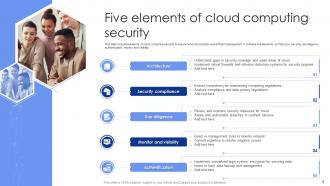
First thing - get multi-factor authentication set up everywhere and encrypt your data. Can't stress that enough. Regular security audits are a must too, and honestly the network side is where most people mess up. Firewalls and traffic monitoring will save your butt. If you're in healthcare or finance or whatever, compliance stuff gets messy so don't ignore that. Figure out what your cloud provider handles versus what's on you - that shared responsibility thing trips everyone up initially. I'd start with assessing what you have now and tackle the worst gaps first.
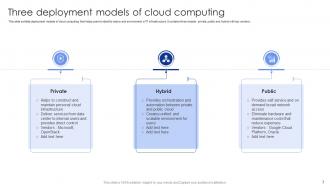
So public clouds are basically shared servers from AWS, Azure, whatever - super scalable and cheap. Private means you get your own dedicated setup with way more control, but yeah, it costs more. Hybrid mixes both approaches. Honestly, most startups just go public since budgets are tight. Private makes sense if you're in banking or healthcare where compliance is a nightmare. Hybrid's solid when you want flexibility - keep the sensitive data locked down but still tap into public cloud power when needed. I'd figure out your security needs first, then see what fits your wallet.
Dude, cloud computing totally changed how we handle data analytics. Instead of buying crazy expensive servers, you just rent computing power when you need it. Need to process a massive dataset? Spin up resources instantly, then shut them down after. AWS and Azure have these built-in visualization tools that make sharing dashboards super easy too. I remember waiting forever for our IT team to set up new servers - what a nightmare. The speed difference is honestly ridiculous. If you're still running everything on your own hardware, you should definitely try moving some stuff to the cloud and see what happens.
Honestly, just pick cloud providers that already have the compliance stuff sorted - AWS, Azure, Google Cloud all have SOC 2, HIPAA, GDPR certifications. Way easier than trying to build from scratch. But don't think you're off the hook completely. You still gotta configure everything right, encrypt your sensitive data, and set up proper access controls. Oh, and keep audit trails of everything (learned that one the hard way). Document what you're doing as you go. Start with whatever compliance checklist matches your industry and work through it systematically.
Dude, edge computing is about to be everywhere - like seriously huge. Multi-cloud setups are becoming standard now, plus AI/ML is getting baked into basically everything. Serverless has totally blown up too, which honestly caught me off guard how quick that happened. Traditional security models are pretty much toast with all these distributed systems, so cloud-native security is where it's at. Green initiatives are pushing sustainability stuff hard. Automation's taking over cloud ops big time. My take? Jump on edge computing experiments ASAP. Also get your containerization skills solid if they're rusty - trust me, you'll need them.
Yeah so cloud stuff cuts way down on upfront costs - no buying servers or fancy networking gear. You just pay monthly for what you actually use. Think renting vs buying a house, you know? Saves you from dealing with maintenance headaches and electricity bills too. But here's the thing - those monthly charges can creep up fast if you're not watching them. I'd probably start small, maybe move some less important stuff first just to see what you're actually spending. Then decide if it makes sense to go all-in.
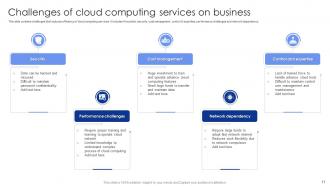
Honestly, the three big headaches are always security fears, budgets going crazy, and your team hating change. People freak out about data breaches - which fair enough, that's scary stuff. Costs can totally spiral if you're not watching usage like a hawk. And yeah, nobody wants to learn yet another system when they're already swamped. My advice? Start small with stuff that won't break everything if it goes wrong. Set up budget alerts immediately or you'll get a nasty surprise. Training is huge too - don't skimp on it. Take your time with this one. Rushing just creates more problems down the road.
Honestly, cloud backup changed everything for disaster recovery. You just automatically sync your stuff to remote servers instead of buying a bunch of hardware that'll probably break when you actually need it. If something crashes, boom - spin up a virtual copy in hours instead of waiting days. The pricing is actually reasonable too since you're not stuck with equipment you barely use. I'd start with your most critical systems first and set up automated backups for those. Way less stressful than the old-school approach.
So SLAs are basically your safety net with cloud providers - they promise stuff like 99.9% uptime and specific response times. If they screw up and don't hit those numbers, you get service credits back. Pretty straightforward deal. The main things they cover are uptime percentages, how fast things load, and support response times. Honestly, most people skip reading the fine print but you should actually look at their SLA before committing. I learned that the hard way once. Just know what you're signing up for so you're not stuck when something inevitably breaks.
So cloud computing is kinda complicated environmentally. Yeah, it's way more efficient than old-school data centers, but we're talking massive energy use because of the scale. The good news? AWS, Google, all those big players are going hard on renewables. When you share infrastructure with everyone else, your carbon footprint per workload drops compared to running your own servers. More adoption means higher demand for electricity and rare earth metals though - that's just reality. I'd pick providers who actually care about clean energy and don't waste resources on stuff you don't need.
Dude, start by right-sizing your stuff - most people run way too much compute power. Turn off anything you're not using, especially dev environments over weekends. Auto-scaling is clutch because you only pay for what's actually running. For predictable workloads, definitely grab reserved instances - the savings are nuts. But honestly? The real money's in auditing monthly. I spend like 30 minutes killing zombie resources and it's saved me literally thousands. Oh and schedule your non-prod environments to shut down automatically. That alone cuts costs big time.
Security and compliance should be your top priorities - don't mess around with those. Cost obviously matters too. Check their uptime guarantees because nothing's worse than your stuff going down unexpectedly. I made that mistake once, wasn't fun. Support quality is huge - you'll need them when things break. Data location requirements can get tricky with regulations and all that. Also make sure you can actually get your data out later if you want to switch. Some companies make it weirdly difficult. Performance depends on what you're running. Honestly though? Start small with a test project first.
So here's the thing - microservices work amazingly well with cloud stuff. You can deploy each piece separately, scale only what's getting hammered, and if one service crashes it won't kill your whole app. Honestly, Kubernetes makes managing all those tiny services way easier than you'd think. Your team can push updates to individual parts without that terrifying "hope we don't break everything" moment. Oh and you're not stuck with one giant server anymore. My advice? Start by pulling out just one service first. Don't go crazy and try rebuilding everything - learned that the hard way.
-
Awesomely designed templates, Easy to understand.
-
Happy to incorporate such stunning templates in my presentation. Made my presentation look professional and engaging.