

Data Mart Powerpoint Ppt Template Bundles




Try Before you Buy Download Free Sample Product
 Impress Your
 Audience
 100%
100% Editable
 Save Hours
 of Time


Our Data Mart Powerpoint Ppt Template Bundles are topically designed to provide an attractive backdrop to any subject. Use them to look like a presentation pro.
People who downloaded this PowerPoint presentation also viewed the following :
Data Mart Powerpoint Ppt Template Bundles with all 22 slides:
Use our Data Mart Powerpoint Ppt Template Bundles to effectively help you save your valuable time. They are readymade to fit into any presentation structure.









FAQs for Data Mart Powerpoint
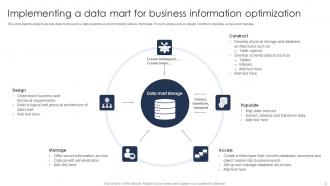
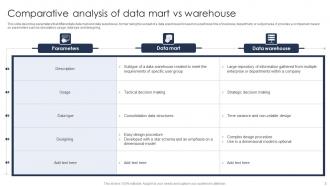
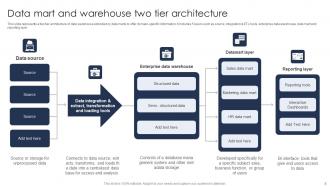
So a data mart is like a mini data warehouse but for just one department. Your marketing team gets their own little slice instead of digging through the entire company's data mess. Way faster to build too - honestly, I'd probably start there if you're new to this whole thing. Think of it as a specialty shop vs. that massive Costco warehouse where you can't find anything. Data marts are cheaper to run since you're not storing every single piece of data from accounting, HR, sales, whatever. Makes reports way quicker when you're not searching through mountains of stuff you don't need.
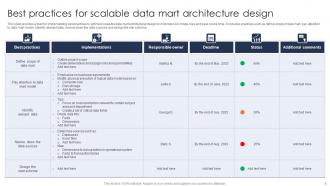
Start by mapping out your data sources and refresh schedules - that's like your foundation. The dimension/fact table setup is huge because it controls how people can actually use the data. Trust me, spend time on data quality rules upfront. We got burned once with terrible data that made everything useless. Build in different aggregation levels too (daily, weekly, monthly) since it'll save you from slow queries later. Oh and don't skip security stuff, especially with sensitive info. Honestly just pick one business area to test with first, then expand from there.
So data mart templates are like having a blueprint already made for you. You don't have to build everything from zero - the tables, relationships, all that boring setup stuff is done. Just drop your data in and you're good to go. It's like following a recipe instead of randomly throwing ingredients together (which I've definitely tried and regretted). Most templates already have the standard KPIs built in anyway. Honestly saves you weeks of headaches. Pick whichever template matches what you're doing and tweak it from there. Way better than staring at a blank screen wondering where to start.
So data mart templates are pretty common across different industries. Retail companies use them for customer segmentation and inventory stuff. Healthcare builds them around patient outcomes and compliance reporting. Financial services focus on risk management and fraud detection - that whole sector is obsessed with security honestly. Manufacturing uses them for supply chain and quality control metrics. The templates come with pre-built KPIs which saves tons of time. You don't have to start from scratch. Figure out what business questions you're trying to answer first, then look for templates that fit your industry's usual reporting patterns.
First thing - get your data governance sorted with validation checks at every step. Automated quality tests are a lifesaver for catching duplicates, missing stuff, inconsistencies before they mess up your mart. Standardize naming conventions and formats across sources (seriously, you'll hate yourself later if you don't). Document your business rules somewhere people can actually find them - not buried in some random folder. Regular audits help too since things drift over time. Oh, and build quality checks into your normal workflow from the start. Way easier than fixing everything after it's already broken.
First thing - map your actual KPIs to those template fields, but don't jam your business logic into their generic setup. Rename everything so your team recognizes the terms (seriously, this will save you later). Strip out data sources you won't even use - why complicate things? The dimensional models should match how your people actually think about the data, not some textbook structure. Test it with real users super early. I learned that one the hard way. Think of templates as your jumping off point, not some rigid box you have to fit into.
Honestly, just go with star schema for your data mart templates. It's fast, simple, and business folks can actually wrap their heads around it when they're pulling reports. Snowflake schema might save you storage space, but the added complexity usually bites you later - trust me on this one. Sure, normalized approaches look clean on paper, but they'll make your analytics queries crawl. I'd stick with star schema as your starting point. You can always tweak individual marts down the road if performance becomes an issue or you hit specific constraints.
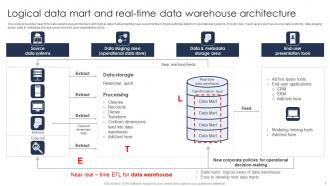
So ETL processes are what make your data mart template actually work - they pull data from source systems, transform it into the right format, then load it into your mart. You'll want to map out how data flows through each stage and define your transformation rules. Honestly, the refresh schedule piece always takes longer to figure out than you'd expect. Build reusable ETL patterns so you're not reinventing the wheel for each business area. Think of it like having a solid recipe you can tweak for different situations rather than cooking from scratch every time.
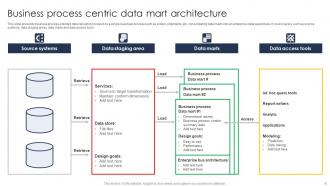
So basically, data mart templates are like pre-made frameworks each department can just drop their metrics into. Your sales team gets conversion funnels ready to go, marketing gets their attribution stuff - no building from scratch. Takes what used to be a 3-month project down to day one. Think of it like LEGO blocks but for data infrastructure, everything just clicks together. The best part? Teams stop wasting time rebuilding the same dashboards over and over. Everyone's working with the same data language too, which honestly saves so many headaches down the road.
So for databases, you're looking at the usual suspects - SQL Server, Oracle, PostgreSQL. ETL stuff gets handled by Informatica, Talend, or SSIS mostly. ERwin and PowerDesigner are solid for modeling your templates before you build anything. Cloud's where it gets interesting though. Redshift, Snowflake, Azure Synapse - they've got pre-built schemas that make templating way less painful. Git works fine for version control, or you could go fancy with something like Collibra for data catalogs. Honestly? Check what licenses your company already owns first. Procurement can be a nightmare otherwise, and you might already have half this stuff sitting unused.
Honestly, data mart templates are a lifesaver for customer analysis. You get all the basic stuff already set up - demographics, purchase history, behavioral data - so you don't have to build everything from scratch. Saves weeks of work, which is huge. They come with standard segmentation tools like RFM analysis and customer lifecycle stages baked right in. You can tweak them for your business, but the foundation's solid. I'd start by finding one that matches your industry, then add your specific touchpoints on top. Way easier than starting with a blank slate.
Build security right into your template from the start - trust me, retrofitting sucks. Set up role-based access so people only see their stuff. Data masking is huge for PII and sensitive fields. Audit logging will save your butt when someone asks who accessed what (and they will). Oh, and encrypt everything - at rest, in transit, the works. I had to learn that lesson the expensive way! Data lineage tracking helps too so you can follow where your sensitive data goes. Start with your most critical assets first, then build your security layers around those.
Honestly, visualization tools are a game changer for data mart templates. Raw spreadsheets are just painful to look at - nobody wants to scroll through endless rows trying to find patterns. Charts and dashboards make everything click instantly. Your users can actually explore the data themselves without calling IT every five minutes, which is pretty nice for everyone involved. The visual stuff helps you spot trends way faster too. I'd suggest hooking up your most popular templates to a BI tool first. You'll probably see people actually start using them more once they're not staring at numbers all day.
Honestly? Data quality will bite you in the ass if you don't profile everything upfront. Stakeholder alignment is another nightmare - getting everyone to agree on requirements feels impossible sometimes. Your existing systems probably won't play nice with the new setup either, so budget extra time for integration work. Performance issues pop up when data volumes get crazy too. My advice: get business users involved super early, don't skip prototyping (trust me on this), and do phased rollouts instead of some massive launch. Oh, and invest in solid ETL processes from the start.
Honestly, AI is about to change data marts in some pretty wild ways. Templates will start detecting patterns automatically and suggest schemas that actually make sense. Your users won't even need to ask for specific dimensions anymore - the system will predict what they want based on past queries. Self-optimization is the big game changer though. No more manual tuning of partitions and indexes, which is such a pain right now. Plus you'll get way better anomaly detection built right in. I'd mess around with some AI modeling tools sooner rather than later so you're not scrambling to catch up.
-
I'm happy to discover your PowerPoint presentations and templates. They met my expectations precisely. Very innovative!
-
Exclusive and extensive collection of templates. Really helped me create a professional presentation in just no time.