

Computer Network Powerpoint Ppt Template Bundles




Try Before you Buy Download Free Sample Product
 Impress Your
 Audience
 100%
100% Editable
 Save Hours
 of Time


Introducing our comprehensive PowerPoint presentation on Network Connection, a dynamic resource designed to unravel the intricacies of modern networking. Delve into the nuances of diverse network media, exploring their roles in establishing robust connections. Navigate through the essentials of network connections, gaining insights into their configurations and the pivotal role of network management in ensuring seamless operations. Uncover the critical aspects of network security, understanding how to fortify connections against potential threats. With a focus on best practices in network configuration, this presentation equips you with the knowledge to optimize and safeguard your digital infrastructure. Elevate your understanding of network dynamics with this insightful PPT, offering a holistic approach to mastering the essentials of contemporary networking.
People who downloaded this PowerPoint presentation also viewed the following :
Computer Network Powerpoint Ppt Template Bundles with all 28 slides:
Use our Computer Network Powerpoint Ppt Template Bundles to effectively help you save your valuable time. They are readymade to fit into any presentation structure.










FAQs for Computer Network Powerpoint
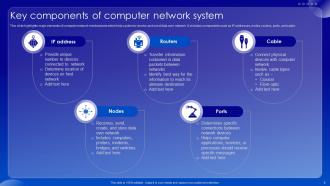
So you'll need nodes first - that's just your computers, servers, routers, whatever devices you're connecting. Then there's transmission media like cables or wireless signals to actually link everything up. Network interface cards are what let devices connect in the first place. Switches handle your local traffic, routers move data between different networks. TCP/IP protocols are basically how devices agree to communicate - honestly the whole thing falls apart without them. You'll want a network operating system too. My advice? Figure out what you need to connect first, then buy components based on that instead of guessing.
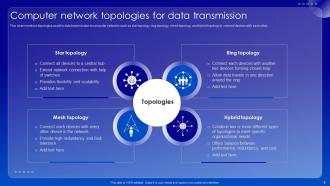
So your network setup totally changes how data moves around and what happens when stuff breaks. With star topology, losing one device won't kill everything - but if your central hub crashes, you're toast. Mesh networks are cool because data can take different routes, which is super reliable, though honestly they cost way more and are a pain to set up. Ring topology moves data efficiently but one bad connection ruins the whole thing. Bus is dirt cheap but gets slower as you connect more devices. I'd go with star for most situations unless you really need that extra backup mesh gives you.
So basically switches handle your local network stuff - they use MAC addresses to move data between devices on the same network. Routers are different though, they're like the GPS for your internet traffic, using IP addresses to send packets between different networks. I always think of it like switches are your neighborhood mail carrier, while routers figure out which city your package needs to go to. When stuff breaks, I usually check the switch ports first for local issues, then dig into router settings if it's a connection problem between networks. Makes troubleshooting way easier.
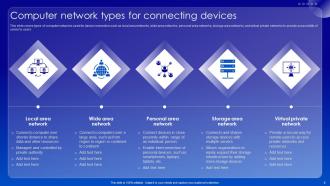
So basically LAN is just your local network - like the WiFi at work connecting all the computers and printers in your building. WANs are massive and cover huge distances. The internet? That's basically one giant WAN. MANs sit in the middle, covering a whole city or big campus area. Obviously they get pricier and way more complicated as you go bigger. Most of the time you're just dealing with your local network hooking up to the internet through whatever provider you've got. If you're actually planning something though, figure out how much area you need to cover first - that'll tell you what you're dealing with.
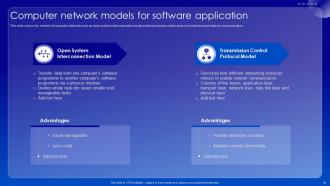
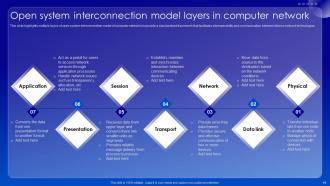
So the OSI model basically splits network stuff into 7 layers, which is super helpful when things break. Physical layer deals with cables and signals. Application layer handles your software. Pretty straightforward. When data travels between devices, it gets wrapped up going down the layers, then unwrapped on the other side. Honestly took me forever to understand this concept back in school lol. But here's why it matters - if your network craps out, you can pinpoint exactly which layer is screwed instead of checking random stuff everywhere. Makes troubleshooting way less of a nightmare.
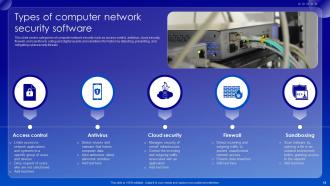
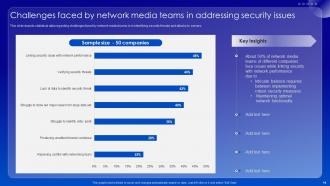
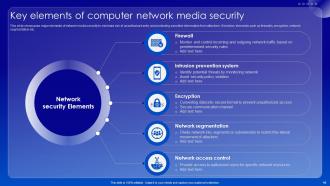
Okay so first things first - get your basics sorted: firewalls, strong passwords, and actually installing those software updates (I know, boring but hackers love outdated systems). Encrypt your sensitive stuff whether it's moving around or just sitting there. Network segmentation is huge too - think of it like having doors between rooms so intruders can't just run wild everywhere. Oh and you definitely need monitoring set up, like intrusion detection systems. Also audit who has access to what pretty regularly. Start there, then add more layers once you've got those down solid.
So basically, a firewall is like having a bouncer at your network - blocks sketchy traffic and only lets the good stuff through based on your rules. VPNs are different though. They encrypt your data so if someone grabs it, it's just gibberish to them. Kind of like mailing something in a locked safe vs. just slapping a stamp on it. Your firewall handles perimeter defense while VPNs protect stuff when it's traveling around the internet. Honestly, you want both - especially if you're working from home or coffee shops. One guards the door, the other keeps your communications private.
Honestly, cloud networking is a game changer compared to those old on-premise setups. No more buying expensive hardware upfront - you just spin things up as needed. Your bills actually match what you're using instead of planning for worst-case scenarios. And thank god someone else deals with all the maintenance stuff now. Remember those awful weekend trips to fix servers? Yeah, not missing that. Built-in backup and disaster recovery comes standard too, which would've cost us a fortune before. Remote access works great for distributed teams. I'd probably test it out on something small first - see how it meshes with your current setup.
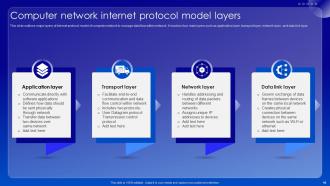
So you'll definitely want to start with TCP/IP - that's like the backbone of everything. It handles breaking up data and making sure it actually gets where it's going. HTTP and HTTPS are for web stuff (always use HTTPS if you're dealing with passwords or whatever). DNS is pretty cool actually - it's what turns "google.com" into the actual numbers your computer needs to find the server. There's also FTP for moving files around and SMTP for email, but honestly? Learn TCP/IP first and everything else clicks way easier.
So network congestion is basically when you've got more data trying to squeeze through than your bandwidth can handle. Like a traffic jam but with packets instead of cars. Usually happens when everyone's online at once or your routing is just trash. QoS helps by letting important stuff cut in line. Load balancing spreads things out so one path doesn't get hammered. Traffic shaping controls how fast data flows - pretty useful actually. Get some monitoring tools though, seriously. They'll catch problems before your users start losing their minds. I'd figure out where your bottlenecks are first before trying anything else.
So the big ones to watch are 5G/6G for insane mobile speeds, plus edge computing that processes stuff closer to users. AI-driven network management is getting pretty wild - networks basically run themselves now. WiFi 7's rolling out too with way better performance when there's tons of devices around. Honestly, SDN is probably the most important one though. You can manage entire networks through code instead of doing everything manually, which is a game changer. There's also quantum networking starting to pop up for super secure communications, but that's still pretty early. I'd definitely focus on learning SDN since it'll change how you design and troubleshoot everything going forward.
So basically, latency is that annoying delay between clicking something and actually seeing it happen. You know how video calls get all choppy and websites feel like they're loading through molasses? That's high latency screwing with you. Gaming becomes impossible, and don't even get me started on trying to type in Google Docs when your connection's being weird. Honestly, anything over 100ms starts feeling pretty sluggish for most stuff. Here's the thing though - if users are complaining about slow apps, check your network latency before you go down some rabbit hole looking at server issues. Nine times out of ten, it's the network.
So we're basically running out of IPv4 addresses, which is where IPv6 comes in. It uses 128-bit addresses instead of 32-bit - that's like going from having a few thousand parking spots to having millions. Way better security built right in too, and mobile devices love it. The whole transition's been kind of a mess though, way slower than anyone thought it'd be. But now ISPs and cloud companies are finally getting their act together. Oh, and if you're building anything new network-wise, just plan for IPv6 from the start. Trust me on that one.
Build flexibility in from the start - modular design with backup pathways and extra capacity. OSPF beats static routing every time for scaling. Core switches are where you absolutely can't go cheap, trust me on this one. VLANs help you segment logically so you won't need major rewiring later. Hybrid cloud setups are perfect for handling traffic spikes. Monitor your current usage religiously - that's how you'll spot bottlenecks before they bite you. Oh, and document your topology now or you'll hate yourself during the next expansion.
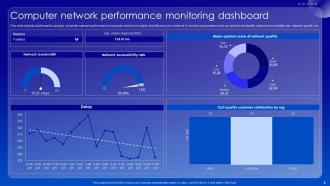
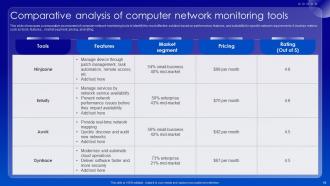
Dude, network monitoring is like having a heads up before everything goes to hell. You're watching bandwidth, latency, packet loss - all that stuff in real-time so you can catch problems early. Way better than finding out when users are already screaming at you. Set up automated alerts for when things hit critical levels, then you can actually fix stuff before it breaks instead of running around putting out fires all day. Honestly, without it you're just waiting for disaster. It's basically the difference between being proactive and reactive, and trust me, proactive is way less stressful.
-
Editable templates with innovative design and color combination.
-
The ease of modifying templates is just superb! Also, the vast collection offers plenty of options to choose from.