


It network types with lan wan and man




Try Before you Buy Download Free Sample Product
 Impress Your
 Audience
 100%
100% Editable
 Save Hours
 of Time


Our IT Network Types With LAN WAN And MAN are topically designed to provide an attractive backdrop to any subject. Use them to look like a presentation pro.
People who downloaded this PowerPoint presentation also viewed the following :
It network types with lan wan and man with all 2 slides:
Use our IT Network Types With LAN WAN And MAN to effectively help you save your valuable time. They are readymade to fit into any presentation structure.

FAQs for It network types with lan
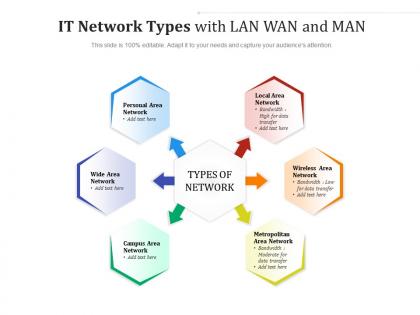
Okay so basically it's all about distance and who's running the show. LANs are just your building or office - you control everything and it's super fast since it's all close together. WANs cover huge distances like cities or countries (the internet is literally just one massive WAN when you think about it). MANs are the weird middle child that covers like a city or big campus area. Speed-wise, LANs win because everything's right there. WANs are slower and cost way more since data has to travel so far. MANs give you decent speed but across a bigger area than LANs. Really just comes down to how far you need your network to reach.
So basically a VPN encrypts all your data - like putting your mail in a locked box instead of sending a postcard where anyone can read it. Your real IP gets hidden too, which stops those sketchy man-in-the-middle attacks. Honestly, public WiFi is sketchy as hell without one. The VPN makes it look like you're browsing from their secure servers instead of whatever coffee shop you're actually in. Plus if you need to access work stuff remotely, it'll act like you're sitting right at your desk in the office. Just use it whenever you're not on your home network.
Oh this is easy! So switches are basically for connecting stuff within your network - like your computers, printers, whatever. They handle all the local traffic. Routers are different though - they're what connect separate networks together. Like when your office network needs to talk to the internet or another office location. I always think of switches as the internal wiring and routers as the bridge to everywhere else. For a small office setup, honestly I'd grab a decent switch first for all your internal connections, then worry about the router part for getting online.
Honestly, wired is still king for speed and reliability. Ethernet doesn't care about walls or interference - that break room microwave can't mess with your cable connection. Wi-Fi 6 is pretty solid now, but distance from your router matters, plus more devices = slower speeds for everyone. I learned this the hard way during video calls. Short version: if it's mission-critical stuff, go wired. Wireless works fine for most things though, just don't expect the same consistency.
So mesh networks are pretty solid - every device connects to multiple others, which means if one connection dies, your data just finds another route. Performance is good too since traffic picks the fastest path available. But honestly? They're a pain to set up. You need tons of cables and network interfaces, so costs get crazy quick. And when something breaks, good luck figuring out where the problem is with all those connections everywhere. I'd only go mesh if you absolutely can't afford any downtime whatsoever. Otherwise it's probably overkill.
So basically, cloud means your stuff runs on someone else's servers that you access online. Traditional networks? That's all your own hardware sitting in your building. Cloud's pretty sweet because you can scale things fast without buying a bunch of expensive equipment upfront. Plus no maintenance disasters at 2am - that's their problem now. But you're screwed if your internet goes down or their service craps out. Traditional gives you total control but honestly, all that gear gets pricey and someone has to babysit it. I'd figure out what you actually need first, then decide.
Okay so three big things to nail down. Which stuff actually has to stay on-premises vs what you can move to the cloud - don't just migrate everything because it gets pricey fast. Connectivity is huge too since latency will absolutely wreck performance if you're sloppy about it. Security policies need to match across both sides, which honestly is trickier than it sounds. Budget for the extra complexity because hybrid setups are way more work than picking one or the other. I'd definitely start with just one workload as a test run before you commit to the whole thing.
For your LAN setup, WPA3 on WiFi and 802.1X for wired connections are solid choices. WANs get trickier - IPSec VPNs work great, and MPLS if you can stomach the cost (seriously, those bills hurt). Cloud stuff? Zero-trust architecture with TLS 1.3 handles most scenarios well. Don't put all your eggs in one basket though - layer different protocols instead of banking on just one. I'd start by checking what you're already running, then focus on protecting your most critical data first. Oh, and defense in depth is still king for network security.
Network latency basically controls how snappy your apps feel. LANs are sweet - you get 1-5ms which is basically instant. WANs though? That's where things get ugly, like 50-200ms. Users definitely notice the difference. Video calls start cutting out, file transfers take forever, and clicking stuff feels painfully slow. I'd say once you hit 100ms, people get annoyed fast. Honestly, I've seen grown adults lose their minds over laggy apps. Tools like ping help you catch problems early - way better than waiting for angry tickets from users.
So 5G's gonna change the game for edge computing and hybrid networks - way lower latency and crazy bandwidth compared to 4G. Instead of sending everything back to your main data centers, you can actually process stuff right where users are. Honestly, the speed difference is pretty nuts when you see it in action. This makes distributed architectures way more realistic than before. If you're running real-time apps or dealing with IoT stuff, definitely start mapping out where edge nodes could help your current setup. It wasn't really doable before but now it's legit.
So basically IoT flips your whole network setup on its head. Instead of that old hub-and-spoke thing, you're pushing processing power way out to the edges where all the data actually happens. We're talking thousands of tiny devices that need to stay connected 24/7 - it's crazy how many sensors end up in just one building! You'll need local gateways everywhere and much better bandwidth management. Security becomes a nightmare too since every single device could be a potential entry point. Honestly, I'd start by figuring out where all these endpoints will actually go before you design anything else.
Start by breaking your VMs into segments based on what they actually do - way easier to manage that way. Set bandwidth limits and make your critical apps get priority over stuff like backups. Honestly, QoS policies are a lifesaver here. Monitor everything because virtual networks turn into a hot mess if you're not paying attention. Firewall rules between segments are non-negotiable too. I learned this the hard way once. The thing is, even though it's all virtual, you still need to treat it like real hardware when it comes to the basics.
So SD-WAN is pretty cool - it bundles all your internet connections (fiber, broadband, even cellular) into one smart network. Traffic automatically picks the best route, and if something goes down, users won't even notice. You'll finally get decent visibility into what's happening too, which honestly should've been standard years ago. The big win though? Way cheaper than those overpriced MPLS lines. I'd say start small - pick your most critical sites for a pilot run. You'll see the performance boost right away and can expand from there.
Honestly, start with the dumb stuff first - loose cables, power issues, blinking lights. I can't tell you how many times it's been something that obvious. After that, run some ping tests to see if your devices are actually talking to each other. Check your IP settings while you're at it. Wireshark is pretty clutch for seeing what's actually moving across the network, though the interface takes some getting used to. Don't skip checking logs on your routers and switches either. I usually just work my way up from physical connections until something clicks.
Network management is getting completely flipped by AI right now. Basically you can predict failures before they happen - sounds crazy but it actually works. Your infrastructure needs way more bandwidth though since AI stuff eats data like nothing else. Traffic gets optimized automatically, security threats handled in real-time, all that good stuff. Oh and scaling predictions too, which honestly saves so much headache. Look into intent-based networking if you haven't already. Instead of configuring every single device manually, you just tell it what you want and it figures out the rest.
-
Innovative and Colorful designs.
-
Excellent design and quick turnaround.
-
Enough space for editing and adding your own content.
-
Excellent products for quick understanding.