

Network security powerpoint presentation slides





Try Before you Buy Download Free Sample Product
 Impress Your
 Audience
 100%
100% Editable
 Save Hours
 of Time


Network Security protects electronic devices such as computers, servers, mobile gadgets, data, electronic systems, and networks from network attacks. This PowerPoint presentation illustrates important details about network security. This network security PowerPoint presentation will be helpful to throw light on the current scenario of the organization, the requirement of network security in different sectors, and its work. In addition, computer security PPT contains the critical elements of network security, network risk identification, and assessment, steps to mitigate those risks, benefits of network security, and automations role in network security. Further, this data security presentation comes with a checklist to implement network security in the organization, a 30-60-90-day plan to manage network security, and the budget to implement the same. The Information Security deck also showcases a roadmap to monitor network security and a timeline to implement network security in the organization. Lastly, this electronic information security PPT shows the effects of network security implementation on the organization and dashboard for threat tracking in network security. Get access now.
People who downloaded this PowerPoint presentation also viewed the following :
Content of this Powerpoint Presentation
Slide 1: This slide introduces Network Security. State Your Company Name and begin.
Slide 2: This is an Agenda slide. State your agendas here.
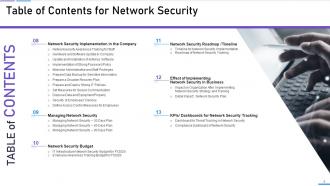
Slide 3: This slide shows Table of Contents for Network Security.
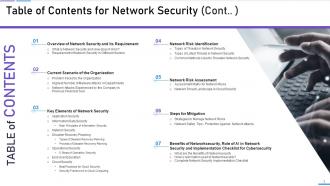
Slide 4: This is another slide continuing Table of Contents for Network Security.
Slide 5: This slide highlights title for topics that are to be covered next in the template.
Slide 6: This slide defines the meaning of Network security and how it helps to prevent data through different methods and techniques.
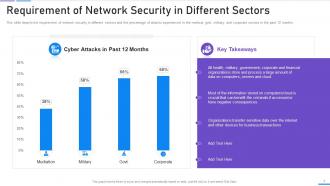
Slide 7: This slide shows Requirement of Network Security in Different Sectors.
Slide 8: This slide highlights title for topics that are to be covered next in the template.
Slide 9: This slide shows the organization's current situation through the total losses experienced because of different cyberattacks.
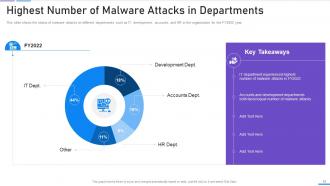
Slide 10: This slide displays Highest Number of Malware Attacks in Departments.
Slide 11: This slide shows Cyber Attacks Experienced by Company in Previous Financial Year.
Slide 12: This slide highlights title for topics that are to be covered next in the template.
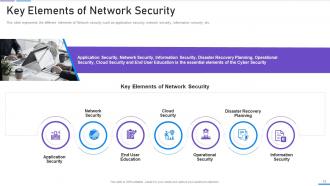
Slide 13: This slide represents the different elements of Network security such as application security, network security, information security, etc.
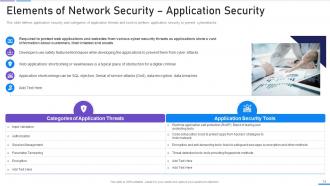
Slide 14: This slide defines application security and categories of application threats and tools to perform application security.
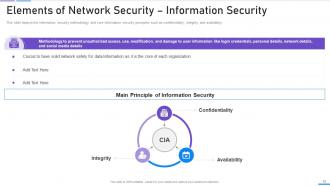
Slide 15: This slide displays Elements of Network Security – Information Security.
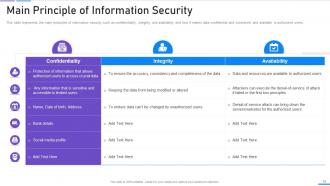
Slide 16: This slide represents the main principles of information security such as confidentiality, integrity, and availability.
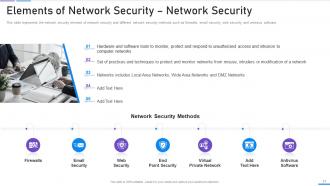
Slide 17: This slide represents the network security element of Network security and different network security methods.
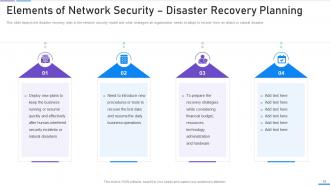
Slide 18: This slide presents Elements of Network Security – Disaster Recovery Planning.
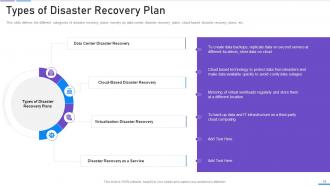
Slide 19: This slide defines the different categories of disaster recovery plans, namely as data center disaster recovery plans, cloud-based disaster recovery plans, etc.
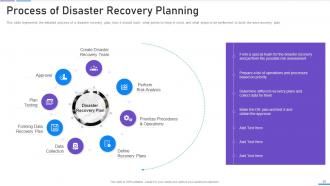
Slide 20: This slide represents the detailed process of a disaster recovery plan, how it should work, what points to keep in mind, etc.
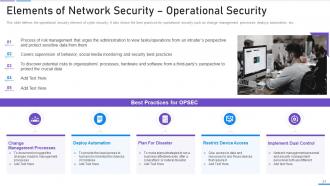
Slide 21: This slide defines the operational security element of Network security.
Slide 22: This slide depicts the main steps of operational security, such as describing sensitive information, identifying potential risks, etc.
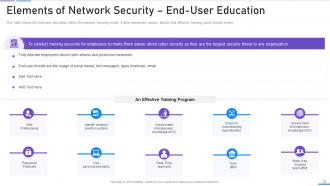
Slide 23: This slide presents the end-user education within the Network security model.
Slide 24: This slide shows Elements of Network Security – Cloud Security.
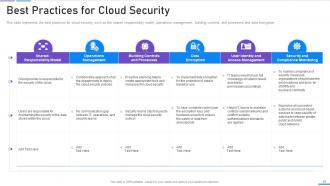
Slide 25: This slide represents the best practices for cloud security, such as the shared responsibility model, operations management, etc.
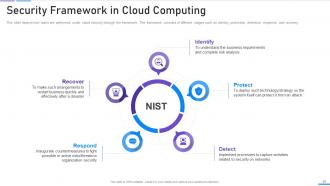
Slide 26: This slide shows Security Framework in Cloud Computing.
Slide 27: This slide highlights title for topics that are to be covered next in the template.
Slide 28: This slide presents the main types of threats in Network security, such as cybercrime, cyber terrorism, etc.
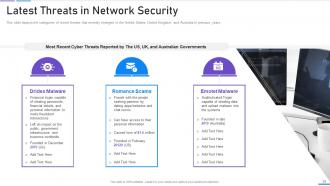
Slide 29: This slide depicts the categories of recent threats that recently emerged in the United States, United Kingdom, etc.
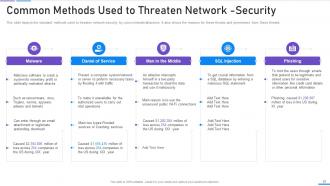
Slide 30: This slide displays Common Methods Used to Threaten Network-Security.
Slide 31: This slide highlights title for topics that are to be covered next in the template.
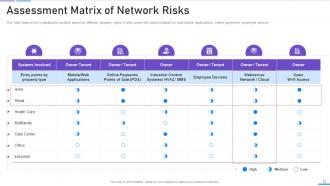
Slide 32: This slide depicts the cyberattacks surface based on different property types.
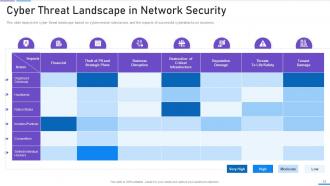
Slide 33: This slide presents Cyber Threat Landscape in Data Security.
Slide 34: This slide highlights title for topics that are to be covered next in the template.
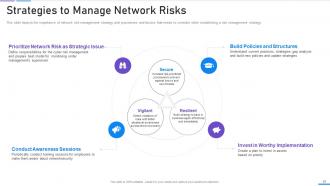
Slide 35: This slide depicts the importance of cyber risk management strategy and procedures.
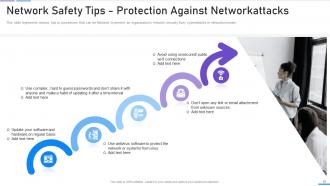
Slide 36: This slide shows Cyber Safety Tips - Protection Against Cyberattacks.
Slide 37: This slide highlights title for topics that are to be covered next in the template.
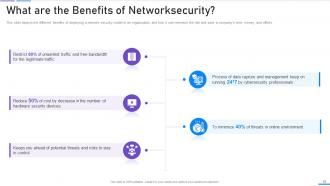
Slide 38: This slide presents the different benefits of deploying a Network security model in an organization.
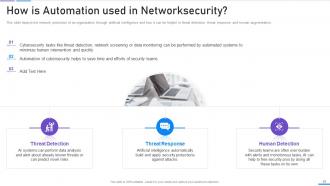
Slide 39: This slide depicts the cyber protection of an organization through artificial intelligence.
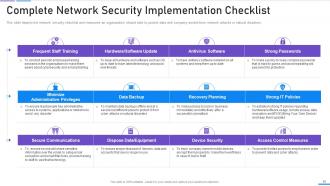
Slide 40: This slide displays Complete Network Security Implementation Checklist.
Slide 41: This slide highlights title for topics that are to be covered next in the template.
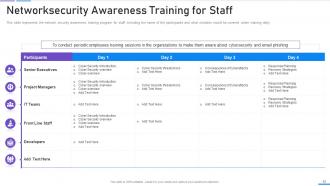
Slide 42: This slide represents the Network security awareness training program for staff, including the name of the participants.
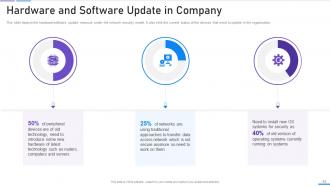
Slide 43: This slide presents Hardware and Software Update in Company.
Slide 44: This slide depicts the benefits of using antivirus software in the organization.
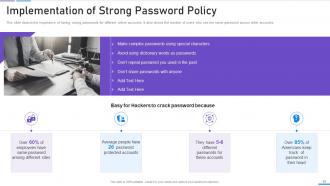
Slide 45: This slide displays the importance of having strong passwords for different online accounts.
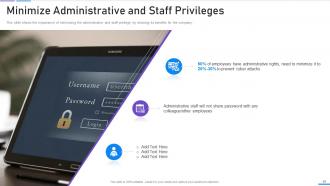
Slide 46: This slide shows the importance of minimizing the administrative and staff privilege by showing its benefits for the company.
Slide 47: This slide displays Prepare Data Backup for Sensitive Information.
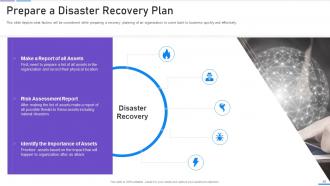
Slide 48: This slide depicts what factors will be considered while preparing a recovery planning of an organization.
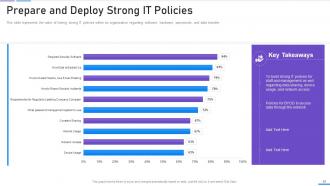
Slide 49: This slide represents the value of having strong IT policies within an organization.
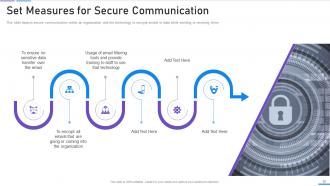
Slide 50: This slide depicts secure communication within an organization and the technology to encrypt emails.
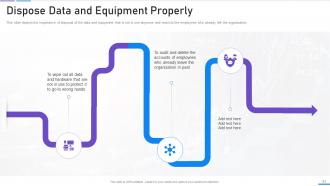
Slide 51: This slide displays the importance of disposal of the data and equipment that is not in use anymore.
Slide 52: This slide depicts that the security of employees’ hardware or devices is also essential while applying the cyber security model.
Slide 53: This slide presents Define Access Control Measures for Employees.
Slide 54: This slide highlights title for topics that are to be covered next in the template.
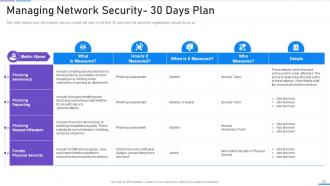
Slide 55: This slide depicts how the Network security model will work in the first 30 days and the tasks the organization should focus on.
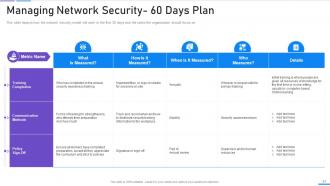
Slide 56: This slide represents the plan for 60 days after implementing the Network security model in the organization.
Slide 57: This slide depicts the 90 days plan of the Network security model in an organization and training compliance.
Slide 58: This slide highlights title for topics that are to be covered next in the template.
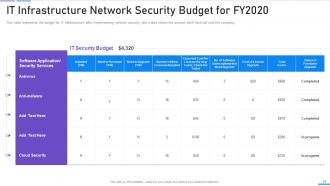
Slide 59: This slide represents the budget for IT infrastructure after implementing data security.
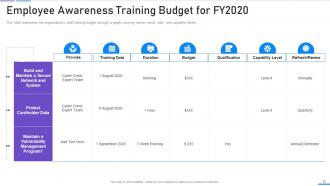
Slide 60: This slide displays the organization's staff training budget through a graph covering trainer name, date, and capability levels.
Slide 61: This slide highlights title for topics that are to be covered next in the template.
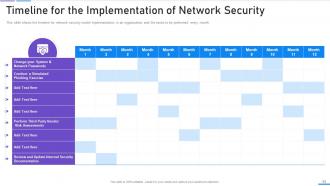
Slide 62: This slide displays Timeline for the Implementation of Network Security.
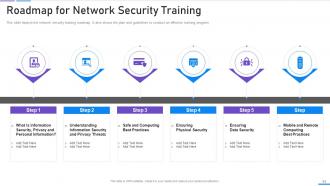
Slide 63: This slide depicts the Network security training roadmap.
Slide 64: This slide highlights title for topics that are to be covered next in the template.
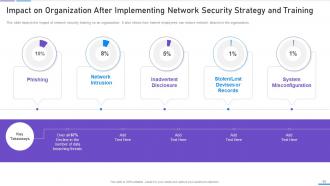
Slide 65: This slide displays Impact on Organization After Implementing Network Security Strategy and Training.
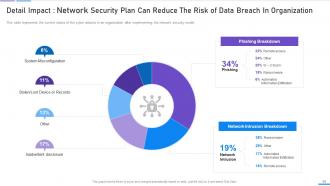
Slide 66: This slide represents the current status of the cyber attacks in an organization after implementing the cyber security model.
Slide 67: This slide highlights title for topics that are to be covered next in the template.
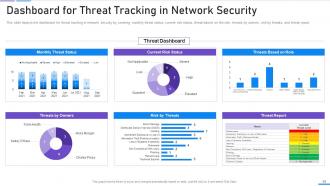
Slide 68: This slide presents Dashboard for Threat Tracking in Network Security.
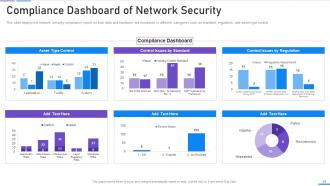
Slide 69: This slide depicts the Network security compliance report on how data and hardware are monitored in different categories.
Slide 70: This slide showcases Icons for Network Security.
Slide 71: This slide is titled as Additional Slides for moving forward.
Slide 72: This slide provides 30 60 90 Days Plan with text boxes.
Slide 73: This is Our Mission slide with related imagery and text.
Slide 74: This slide presents Roadmap with additional textboxes.
Slide 75: This is a Timeline slide. Show data related to time intervals here.
Slide 76: This slide shows Post It Notes. Post your important notes here.
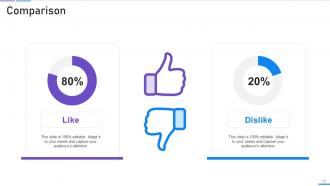
Slide 77: This is a Comparison slide to state comparison between commodities, entities etc.
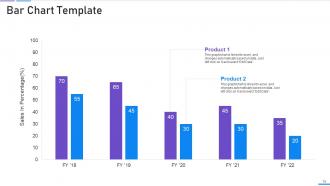
Slide 78: This slide presents Bar chart with two products comparison.
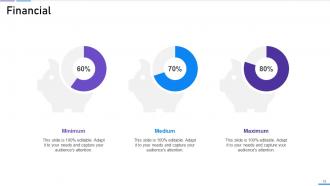
Slide 79: This is a Financial slide. Show your finance related stuff here.
Slide 80: This slide contains Puzzle with related icons and text.
Slide 81: This is a Thank You slide with address, contact numbers and email address.
Network security powerpoint presentation slides with all 86 slides:
Use our Network Security Powerpoint Presentation Slides to effectively help you save your valuable time. They are readymade to fit into any presentation structure.


























FAQs for Network security
Honestly, malware is the worst right now - ransomware especially will destroy everything you've built. Your employees are getting hit with phishing emails constantly, and some of these are getting really sneaky. Then you've got insider threats, which is basically people on your team who already have access but decide to abuse it. Layer your defenses though - patch everything regularly, train people to spot sketchy emails (my cousin fell for one last month, ugh), and watch for weird user behavior. Short sentences work. Don't trust anyone completely.
First thing - figure out what you actually have on your network and who's accessing it. Can't protect what you don't know about, right? Multi-factor auth is your friend, even though it'll annoy people at first. Break your network into smaller chunks instead of one big open space. Oh, and here's the thing that trips people up - treat your internal network like it's already compromised. Don't trust anything just because it's "inside." Monitor everything constantly and verify every access request. Start with your most important stuff first rather than trying to fix everything overnight. You'll go crazy otherwise.
So MFA is like having a bouncer check multiple IDs before letting someone into your network. You need your password plus something else - could be your phone, a token, or even your fingerprint. Honestly, it's probably the best security move you can make. Even if someone steals your password, they're still stuck without that second piece. Most hacks happen because passwords get compromised anyway. MFA blocks like 99% of those automated attacks. I'd start with your most important stuff first - email accounts, admin access, anything with sensitive data. Way easier than dealing with a breach later.
So hardware firewalls basically guard your whole network from the outside - like a bouncer at the door. Software ones live on each device and control what apps can do. Hardware handles way more traffic and has those fancy enterprise features, but honestly? Software gives you way better control over individual programs. Most people think you have to pick one, but that's dumb. You want both working together. Hardware catches the big stuff trying to get in, then software handles the nitty-gritty details on each computer. It's like having security at the building AND a personal alarm system.
Dude, public wifi is sketchy as hell - anyone can basically spy on what you're doing. Learned that one the hard way at Starbucks when I was being way too careless. Your passwords and personal stuff are just floating around for hackers to grab. Always use a VPN if you can, it scrambles everything so nobody can read it. Only visit sites that start with https (the secure ones), and maybe don't check your bank account while you're there? Also turn off file sharing - forgot about that setting until recently. Honestly just assume someone's watching because they probably are.
You really need to do regular security audits - they're like catching problems before hackers do. Skip them and you're basically driving blind while your network slowly falls apart. They scan everything to find weak spots, old software, bad configs, stuff like that. Honestly, most companies wait way too long and then act shocked when something breaks. I'd do vulnerability scans every quarter minimum. Full audits once a year. Oh, and map out what you actually have first - you can't protect what you don't know exists.
So APTs usually get in through those sketchy phishing emails, stolen passwords, or just exploiting bugs that haven't been patched yet. Once they're inside, they'll hang out for literally years sometimes - moving around your network super quietly. Honestly, zero-trust setups are pretty much mandatory now since you have to assume everything's already compromised. Your defense needs network segmentation, good monitoring tools, regular security audits, and training your team not to click random links. But seriously, start by figuring out what's actually happening on your network right now. Can't fight what you can't see.
Honestly, your people are the weak link - like 95% of breaches come from human mistakes. Someone clicks a sketchy link, uses "password123," or finds a random USB in the parking lot and thinks "hmm, wonder what's on this." I've watched whole companies get wrecked because Janet from accounting fell for a fake CEO email. Those boring yearly security meetings? Totally useless. You need regular training that actually sticks. Try phishing simulations and short monthly sessions instead. Oh, and definitely test how many of your team would fall for fake emails right now - you might be surprised how bad it is.
Start with proper due diligence - I know it's boring but you've gotta vet any cloud provider before signing anything. Look at their security certs, compliance stuff, incident history. Most people skip this part which is honestly kind of insane. Set up strong access controls with multi-factor auth and encrypt everything in transit and at rest. Don't forget regular security audits - this isn't something you can just ignore once it's set up. Get clear data handling agreements that spell out exactly what they can do with your info. Never assume they'll handle security the way you would.
Dude, first thing - change those default passwords! Hackers literally have lists of "admin/admin" combos they try. Put your IoT stuff on a separate network if you can, that way if your smart doorbell gets hacked it can't access your laptop. Update firmware when you remember to (I know, it's annoying). Turn off features you don't actually use. Most of these devices are basically tiny computers with garbage security - your smart thermostat has no business scanning your network at 3am, right? Set up alerts for weird behavior if your router supports it. Honestly, treat them like they're already compromised and you'll be way ahead of most people.
So encryption scrambles your data into complete nonsense that only the right people can unscramble. AES-256 is what you want for symmetric stuff, and RSA or elliptic curve works for asymmetric. TLS/SSL handles web traffic automatically (yeah, I know SSL is technically old but whatever, everyone still says it). The real trick is good key management - bad encryption actually makes things worse because you think you're protected when you're not. Make sure you're running TLS 1.3 and check what protocols are actually active on your systems.
Think of IDPS like having bouncers for your network - they watch all the traffic coming through and can actually stop bad stuff in real time. Way better than just getting alerts after you've already been hit, you know? You can put them at your main entry points, inside different network segments, or right on critical servers. They're pretty solid for compliance since they log everything automatically. Honestly, I'd start with network-based ones at your perimeter first - that'll catch most of the obvious attacks. Then maybe add host-based protection on your important servers later. The auto-blocking feature is clutch though.
Honestly, start with whatever regulations hit your industry directly - GDPR if you're dealing with EU customers, HIPAA for healthcare stuff, PCI DSS when you're processing payments. SOX is a nightmare if you're publicly traded (those auditors will tear apart every security control). Data breach laws are all over the place depending on your state and country, which is super annoying. Plus there's liability headaches if customer data gets leaked. I'd map out which ones actually apply to you first, then design your security around meeting those specific requirements. Way easier than trying to do everything at once.
So network segmentation is like putting up walls inside your network - attackers can't just walk around freely if they get in. Picture a house with locked rooms vs one giant open space, you know? Way harder to trash everything. Micro-segmentation goes nuts with this concept and locks down individual devices and apps. Honestly, it's probably overkill for smaller setups, but whatever. The real benefit is containing damage fast. Your critical stuff stays protected even when your outer defenses fail, which they will eventually.
Dude, you've gotta check out AI-driven threat detection - it catches weird stuff way faster than those old signature systems. Zero-trust is everywhere now too, where you basically verify everything instead of assuming things inside your network are safe. SASE is blowing up (combines networking and security in the cloud), though honestly I can barely keep track of all these acronyms anymore. Quantum-resistant encryption is worth watching since quantum computers might eventually crack everything we use today. Start looking into AI security tools now - threats are moving too fast for the manual stuff.
-
Great product with effective design. Helped a lot in our corporate presentations. Easy to edit and stunning visuals.
-
Excellent Designs.