

Operating System Powerpoint Ppt Template Bundles





Try Before you Buy Download Free Sample Product
 Impress Your
 Audience
 100%
100% Editable
 Save Hours
 of Time


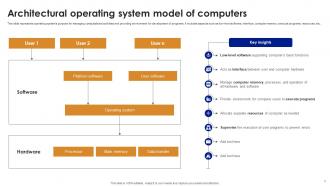
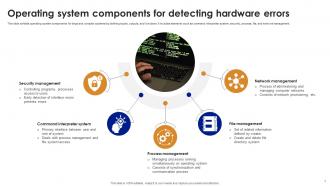
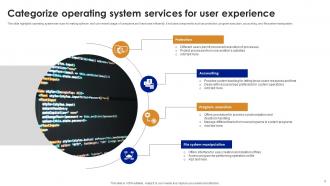
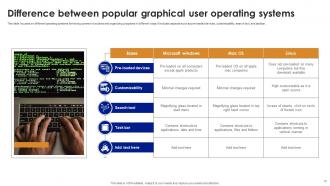
An operating system OS is a fundamental software component that serves as the intermediary between computer hardware and user applications. It manages system resources, including memory, processors, and peripheral devices, to facilitate efficient and secure execution of software. The OS provides essential services such as process management, file storage, and user interface, enabling users to interact with the computer. Key functions of an OS include memory allocation, task scheduling, and input or output management. Common examples include Microsoft Windows, macOS, and Linux. The operating system plays a critical role in ensuring the stability, security, and overall functionality of computer systems across various devices, from personal computers to servers and embedded systems.
People who downloaded this PowerPoint presentation also viewed the following :
Operating System Powerpoint Ppt Template Bundles with all 28 slides:
Use our Operating System Powerpoint Ppt Template Bundles to effectively help you save your valuable time. They are readymade to fit into any presentation structure.








FAQs for Operating System Powerpoint
So your OS does four main things - manages memory and CPU, controls how apps talk to hardware like your drive or network card, gives you that interface you click around in, and organizes your files. It's basically the translator between your programs and the actual computer parts. Without it, nothing would work together. Honestly, most people don't realize how much juggling happens behind the scenes. When your laptop's being slow, there's probably like 50 processes running that you can't even see.
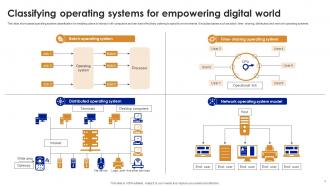
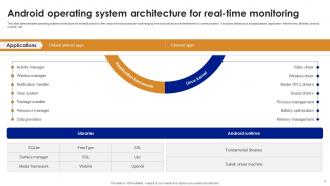
So basically real-time systems are all about hitting deadlines - they'll guarantee your tasks finish on time no matter what. Distributed systems? Totally different game. They're built around talking between machines and not falling apart when stuff breaks. Embedded ones are the opposite of bloated - super stripped down because they're running on like no memory or battery. Honestly the scheduling tells you everything. Real-time uses preemptive kernels that barely let interrupts slow things down. Figure out what you're dealing with first - is it timing that'll kill you, scale, or just not having enough resources? That pretty much decides your whole approach.
So basically, your file system is like your computer's organization method for all your stuff. It creates folders, manages files, and tracks where everything sits on your hard drive. Pretty much acts like a super-fast librarian who never forgets where things are. Without it? Your OS would just stare at a giant mess of random data and shrug. Oh, and it handles security too - deciding who gets to peek at which files. Honestly kind of amazing how it all works invisibly while you're just trying to find that document you saved yesterday.
Your computer's got a bunch of security stuff running behind the scenes. Access controls decide who gets into what files, and you've got passwords or fingerprint scanners checking if you're really you. Programs can't mess with each other thanks to memory protection - which honestly saves us from so many crashes. There's also encryption for sensitive stuff, firewall management, and automatic security updates. Speaking of updates, don't ignore those notifications! New vulnerabilities pop up all the time, so those patches are basically what keep the bad guys out.
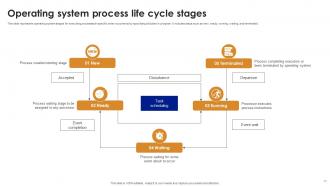
So basically your computer has this process management thing that creates, schedules, and kills all the programs you're running. Every app gets its own unique ID when you open it, then they all fight for CPU time - kinda like a traffic jam but way more organized lol. There's a process table keeping track of what's using memory and which stuff gets priority. The scheduler decides who goes next so nothing completely takes over your system (though sometimes it feels like Chrome still manages to). When your laptop starts acting slow, just pop open task manager and you'll see exactly what's hogging everything.
So virtual memory is this neat trick that lets you run way more stuff than your RAM should technically handle. Your computer uses the hard drive as backup storage when things get cramped. Like, I can have Chrome eating up memory with a million tabs (why do I do this to myself?), Spotify playing, maybe some other random apps - and somehow it all keeps working. The OS just shuffles less important data to your disk temporarily, then grabs it back when needed. Pretty smart system. You don't have to constantly worry about closing everything down.
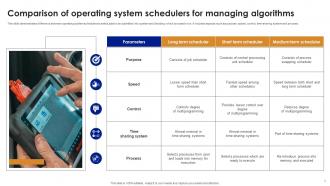
Your computer basically tricks you - it's switching between programs crazy fast using something called time-slicing. Each program gets a tiny slice of CPU time (we're talking milliseconds) before the next one gets a turn. Scheduling algorithms decide what runs first, and the OS uses locks to stop programs from fighting over memory. Multiple cores actually help run things at the same time now. Honestly, it's pretty wild how smooth it feels when you think about it. Check your task manager sometime - there's probably like 50+ processes all wanting their turn.
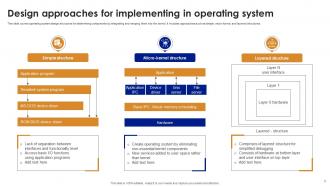
So basically, monolithic kernels cram everything into kernel space - drivers, file systems, all of it. Way faster since components don't need to chat back and forth, but one bad driver can nuke your whole system (Windows users know this pain). Microkernels are the opposite - they keep kernel space super minimal and stick drivers in user space instead. More stable and secure for sure, but slower because of all the message passing overhead. Linux went monolithic, QNX picked microkernel. Really comes down to whether you want speed or you can't afford crashes.
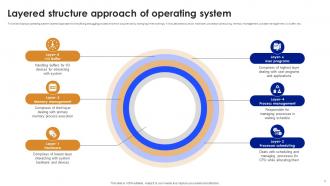
So basically the OS uses device drivers and interrupt handlers to translate between your apps and hardware. It's like having a traffic controller - schedulers decide which processes get CPU time, memory managers handle RAM, file systems manage storage. Pretty clever stuff honestly. The whole thing works through queues, priority systems, and protection rings that keep processes from stepping on each other. Oh and next time you're dealing with performance issues, definitely check your resource monitor. You'll see exactly how well everything's balanced. Short answer: it's constantly juggling so nothing crashes.
So basically, system calls are how your app talks to the OS kernel - like requesting file operations, memory stuff, network access, whatever. Your programs would be completely useless without them, honestly. Just stuck in user space unable to read files or even print anything to the screen. They're also what keeps apps from directly messing with hardware or screwing with other processes. Oh, and pro tip - if you're debugging something weird, run strace to see what system calls are happening. I've found some bizarre issues that way. It's like having a bouncer between your code and the kernel.
So basically your OS has this whole network stack built in that talks to all your hardware - wifi cards, ethernet, whatever. When you open Chrome or download something, you're not actually dealing with any of that messy low-level stuff. The OS just handles it all automatically - packet routing, fixing errors, security protocols, the works. Pretty neat honestly. Your apps just go "hey connect me to Netflix" and boom, the OS figures out all the complicated bits behind the scenes. It's like having a translator between your programs and the actual network hardware.
Honestly, hardware abstraction is your biggest headache - creating one interface that plays nice with totally different processors, graphics cards, all that stuff. Performance gets tricky too since x86 optimizations might tank on ARM. You're also going up against years of platform-specific tweaks that native systems already nailed down. Oh, and users are picky - Linux folks want everything customizable while Mac people expect everything to just work smoothly. I'd probably start with a microkernel setup and build modular pieces that can actually adapt to each platform's weird quirks.
Linux is honestly pretty solid these days - way more customizable than Windows and you don't pay licensing fees. Ubuntu and Mint are good starting points if you wanna test drive it in a VM first. The main downside? You'll be hitting up forums and community wikis instead of calling a help desk when stuff breaks. Though honestly, the Linux community knows their shit and they're usually quick to help. Windows has that whole corporate support thing going for it, which some people need. Really comes down to whether you're cool with forum diving or need someone on the phone walking you through fixes.
So basically, your OS makes a huge difference in how fast stuff runs and whether it'll even work. Memory management and CPU handling vary tons between systems - same app can be lightning fast on one OS and crawl on another. Obviously Windows apps won't run on Mac without some workaround magic. Also, different operating systems give you access to different dev tools and frameworks, which honestly can be a pain when you're trying to pick a tech stack. My advice? Test on whatever system you're targeting right from the start. Trust me, finding out your app is broken after months of work absolutely sucks.
Honestly, everyone's going crazy for containers right now - Alpine Linux and that whole lightweight thing. Serverless is pretty cool too since you don't even think about the OS anymore. There's this thing called unikernels that's kinda niche but interesting, basically strips your OS down to just what your app needs. Oh and microservices everywhere, which... can be overkill sometimes but whatever. People are also treating infrastructure like it's disposable now, plus edge computing's pushing specialized OSes for IoT stuff. I'd mess around with Kubernetes if I were you - good way to actually see this stuff in action.
-
I really liked their customized design services. I got my desired template made by their expert team. Thank You!
-
Design layout is very impressive.