


Embedded Systems Powerpoint Ppt Template Bundles




Try Before you Buy Download Free Sample Product
 Impress Your
 Audience
 100%
100% Editable
 Save Hours
 of Time


Our Embedded Systems Powerpoint Ppt Template Bundles are topically designed to provide an attractive backdrop to any subject. Use them to look like a presentation pro.
People who downloaded this PowerPoint presentation also viewed the following :
Embedded Systems Powerpoint Ppt Template Bundles with all 21 slides:
Use our Embedded Systems Powerpoint Ppt Template Bundles to effectively help you save your valuable time. They are readymade to fit into any presentation structure.






FAQs for Embedded Systems Powerpoint
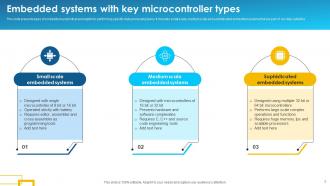
So you'll want a microcontroller, some RAM and storage, plus I/O interfaces for connecting stuff. Power management is huge too - learned that the hard way on my last project. Most systems need real-time OS software, though simple ones can run bare metal if you're feeling brave. Obviously you need sensors and actuators to actually touch the real world. What makes it "embedded" is everything's built for one specific job, not general computing like your laptop. Honestly, I'd start by figuring out exactly what inputs and outputs you need, then size your processor and memory from there.
So RTOS is all about hitting deadlines - like, your motor control HAS to respond in exactly 2ms or stuff breaks. Regular operating systems? They're more like "eh, we'll get to it when we get to it" while juggling your Spotify and 47 Chrome tabs. Honestly, RTOS can be pretty boring to code for since everything's so rigid and predictable. But that's exactly why you need it for anything safety-critical. Your phone can lag for a second and nobody dies - not the case with embedded systems. If timing matters at all in your project, look into RTOS early.
Dude, power management can literally make or break your embedded project. Most of these devices run on batteries, so you're constantly fighting that trade-off between performance and energy consumption. Sleep modes are your best friend - put unused peripherals to sleep whenever possible. Dynamic voltage scaling helps too. Oh, and pick a low-power microcontroller from the start if you can. Wake-on-interrupt is clutch for keeping things efficient. Honestly, measure your current draw super early in development. I've seen too many projects scramble to optimize power at the end when it's way harder to fix. IoT stuff especially needs to run for months without dying.
Honestly, IoT is completely changing how we approach embedded design. These systems need wireless connectivity and cloud integration baked in from day one - can't just bolt it on later. Security's become a nightmare since everything's online 24/7. Battery life matters way more now too, especially when devices need to run for years without replacement. The edge processing stuff is actually pretty cool though - you're handling more data locally instead of sending everything to the cloud. Makes things complex but gives you better performance. My advice? Figure out your connectivity and security requirements super early. Don't make my mistake of treating them as afterthoughts.
C and C++ are still your best bet for embedded stuff - they give you that low-level hardware control without much overhead. Assembly's there for when you really need to squeeze every bit of performance, but honestly I avoid it unless I'm absolutely stuck. Python and JavaScript are popping up more for prototyping and higher-level systems now. Rust is getting popular too because of the memory safety thing. Really depends on what hardware you're working with and how fast it needs to be. I'd say start with C though - once you get that down, everything else makes way more sense.
So basically, instead of building hardware then figuring out software later, you design both together from the start. Way smarter approach honestly. You can put the heavy computational stuff on dedicated hardware while keeping the flexible parts in software - like putting critical loops on custom chips but leaving control logic programmable. Catches integration headaches early too, which saves you from those awful debugging sessions later. I'd start by finding your biggest performance bottlenecks first, then decide what goes where. It's kinda like planning a road trip - you wouldn't pick the car after choosing the route, right?
Honestly, the biggest pain is working with such limited resources - tiny memory, weak processors, barely any storage. You can't just slap on heavy security tools like normal software. Updates are brutal too since these things get stuck in remote places or baked into products where patching costs a fortune. Legacy systems? Don't even get me started - they run for years without updates. Then you've got weak passwords, everything sent in plain text, and those hardcoded credentials that developers thought were "temporary." Build security in from day one, not after everything's already broken.
So for ML on embedded systems, edge AI chips are your best bet. TensorFlow Lite and TinyML work great for lightweight stuff. Preprocess data locally and use quantized models - memory's always tight on these things. Power efficiency used to be a total pain but honestly newer microcontrollers are so much better now. Don't try shoving a whole AI stack in there though, that's just asking for trouble. Focus on specific things like predictive maintenance or smart sensors. Start with something simple for inference, then optimize. Real-time classification works well too if that's what you need.
Dude, if you're just starting out, Arduino IDE is perfect - super easy to pick up. PlatformIO and Keil are way better once you need more features though. Hardware depends on what you're building. Arduino's great for quick prototypes, Raspberry Pi if you need serious processing power. STM32 and ESP32 are solid for anything you actually want to ship. ESP32 is honestly amazing value right now, I use it for everything. Oh and you'll probably want JTAG debuggers or logic analyzers down the road. Start simple with Arduino, then upgrade your tools as projects get crazier.
Okay so first thing - assume everything will break eventually because it will. Build in backup systems for anything critical, like having spare components ready to take over. Software watchdogs are your friend too - they'll reset things when stuff gets weird. Since this is medical equipment (yikes, no pressure right?), you've gotta do formal verification on the important code. Run fault injection tests to see what happens when things go sideways. Also build in self-diagnostics so the system can basically tattle on itself before something dangerous happens. Redundancy is everything here.
Start with JTAG debuggers if you can - they're absolute lifesavers for real-time stuff. Hardware-in-the-loop testing is your friend too. I know unit testing feels like overkill sometimes, but honestly it'll save your sanity later. Get logging set up early, don't wait. Use oscilloscopes or logic analyzers to catch timing issues that software debugging totally misses. Oh, and test under different power conditions if possible - temperature ranges too. The biggest thing though? Build testability into your design from the start. Way easier than trying to hack it in later when everything's already a mess.
Honestly, start by looking at what you've already got - I bet there's redundant stuff you can just cut. Multi-layer PCBs are your friend here, and ditch those chunky through-hole components for surface-mount ones. The weight difference is wild. Try finding microcontrollers that already have wireless built in instead of using separate modules. Flexible PCBs work great for connections too, way better than thick cables everywhere. System-on-chip solutions can really help if they fit your needs. Oh, and this might sound obvious but seriously audit your current design first - you'd be surprised how much dead weight most circuits carry around.
Honestly, edge AI integration is the biggest thing right now - we're literally putting machine learning on microcontrollers which blew my mind when I first saw it. Ultra-low power design is huge too, especially with IoT everywhere. Real-time processing at device level instead of relying on cloud is what everyone wants now. Security's become non-negotiable - hardware encryption is pretty much standard at this point. Oh and definitely check out TinyML frameworks if you haven't yet. That's where most embedded stuff is headed. The whole field's moving so fast it's wild.
Dude, component selection is make-or-break for how long your system lasts. Go cheap and you'll be redesigning in 2 years instead of 20. I've watched entire teams panic when their main MCU got discontinued with only 6 months warning - total nightmare. Temperature ratings and power efficiency aren't sexy but they matter. Also, check if suppliers actually plan to keep making the parts long-term. Honestly, spending extra upfront on components with solid track records beats doing emergency redesigns later when some random chip vanishes from the market. Trust me on this one.
Look, open-source stuff is kinda awesome for embedded projects - you'll save a ton on licensing and development time since there's already solid code out there. But honestly? Security patches become your problem forever, and real-time performance can be hit or miss depending on what you pick. License restrictions might bite you later when you're trying to sell the thing. Oh, and some of the documentation is... questionable. My advice? Check those licenses super early before you're in too deep. The cost savings are real though - just don't expect it to be completely painless.
-
These stunning templates can help you create a presentation like a pro.
-
I want to thank SlideTeam for the work that they do, especially their customer service.