


Education Technology Powerpoint Ppt Template Bundles





Try Before you Buy Download Free Sample Product
 Impress Your
 Audience
 100%
100% Editable
 Save Hours
 of Time


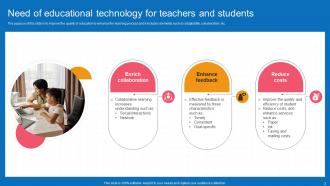
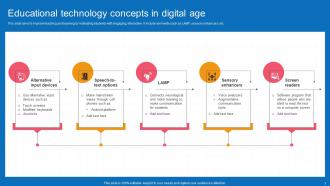
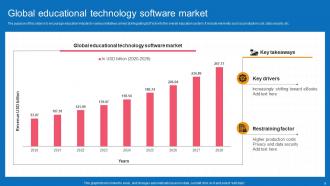
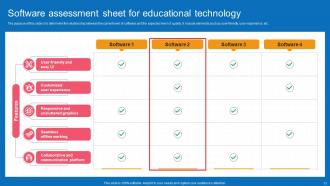
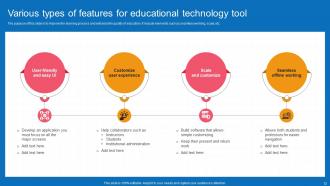
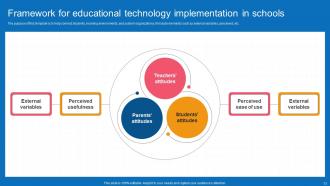
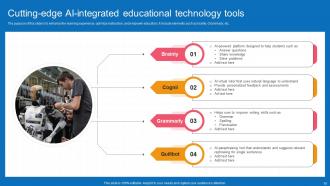
Deep dive into our Edtech presentation. Implement new technological implementations in the classroom. Incorporate in-classroom tablets, interactive projection screens and whiteboards, online content delivery, and MOOCs are all examples of EdTech. It includes ecosystem for students and teacher, Types of educational technology, Best practices for adopting e-learning, Various types of educational technology courses, Key importance of educational technology in future, Educational technology concepts in digital age, Global educational technology software market. Dont miss out on the opportunity to level up your edtech business.
People who downloaded this PowerPoint presentation also viewed the following :
Education Technology Powerpoint Ppt Template Bundles with all 28 slides:
Use our Education Technology Powerpoint Ppt Template Bundles to effectively help you save your valuable time. They are readymade to fit into any presentation structure.
















FAQs for Education Technology Powerpoint
Honestly, the coolest stuff I'm seeing is AI that actually adapts to how each kid learns - like, it gives feedback based on their specific style. VR and AR are getting huge too, though some of it still feels gimmicky to me. Gamification is everywhere now, which makes sense since it keeps students hooked. Digital workspaces and interactive boards have made remote learning way less painful than it used to be. The best part? Teachers don't need to be tech wizards anymore to use this stuff. My advice would be pick one thing, test it out, see what clicks with your students first.
Honestly, just pick one clear goal first - what do you actually want kids to learn? Then find tech that helps with that specific thing. Don't just throw iPads at everything (been there, it's painful to watch). Google Workspace is solid for collaboration stuff. Those little polling apps? Way better engagement than I expected. The trick is making it feel normal, not like "look we're using technology!" I'd say try one new thing per month max - otherwise you'll drive yourself crazy. Oh, and definitely test it yourself first because nothing's worse than tech failing mid-lesson.
Honestly, interactive stuff is a game changer because kids actually have to participate instead of just zoning out. When they can vote on polls or answer questions live, you'll notice they're way more tuned in. Getting their phones involved in the lesson instead of having them scroll Instagram under their desks? That's brilliant. Real-time feedback is huge too - students love seeing how their answers stack up against everyone else's. I'd say start with just one interactive thing per class though, don't go crazy right away.
Yeah, gamification definitely works - I've seen kids get way more into boring stuff when there's points or badges involved. They'll actually stick with hard problems instead of giving up right away. But honestly? You can't just throw a leaderboard on crappy content and expect miracles. The material still has to be good. What really matters is matching your game stuff to what you actually want them to learn. Don't go overboard at first though. Pick one thing - maybe just points or a simple progress bar - and see how they react before you turn everything into a video game.
Honestly, skip the fancy stuff and just use tools that show you what's happening right now. Kahoot's great for quick checks, or even basic Google Forms work. Real-time beats those end-of-unit tests that come too late to actually help anyone. Don't overthink the data either – I swear, three useful insights are way better than drowning in twenty random metrics. Pick one tool you'll actually stick with instead of trying everything at once. Oh, and make it feel like a casual check-in rather than some big scary test moment.
Here's the thing - tech can actually adjust to how each kid learns, which is something teachers with 30 students just can't pull off. AI platforms bump up or down the difficulty based on how you're doing. Learning systems spot where you're stuck and serve up content differently depending if you're more visual or need to hear stuff. Pretty neat, right? Students can go back and review whatever they missed, whenever. Oh, and they're not stuck moving at the same snail pace as everyone else. I'd say figure out what your biggest personalization headaches are first, then go from there.
Honestly, start with just one platform - don't overwhelm yourself right away. Instagram and Twitter are solid for sharing quick educational stuff, and kids are already on there anyway. Class hashtags work surprisingly well for getting discussions going outside of regular hours. Facebook groups are decent too if your students actually use Facebook (mine barely do anymore lol). Before you dive in though, definitely check what your school allows - some places are weirdly strict about teachers connecting with students online. Set up some basic rules about appropriate posting first. Once you figure out what clicks with your kids, then you can branch out to other platforms.
Honestly, it's mostly about time and money - schools never have enough of either. Training takes forever when teachers are already swamped. Plus the upfront costs? Brutal, especially with budgets that are already a joke. Half the staff will fight you on it too because they're set in their ways (which I get, change sucks). Oh and don't get me started on tech issues - school IT is... well, let's just say it's not Amazon-level support. Best bet is starting with a small pilot program. Get a few teachers who actually want to try it, then let them sell the skeptics on it.
Ugh, group projects used to be such a pain with all those endless email chains! Now though? Way easier with the right tech. Google Workspace is clutch - everyone can edit docs at the same time and actually see what others are doing. Teams works great too if your school uses Microsoft stuff. For staying organized, Trello's pretty solid for tracking who's doing what and when things are due. Zoom calls obviously help when you can't meet up in person. The trick is just picking one main platform and getting everyone to actually use it instead of switching between like five different apps.
Honestly, start simple with like 3-4 metrics instead of drowning in data. Test scores and assignment completion rates are obvious ones - they show if kids are actually learning. Usage patterns matter too though... are students logging in regularly or just when forced? I'd also check how much time they're spending on tasks vs just clicking around randomly. Those fancy dashboards look impressive but can be total information overload. Don't skip the human element either - ask teachers and students what they think. Sometimes the best insights come from just talking to people using the tools daily.
So AI watches how your kids learn and adjusts on the fly. It figures out what they're stuck on, their pace, learning styles - that whole thing. Then it tweaks difficulty and suggests different content automatically. Khan Academy does this really well, honestly way better than I expected when I first tried it. DreamBox is another solid one that creates these personalized learning paths. The pacing changes based on each student too. My advice? Pick one tool first and test it out. Don't overwhelm yourself (or them) by trying everything at once.
Consent and transparency are huge - parents need to actually understand what you're collecting, not just click through some massive terms document. Kids can't really consent to this stuff themselves, which makes it extra tricky. Only grab data you truly need for learning purposes and lock it down tight. Honestly, the whole personalized learning vs privacy thing is such a balancing act. Be super clear about who gets access to what. I'd probably err on the side of being overly protective rather than sorry later. Also worth checking regularly if you're actually using all that data or just collecting it because you can.
Honestly, VR is pretty amazing for teaching because kids get to actually *be* in the lesson. Like they're walking around ancient Rome instead of staring at textbook pictures. Chemistry suddenly makes sense when you're grabbing molecules with your hands. Plus it hits all the learning styles - visual, hands-on, auditory - so more kids actually get it. The retention rates are way better too since they're living the experience, not just memorizing facts. Oh, and it's perfect for risky stuff like medical procedures or dangerous experiments. I'd say pick your hardest topic and try one VR lesson - you'll probably be shocked at how much more engaged they are.
Start with the basics - get comfy with your LMS, interactive boards, and whatever apps your school uses. Don't stress about mastering everything at once though. Pick one new tool each month and actually learn it well. The real trick is staying calm when tech inevitably crashes during class (because it will). Blended learning is where it's at - mixing digital stuff with old-school methods. Also, don't fall for every flashy new platform that comes along. Half of them are garbage anyway. Focus on tools that actually help kids engage, not just the ones with the coolest marketing.
Honestly, it's pretty cool once you get used to it. You're not just lecturing anymore - now you're more like a coach helping kids figure stuff out. The whole thing is way more personalized now. You guide them through different learning paths, help them with all the digital tools (which, let's be real, can be overwhelming at first), and focus on getting them to think critically. I spend way more time actually talking with students about their projects and using data to see how they learn best. Oh, and collaborating is huge now. These tech tools don't replace what you bring to the table - they just make you better at it.
-
“As you have innovative ideas and they are all customizable, this saves a huge chunk of your time to prepare well-read presentations.”
-
Easy to use and customize templates. Helped me give a last minute presentation.