

Remote Learning Powerpoint Ppt Template Bundles





Try Before you Buy Download Free Sample Product
 Impress Your
Audience
 100%
Editable
 Save Hours
of Time


Use our Remote Learning Presentation to explore the world of digital education by accessing flexible and advanced learning solutions. Our presentation let learners explore key elements of remote learning that shows how leveraging technological solutions can streamline teaching processes and enhance overall learning experience. It helps ed-tech businesses implement effective learning management system to deliver engaging multi-media lessons. It shows how educators can optimize remote learning outcomes by using video conferencing tools for live discussions and virtual classrooms for lecture delivery. Hence, empower students by delivering high-quality educational content in remote learning environment using techniques and concepts discussed in our comprehensive Remote Learning Presentation.
People who downloaded this PowerPoint presentation also viewed the following :
Content of this Powerpoint Presentation
Slide 1: This slide showcase title Remote LEARNING.
Slide 2: The purpose of this slide is to help students achieve success by ensuring effective tea.
Slide 3: This slide is to help educational institutions implement remote learning system to promote virtual education setup.
Slide 4: This slide is to provide key areas where remote education can enhance user learning experience.
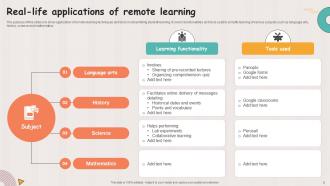
Slide 5: This slide is to show application of remote learning techniques and tools in streamlining student learning.
Slide 6: This slide is to promote student engagement by transforming traditional learning techniques.
Slide 7: This slide is to illustrate impact of remote education on various learning outcomes.
Slide 8: This slide is to help educational institutions analyze market benefits of remote learning.
Slide 9: This slide is to help learners choose best remote learning platform for efficient learning experience.
Slide 10: This slide is to assist ed-tech businesses nurture remote learning culture by promoting effective online employee training and student classes.
Slide 11: This slide is to help ed-tech businesses enhance remote learning processes by overcoming potential problems.
Slide 12: The purpose of this slide is to analyze people’s viewpoint on remote learning and digital education. It illustrates
Slide 13: The purpose of this slide is to help ed-tech professionals design comprehensive remote learning tool.
Slide 14: This slide is to help ed-tech professionals design comprehensive remote learning tool.
Slide 15: This slide is to help learners compare features of various remote learning platforms.
Slide 16: This slide is to show how artificial technology transforms remote learning processes and learners experience.
Slide 17: This slide is to help learners track their learning progress report.
Slide 18: This slide is to assist learners determine basic requirements for availing remote learning benefits.
Slide 19: This slide is to improve reach of remote learning by replacing traditional techniques with advanced digital educational platforms such as online, distance and e-learning.
Slide 20: This slide is to analyze top factors that needs to prioritized while implementing remote learning strategy.
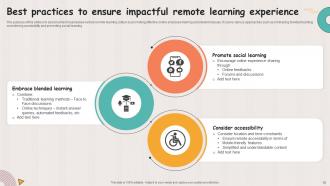
Slide 21: This slide is to make remote learning more impactful through adoption of strategic approaches.
Slide 22: This slide is to help ed-tech businesses set up remote learning classroom.
Slide 23: This slide showcase Icon showcasing video conferencing remote learning solution.
Slide 24: This slide showcase Remote learning and distance degree icon.
Slide 25: This slide showcase Virtual meeting platform icon for remote learning.
Slide 26: This slide showcase Icon showcasing student collaboration in remote learning.
Slide 27: This is a Thank You slide with address, contact numbers and email address.
Remote Learning Powerpoint Ppt Template Bundles with all 35 slides:
Use our Remote Learning Powerpoint Ppt Template Bundles to effectively help you save your valuable time. They are readymade to fit into any presentation structure.














FAQs for Remote Learning Powerpoint
Honestly, the flexibility is huge - you can study whenever works for you instead of being stuck with set class times. No commuting is a massive win too. I love that most programs record everything so if you zone out or miss something, you can just rewatch it later. The cost thing is pretty nice since you're not paying for gas or parking or whatever. Digital collaboration tools are actually pretty solid these days, though I know some people miss the in-person vibe. Really depends on how you learn best though - some people need that classroom energy to stay focused.
Honestly, breakout rooms are a lifesaver for getting people talking in small groups. Throw in some polls during your lesson too - keeps everyone awake! The chat feature is huge, so get them using it constantly. I'll be real though, staring at those black squares with muted mics feels so awkward at first. Discussion boards work great for the async stuff, or have them record video responses when they can't make it live. But here's what really matters - check in with individuals way more than you think you need to. Send random messages asking how they're doing. Oh, and always have a backup plan because tech will definitely fail you at the worst moment!
First thing - get solid internet or you're screwed. Good webcam and headset are worth it, trust me on this one. Laptop mics sound like garbage so definitely upgrade that. You'll need whatever system your school uses (Canvas, Blackboard, etc.) plus Zoom or Teams for video stuff. Cloud storage saves your ass when you need files from anywhere. Oh, and get a backup internet plan through your phone or something - I swear tech always breaks right before important deadlines. Test everything beforehand!
Oh man, this stuff is trickier than people think! You've got some cultures where everyone's supposed to collaborate and discuss everything together. Then others where students just quietly respect the teacher and study alone - totally different vibes for online classes. Communication styles vary wildly too. Some students won't ask questions even if they're lost, others expect constant interaction. Tech skills are all over the place, and don't get me started on time zones making everything complicated. Best bet? Give people multiple ways to participate so you're not accidentally shutting anyone out.
Honestly, I'd start with clear deadlines and do regular check-ins - that's been my lifesaver. Discussion boards work great if you make students respond to each other, not just you. Weekly quizzes help too (nothing brutal, just keeps them engaged). For bigger assignments, have them submit drafts or updates first. Oh, and video calls with struggling students? Game changer for accountability. The trick is being present without hovering over them constantly. I probably sound like a broken record about check-ins, but seriously - it makes all the difference in online classes.
Honestly, you've got to mix up your content formats or you'll lose half your students. Visual learners love infographics and videos - mind maps too. Recording lectures works great for auditory people, plus discussion forums. Kinesthetic learners though? They're screwed in remote learning, not gonna lie. Try interactive simulations or virtual labs if you can swing it. Maybe send home some hands-on project materials. The trick is giving students 2-3 ways to access the same info. Survey them first about what they actually want - then just focus on the popular stuff to start.
Honestly, collaboration saves remote learning from being a total slog. Students teach each other way better than we sometimes do - peer explanations just hit different. Group work keeps them engaged instead of zoning out during another Zoom session (which, let's face it, happens constantly). Mix it up with breakout rooms for real-time stuff, shared docs for projects, and discussion boards work surprisingly well for shy kids. The accountability factor is huge too. When they're responsible to teammates, they actually show up and participate instead of lurking with cameras off.
Honestly, Loom or Screencastify are lifesavers for this - I just record quick video responses instead of typing everything out. Way more personal and actually saves time. I always do virtual office hours too, helps tons. Oh, and I push feedback through the gradebook within 48 hours or students think I've disappeared forever lol. During live sessions, polls work great. Breakout rooms too. Google Docs is incredible for commenting on drafts while they're still writing - feels like magic sometimes. Don't try to do everything though. Pick maybe 2-3 methods you actually like and just stick with those consistently.
Ugh, honestly the tech stuff will drive you crazy - kids have different internet speeds, random devices, some barely know how to use email. Keeping them engaged through a screen? Good luck with that. It's so much harder than teaching in person. You can't read the room anymore or catch those random teachable moments. Also you're basically rebuilding everything from scratch while learning new platforms at the same time. Total chaos. Start with whatever tools you already know, then slowly add new stuff once everyone's not completely lost. Don't try to do everything perfect right away.
Honestly, remote learning can be huge for special needs kids. The flexibility is incredible - you can slow things down, speed them up, whatever works. Assistive tech is way easier to integrate at home too. My favorite part? Recording lessons so students can rewatch stuff. I mean, I'd probably use that feature myself lol. Quieter home environments help a lot of kids focus better than busy classrooms. You'll definitely want to team up with families though - they know what setups work best. Oh, and check if your platform actually works with screen readers and has decent captions. Some are terrible at accessibility.
You gotta check in with kids about their actual feelings, not just grades. Set up breakout rooms and casual chat time - maybe virtual lunch hangouts too. Kids are seriously missing those random hallway moments! Watch for withdrawn students during video calls and message them privately. Create multiple ways they can ask for help without feeling weird about it. Also normalize just talking about how everyone's doing. Short calls work better than I expected - keeps them engaged without Zoom fatigue kicking in.
Honestly, the biggest difference is just the format - you're dealing with online quizzes and video submissions instead of paper tests. Cheating becomes way trickier to catch, which is annoying. I've found it works better to focus on open-book, critical thinking questions since they can Google stuff anyway. Tech problems are inevitable too (my wifi crashed during an exam last month, ugh). The key is designing assessments that actually make students think rather than just memorize facts. Traditional presentations become recorded videos, but the content planning is similar. It's definitely more work upfront but forces you to be more creative.
Honestly, the trick is getting students talking to *each other*, not just you. Try setting up virtual study groups or those breakout rooms during class - people can work on stuff together or just hang out. Coffee chats sound cheesy but they actually work! I was surprised how many showed up to mine. You could also do peer feedback on assignments or maybe start a class group chat. Don't overthink it though. Pick one or two things first and see what clicks with your particular group.
Honestly, your LMS is probably already collecting tons of useful stuff - login times, how long kids spend on assignments, quiz scores, all that. I'd start there and just run some basic reports to see who's struggling. Track completion rates and you'll spot the ones falling behind pretty quickly. What's actually kind of interesting is analyzing which teaching methods click with different students. Some are all about videos, others need those hands-on interactive things. Once you see the patterns, you can tweak your approach and maybe reach out to specific kids who need help before they totally check out.
Honestly, AI tutoring is getting insanely good at reading how you learn and adapting on the spot. VR/AR stuff is finally becoming actually useful instead of just gimmicky. Microlearning's huge too - people want quick chunks they can digest during lunch breaks or whatever. Mobile design isn't optional anymore since everyone expects to learn on their phones. Virtual collaboration tools are way better now, thank god, because we've all had enough terrible Zoom fatigue. My take? Jump into AI tools now and ditch the boring lecture videos. Interactive content wins every time. Your students will actually stick around.
-
Understandable and informative presentation.
-
The Designed Graphic are very professional and classic.