

Mobile Learning Powerpoint Ppt Template Bundles




Try Before you Buy Download Free Sample Product
 Impress Your
 Audience
 100%
100% Editable
 Save Hours
 of Time


Introducing our comprehensive Mobile Learning PowerPoint PPT presentation your essential resource for harnessing the power of learning on the go. Delve into the world of mobile learning, a transformative approach to training and education that leverages the ubiquity of smartphones and tablets. Explore the advantages and challenges of mobile learning, from flexibility and accessibility to concerns about data security and engagement. Learn how to design effective mobile learning training programs that engage learners and drive knowledge retention. With visually captivating slides and expert insights, our Mobile Learning PPT equips you to navigate the complexities of modern learning in a mobile driven world. Whether youre an educator, corporate trainer, or involved in workforce development, this PPT is your compass for implementing mobile learning solutions. Elevate your training and educational practices with our PPT today
People who downloaded this PowerPoint presentation also viewed the following :
Mobile Learning Powerpoint Ppt Template Bundles with all 28 slides:
Use our Mobile Learning Powerpoint Ppt Template Bundles to effectively help you save your valuable time. They are readymade to fit into any presentation structure.











FAQs for Mobile Learning Powerpoint
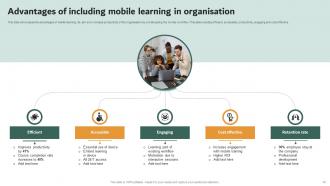
Honestly, the flexibility is a game changer - you can learn literally anywhere instead of being stuck in some boring classroom. Interactive stuff like videos and games make it way more engaging than traditional methods. You get instant feedback too, which is pretty cool. It's cheaper to scale since there's no need for physical spaces or tons of printed materials. Oh, and the personalization aspect is actually huge - everything adapts to how fast you learn and your style. I'd say just download one app related to your field and test it out compared to whatever you're doing now.
Start with multiple formats - audio, video, text - so people can choose what clicks for them. Short lessons work way better since everyone's learning on their phone during commutes or whatever. Offline access is huge because WiFi can be sketchy. Some users need more hand-holding with apps than others, which honestly makes sense. Oh, and definitely test with real people from your audience first - I can't stress this enough. They'll spot problems you'd never catch. Nobody wants to wrestle with clunky mobile design when they're actually trying to learn something.
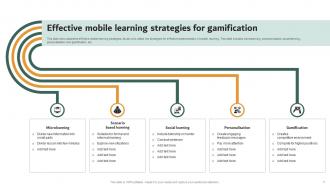
Honestly, gamification just makes mobile learning way less boring. Instead of another dreaded training module, you're adding points, badges, leaderboards - stuff that hits our competitive side. Think about how addictive those random phone games are, even the dumb ones! Same principle works here. People actually retain info better when they're enjoying themselves. The trick is keeping your game elements tied to real learning goals, not just random flashy stuff. I'd say start basic with progress bars and maybe unlock new content as people move forward. Don't go overboard right away.
Honestly, mobile learning is a game-changer for adults because you can literally learn anywhere. Stuck in traffic? Perfect time to review that lesson. Kids finally asleep at 11 PM? That works too. You don't have to stress about keeping up with some rigid schedule - just pause whenever life happens (which is constantly, let's be real). The content comes in small chunks so you're not overwhelmed. Most apps automatically save where you stopped, which is clutch. I wish I'd had this when I was working full-time and taking classes - would've saved my sanity. Just download one app in your field and try 15 minutes daily.
Dude, the network thing is huge - all those phones and tablets will absolutely crush your WiFi if you're not ready. Faculty pushback is real too, some profs just hate change no matter what. Security becomes a mess when everyone's using their own devices, and don't even get me started on making apps work across iOS, Android, whatever else students bring. Development costs add up fast. Oh, and cross-platform compatibility is such a pain. Honestly? Run a small pilot first to see what breaks before you commit to the whole thing.
Honestly, start with completion rates and quiz scores - that's your bread and butter data. Time spent in modules matters too, but don't obsess over it. I'd definitely do follow-up assessments like a month later because immediate quizzes don't tell you if they actually retained anything. Student feedback is clutch though - I've seen platforms with killer metrics that everyone despised using. Oh, and set up your tracking before launch so you have something to compare against. Maybe stick to 3-4 key metrics at first instead of going crazy with data.
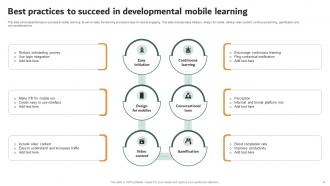
Keep videos super short - like 3-4 minutes tops. Nobody's got time for longer stuff on mobile anyway. Make your buttons big so people don't keep hitting the wrong thing (seriously annoying when you're cramped on a bus). Break up text into small chunks. Use responsive design so it works on phones and tablets. Always add captions to audio since most people browse with sound off. Oh, and test everything on your actual phone first - I can't tell you how many times something looked fine on my computer but was totally broken on mobile.
Honestly, mobile learning is a game changer for getting kids to actually work together. Your shy students will suddenly start talking more since they're not worried about speaking up in front of everyone. Discussion forums and shared docs let them collaborate whenever - not just during class time. I've noticed they give way better feedback when they have a minute to think first instead of putting them on the spot. The social learning apps don't even feel like homework to them. Start small though - maybe try one mobile group activity per week and see what happens. You'll be surprised how differently they engage.
Honestly, mobile learning works pretty well - retention goes up like 25-60% vs regular classroom stuff. Short chunks are way easier for your brain to handle, and you can squeeze learning into those weird 10-minute windows when you're waiting around. Way more engaging than sitting through endless PowerPoint slides too. You can go at your own speed and replay things when they don't stick the first time. Oh, and definitely keep modules under 5 minutes if you're just starting out - people's attention spans are shot these days anyway.
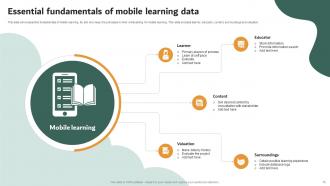
So basically, data analytics shows you what's actually happening with your mobile learning stuff. People skip certain modules? You'll see it. Getting stuck somewhere specific? The data tells you exactly where. I love that it's real-time too since mobile learning isn't tied to some classroom schedule - learners are doing it whenever, wherever. Track completion rates first (that's the easiest starting point), then look at how much time people spend on each section. Once you spot patterns like "wow, lesson 3 is killing everyone," you can fix it. Plus you can catch struggling learners early and personalize their paths based on how they actually use the content.
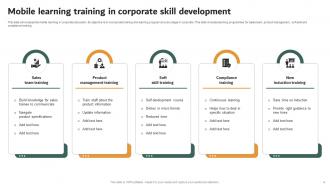
Honestly, mobile learning is perfect for this stuff. Break everything into super short chunks - like 5-10 minutes max that people can do on their commute or whatever. QR codes work really well too, employees just scan them when they need help with equipment right on the spot. Compliance training is probably the easiest win since nobody wants to sit at their computer for that anyway. Keep it interactive though - boring mobile content is still boring. I'd pick one department to test it out first, maybe something where people are already on their phones a lot. Oh, and don't try to cram everything mobile - some topics just work better in bite-sized pieces than others.
Okay so first off, data breaches are huge - hackers love going after student info. Wi-Fi security is another mess, especially on public networks. Some of these education apps are honestly super shady about collecting kids' personal data way beyond what they need (like why does a math app need location access??). Device theft is also a problem since phones store everything these days. Access controls are often terrible too, so random people can get into student records. Oh and don't even get me started on COPPA compliance if you're dealing with younger kids. Start by figuring out exactly what data you're collecting and encrypt literally everything.
So basically AR lets you point your phone at stuff and digital content pops up on your screen. Like you could aim it at a monument and boom - interactive timeline appears. Science classes get way cooler when you can see 3D models floating on your desk. The tech's finally good enough that it's not just a gimmick anymore (well, when done right). You can actually grab and move virtual objects around. My advice? Don't go crazy at first - start with simple overlays before getting into the fancy gesture stuff. Otherwise you'll end up with something that looks impressive but doesn't actually help anyone learn.
Honestly, start by figuring out what tech your students actually have - don't assume anything. Partner with groups that loan out devices or help with data plans. Your content needs to work on crappy old phones too, not just fancy new ones. Design stuff that doesn't burn through data and works offline when possible. SMS learning is clutch for spotty internet areas. Oh, and give people multiple ways to access the same material - some folks prefer different formats anyway. Basically build around their reality, not what you think they should have.
Oh man, this stuff varies so much by region! Asian countries love group features since they're more collectivist - think study groups and shared progress. Western cultures? Total opposite. They want personalized, go-at-your-own-pace content. Authority matters too - some places expect teacher-led modules while others prefer peer learning apps. Infrastructure's obvious but honestly, religious and language factors trip up companies way more than they expect. My buddy's startup learned this the hard way in Southeast Asia. Bottom line: research local preferences first or you'll waste tons of money building the wrong thing.
-
Stunning collection! With a wide variety of options available, I was able to find a perfect slide for my presentation. Thank you, SlideTeam!
-
The designs by SlideTeam are honestly the best I have seen so far. Will be definitely coming back for more.