


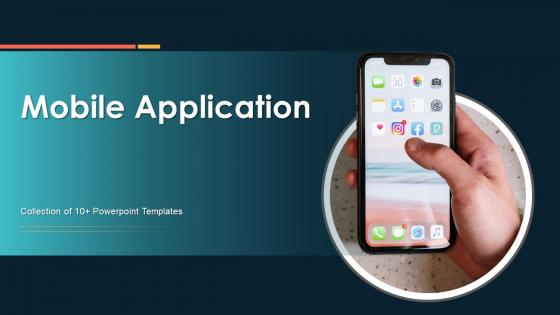
Mobile Application Powerpoint Ppt Template Bundles




Try Before you Buy Download Free Sample Product
 Impress Your
 Audience
 100%
100% Editable
 Save Hours
 of Time


Our Mobile Application Powerpoint Ppt Template Bundles are topically designed to provide an attractive backdrop to any subject. Use them to look like a presentation pro.
People who downloaded this PowerPoint presentation also viewed the following :
Mobile Application Powerpoint Ppt Template Bundles with all 20 slides:
Use our Mobile Application Powerpoint Ppt Template Bundles to effectively help you save your valuable time. They are readymade to fit into any presentation structure.





FAQs for Mobile Application Powerpoint
Start with your must-have features and work backwards from there. Clean, documented code is huge - you don't want to spend weeks deciphering someone else's mess. Performance should be solid, and if you need both iOS and Android, make sure it actually works well on both platforms. The UI needs to feel modern too, not like it's from 2015 or something. Community support matters more than you'd think - if you get stuck, you want other developers who've used the template before. Oh, and check what's already built in (auth, payments, etc.) so you're not reinventing the wheel. Honestly, spending extra time upfront beats debugging later.
Honestly, mobile app templates are a game changer. You get all the basic stuff already built - UI components, navigation, standard features - so you don't have to code everything from scratch. It's like getting a head start instead of staring at a blank screen forever. Think of it as using cake mix vs measuring out flour yourself. Way faster but you still customize it however you want. I've seen projects cut development time by like 40-60% easily with good templates. Just browse through some popular template libraries for whatever tech stack you're using and see what fits your project. Trust me, your future self will thank you.
E-commerce templates are crushing it right now, plus anything productivity-related. Food delivery and fintech apps too - people want their daily stuff streamlined. Social media templates still do well, though honestly the dating app thing feels overdone at this point. What businesses really want are templates with the heavy lifting already done. Payment systems, user logins, push notifications - all that backend stuff nobody wants to build from scratch. Clean design matters too, but make sure it's actually customizable. I'd skip anything that looks too rigid or trendy since those age fast.
Honestly, templates are pretty great for getting started - they come with UI patterns people already know how to use, so there's way less friction. Most have solid UX principles built right in, which saves you from making rookie mistakes. But (and this is kinda obvious) if you barely customize them, your app will look like every other generic app out there. Nobody wants that. Short answer: use them as your foundation, then make the important stuff - interactions, colors, key screens - actually feel like *your* brand. Don't just slap your logo on it and call it done.
Most templates let you change colors, fonts, logos - the usual visual stuff to make it yours. Swapping out content and images is pretty straightforward too. Better ones give you more control over functionality, like adding features or connecting to different APIs. Some even let you dig into the actual code if that's your thing (though honestly, who has time for that?). Layout customization varies a lot though. I'd definitely check what each template actually allows before you buy since flexibility is all over the place. Don't assume they're all the same!
Oh yeah, totally! E-commerce and restaurants crush it with templates - they've got all those standard features like catalogs and booking systems built right in. Real estate and fitness apps do great too. Beauty industry's probably my favorite example though. Like, every salon I know uses some templated app for appointments because why reinvent the wheel, you know? These industries just have really predictable user flows. But if you're doing something super niche - maybe complex fintech or some specialized B2B thing - templates might cramp your style. I'd map out your main features first. If most of them line up with what's already out there, you're set.
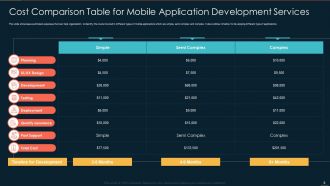
Dude, app templates will save you a ridiculous amount of money - like 60-80% compared to building everything yourself. Custom development? You're talking $50K-150K easy. Templates? More like $5K-15K to get something solid running. All the boring stuff is already done - login systems, payment processing, basic design elements. That alone would take your developers months to build. You just customize the look, adjust features for what you actually need, and boom - you're pretty much ready to go live. Honestly, I'd start by just browsing template marketplaces first. See what's out there that matches your idea closest. Way easier than I thought it'd be.
Honestly, the worst thing is ending up with some cookie-cutter template that looks like everyone else's app. Also avoid the ones packed with random features you'll never touch - just bloats everything up. Poor documentation is a nightmare too, you'll be googling basic stuff for hours. Oh, and definitely check that it works well on both iOS and Android upfront. Otherwise you're fixing compatibility issues later which sucks. I always read recent reviews first and actually test the demo before buying anything. Clean code makes a huge difference when you're customizing. Sounds boring but it saves so much headache later.
Honestly, design principles are what separate usable templates from total garbage. You want clear navigation, consistent spacing, stuff that just makes sense when you're clicking around. I've downloaded so many beautiful templates that were absolutely painful to actually use - like, what's the point? Good templates prioritize mobile-first design and accessibility from the start. Visual hierarchy matters too. Trust me, finding one that nails these basics will save you hours of tweaking later. Way better than having to rebuild everything because users can't figure out where anything is.
So basically these mobile templates use frameworks like React Native or Flutter where you write the code once and it works on both iPhone and Android. Game changer honestly. You're not stuck building two separate apps anymore - maybe 80-90% of your code gets reused across both platforms. Sure, you'll still need to tweak some stuff for each OS and follow their design rules, but it beats maintaining completely different codebases. Development goes way faster this way. Oh and obviously double-check that whatever template you pick actually supports the platforms you want before diving in.
Yeah totally! Most decent templates come with integration stuff already baked in. You can hook them up to your existing APIs, databases, payment systems - basically whatever you're already running. Templates usually have the common connection points ready to go, which honestly saves so much headache. Some even include connectors for things like Stripe or Firebase right out of the box. I'd definitely peek at the documentation first though - tells you exactly what's supported without having to guess. Way better than finding out later that your specific setup won't work. Short answer: you're probably good to go.
Dude, responsive design basically means your app won't look like garbage on different devices. Whether someone's using a tiny phone or a massive tablet, everything adjusts automatically. Trust me on this - users will bounce if your layout gets all wonky when they flip their screen sideways. The template does the technical stuff for you with flexible layouts and elements that scale up or down. I learned this the hard way on my first project, honestly. Skip templates without responsive features and you'll hate yourself later when you're manually fixing everything.
So it really depends where you got the template from, but yeah - once you build it, you're basically on your own for updates. Most places just hand you the code and that's it. Bug fixes, new features, keeping up with iOS updates? All you. Some of the pricier template companies will offer update packages though, which is actually clutch if you can find one. Plus you'll be doing all the app store stuff yourself - submissions, security patches, making sure it works when Apple inevitably breaks something. Oh, and definitely budget for maintenance costs upfront. We're talking like 15-20% of what you spent initially, every year.
Honestly, don't just swap logos and call it done - that's amateur hour. Dig into the actual codebase first. Replace all the placeholder stuff with your real content, update metadata and package names, then delete whatever components you're not using. Test it on different devices pretty early too since templates can be weirdly buggy on mobile sometimes. Oh and actually read the docs even though they're usually terrible - I learned this the hard way after spending like 3 hours debugging some random config issue that was literally explained on page 2.
Dude, just check the reviews first - anything under 3.5 stars is gonna be a headache. Look for 4+ stars and actually read what people are saying, especially recent ones. The comments section is where you'll find the real tea about broken code or trash documentation. I always hunt for reviews from devs doing similar stuff since they'll call out the issues that actually matter to you. Also skip templates where everyone's complaining about support being MIA. Trust me, you don't want to be stuck debugging someone else's mess at 2am.
-
I want to express my gratitude to SlideTeam’s presentation design services team for helping me create the best presentation of my life!
-
A library of engaging, customizable and content-ready templates.