

Mobile app architecture PowerPoint PPT Template Bundles




Try Before you Buy Download Free Sample Product
 Impress Your
 Audience
 100%
100% Editable
 Save Hours
 of Time


Our Mobile app architecture PowerPoint PPT Template Bundles are topically designed to provide an attractive backdrop to any subject. Use them to look like a presentation pro.
People who downloaded this PowerPoint presentation also viewed the following :
Mobile app architecture PowerPoint PPT Template Bundles with all 17 slides:
Use our Mobile app architecture PowerPoint PPT Template Bundles to effectively help you save your valuable time. They are readymade to fit into any presentation structure.






FAQs for Mobile app architecture PowerPoint
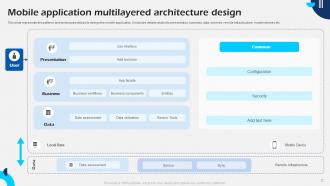
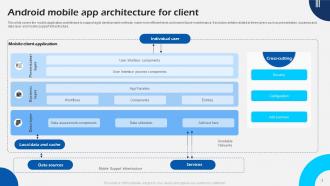
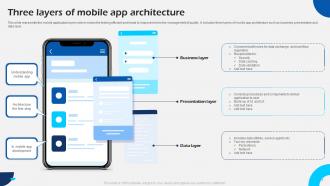
So you've got three main pieces to think about: your UI (presentation layer), where all your app logic lives (business logic), and data stuff like storage and API calls. Most apps throw in a network layer and something for local storage too - tbh this is where things get weird if you wing it. I'd sketch out how data moves between everything first, saves you headaches later. Keep them separate so you're not debugging spaghetti code at 2am. Think of each layer doing its own thing but still talking to the others when needed.
So basically, client-server means your app talks to one big backend that does everything - auth, data, payments, whatever. Microservices splits that into tiny specialized services instead. Your app ends up calling different services for different stuff, which honestly gets messy to manage at first. But it scales way better down the road. I'd probably just go client-server if you're starting out simple. You can always break things apart later when you actually need the flexibility - no point overengineering from day one.
So the backend is like your app's brain - it does all the actual work while your mobile app is just the pretty interface users see. User login, database stuff, business logic, API calls - that's all backend territory. Your app can't really handle that locally anyway. Without it you'd have a super basic app that can't sync data or support multiple users, which honestly would be pretty useless these days. Oh and definitely get your API endpoints mapped out early because your mobile devs will be bugging you for them constantly. It's basically the engine that makes everything actually function behind the scenes.
So basically you want your app to handle tons of users without dying, right? Break everything into microservices that can scale separately - way easier to manage. Horizontal scaling is your friend here, plus load balancers and caching layers. When traffic goes crazy, you won't be scrambling to fix everything at 3am (trust me on this one). The trick is building components you can just duplicate when needed. Oh, and figure out where things slow down now before you're dealing with angry users later. Auto-scaling based on demand is pretty much non-negotiable these days.
First thing - get all your API calls into one service layer instead of spreading them everywhere. Mobile connections suck, so build in retry logic for timeouts. Cache smart to avoid hitting the server constantly. Always validate what comes back before you use it (learned this the hard way). Retrofit or Alamofire will save you tons of boilerplate code. Don't forget token refresh - nothing worse than users getting logged out randomly. Honestly, just audit what you have now and consolidate. That alone usually fixes half the problems.
Honestly, start by profiling what you've got now to see where things are actually slow. Three big things to tackle: separate your UI from business logic and data layers - sounds boring but it prevents one heavy part from dragging everything down. Cache stuff intelligently so you're not hammering APIs every time (users will literally abandon your app if they're waiting forever). Lazy load images and content that's below the fold. Oh and figure out state management early - I've seen too many apps become a nightmare to debug because someone thought they could wing it. Short sentences help too.
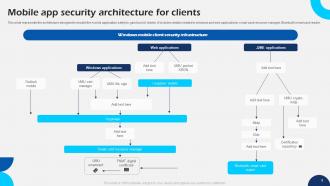
Start with encrypting everything - data at rest and in transit. That's your base layer. Authentication and authorization controls are critical, and seriously, never trust what the client sends you. For APIs, use tokens that actually expire and add rate limiting. Oh man, the number of times I've seen hardcoded API keys mess up launches is wild. Use proper secret management instead. Session handling matters too, and certificate pinning if you're dealing with sensitive stuff. Honestly though? Do a threat modeling session first to figure out what you're actually protecting against, then build from there.
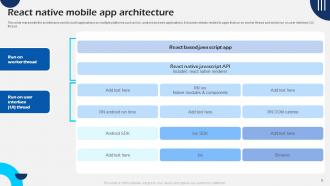
So cross-platform stuff makes you think in layers, right? You've got your shared business logic and UI bits, then platform-specific stuff for native features. React Native and Flutter work pretty differently though - Flutter's all about these composable widgets, while React Native bridges over to native modules more. Both can turn into a nightmare if you don't plan ahead tbh. Figure out early what you're keeping shared versus what needs platform-specific work. Camera stuff, push notifications, fancy animations - those usually end up needing native code anyway.
Honestly, cloud services are a total game-changer for mobile apps. Your app automatically scales when traffic hits, so no more crashes during busy periods. Authentication and push notifications come built-in too - saves you tons of development time. The best part? Heavy processing happens server-side while your app stays fast and lightweight. Real-time sync across devices is pretty much expected now (learned that the hard way on my last project). I'd recommend starting simple with cloud storage and auth features first. Then slowly move more stuff to the cloud as you grow. Way easier than trying to do everything at once.
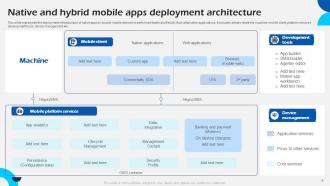
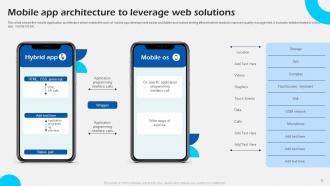
Honestly? Native apps are faster and can tap into everything your phone does, but you're building two separate apps - one for iPhone, one for Android. That's double the work and cost, which kinda sucks. Hybrid lets you code once and ship everywhere, so it saves a ton of time and money. Performance can get wonky with heavy graphics though, and you're stuck with whatever the framework allows instead of direct access to all the phone's features. Most business apps work fine with hybrid - I've seen plenty that you'd never guess weren't native. Only go native if you really need max speed or some weird device integration.
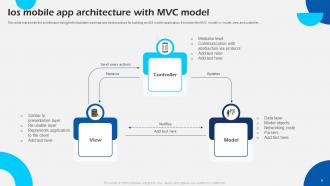
So design patterns are basically like having a shared language with other devs - you say "Repository pattern" and everyone immediately gets what you mean. They're proven solutions that make your code way more predictable. MVVM is honestly a game changer for UI stuff. The thing is, don't go crazy trying to use every pattern you've learned (I definitely did this when I started). Pick maybe 2-3 that actually fit what you're building. When you're debugging some random bug at 2am, you'll thank yourself for that clean separation of concerns. Start with MVVM and see how much easier everything becomes.
Honestly, I'd mix visual stuff with some basic written docs. Lucidchart or Draw.io work great for architecture diagrams - way better than trying to explain everything in text. The C4 model is pretty solid too, cuts through all that enterprise diagram nonsense. Throw some markdown files in your repo covering the big decisions and API specs. ADRs are clutch for tracking why you picked certain approaches (trust me, you'll forget). Oh and definitely keep everything in version control. Your future self will thank you when you're staring at code six months later wondering what the hell you were thinking.
Dude, UX should totally drive your architecture decisions. Users want offline stuff? Build caching and sync. Performance matters? Optimize data flow, maybe go native instead of hybrid. Real-time features need WebSockets and solid state management. I've watched so many devs pick "sexy" architectures that users absolutely hated - slow, janky, whatever. Good architecture is invisible to users. They shouldn't even notice it's there doing its thing. Always map out user journeys first, then choose your tech stack around that. Way better approach.
So monolithic architecture is basically cramming your whole app into one giant bundle - features, logic, UI, everything. Super easy to deploy and test when you're starting out. Performance is pretty decent too since it all runs together. But here's the thing - it gets messy fast. Want to change one tiny feature? You're rebuilding the entire app. Multiple devs working on it? Good luck not stepping on each other's toes. And forget about scaling just one part of your app. Honestly, if you're just building something small or testing an idea, monolithic works fine. Anything bigger though? You'll thank yourself later for going modular from day one.
Dude, AI and IoT are completely changing how we have to think about mobile apps. You can't just tack these features on anymore - they need real-time processing and way beefier backend stuff. Your app's gotta handle constant sensor streams while running ML models locally or in the cloud. Super cool but also a nightmare to build honestly. Oh, and edge computing is becoming huge for this. Start designing for distributed processing right away. Plan your data flows and APIs around these needs early or you'll hate yourself later. Trust me on this one.
-
Helpful product design for delivering presentation.
-
Very unique, user-friendly presentation interface.