

Network Assessment Powerpoint Ppt Template Bundles





Try Before you Buy Download Free Sample Product
 Impress Your
 Audience
 100%
100% Editable
 Save Hours
 of Time


Elevate your network management prowess with our comprehensive Network Assessment PowerPoint template. Seamlessly analyze network performance, employing advanced techniques for network monitoring, troubleshooting, and security assessment. Dive into intricate network traffic analysis to optimize data flow and bolster efficiency. This meticulously crafted presentation equips you with expert insights, helping you navigate the complex realm of network evaluation. Harness the power of visual aids to communicate your strategies effectively. From real-time monitoring to proactive security measures, our template covers it all. Elevate your network assessment skills and illuminate your presentations with cutting-edge graphics and information. Streamline your approach to network excellence today.
People who downloaded this PowerPoint presentation also viewed the following :
Network Assessment Powerpoint Ppt Template Bundles with all 16 slides:
Use our Network Assessment Powerpoint Ppt Template Bundles to effectively help you save your valuable time. They are readymade to fit into any presentation structure.
-

Network Assessment
-
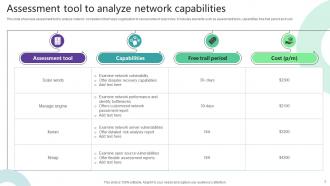
Assessment tool to analyze network capabilities
-
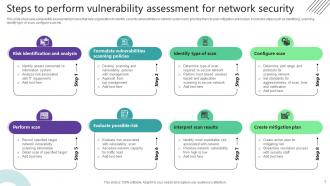
Steps to perform vulnerability assessment for network security
-
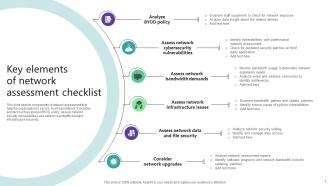
Key elements of network assessment checklist
-
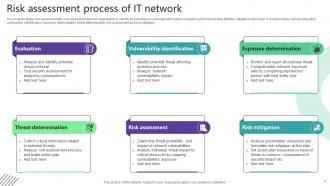
Risk assessment process of IT network
-
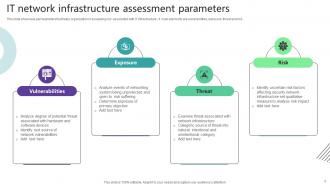
IT network infrastructure assessment parameters
-
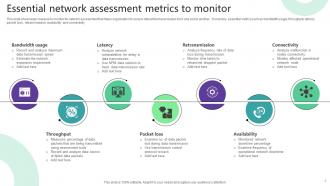
Essential network assessment metrics to monitor
-
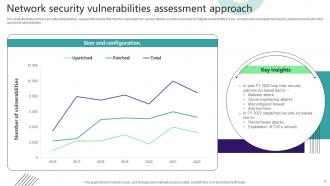
Network security vulnerabilities assessment approach
-
Icon showcasing security network assessment
-
Icon showcasing network infrastructure assessment
-

Network Assessment
-

-

-

-

-

FAQs for Network Assessment Powerpoint
Start with the basics - bandwidth, latency, packet loss, and uptime. Those tell you the most. CPU and memory on your switches matter too, obviously. Security scans are pretty critical these days. Honestly, topology mapping is a pain but you'll thank yourself later. QoS settings are huge if you've got VoIP running. The real trick is setting baselines for everything so you can actually see if changes help. Skip the manual checks - get monitoring tools that pull data automatically. Way less headache than doing snapshots whenever you remember to check.
Wireshark and SolarWinds are solid for monitoring bandwidth and packet loss - honestly can't go wrong with either. Check your router logs first though, they catch hardware problems you'd totally miss otherwise. High CPU usage on network devices is usually a dead giveaway something's up. Traffic analysis will show you exactly where things are bottlenecking. Response times between nodes acting weird? That's your cue to dig deeper. Oh and set up continuous monitoring because catching this stuff before users start whining is way better than dealing with angry tickets later.
Nmap's your go-to for network discovery and port scanning - that one's a must-have. For vulnerability scanning, try Nessus or OpenVAS to spot security holes. Wireshark handles packet analysis really well, though it takes some getting used to. Network mapping? Lansweeper or Network Topology Mapper will do the trick. PRTG or SolarWinds are solid for bandwidth monitoring if you need performance baselines. Oh, and grab something for documentation - trust me, you'll forget half of what you find otherwise. Start with the free options first, see what clicks for you, then maybe invest in paid tools later.
Honestly, once a year is cutting it way too close. Most places should be doing this quarterly, especially if you're dealing with anything regulated or sensitive. I've watched companies get absolutely wrecked because they waited 12 months between checks. Also run one whenever you change major infrastructure stuff or add new sites - basically treat it like you would regular maintenance on your car. Oh, and definitely after any security incidents too. The companies that stay on top of this don't get surprised by random vulnerabilities popping up. Schedule your next one right now, even if you just finished one.
Look, you gotta start with security before anything else - it's the foundation of the whole assessment. Run vulnerability scans first and check your current policies. I've seen way too many people jump straight into performance testing and completely miss glaring security holes. Those findings will actually shape your infrastructure recommendations later since you might need extra controls that mess with bandwidth. Check for outdated protocols and attack vectors that could tank your reliability. Security gaps directly impact how you'll interpret all your performance data anyway. Trust me on this one.
Dude, virtualization will absolutely screw with your network assessments. VMs bounce between hosts so traffic patterns make zero sense compared to physical topology. Performance gets wonky too since everything's sharing resources - kinda depends what else is hogging the CPU that day. Those virtual switches and overlays just pile on more complexity. Honestly the whole thing's a nightmare to track. You gotta assess virtual and physical layers separately, then figure out how they're actually talking to each other. Don't forget VM-to-VM traffic either - that stuff totally bypasses your usual monitoring setup.
Dude, the network docs are always garbage - like nobody's touched them since 2015. Getting into those old legacy systems is a nightmare too, and good luck scheduling downtime for discovery without everyone losing their minds. Oh, and those system dependency maps? Total fiction. Everything's connected in ways that make zero sense. You'll spend forever trying to get clean performance data while the network keeps changing under you. Honestly though, just bite the bullet and update that network inventory first. I know it's boring as hell, but trust me - it'll save you from wanting to throw your laptop later.
Yeah, topology totally affects your results because it controls how traffic moves around and where things get jammed up. Star networks have different congestion spots than mesh ones - with stars, that central hub is your weak point, but mesh spreads the load out more. Ring setups are honestly kind of a pain since one failure can mess up everything downstream. You need different monitoring approaches too depending on the layout - where you capture packets and what metrics matter will change based on how everything's connected. Definitely map out your topology before doing any real testing.
Dude, you HAVE to document everything before you start poking around. Grab screenshots, export configs - whatever you can get your hands on. Here's why: you need that baseline to spot weird stuff that shouldn't be there. Can't tell if something's misconfigured without knowing what "normal" looks like, right? Also - and I learned this the hard way - if you accidentally break something during testing, you'll be scrambling to fix it without those original configs. Trust me on that one. Plus your final report will actually mean something when you can point to specific issues with real data backing it up.
Honestly, just ask people directly what's bugging them about the network. Send out surveys about slow speeds, dropped connections, apps crashing - trust me, everyone has opinions about WiFi. Put up some quick rating tablets in break rooms or send emails after outages. The trick is doing this regularly, not just once. Set up a basic ticket system so people can report problems straight to your team. Then compare what they're saying with your monitoring data - you'll probably find issues your tools totally missed. People notice weird stuff that doesn't show up in logs.
First thing - you need a solid baseline of what normal traffic looks like. Capture data at different times so you actually know your network's personality. Start broad with bandwidth usage and top talkers, then narrow down to the sketchy stuff. Honestly, I waste too much time digging into packets when flow data usually tells me everything I need way faster. Visualization tools are clutch for spotting patterns you'd miss in raw logs. Always check if traffic spikes match up with business stuff or known events. Set alerts for obvious anomalies so you can hunt the really weird edge cases.
Look at risk and business impact first - anything that'll cause outages or security issues gets dropped to the top immediately. Performance problems hitting critical apps or tons of users come next. I make this simple matrix thing ranking severity against how many people are affected, which honestly saves my butt when I have to explain decisions to the boss later. Quick fixes on medium stuff sometimes beats wrestling with complex low-impact problems for hours. Oh, and write down why you picked what you did so you can defend it if someone questions your call.
Honestly, network capacity planning is a game-changer for spotting bottlenecks before they wreck your day. It shows you which links are getting hammered during busy periods and reveals those pricey circuits you're barely using (ugh, we've all been there). The data gives you real growth patterns instead of just winging it. You can actually plan upgrades before users start breathing down your neck. Plus it helps with smarter traffic routing decisions. Best part? You'll have a solid timeline for scaling based on what's actually happening, not just crossing your fingers and hoping nothing breaks.
Look, network assessments are basically like getting your car inspected before a road trip. You'll spot bandwidth issues and aging hardware before they bite you in the ass. Security gaps too - honestly, those are the worst surprises. Document what you're currently using capacity-wise first. Then you can actually budget for the next few years instead of panic-buying during outages. It shows you what needs upgrading and when. Way better than scrambling at 2am when something dies. You can plan updates during maintenance windows like a normal person.
So you'll want to grab tools like SolarWinds, PRTG, or Nagios first - they track your latency, throughput, packet loss, all that stuff. Get your baseline numbers, then stack them against industry benchmarks (Gartner reports are decent, or just check your ISP's promises). Speed test APIs work great too. Honestly, "industry standard" changes every five minutes anyway, but whatever. The real trick? Figure out what actually matters for your setup before you go down the rabbit hole of metrics. Synthetic monitoring can simulate real user stuff if you need that angle.
-
Crisp and neat slides. Makes it fun and easier to curate presentations.
-
They saved me a lot of time because they had exactly what I was looking for. Couldn’t be happier!