Cloud Computing Powerpoint Ppt Template Bundles CRP

Rating:
100%
Cloud Computing Powerpoint Ppt Template Bundles CRP
Slide 1 of 28
Favourites Favourites

Try Before you Buy Download Free Sample Product

Audience Impress Your
Audience
Editable 100%
Editable
Time Save Hours
of Time
The Biggest Sale is ending soon in
0
0
:
0
0
:
0
0
Rating:
100%
Introduce your topic and host expert discussion sessions with this Cloud Computing Powerpoint Ppt Template Bundles CRP. This template is designed using high-quality visuals, images, graphics, etc, that can be used to showcase your expertise. Different topics can be tackled using the twenty slides included in this template. You can present each topic on a different slide to help your audience interpret the information more effectively. Apart from this, this PPT slideshow is available in two screen sizes, standard and widescreen making its delivery more impactful. This will not only help in presenting a birds-eye view of the topic but also keep your audience engaged. Since this PPT slideshow utilizes well-researched content, it induces strategic thinking and helps you convey your message in the best possible manner. The biggest feature of this design is that it comes with a host of editable features like color, font, background, etc. So, grab it now to deliver a unique presentation every time.

FAQs for Cloud Computing Powerpoint Ppt

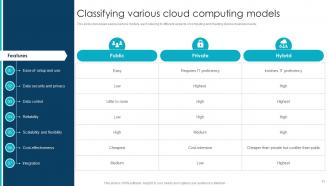
So basically it's all about who runs the show. Public clouds like AWS are shared - you're renting server space with a bunch of other companies. Way cheaper to start. Private clouds? That's your own dedicated setup, which gives you total control but costs a fortune upfront. Then there's hybrid, mixing both approaches. You can keep your super sensitive data locked down privately while throwing the regular stuff on public cloud. Most places I know end up doing hybrid anyway - it just makes sense. Figure out what data you actually need to guard with your life first, then pick your poison.

So cloud computing is basically like having a shared workspace online where your whole team can grab the same files and apps from wherever they are. No more of that "final_final_ACTUAL_final.docx" chaos we all know too well. Everyone can edit docs together in real-time, hop on calls, sync updates - the works. Honestly, the trick is finding platforms that actually play nice together instead of creating more headaches. I'd say figure out what's driving your team crazy right now (like are people constantly out of sync? Can't find files?) then pick cloud tools that fix those specific problems first.

Honestly, the biggest things to watch out for are data breaches and losing control of your files. Cloud companies have decent security, but they're massive targets for hackers - kinda comes with the territory. If someone gets into your account or the provider gets hacked, your stuff is out there. Account hijacking is another big one if your password sucks. Oh, and depending on where they store your data, you might run into compliance headaches. Two-factor authentication is a must, and actually skim through their security policies before dumping anything important up there. Strong passwords too, obviously.

Honestly, cloud computing is probably your best bet for speeding up digital transformation. Instead of dropping tons of cash upfront on hardware, you can scale resources instantly - which is huge for budgets. Remote work becomes way easier, collaboration tools actually work, and deploying new apps happens so much faster than old-school IT. You get access to AI and analytics stuff that would cost a fortune to build yourself. The biggest advantage? You can test things out, screw up quickly, and change direction without being stuck with expensive equipment. I'd say start small - maybe move one non-critical system first and see how it goes.

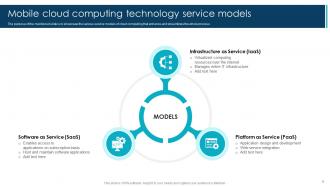
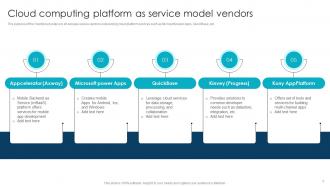
So basically it comes down to how much you want to manage yourself. With IaaS you're getting the raw servers and storage - full control but also full responsibility for everything. PaaS is honestly where I'd start if you're doing development work since they handle all the backend infrastructure nonsense and you just focus on building your app. Then there's SaaS which is just ready-to-use software like Gmail or Slack. I'd say figure out what your team actually wants to control vs. what you'd rather have someone else worry about. Most startups I know go PaaS route these days.

So edge computing basically moves processing power closer to users instead of sending everything to distant data centers. Way less lag that way. Think cell towers or local servers handling the heavy lifting right where you need it. Super important for stuff like self-driving cars and IoT gadgets that can't wait around for responses. Honestly, I think it's pretty cool tech. The future's gonna be this mix where you have big centralized clouds for major computing but edge nodes take care of the instant-response stuff. You should probably figure out which apps would actually benefit from that speed boost.

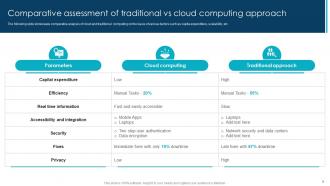
Honestly, I'd start by adding up everything you're spending now - servers, maintenance, power bills, staff time dealing with IT headaches, all of it. Then get some quotes from AWS or whoever for the same stuff. But here's the thing everyone forgets: migration costs are brutal. Training your team, downtime when things break, new security tools you'll need. The benefits are real though - way less maintenance stress and you can actually scale when needed. My advice? Pick one small project first and see what it actually costs before moving everything.

First thing - figure out what data you actually have and where it's sitting. AWS, Azure, and GCP all have decent compliance certifications, so pick one that matches your industry needs. Strong access controls are a must, plus encrypt everything (in transit and at rest). Audits suck but they're better than getting slammed by regulators later. Set up monitoring to catch weird access patterns - that stuff can save your butt. Oh, and document literally everything. I can't stress this enough because when audit season hits, you'll be scrambling for paperwork otherwise.
Dude, cloud computing is a lifesaver when traffic goes nuts. Black Friday hits? Viral campaign takes off? You don't have to panic-buy servers that take forever to arrive. Just click some buttons and you've got more power instantly. The best part is it scales back down automatically when things chill out, so you're not bleeding money on unused resources. Oh, and definitely set up those auto-scaling rules ahead of time - trust me, you don't want to be babysitting dashboards at 2am when your site's exploding.

Yeah, data centers are energy hogs - all those servers plus the cooling systems to keep them from melting down. But honestly, cloud's still way better than running your own hardware. Pick providers going renewable like AWS or Google Cloud, they're actually competing on who can go green fastest which is kinda cool. Audit what you're using first though - I bet you've got random stuff running you forgot about. Shut down unused instances, use auto-scaling so you're not paying for idle resources, and choose regions that run on cleaner energy when you can. Small changes add up.

Honestly, cloud ML services are perfect for this. You can grab pre-trained models and AutoML tools from AWS, Google, Microsoft - whatever. The crazy part is how fast you can go from random idea to actual working prototype. I'm talking days, not months like the old way. Your laptop would probably melt trying to process the datasets these platforms handle easily. Plus you're only paying for what you actually use, so you can test out completely ridiculous ideas without your boss freaking out about costs. Oh, and most have simple APIs you can just plug into. Start small with a proof-of-concept and see what happens.
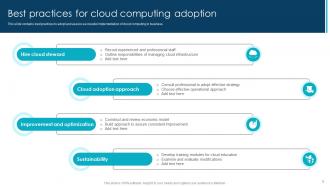
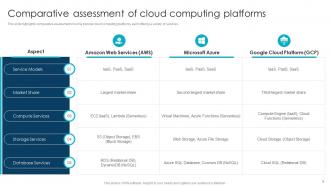
First thing - figure out what you actually need before getting sucked into all their flashy marketing stuff. Security's huge, so check their certifications and where they're storing your data. Pricing is honestly a nightmare to compare since everyone structures it differently. Look at uptime guarantees too because downtime sucks. Support quality matters when stuff breaks at 2am. Oh, and don't ignore how easy it'd be to leave later - some providers make it ridiculously hard to get your data out. I'd probably start with a small pilot project first.

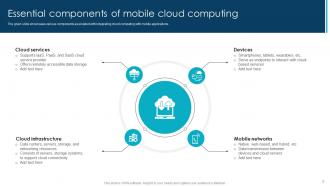
So basically, cloud computing is what makes remote work actually work. All your stuff - files, apps, whatever - lives online instead of being stuck on some office computer. You can grab everything from anywhere with decent internet. The coolest part? Multiple people can edit the same document at once and you see changes happen live. Companies don't have to deal with maintaining servers or making sure everyone's got updated software (which honestly sounds like a nightmare). I mean, think about it - if you're working from home, you're probably already using Google Drive or Slack or Zoom without really thinking about the "cloud" part.
Honestly, cloud DR is a game changer. You can rebuild your whole setup in minutes instead of waiting weeks like the old days. No more paying for those expensive backup data centers that just sit there doing nothing most of the time - everything's virtual now so costs drop big time. Your RTOs get way faster too. Just don't put all your eggs in one basket though, because even AWS goes down sometimes. Multi-region is smart if you can swing it. I'd start with your most critical stuff first and actually test the procedures regularly. You don't want to find out your backup plan sucks when everything's on fire.

Docker and Kubernetes are your best friends here - they'll make moving stuff between cloud providers so much smoother. Also, build everything with APIs and infrastructure-as-code instead of clicking around different dashboards like a maniac. Go with monitoring tools that work across AWS, Azure, all of them. Skip the proprietary services where you can and keep your data easy to move. I'd start by looking at what you've got running now. Figure out which services would be the biggest pain to migrate - those are the ones you need to plan for first.

Ratings and Reviews

100% of 100
Review Form
Write a review
Most Relevant Reviews
  1. 100%

    by Chet Cox

    SlideTeam is my one-stop solution for all the presentation needs. Their templates have beautiful designs that are worth every penny!
  2. 100%

    by Dana Owens

    “There is so much choice. At first, it seems like there isn't but you have to just keep looking, there are endless amounts to explore.”

2 Item(s)

per page: