


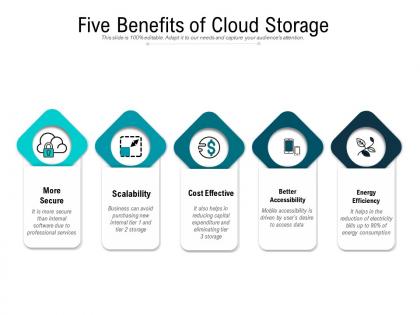
Five benefits of cloud storage




Try Before you Buy Download Free Sample Product
 Impress Your
 Audience
 100%
100% Editable
 Save Hours
 of Time


Our Five Benefits Of Cloud Storage are topically designed to provide an attractive backdrop to any subject. Use them to look like a presentation pro.
People who downloaded this PowerPoint presentation also viewed the following :
Five benefits of cloud storage with all 2 slides:
Use our Five Benefits Of Cloud Storage to effectively help you save your valuable time. They are readymade to fit into any presentation structure.

FAQs for Five benefits
Honestly, cloud storage is a game changer. You can grab your files from literally anywhere with wifi, which is clutch. Your stuff gets backed up automatically too - way better than losing everything when your computer inevitably crashes. Need more space? Just upgrade your plan instead of buying another expensive hard drive. Oh and sharing files with people is actually simple now, not like the old days of emailing attachments that were too big half the time. Only downside is you're screwed without internet, but when's the last time that was really an issue? Just try the free version first and see how you like it.
Dude, cloud storage is a game changer for remote work. Everyone can jump into the same files instantly from wherever they are. No more of that annoying email chain nonsense or trying to figure out which version is actually the latest one. Your team can edit stuff together in real-time and drop comments as things come up. Oh, and you can control who sees what - super helpful when you've got contractors who don't need access to everything. Just get your folder organization sorted early or it'll be chaos later!
Look for encryption - both when files are moving and just sitting there. Two-factor auth is non-negotiable, seriously. If they don't have it, run. Check their certifications like SOC 2 or ISO 27001. Where are their data centers? What's their backup situation look like? You need to know where your stuff actually lives. Read up on their incident history too - I mean, everyone gets hacked eventually, but some companies handle it way better than others. Their response tells you everything about how they'll treat your data.
Honestly, cloud storage makes backup and disaster recovery so much less stressful. Your data gets synced automatically to multiple data centers, so you don't have to worry about drives dying or some disaster hitting your office. Recovery is fast too - we're talking hours instead of weeks. No more dealing with expensive backup hardware or those awful tape rotations (ugh, who misses those?). The trick is setting everything to backup automatically. Otherwise someone's gonna forget and you'll be screwed when something actually goes wrong. Way better than the old days.
Honestly, cloud storage is a game changer for scaling. Need more space? Just click and boom - you've got terabytes. Business slowing down? Scale it back. No more playing the guessing game about what you'll need later. The best part? You only pay for what you actually use. None of that "buy a ton of servers upfront and hope for the best" nonsense. You get all the fancy enterprise stuff without dropping serious cash right away. I always tell people to start small - like, really small. Then just grow as you need it. Way less stressful than traditional storage headaches.
Honestly, migration costs are all over the map depending on what you're working with now. You'll hit upfront costs for data transfer, downtime, training your team - the usual suspects. But here's the thing: most companies break even in 6-18 months because you're finally done with hardware maintenance and crazy IT overhead. No more paying for stuff you don't use. And thank god, no more panic when servers randomly die at 2am. Your costs become predictable monthly bills instead of those brutal equipment refresh cycles every few years. I'd definitely run a cost comparison between what you're spending now versus cloud pricing for your actual usage.
So each industry basically tweaks cloud storage to fit what they actually need. Healthcare uses it for sharing patient files securely between doctors. Media companies need the huge space for video files and working with teams everywhere. Finance is obsessed with backup and disaster recovery - makes sense since losing transaction data would be a nightmare. Retail connects it to inventory systems and customer analytics across all their stores. Manufacturing hooks it up to IoT sensors for monitoring stuff in real-time. Honestly, you've got to figure out your industry's biggest headaches first, then match cloud features to fix those specific problems.
Dude, you can grab your files from literally anywhere with internet - phone, laptop, whatever. Game changer for remote work honestly. Your team can jump into shared folders instantly instead of dealing with email attachments (which are the worst). Everyone stays on the same version of docs too, so no more "wait, are we looking at the updated spreadsheet?" confusion. I'd start with setting up shared project folders - makes collaboration way smoother. Oh and it's clutch when you're traveling for work.
Honestly, cloud storage makes compliance so much easier. Reputable providers already have encryption, access controls, and audit trails built in - all that GDPR stuff you need anyway. They're constantly updating security too, which is great because I definitely don't want to become a compliance expert overnight. Pick providers that are certified for your industry requirements. You'll still need to handle user permissions and classify your data properly though. It's a shared responsibility thing - they handle infrastructure security, you manage the user side. Way better than doing it all yourself.
Honestly, the biggest pain is needing internet all the time and those monthly fees add up fast. Security's another thing - if your provider gets hacked, your stuff's at risk too. You lose control over where your data actually lives, which can mess with compliance requirements. Oh and when services go down? You're just sitting there waiting. Had that happen during a big project once, total nightmare. Moving between providers later is also a headache. But decent providers usually handle most of this pretty well, and keeping local backups of important stuff helps.
Multiple layers of protection are your friend here. Checksums and hash verification should be happening automatically with most providers - just double-check they're actually doing it. Back up your stuff across different locations religiously. I've seen too many people get burned by putting everything in one place, even Google Drive. Set up those automated integrity checks to catch corruption or sketchy changes. Go with reputable providers that have solid SLAs and certifications. Oh, and redundancy is everything - spread your data around like you're hedging bets.
Yeah, cloud storage integrates with basically everything now. Dropbox, OneDrive, Google Drive - they all connect to Office apps, Google Workspace, project management stuff like Trello. Adobe Creative Suite too, which is clutch if you're doing design work. CRM and accounting software usually have direct integrations as well. Honestly? Just check what you're already using first. I was shocked when I realized half my apps already had built-in connections I didn't even know about. APIs exist for the weird niche stuff, but you probably won't need them. Makes everything way less of a headache than it used to be.
Honestly? Your internet connection matters way more than anything else here. Most day-to-day stuff feels pretty much the same as local storage, especially if you've got decent fiber. Collaboration actually gets better since everyone hits the same files without weird network issues. Large transfers can drag though - and don't even think about it for heavy database work that needs crazy low latency. But the automatic backups alone make it worth it for me. Plus accessing everything from anywhere is huge. Maybe test it out with whatever you do most often? That'll give you the real feel for it.
Honestly, it's kinda complicated. Cloud storage can be way more efficient since you're sharing resources instead of everyone having their own servers. Major companies like AWS and Google are going hard on renewable energy too, which helps. But data centers still suck up crazy amounts of electricity and water for cooling - like, the numbers are wild. Your best bet? Pick a provider that's actually committed to 100% renewable energy if you care about the environmental stuff. Makes a real difference which one you choose.
Honestly, start with a storage audit - you'll probably find tons of junk you forgot about. Delete duplicate files and old downloads first. Those random screenshots from like 3 years ago? Yeah, definitely don't need cloud backup for those lol. Set up your sync settings so only important stuff gets uploaded automatically. Compress big files if you can, and most providers have these tiered storage things where old files get moved to cheaper storage. Oh, and use their built-in analyzer tools to see what's actually hogging space. Do this cleanup this week before you hit your limit.
No Reviews