

Building A Cloud Strategy Powerpoint Presentation Slides





Try Before you Buy Download Free Sample Product
 Impress Your
 Audience
 100%
100% Editable
 Save Hours
 of Time


Use the cutting-edge graphics of Building a Cloud Strategy PowerPoint Presentation Slides. Our cloud computing PPT theme offers layout for all the fundamentals of cloud strategy implementation like solution architecture, and challenges. Creating a cloud strategy PowerPoint template graphics enable users to explain sophisticated information by simply editing the layout and various parameters. Our big data strategy PPT slideshow is sequential and outlines all of the related concepts in a chronological fashion. Starting from the need all the way to cloud strategy transformation, you will find this cloud computing plan PowerPoint presentation content-driven. Showcase the best cloud features and practices for your organization like quicker business infrastructure access through cloud application PPT deck. Explain the cloud deployment model, three-year strategy roadmap, and cloud service layers using our cloud storage management PowerPoint theme’s PowerPoint presentation. So, hit the download button and edit your way to create a killer PPT presentation on cloud data storage.
People who downloaded this PowerPoint presentation also viewed the following :
Content of this Powerpoint Presentation
Slide 1: This slide introduces Building a Cloud Strategy. State your Company name and begin.
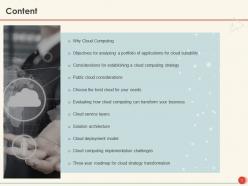
Slide 2: This slide displays the Content of the presentation.
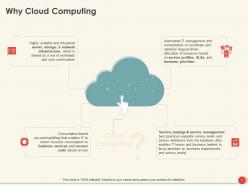
Slide 3: This slide explains Why Cloud Computing?
Slide 4: This slide showcases Objectives for Analyzing a Portfolio of Applications for Cloud Suitability.
Slide 5: This slide depicts the Considerations for Establishing a Cloud Computing Strategy.
Slide 6: This slide depicts Public Cloud Considerations
Slide 7: This slide describes to Choose the Best Cloud for your Needs.
Slide 8: This slide is continued with Choose the Best Cloud for your Needs.
Slide 9: This slide is continued with Choose the Best Cloud for your Needs.
Slide 10: This slide represents Evaluating how Cloud Computing can transform your business.
Slide 11: This slide showcases the Elemental technical services accessing hardware such as server, shortage & network devices.
Slide 12: This slide displays Solution Architecture.
Slide 13: This slide presents Cloud Deployment Model.
Slide 14: This slide shows Cloud Computing Implementation Challenges.
Slide 15: This slide showcases Three-year Roadmap for Cloud Strategy Transformation.
Slide 16: This is Building a Cloud Strategy Icons Slide.
Slide 17: This slide is titled as Additional Slides for moving forward.
Slide 18: This is Our Mission slide with Vision, Mission and Goals.
Slide 19: This is Our Goal slide. State your Company goals.
Slide 20: This is Our Team slide with names and designations.
Slide 21: This is Comparison slide showcasing Comparison between male and female users.
Slide 22: This slide displays Column Chart with product Comparisons.
Slide 23: This slide displays Clustered Bar chart with product comparison.
Slide 24: This slide displays Timeline process.
Slide 25: This is Thank You slide with Email address, Address and Contact number.
Building A Cloud Strategy Powerpoint Presentation Slides with all 25 slides:
Use our Building A Cloud Strategy Powerpoint Presentation Slides to effectively help you save your valuable time. They are readymade to fit into any presentation structure.
-
Building a Cloud Strategy
-
Content
-
Why Cloud Computing
-
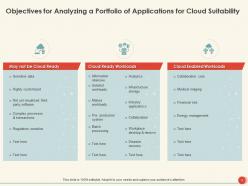
Objectives for Analyzing a Portfolio of Applications for Cloud Suitability
-
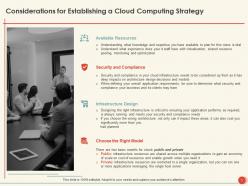
Considerations for Establishing a Cloud Computing Strategy
-
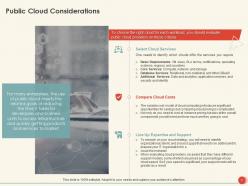
Public Cloud Considerations
-
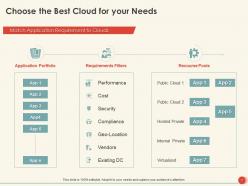
Choose the Best Cloud for your Needs
-
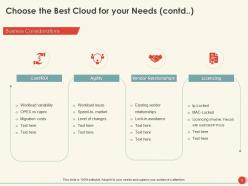
Choose the Best Cloud for your Needs contd
-
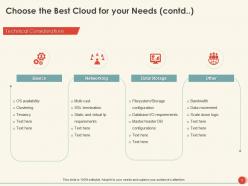
Choose the Best Cloud for your Needs contd
-
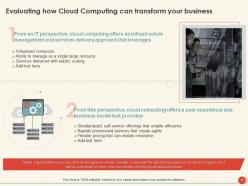
Evaluating how Cloud Computing can transform your business
-
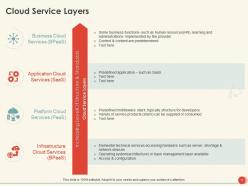
Cloud Service Layers
-
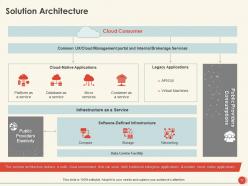
Solution Architecture
-
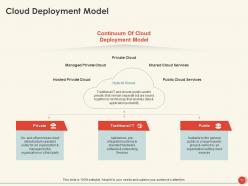
Cloud Deployment Model
-
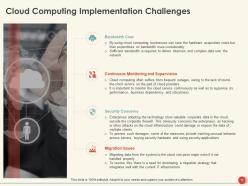
Cloud Computing Implementation Challenges
-
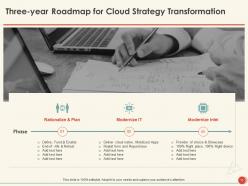
Three year Roadmap for Cloud Strategy Transformation
-
Building a Cloud Strategy Icons Slide
-

Additional Slides
-
Our Mission
-
Our Goal
-
Our Team
-
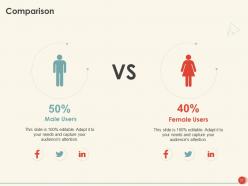
Comparison
-
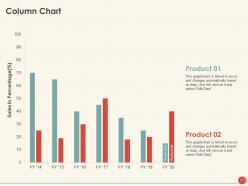
Column Chart
-
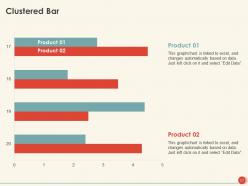
Clustered Bar
-
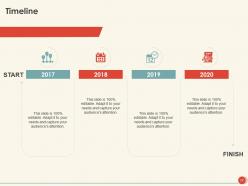
Timeline
-
Thank You
FAQs for Building A Cloud Strategy
Okay so first thing - figure out what you're actually trying to accomplish business-wise. Map out your current setup and pick the easiest wins to move first. Your migration plan needs to be solid, obviously. Security can't be an afterthought either, has to be locked down from the start. Honestly, governance is where I've seen most teams completely fall apart. Cost monitoring is huge too because those bills get scary fast if you're not watching. Oh and quick wins early on will keep your team motivated - trust me on that one.
Your cloud strategy needs to actually solve real business problems - faster launches, cutting costs, going global, whatever you're chasing. Don't just move to cloud because everyone else is doing it (though we've all been guilty of that). Map out your top 3 business goals first. Then figure out how cloud gets you there. Want to innovate faster? Cloud gives you that speed. Need to slash expenses? Focus on efficiency and smart resource use. I always tell people cloud should be your tech foundation that makes everything else possible, not just a shiny new toy.
Honestly, the hardest part isn't even the tech stuff - it's dealing with executives panicking about data security and CFOs losing their minds when those AWS bills hit. Your team probably doesn't have the right skills yet either. Legacy system integration is a nightmare, and good luck getting different departments to cooperate when they all want different things. The whole mindset shift from owning servers to renting them? Way tougher than you'd think. Oh, and definitely get your key people on board first - like, before you touch anything important. Set up some basic rules around who can do what.
Start with a full inventory - catalog your hardware, software, apps, and how data moves around. Map out which systems depend on each other because that's usually where things break. Super boring but you can't skip it. Check your network bandwidth, security setup, and any compliance stuff you need to hit. Also figure out if your team actually knows cloud basics or if they'll need training. Oh, and document everything now even if you're not migrating for months. I learned that one the hard way - you'll forget half this stuff otherwise.
So the service models are basically about control vs convenience. IaaS gives you tons of flexibility - you're handling everything from the OS up. Great for custom stuff but honestly, it's a lot of work. PaaS is probably where most dev teams should start since you just worry about your code. SaaS is dead simple but you're stuck with whatever the vendor decides. Here's what I've seen work though - don't pick just one. Most companies I know mix all three depending on what they're building. I'd map out your current setup first and see which model makes sense for each piece.
Okay so first thing - get your data classification sorted out and pick cloud providers that actually meet your industry standards (SOC 2, HIPAA, whatever applies). Encrypt everything in transit and at rest. Set up proper access controls with MFA - this stuff isn't optional anymore. The shared responsibility thing trips people up constantly. You handle data and apps, they handle infrastructure, but definitely nail down exactly where that boundary is. Oh and document literally everything as you go. Run compliance checks regularly because catching problems early beats scrambling later when auditors show up.
Honestly, pricing is where most people screw up - those costs add up way faster than you'd think. First figure out what you actually need workload-wise and any compliance stuff you're stuck with. Check their uptime guarantees and make sure they've got good coverage where your users are. You'll want solid security certs if you're dealing with sensitive data, that's just basic. Their support better be decent too, and see what kind of help they give with migration. Oh, and don't just take their word for it - actually test things out with a small pilot before you go all in.
Alright so hybrid cloud is basically when you mix your own servers with public cloud stuff - like keeping your sensitive data in-house but running your web apps on AWS. Multi-cloud means you're juggling multiple providers at once, like AWS plus Azure plus Google Cloud. Hybrid's great for compliance but honestly? It can be a pain to manage everything. Multi-cloud stops you from getting trapped with one vendor, and you can cherry-pick the best features. Though you'll need people who know all the different platforms. I'd pick one approach first depending on what you've already got running.
Honestly, cloud strategy is a game-changer for getting your team on the same page. Real-time document editing means no more emailing files back and forth (thank god). Everyone can access the same stuff whether they're working from home or the office. When you need extra computing power for big projects, it just happens - none of that "submit a ticket and wait three weeks" nonsense. File sharing becomes instant, and different tools actually talk to each other properly. I'd start by moving your main collaborative work to cloud tools first. You'll probably notice the difference pretty quickly once people aren't constantly asking "which version are we using?"
Honestly, you've gotta track the obvious stuff first - cost savings, how fast deployments happen, overall performance gains. Security incidents too because one bad breach ruins everything. But here's what most people miss: actually ask your devs if they're happier. Are outages getting fixed quicker? That tells you way more than spreadsheets sometimes. Compliance audit results matter if you're in a regulated industry. I'd pick maybe 6 key things max and throw them on a dashboard. Review monthly with your team so you don't lose sight of what's working and what isn't.
Okay so the main things I'm seeing: edge computing is everywhere now - basically moving processing closer to users so stuff loads faster. Everyone's terrified of vendor lock-in (honestly can't blame them), which is why multi-cloud setups are blowing up. AI features are becoming standard rather than some expensive add-on you have to bolt on later. Oh, and sustainability matters way more than it used to - companies actually pick providers based on carbon footprint now. Containers and serverless keep getting better too. My advice? Don't put all your eggs in one basket, and build AI stuff in from day one.
Honestly, cloud strategy is a game-changer for digital transformation stuff. Your team can launch new services way faster instead of waiting around for IT to set things up. Scaling becomes automatic when you need more resources. The built-in AI and analytics tools are pretty sweet too - way cheaper than building that yourself. I'd focus on specific business goals though, not just moving everything to cloud because it sounds cool. Figure out which projects would actually benefit from cloud features first, then go from there. Makes the whole process less overwhelming.
First thing - figure out your RTO and RPO numbers upfront. How fast do you need to be back online, and what data loss can you actually live with? Multi-region backups are a must, but here's the thing - your cloud provider isn't handling everything automatically like most people think. I'd honestly rather over-plan than get caught off guard. Test your DR plan regularly because I've seen too many "perfect" setups fall apart during actual outages. Document your recovery steps clearly, understand what's your responsibility vs theirs, and watch those costs. DR gets pricey quick if you don't pay attention.
Dude, first thing - don't just move everything to massive instances. That's where everyone screws up initially. Auto-scaling is your friend since you'll only pay for what you're actually using. Reserved instances are clutch if your workloads are pretty predictable. Most companies go nuts with over-provisioning at first, then freak out when the bill hits. Set up monitoring and alerts so you catch issues before they blow up your costs. Think of it more like a volume knob you can adjust, not just flipping a switch on or off. Makes way more sense that way.
Honestly, you can't just throw everyone into cloud training and hope it sticks. Get the basics covered first - cloud fundamentals for the whole team. Then split into tracks: devs need containerization and serverless, ops folks should focus on monitoring/security, architects get the fun stuff like design patterns and cost optimization. Teams collaborate differently in the cloud though, so don't skip workshops on agile practices. The real magic happens when you make it ongoing - set up internal communities, lunch sessions, pair newbies with cloud veterans. Most importantly? Actually give people time to practice this stuff instead of just cramming theory.
-
Great designs, Easily Editable.
-
Good research work and creative work done on every template.
-
Qualitative and comprehensive slides.
-
Designs have enough space to add content.