

Cloud service providers powerpoint presentation slides




Try Before you Buy Download Free Sample Product
 Impress Your
 Audience
 100%
100% Editable
 Save Hours
 of Time


Use our Cloud Service Providers PowerPoint Presentation Slides and educate your audience about the wide range of products and services you render. Employ this cloud computing PPT slideshow to present an attractive business overview of the organization and build confidence in your audience by displaying your company’s strengths, achievements, vision, mission, and goals. Pitch your business strategies to your customers and persuade them to determine their cloud journey with your company with the help of these internet storage PPT templates. Highlight the need for data center, security, cloud strategy, IT resource management, and modern applications by taking the assistance of these e-computing PPT layouts. Give a detailed account of additional services like collocation services and dedicated hosting services that you offer with this computing service PPT slideshow. Take the advantage of this timeline PPT layout from our presentation slides and keep track of the ongoing activities in the organization. Download this completely customizable and adaptable enterprise-grade cloud services PPT template to impress your viewers with an easily accessible presentation.
People who downloaded this PowerPoint presentation also viewed the following :
Content of this Powerpoint Presentation
Slide 1: This slide introduces Cloud Service Providers. State Your Company Name and begin.
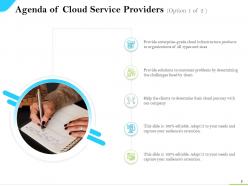
Slide 2: This slide shows Agenda of Selling Cloud Services with related imagery and text boxes.
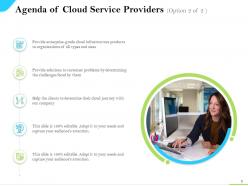
Slide 3: This is another slide showing Agenda of Selling Cloud Services with related imagery.
Slide 4: This slide displays Table of Contents describing- Company Overview, Cloud Computing, Challenges and Solutions, etc.
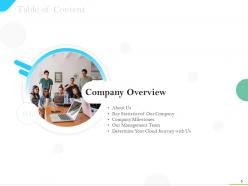
Slide 5: This slide showcases Table of Contents highlighting Company Overview.
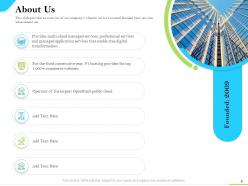
Slide 6: This is About Us slide to show company specifications etc.
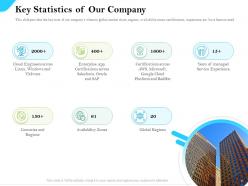
Slide 7: This slide displays Key Statistics of Our Company describing- Countries and Regions, Availability Zones, Global Regions, etc.
Slide 8: This slide shows Company Milestones with the help of a timeline.
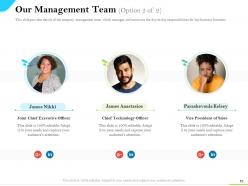
Slide 9: This slide shows Our Management Team with names and designation.
Slide 10: This is another slide showing Our Management Team with names and designation.
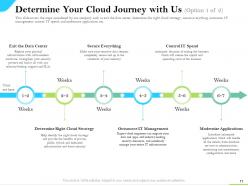
Slide 11: This slide presents Determine your Cloud Journey with Us.
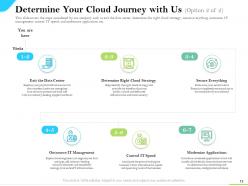
Slide 12: This is another slide displaying Determine your Cloud Journey with Us.
Slide 13: This slide displays Table of Contents highlighting Challenges and Solutions.
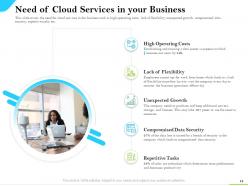
Slide 14: This slide shows Need of Cloud Services in your Business describing- Unexpected Growth, High Operating Costs, Compromised Data Security, etc.
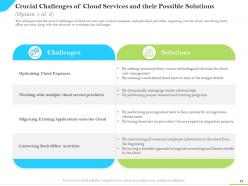
Slide 15: This slide presents Crucial Challenges of Cloud Services and their Possible Solutions.
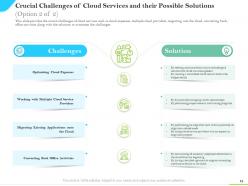
Slide 16: This is another slide displaying Crucial Challenges of Cloud Services and their Possible Solutions.
Slide 17: This slide represents Table of Contents highlighting Characteristics and Benefits of Cloud Computing.
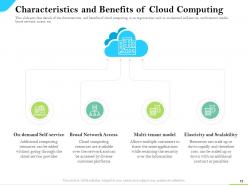
Slide 18: This slide showcases Characteristics and Benefits of Cloud Computing describing- Multi-tenant model, Elasticity and Scalability, On-demand Self-service, etc.
Slide 19: This slide shows Table of Contents highlighting Additional Benefits which you will Get.
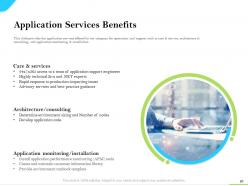
Slide 20: This slide presents Application Services Benefits describing- Care & Services, Architecture/Consulting, etc.
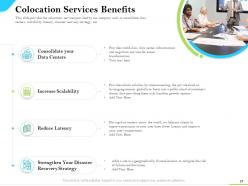
Slide 21: This slide displays Colocation Services Benefits describing- Consolidate your Data Centers, Increase Scalability, Reduce Latency, etc.
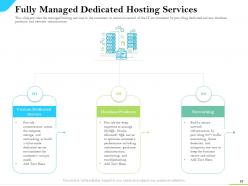
Slide 22: This slide represents Fully Managed Dedicated Hosting Services describing- Database Products, Custom Dedicated Servers, Networking, etc.
Slide 23: This slide showcases Table of Contents highlighting Cloud Services Competitive Landscape.
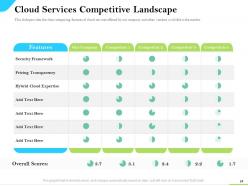
Slide 24: This slide shows Cloud Services Competitive Landscape in tabular form.
Slide 25: This slide presents Table of Contents highlighting Types of Cloud Services Provided by Our Company.
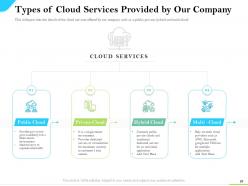
Slide 26: This slide displays Types of Cloud Services Provided by Our Company like Public Cloud, Private Cloud, Multi –Cloud, etc.
Slide 27: This slide represents Table of Contents highlighting Cloud Computing Models.
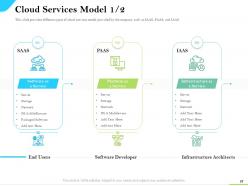
Slide 28: This slide showcases Cloud Services Model such as SAAS, PAAS, and IAAS.
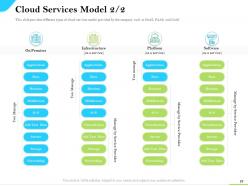
Slide 29: This is another slide showing Cloud Services Model describing- Infrastructure, Software, platform, etc.
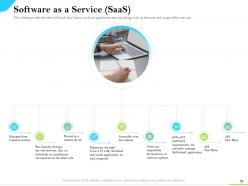
Slide 30: This slide presents Software as a Service (SaaS) such as- Managing from a central location, Accessible over the internet, Hosted on a remote server, etc.
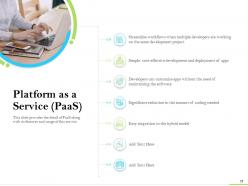
Slide 31: This slide displays Platform as a Service (PaaS) providing the detail of PaaS along with its features and usage of this service.
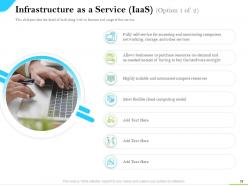
Slide 32: This slide represents Infrastructure as a Service (IaaS) describing its features and usage of this service.
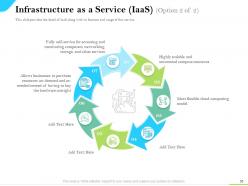
Slide 33: This is another slide showing Infrastructure as a Service (IaaS).
Slide 34: This slide represents Table of Contents highlighting Cloud Service Pricing Offered by Our Company.
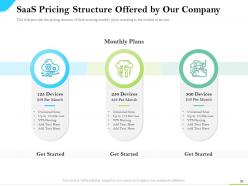
Slide 35: This side showcases SaaS Pricing Structure Offered by Our Company with variety of monthly plans.
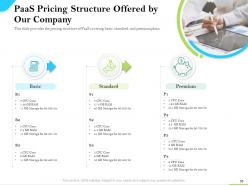
Slide 36: This slide provides the pricing structure of PaaS covering basic, standard, and premium plans.
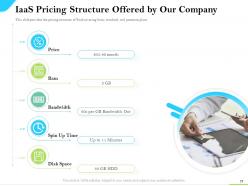
Slide 37: This slide shows IaaS Pricing Structure Offered by Our Company.
Slide 38: This slide presents Table of Contents highlighting Impact of Cloud Services in Your Company.
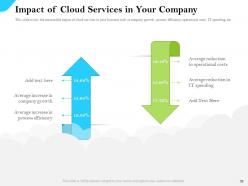
Slide 39: This slide displays Impact of Cloud Services in Your Company describing- Average increase in company growth, Average increase in process efficiency, etc.
Slide 40: This slide showcases Table of Contents highlighting Why to Choose Our Company?
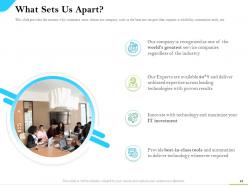
Slide 41: This slide is titled as What Sets Us Apart? with relatated imagery and icons.
Slide 42: This slide shows Customer Success Stories with images, names, designations, etc.
Slide 43: This slide displays Cloud Service Providers - Icons.
Slide 44: This slide is titled as Additional Slides for moving forward.
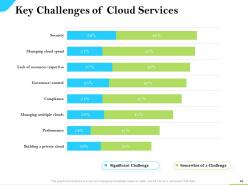
Slide 45: This slide shows Key Challenges of Cloud Services with the help of bar graph.
Slide 46: This is Our Awesome Team slide with names and designation.
Slide 47: This is About Us slide to show company specifications etc.
Slide 48: This is Our Target slide. State your targets here.
Slide 49: This is Our Mission slide with related imagery and text.
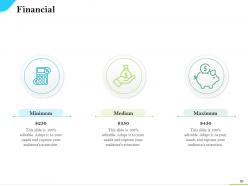
Slide 50: This is a Financial slide. Show your finance related stuff here.
Slide 51: This is a Comparison slide to state comparison between products, commodities, etc.
Slide 52: This is Our Goal slide. State your firm's goals here.
Slide 53: This is a Quotes slide to convey message, beliefs, etc.
Slide 54: This is a Puzzle slide with additional text boxes.
Slide 55: This is an Idea Generation slide to state a new idea or highlight information, specifications etc.
Slide 56: This is a Timeline slide. Show time intervals related data here.
Slide 57: This is a Thank you slide with address, contact numbers and email address.
Cloud service providers powerpoint presentation slides with all 57 slides:
Use our Cloud Service Providers Powerpoint Presentation Slides to effectively help you save your valuable time. They are readymade to fit into any presentation structure.



FAQs for Cloud service providers
Start with security and compliance - that stuff's non-negotiable. Pricing models and scalability come next, plus how well everything plays with your current setup. Performance matters, especially if your users are scattered everywhere. Their support quality is huge too (trust me, you'll need them eventually). Read through those SLAs super carefully. Maybe create some kind of scorecard ranking your must-haves against the nice-to-haves? Oh, and definitely check reviews from companies that look similar to yours - way more useful than generic testimonials.
So it's basically about how much you want to manage yourself. IaaS gives you the raw stuff - virtual machines, storage, all that - but you're handling everything from the operating system up. Great for custom setups or when you've got weird legacy systems to deal with. PaaS is the sweet spot honestly - you get a dev platform without the infrastructure headache. Then SaaS is just plug-and-play, like Gmail or Salesforce. Pick based on your team's tech skills and how much server babysitting you can handle.
Yeah, so AWS, Azure, and Google Cloud are actually pretty solid security-wise. They encrypt your data when it's stored and while it's moving around, plus they've got multi-factor auth, firewalls, all that good stuff. Honestly, they're way better at security than most companies could pull off themselves - makes sense with their budgets. You'll get compliance stuff like SOC 2 too. But here's the thing though - you still gotta set everything up right on your side. They handle the infrastructure security, but your apps and who gets access? That's on you.
So cloud providers basically get tons of certifications - SOC 2, ISO 27001, HIPAA, PCI DSS, whatever your industry needs. AWS and those guys are honestly kind of neurotic about third-party audits, which is good I guess. They bake compliance stuff right into their services too: encryption, access controls, audit logs. But here's where people mess up - you still gotta configure everything properly on your end. There's this whole "shared responsibility" thing where they handle infrastructure security but you're responsible for your data and settings. Just double-check what certs they actually have for your specific requirements first.
Honestly, it's all about your current setup and how much you're actually using. Most people see quick savings on hardware and IT headaches, but then you're stuck with those monthly subscription fees. Usage spikes can really bite you - I've watched friends get absolutely destroyed by unexpected cloud bills lol. Migration costs are real too, plus you might need to retrain your team. My take? Don't just look at monthly costs - compare what you'd spend over 3 years total. And seriously, watch those usage patterns like a hawk for the first couple months or you'll get burned.
Dude, budget alerts are a lifesaver - wish someone told me before I got hit with an $800 AWS bill that made me question my life choices. Set those up first. Most cloud providers have dashboards where you can watch spending in real-time. Look at last month's bill and see what's eating your budget. Right-size your instances based on actual usage, not what you think you need. Dev environments? Shut them down when you're not using them. Reserved instances can save you money if you've got predictable workloads. Trust me on this one.
So basically, public cloud is like renting shared office space - you're using AWS or Azure with everyone else. Private cloud gives you your own dedicated setup, either at your office or hosted somewhere, which costs more but you get way better control and security. Then there's hybrid where you mix both approaches. Keep the really sensitive stuff private but throw everything else on public cloud. Most companies I've seen end up doing hybrid anyway because, honestly, nothing's ever that simple. Oh and definitely figure out what data absolutely has to stay locked down first - that'll help you decide.
Most cloud providers guarantee 99.9% to 99.99% uptime in their SLAs - that's only a few hours of downtime yearly. Pretty impressive honestly. They'll give you service credits if they miss those targets, though you usually have to ask for them. AWS, Azure, and Google Cloud work similarly here. They use multiple data centers and automatic failover to prevent outages. The tricky part? What actually counts as "downtime" varies between providers. I'd definitely read the fine print on whatever service you're looking at since the credit amounts differ quite a bit.
Dude, support is everything with cloud providers. When stuff breaks (and it will), you need someone who actually knows what they're talking about, not some person reading from a script. Bad support equals your site being down for hours while you wait for help. The decent providers have 24/7 support with real technical people. Look for multiple ways to contact them and check their response time guarantees. Oh, and definitely test their support during your free trial - send them a ticket about something random and see how they handle it. Trust me on this one.
So basically, your apps can scale themselves up when traffic hits instead of you guessing how much server power you'll need. Docker and Kubernetes make everything way more portable - I spent forever learning K8s but it's worth it. Microservices let you break stuff into tiny pieces that work independently. With serverless, you literally just pay for what runs, not some server collecting dust. The cool part? No more crashes when you get slammed with users, and your AWS bill won't make you cry.
AI stuff is everywhere now - every cloud provider's cramming it into their platforms like crazy. Multi-cloud setups are big too, plus edge computing getting closer to users. Oh, and everyone's obsessed with green data centers lately which honestly makes sense. Security's tighter than ever with all the new regulations. Serverless and containers are still growing because who wants to deal with infrastructure nightmares, right? I'd definitely check what AI features your current provider's rolling out soon - that's probably where you'll see the biggest competitive edge this year. It's moving stupid fast.
Most cloud providers have pretty solid backup options - you can set them to run daily, weekly, or even in real time across different regions. AWS, Azure, Google Cloud all do this stuff but their pricing is obviously different. The cool part is their disaster recovery features let you basically recreate your whole setup somewhere else if things go south. Honestly though, you really need to figure out your RTO and RPO numbers first (how fast you need to be back up and how much data loss you can handle). Otherwise you're just guessing. Oh, and definitely test your recovery process every few months - I've seen too many people assume it works until they actually need it and... yeah, doesn't always go smoothly.
Yeah so vendor lock-in is when you get stuck with one cloud provider and can't easily bail without major headaches. Think of it like signing up for a gym membership that never ends - except worse because your entire business runs on it. The more of their proprietary stuff you use, the deeper you're trapped. Your strategy gets boxed in by whatever they decide to charge or build next. I learned this the hard way at my last job, honestly. Best move? Start with open standards and containers from the beginning. Multi-cloud might seem overkill now, but you'll thank yourself later when you're not held hostage.
Honestly, just keep an eye on the basics - uptime percentage, response times, and how fast data moves. Your provider should give you some kind of dashboard for all this. If they're promising 99.9% uptime but you're seeing way less consistently, that's sketchy. Watch your bills too because cloud costs can spiral weirdly if you're not paying attention (learned that one the hard way). Set alerts for when performance tanks. The trick is noting your baseline numbers right when you start so you can actually tell when things go downhill later.
Honestly, start by figuring out what you've got and pick the least important stuff to move first - way safer that way. Make a solid plan with timelines and budget. Your team's gonna need training because cloud is totally different than what they're used to (trust me on this one). Don't try moving everything at once - that's a recipe for disaster. Most cloud providers have decent migration tools that'll handle the heavy lifting. Oh, and always have a backup plan in case things go sideways. Document each step so you don't forget what worked.
-
Use of icon with content is very relateable, informative and appealing.
-
Great quality slides in rapid time.
-
Great experience, I would definitely use your services further.
-
Great designs, Easily Editable.