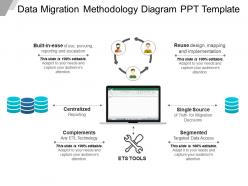
Data migration methodology diagram ppt template
Try Before you Buy Download Free Sample Product
Audience
Editable
of Time
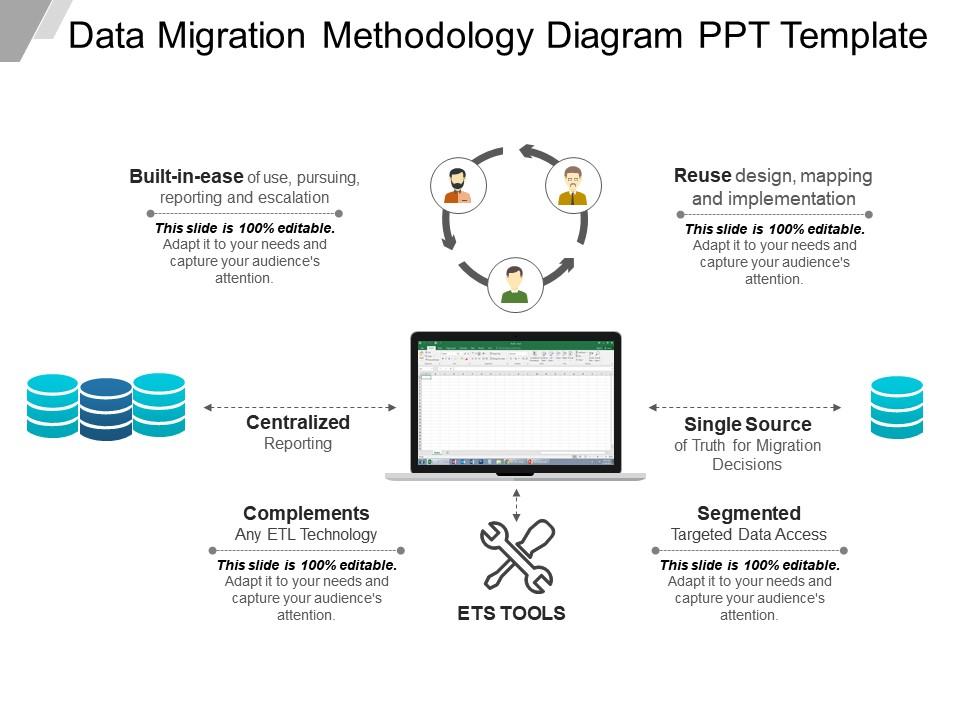
Data migration has become one of the most important technologies which are useful for various organizations these days. Download this data migration methodology diagram PPT slide to represent data migration concept in the business meeting. The data migration approach presentation template designed by our experienced design team. A user can take help of the data migration model slide design for PowerPoint to illustrate this approach involves copying or moving data from one system to another, or from one environment to another, whereas data integration deals with data flow among various applications as well as systems. The data migration process presentation visual template incorporates technological cons related to the content in this template which makes it look even more eye-catching. Using the data migration accomplishment template design, the presenter can describe the main options to accomplish data migration strategies. To engage the viewers in the data transfer presentation, the correct slide design is essential, and there comes our professionally designed data migration slide. The data migration challenge PPT template is perfect to showcase data migration challenges like storage migration, database migration, etc. Give examples of generosity with our Data Migration Methodology Diagram Ppt Template. Explain how entire communities benefit.
People who downloaded this PowerPoint presentation also viewed the following :
Data migration methodology diagram ppt template with all 5 slides:
Guard innocence with our Data Migration Methodology Diagram Ppt Template. Caution folks against evil influences.
FAQs for Data migration methodology
So the main phases are planning/assessment, design, build, testing, and cutover. Basically you map out what you've got, design where you're going, build your migration tools, test like crazy, then do the actual move. Planning's where you'll burn most of your time upfront - seriously, don't rush this part or you'll hate yourself later. Design and build is creating your data mappings and ETL processes. Testing though? That's where it gets real. Do multiple dry runs with actual production-sized data volumes. Oh and have solid rollback plans for everything. Migrations turn into dumpster fires way faster than you'd think.
Start with automated tools to scan for missing data, format issues, and weird outliers - but honestly the manual checks are where you'll catch the really bizarre stuff. Run a full profiling exercise checking completeness, accuracy, and duplicates across all your source systems. Document everything and rank issues by how much they'll screw up your business processes. Build scorecards for each system so everyone knows what quality they're dealing with. Oh, and set your acceptable thresholds right at the beginning. Trust me, it saves so many headaches later when people start complaining about missing records.
Talend and Informatica are solid picks for complex stuff, but honestly? Sometimes plain SQL scripts and Python pandas work just as well for basic migrations. SSIS is decent if you're already using Microsoft everything. Cloud options like AWS Glue or Azure Data Factory scale really well too. I'd probably avoid overthinking it though - match your tool to how much data you're moving and how messy it is. Oh, and definitely test with a tiny dataset first. Trust me on that one. You don't want surprises when you're migrating terabytes at 2am.
Do ALL your prep work first - seriously can't stress this enough. Test those migration scripts on dummy data until you're sick of looking at them. Off-peak hours only for the real thing, obviously. Break it into chunks instead of one giant migration (trust me on this one, I've been burned). Your rollback plan needs to be bulletproof because something will go wrong - it always does. Pilot test with non-critical stuff first. Set up monitoring so you'll catch problems fast, and give users a heads up about timing. Oh, and maybe grab some coffee beforehand because you'll probably be there late.
Data mapping is your roadmap for the whole migration - shows how fields in your old system match up with the new one. It's like being a translator between databases, honestly. Document field names, data types, any transformation rules, plus business logic that kicks in during the transfer. Skip this step and you're basically asking for data quality nightmares or straight-up lost information. Oh, and definitely get your business users to eyeball the mappings early on. They actually know what all that data means in real life, unlike us tech folks who just see field names and assume stuff.
Honestly, start with compliance from day one - don't make my mistake. We had to completely redo a customer database migration because we didn't plan ahead (total nightmare). First, figure out what regulations hit your data - GDPR, HIPAA, whatever applies. Then build validation rules that run automatically at each phase. Encrypt everything in transit and at rest, obviously. Document with audit trails and run compliance scans before launch. But here's the real key: loop in legal and compliance early so they can approve your approach upfront. Trust me, it's way easier than fixing things later.
Data quality problems are gonna be your worst nightmare, plus downtime and compatibility headaches between old/new systems. Profile your data early to spot the messy stuff. Run everything in staging first - can't stress this enough. Map out dependencies beforehand and definitely have a rollback ready. Oh, and do incremental migrations instead of one giant cutover. Seriously though, triple whatever timeline you're thinking. I've never seen one of these go smoothly when rushed. Your future self will thank you for the extra buffer time.
Honestly, the biggest pain with cloud migration is you're stuck with whatever internet speed you've got. Moving huge amounts of data can take forever - like weeks instead of hours. On-premises is way faster since everything stays in your own network. But here's the kicker - those data transfer fees from cloud providers can get expensive real quick if you don't plan ahead. The upside though? Cloud lets you spin up extra resources during the move if needed. Just make sure you crunch the numbers on bandwidth and costs first, or you'll be in for some nasty surprises.
Okay so first thing - check your row counts and data types match between old and new systems. Manual spot checks are clutch here, trust me on this one. Pull some critical business records and compare them side by side. Your existing reports? Run those against the fresh data to see if anything looks wonky. Definitely get business users involved early - they know their data better than anyone and can spot weird stuff you'd miss. Oh and set up monitoring for like 2-3 weeks after go-live because issues always pop up once people start actually using it.
Honestly, different people need different info - execs just want the big picture and deadlines, but your tech folks need all the details. Visual timelines are your friend here, showing milestones and what might go wrong. Trust me, dashboards beat long emails every time because no one actually reads those things anyway. Don't just send updates and hope for the best though. Set up regular check-ins so you can catch issues early. Be super clear about who's doing what and when. Oh, and don't wait for people to come to you with questions - stay ahead of it. Getting those recurring meetings on everyone's calendar now will save you major headaches later.
Oh dude, document EVERYTHING as you go - seriously don't wait until later when you've forgotten all the messy details. Map out where your data's moving, what transforms you're doing, validation rules, rollback plans. I made this mistake once and had to explain a migration months later with literally no notes... nightmare. Custom scripts and tools too - write that stuff down. Oh and testing results, performance numbers, any weird issues that pop up. Just dump it all somewhere your team can actually access when (not if) something breaks.
Okay so first thing - encrypt literally everything. In transit, at rest, all of it. VPNs between your source and target systems are a must, plus strong encryption protocols obviously. Keep your team small during the actual move. We screwed this up once and had like 15 people with admin access - total nightmare. Back everything up beforehand but don't just dump those backups anywhere unsecured. The thing people always forget? Run a security audit after you're done. Can't tell you how often sensitive data gets stuck in temp files or logs somewhere. Short sentences work better for this stuff, trust me.
Dude, you absolutely need a rollback plan for migrations. Things will break - maybe corrupted data, maybe your system crashes under real load, who knows. I've watched "perfect" test migrations completely implode once they hit production data. Your rollback strategy is what saves you from disaster. It lets you quickly jump back to the old system while you fix whatever went wrong. Oh, and test the rollback process first! You don't want to find out it's broken when you're already panicking at 2am.
Dude, break it into phases - don't try to do everything at once. Run both systems side by side during the switch so you can bail if things go wrong (spoiler: they will). Do the big stuff during off-hours when nobody's around. Monitor everything in real-time to catch problems before users lose their minds. Have your rollback plan ready and actually test it first - learned that one the hard way. Oh, and tell everyone upfront about potential slowdowns so they can't act shocked later.
So you'll need to watch a few things to make sure this doesn't blow up in your face. Check if all your data actually made it over - sounds obvious but you'd be surprised. Compare some sample records between the old and new systems for accuracy. Performance stuff matters too - response times, throughput, the usual suspects. Nobody's gonna be happy if everything runs like molasses after the switch. Track your timeline and any downtime during cutover. Oh, and don't forget user adoption rates once you're live. Best migration in the world means nothing if people hate using it. Set up dashboards early so you're not scrambling later.
-
The Designed Graphic are very professional and classic.
-
Very well designed and informative templates.