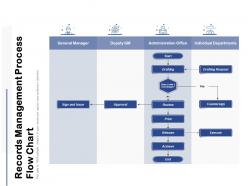
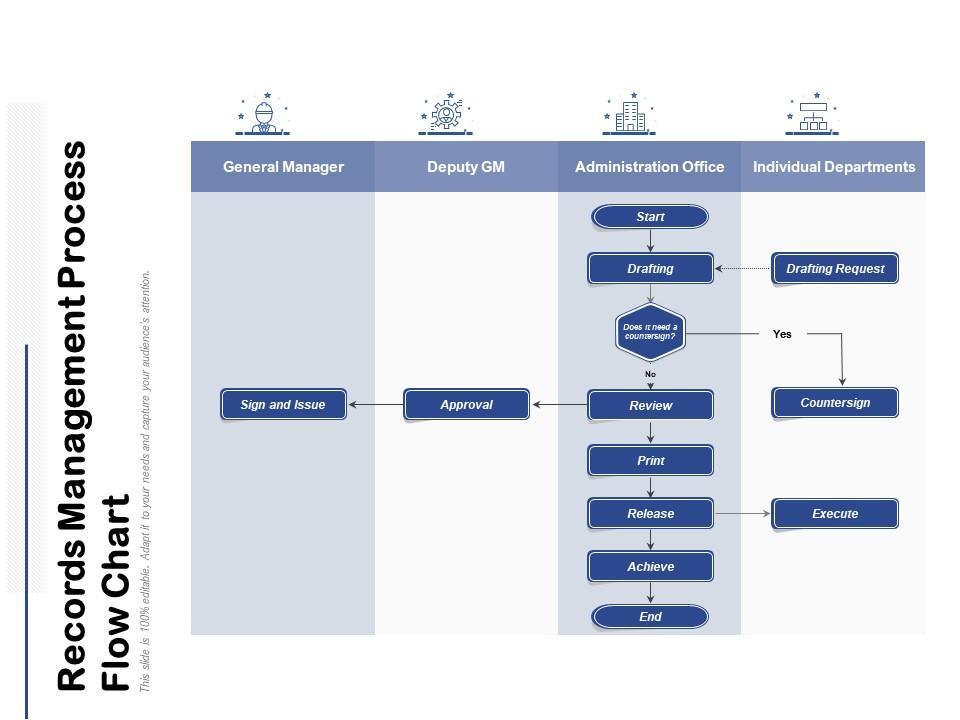
Records management process flow chart
Try Before you Buy Download Free Sample Product
Audience
Editable
of Time
Color the canvas as you desire. Get a free hand with our Records Management Process Flow Chart.
People who downloaded this PowerPoint presentation also viewed the following :
Records management process flow chart with all 2 slides:
Free yourself of all apprehension. Our Records Management Process Flow Chart allow your thoughts to flow fearlessly.
FAQs for Records management
So basically you need three main things: a schedule showing how long to keep different documents, solid policies for creating/storing records, and a way to actually find stuff later. First thing I'd do? Map out what records you have and where they're sitting - honestly that step alone will probably shock you. Training your team is huge too because I've watched programs crash just because people didn't know the rules. Oh, and assign someone as the records officer to babysit the whole thing. Without that person keeping track, it'll fall apart pretty quickly.
Okay so first thing - get a retention schedule that actually matches your industry's rules. That's like step one. Break it down by what type of records you're dealing with and where you operate, because honestly the regulations are all over the place. Train your team on this stuff and audit regularly. Document everything you do - when auditors show up (and they will), you'll want proof you followed the rules. Oh and set up those automated reminders for deadlines because who remembers that stuff? Have legal look over your policies once a year too.
Oh man, technology has completely changed records management. Cloud storage, automated schedules, AI search - it's all there now. Most companies have ditched the filing cabinets already, which honestly makes sense. You get better compliance tracking and disaster recovery too. The collaboration tools are so much better now - my old job still used paper for everything and it was a nightmare. Just don't try to change everything overnight. Pick systems that actually work with what you're already doing. Digital workflows handle most of the tedious stuff automatically now.
First thing - make a list of all your record types and group them by what they do (financial stuff, legal docs, day-to-day operations). Research the legal requirements because you absolutely can't mess that up. But also think practically - do you actually ever look at those old contracts again? Industry standards are your friend here, honestly saves so much time. Storage costs matter too, plus how often you'll need to dig things up later. Sometimes there's litigation to worry about, which is fun. Map it all out, write it down clearly, and make sure your team actually knows the schedule exists. Otherwise it's just a fancy document nobody follows.
Ugh, the worst part is always messy organization and people just throwing documents wherever they feel like it. Nobody follows the retention rules either - drives me crazy! Paper to digital transitions? Pure chaos every single time. Here's what actually works though: make your procedures super simple so people can't mess them up. Regular training helps too, even if it's boring. Get some halfway decent software - seriously, it's worth the money. But honestly, if leadership doesn't care about your policies, you're basically screwed from the start. My advice? Pick one department first and nail it there before expanding.
Start with figuring out what records you actually have vs what your policies claim you should have - honestly, this part always shows some pretty shocking gaps! Pick a sample from different departments and check if they're classified right, stored properly, and following retention rules. Talk to people about what they really do day-to-day because trust me, it's never what the procedures say. Hit the high-risk stuff first - legal docs, financial records, that kind of thing. After you spot the worst problems, make a list and tackle the scary stuff first.
Definitely scan at 300+ DPI minimum, and use checksums to check your files didn't get corrupted. Before you even start, set up a naming system that makes sense - seriously, "Document1.pdf" is the worst and you'll regret it. Always work from originals, never copies. Have someone double-check that the digital version actually matches what's on paper. Save everything as PDF/A for long-term storage, but maybe keep other formats too. Multiple backups in different places, obviously. Oh, and test your whole process on like 50 documents first - don't jump into scanning thousands right away. Trust me on that one.
Training is literally everything for records management - I can't stress this enough. Your team will mess up filing, blow past retention deadlines, and basically wreck your whole system without it. People need to get WHY they're doing stuff, not just robotically follow rules. Cover the classification standards, retention schedules, all that compliance stuff so they can think for themselves. Oh, and don't make it a one-and-done thing during onboarding. That's where most companies screw up. You'll want quarterly refreshers and updates whenever procedures change. Trust me on this one.
Honestly, start with automated tagging - it'll save you so much headache down the road. Cloud storage is pretty much essential now for backups and migration stuff. You don't want to deal with obsolete file formats later (trust me on this one). Set up retention policies that auto-delete expired records, and make sure your metadata game is strong for searching. Oh, and definitely audit your current digital formats first - figure out what's most critical and protect that stuff immediately. The backup protocols with offsite storage are non-negotiable too.
Honestly, records management is a lifesaver once you get it set up. No more frantically searching through random folders or texting everyone "do you have that invoice from last year??" Your team actually knows where stuff is. Compliance gets so much easier too - auditors love organized docs. I learned this the hard way after we almost lost a major contract because nobody could find the renewal paperwork. Start with your most important files first. Trust me, you'll notice the difference right away and wonder why you waited so long.
Okay so records management is like your lifeline when everything goes to hell. Figure out what documents you absolutely can't live without - payroll stuff, contracts, financial records. Store copies somewhere else or in the cloud because you don't want to be that company frantically digging through rubble. I've watched businesses completely lose their minds trying to piece together what vanished! Map out who grabs what during recovery. Honestly, most places wing it until disaster hits. Start with your most critical files first, then work backwards. Document the whole process so someone besides you knows where everything lives.
Ugh, privacy laws totally changed the game for record keeping. You can't just hoard everything anymore - need actual deletion schedules and ways to quickly pull someone's data when they ask. GDPR and CCPA are the big ones pushing "right to be forgotten" stuff. Honestly though? It's kind of forced me to clean house, which was overdue anyway. I'd start by looking at what you're actually storing - bet there's a ton of random files you forgot about. Short story: if you don't need it, ditch it. Makes compliance way easier.
Honestly, just set up four basic levels - public, internal, confidential, and restricted. Most companies go nuts slapping "confidential" on literally everything because they're paranoid, but that backfires hard later. Default to being open unless there's an actual legal or business reason to lock something down. Make sure you've got written criteria for each level so people aren't just winging it. Set up regular reviews too - like every year or two - to see if old sensitive stuff can finally be declassified. Train your team on what genuinely needs protection vs. what you're hoarding for no good reason.
So metadata is basically your records' DNA - tells you who made what and when. Capture it right when you create stuff, not later when you're panicking and can't remember anything. Include the obvious things like author, date, version, plus whatever business context matters. Honestly, the whole point is making everything searchable so you don't lose your mind hunting for documents. Keep it consistent across your team too - otherwise it's useless. You'll thank yourself when you're desperately looking for that random contract from 2021 and actually find it in two seconds instead of three hours.
Honestly, getting departments to work together fixes so much records chaos. You'll stop seeing five different filing systems for the same stuff. IT finally gets what legal needs instead of guessing. HR quits keeping every random email "just in case" - we've all been there. Everyone starts using the same naming rules and disposal schedules, which sounds boring but actually saves tons of headaches. Finance realizes why audit trails matter too. The trick is starting small - maybe just monthly coffee chats between department heads to sync up on policies. Once people start sharing what works, things click.
No Reviews