

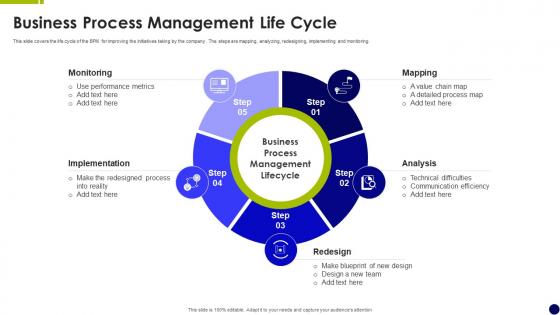
Business Process Management Life Cycle




Try Before you Buy Download Free Sample Product
 Impress Your
 Audience
 100%
100% Editable
 Save Hours
 of Time


This slide covers the life cycle of the BPM for improving the initiatives taking by the company. The steps are mapping, analyzing, redesigning, implementing and monitoring.
People who downloaded this PowerPoint presentation also viewed the following :
Business Process Management Life Cycle with all 6 slides:
Use our Business Process Management Life Cycle to effectively help you save your valuable time. They are readymade to fit into any presentation structure.





FAQs for Business Process
So BPM has six stages that kind of flow together: Design (mapping what you're doing now), Model (making visual workflows), Execute (actually running it), Monitor (watching how it performs), Optimize (tweaking stuff), and Re-engineer (big changes when things are really broken). Honestly, it's this never-ending cycle that can drive you nuts sometimes. You'll think you're done, then monitoring shows problems and you're back to square one. Each step connects to the next one though. My advice? Just pick one process and map it out completely before you get sucked into buying expensive software or anything fancy.
Think of process modeling as your GPS for BPM - you can actually see where you're going instead of wandering around blindly. Map out what you're doing now, then it's way easier to spot the messy parts and figure out better ways to do things. Your team will love you for it too since flowcharts beat reading through boring process docs any day. I always tell people to start simple with basic flowcharts first. Don't jump into fancy notation right away - that's where people get overwhelmed and give up. These models become your go-to reference for tracking progress later on.
So for process mapping, I'd go with Visio or Lucidchart - they're pretty solid for visualizing what you've got now. Tableau and Power BI are great for digging into the actual data and finding where things get stuck. Don't underestimate a whiteboard session though, seriously. ProcessMaker or Nintex help with workflow timing stuff. BPMN modeling tools create those standardized diagrams that don't make people's eyes glaze over. Oh, and honestly? Just start with whatever your team already has access to - no point buying new software if you've got something sitting there unused. Build from there.
Get stakeholders involved from the start - that's half the battle right there. Figure out who's actually impacted, including the downstream folks people always forget about. Skip the endless meetings though, nobody wants that. Do quick check-ins instead, maybe some visual updates they can actually see. Listen to their feedback and actually do something with it. Give everyone a real role so they feel like they own part of it. Oh, and make them your partners in this whole thing, not just people you update when you remember to. That partnership thing makes a huge difference.
Focus on cycle time, cost per process, and error rates first - those tell you if things are actually working. Customer satisfaction and employee engagement matter too because efficient processes are useless if people hate them. Don't forget adoption rates and ROI from your automation stuff. Set your baselines early, then stick to consistent measuring. Honestly, just pick 3-5 metrics that actually align with what your business cares about. I've seen teams get lost tracking dozens of things that don't really move the needle.
So tech basically changes everything about BPM - you get real-time data when you're figuring out your processes, plus automated workflows when you're building stuff out. The monitoring part is huge too, all those dashboards and alerts keep you in the loop. Honestly can't imagine doing this without decent tools anymore (maybe I'm just spoiled). Speed is where you really feel it though. You can test things faster, catch problems way quicker, and actually roll out improvements that stick. I'd say figure out which part of your process is the most manual right now - that's probably where you want to start with tech.
First thing - map out what you're doing now and see how it stacks up on cost, time, quality. Go after the obvious stuff first, like where customers are always pissed off or your team keeps getting stuck. The worst problems are usually right in front of you anyway. Pick fights you can win - high impact but not crazy expensive to fix. Your frontline people know where the real pain is, so ask them (management misses half this stuff). Just pick one process to start with. Perfect that approach, then roll it out everywhere else.
Honestly, the hardest part is always getting people on board - nobody wants to change how they do things. Training usually gets rushed too, which bites you later. Plus you'll probably underestimate how long everything takes (I always do). Tech integration can be a nightmare if your systems are old or weird. Oh, and stakeholders love throwing in random requests halfway through. Communication between teams? Good luck with that. Budget more time than you think, like way more. Really focus on explaining why the change matters to people personally. And don't skimp on proper training - it's worth the investment upfront.
Honestly, monitoring isn't just something you do at the end - it's happening constantly throughout the whole BPM cycle. You're always grabbing performance data and checking it against your KPIs. Build those feedback loops so you catch problems early instead of waiting around. Real-time dashboards are your friend here (way better than those quarterly check-ins everyone dreads). I'm a big fan of making small tweaks regularly rather than these massive overhauls that stress everyone out. Keep your finger on the pulse and adjust as you go.
So process automation is where your BPM design actually starts doing stuff - like the execution part. Most people implement it later, but honestly you should think about it during design too. It takes care of all the boring, repetitive tasks that follow clear rules, which frees up your team for the tricky decisions that need actual brains. Here's the thing though - start with whatever's causing you the biggest headaches first. Don't go crazy trying to automate everything right away or you'll just create chaos and probably tank your change management efforts.
Look, you've gotta adjust each BPM phase based on what your industry actually cares about. Healthcare? They're obsessed with compliance checks and patient privacy at every step. Manufacturing goes hard on lean principles and quality control. Financial services - honestly, they just want risk assessments everywhere you look. Figure out what makes your field tick first. Maybe it's regulations, customer quirks, or just how things flow operationally. Then work those specifics into your discovery, design, implementation, and monitoring phases. I'd start by listing out the absolute must-haves for your industry before touching anything else.
Okay so feedback loops are literally what stop your BPM from turning into a complete mess. You get these ongoing conversations between monitoring, analysis, and improvement - so when something's not working, the info actually flows back to where it needs to go. Otherwise you're just making random changes based on old data. It's like... imagine trying to drive while only looking straight ahead (terrible idea). Regular check-ins where teams can say "hey this part sucks" or "actually this is working great" - that's what keeps your processes from getting stale. Short version: build in review points or you'll be guessing forever.
Look, analytics should basically run through your whole BPM process. First, dig into your current data to spot where things are getting stuck. When you're designing new stuff, use what happened before to set targets that actually make sense. Real-time tracking during rollout is huge - most people skip this part and regret it later. Then keep analyzing to optimize and see if you're getting ROI. Honestly, the dashboard thing is where it gets tricky. Don't track everything under the sun. Pick maybe 3-5 metrics that truly matter and watch those like a hawk.
Keep it simple with flowcharts and step-by-step stuff that makes sense to everyone. Document what you're actually doing now before trying to fix anything - trust me, skipping this step always bites you later. Include who does what, decision points, and where things go wrong. Oh, and version control everything since processes change constantly. I'd start broad with high-level maps, then get detailed only where you really need it. But honestly? The biggest thing is getting the people who actually do the work involved. They'll spot issues you'd completely miss and save you tons of headaches down the road.
Look, when you nail the BPM life cycle, adapting to change becomes way easier. Your workflows aren't set in stone anymore - you can tweak them as markets shift or customers want different things. Those feedback loops? Total game changer for catching problems before they blow up. So when disruption hits (and it always does), you're not panicking about what's broken. You've got flexible processes that work like building blocks. My advice? Pick your most important processes first and get those dialed in. Once you see how smooth it runs, you'll want to expand it everywhere.
-
Crisp and neat slides. Makes it fun and easier to curate presentations.
-
Easy to edit slides with easy to understand instructions.