

Business Process Management Powerpoint Presentation Slides





Try Before you Buy Download Free Sample Product
 Impress Your
 Audience
 100%
100% Editable
 Save Hours
 of Time


If you are planning to create a stunning presentation to showcase the concept of business process management, then we recommend you download, our ready to use business process management PowerPoint presentation slides. Our content ready presentation will save your time and efforts. With the help of this predesigned business operations management PPT presentation, you will be able to represent the numerous techniques to discover, model, examine, measure, refine, optimize, and automate organization processes. This business quality improvement presentation PPT has been designed using a slide on various essential subtopics such as introduction, functional area overview, ERP system architecture, task categories of ERP systems, ERP project progress, implementation process overview, planning and selection phase, implementation phase, enterprise resource planning funnel, tuning of concept, situational analysis-basic target concept, software selection process, and software selection criteria. It also covers a template on software selection criteria, realization and implements, v model for implementation of ERP system, tips for selecting ERP system, ERP criteria list-technical requirement, and ERP implementation-selection phase. Do not delay, quickly download these predesigned business project management presentation slides. Bring down the amount of friction existing with our Business Process Management Powerpoint Presentation Slides. Halt the further build up of differences.
People who downloaded this PowerPoint presentation also viewed the following :
Content of this Powerpoint Presentation
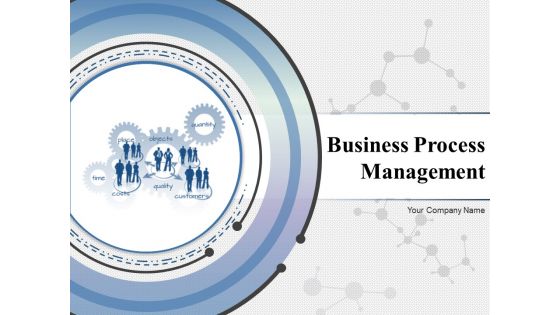
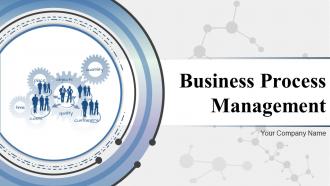
Slide 1: This slide introduces Business Process Management. State Your Company Name and begin.
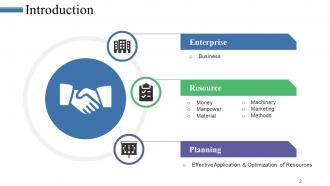
Slide 2: This slide showcases Introduction with these parameter- Resource, Money, Manpower, Material, Machinery, Marketing, Methods, Enterprise, Business, Planning, Effective Application & Optimization of Resources.
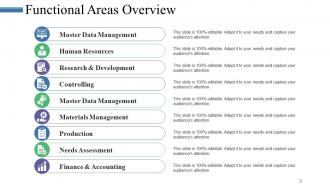
Slide 3: This slide showcases Functional Areas Overview with these factors- Master Data Management, Master Data Management, Materials Management, Finance & Accounting, Human Resources, Research & Development, Controlling, Needs Assessment, Production.
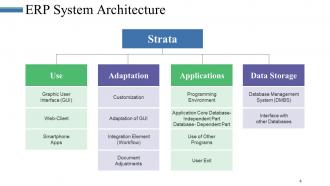
Slide 4: This slide presents ERP System Architecture which further includes- Strata, Use, Graphic User Interface (GUI), Web-Client, Smartphone Apps, Adaptation, Customization, Adaptation of GUI, Integration Element (Workflow), Document, Adjustments, Data Storage, Database Management System (DMBS), Interface with other Databases, Applications, Programming Environment, Application Core Database- Independent Part Database- Dependent Part, Use of Other Programs, User Exit.
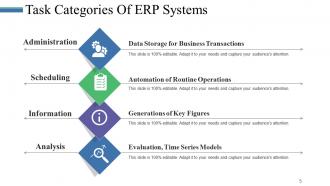
Slide 5: This slide showcases Task Categories Of ERP Systems with these stages- Administration, Scheduling, Information, Analysis.
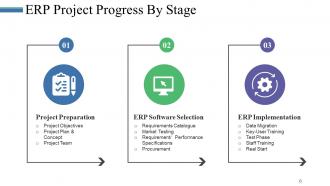
Slide 6: This slide presents ERP Project Progress By Stage with these of the factors- Project Preparation, ERP Software Selection, ERP Implementation.
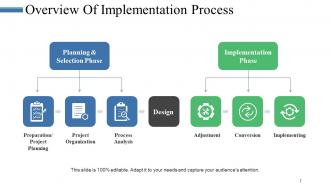
Slide 7: This slide showcases Overview Of Implementation Process with which these are the factors you can use- Design, Planning & Selection Phase, Preparation/ Project Planning, Project Organization, Process Analysis, Implementation Phase, Adjustment, Implementing, Conversion.
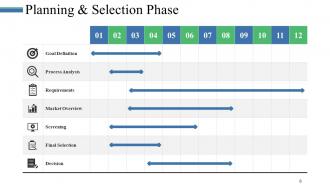
Slide 8: This slide shows Planning & Selection Phase with those of the phases we have listed.
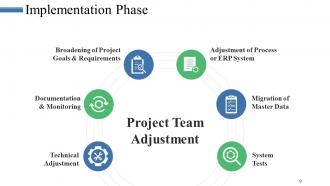
Slide 9: This slide presents Implementation Phase with these Project Team Adjustment Broadening of Project Goals & Requirements, Adjustment of Process or ERP System Documentation & Monitoring, Migration of Master Data, Technical Adjustment, System Tests.
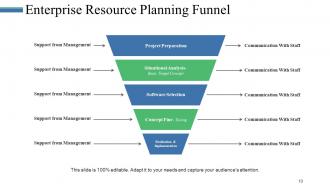
Slide 10: This slide showcases Enterprise Resource Planning Funnel with these five parameters- Project Preparation, Realization & Implementation, Situational Analysis- Basic Target Concept, Software Selection, Concept Fine- Tuning.
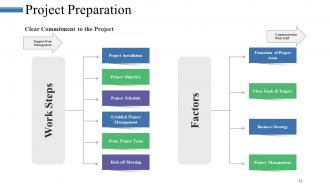
Slide 11: This slide presents Project Preparation with these Clear Commitment to the Project Support from Management, Communication With Staff, Work Steps, Project Installation, Project Objective, Project Schedule, Establish Project Management, From Project Team, Kick-off Meeting, Factors, Formation of Project team, Clear Goals & Targets, Business Strategy, Project Management.
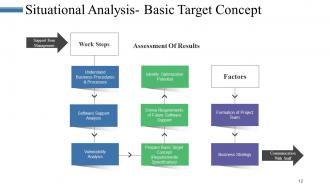
Slide 12: This slide showcases Situational Analysis- Basic Target Concept wich further includes- Support from Management, Communication With Staff, Identify Optimization Potential, Derive Requirements of Future Software Support, Prepare Basic Target Concept, Software Support Analysis, Vulnerability Analysis, Understand Business Procedures & Processes, Formation of Project Team, Business Strategy, Work Steps, Assessment Of Results.
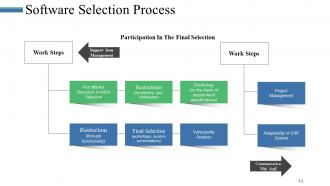
Slide 13: This slide presents Software Selection Process with these of the factors- Support from Management, Restrictions, Shortlisting, First Market Research or Initial Selection, Final Selection, Vulnerability Analysis, Restriction, Work Steps, Project Management, Adaptability of ERP System, Work Steps, Communication With Staff, Participation In The Final Selection.
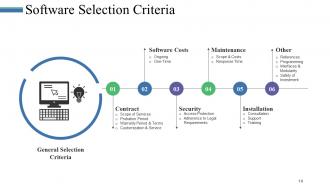
Slide 14: This slide showcases Software Selection Criteria with these six of the factors- General Selection Criteria, Contract, Software Costs, security, maintenence, installation, other.
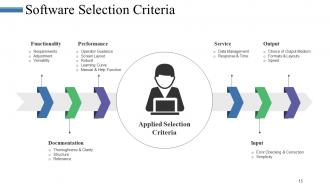
Slide 15: This slide shows Software Selection Criteria with Applied Selection Criteria.
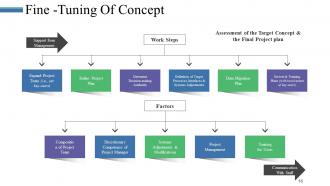
Slide 16: This slide showcases Fine -Tuning Of Concept with these of the working factors- Assessment of the Target Concept & the Final Project plan, Work Steps, Expand Project Team (i.e., set key-users), Refine Project Plan, Determine Decision-making Authority, Definition of Target Processes, Interfaces & Systems Adjustments, Data Migration Plan, Set test & Training Plans (with involvement of key-users), Factors, Composition of Project Team, Discretionary Competence of Project Manager, Systems Adjustments & Modifications, Training for Users, Project Management, Support from Management, Communication With Staff.
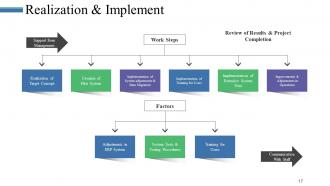
Slide 17: This slide shows Realization & Implement.
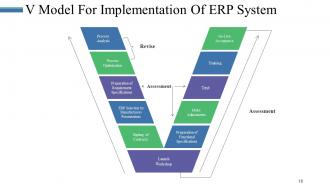
Slide 18: This slide V Model For Implementation Of ERP System with these processes- Process Analysis, Process Optimization, Preparation of Requirement Specifications, Signing of Contracts, ERP Selection by Manufacturers Presentations, Launch Workshop, Training, Preparation of Functional Specifications, Make Adjustments, Test, Go-Live Acceptance, Assessment, Revise.
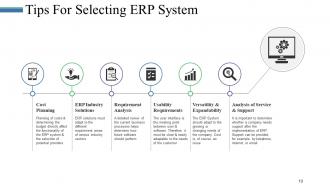
Slide 19: This slide presents Tips For Selecting ERP System with these of the factors- Cost Planning, Requirement Analysis, Usability Requirements, Versatility & Expandability, Analysis of Service & Support.
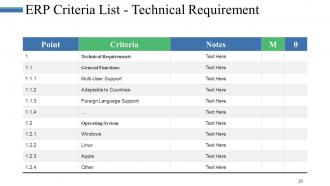
Slide 20: This slide shows ERP Criteria List - Technical Requirement.
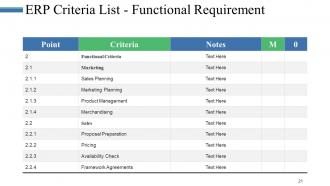
Slide 21: This slide presents ERP Criteria List - Functional Requirement.
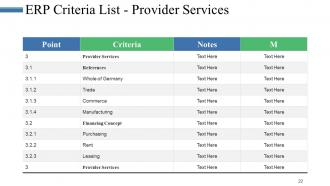
Slide 22: This slide showcases ERP Criteria List - Provider Services.
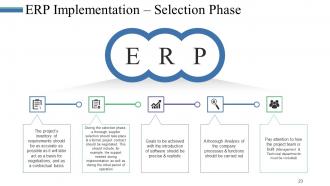
Slide 23: This slide shows ERP Implementation – Selection Phase.
Slide 24: This slide shows Coffee Break image.
Slide 25: This slide displays the title Charts & Graphs.
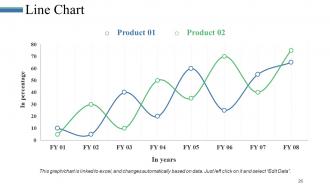
Slide 26: This slide can be used as Line Chart.
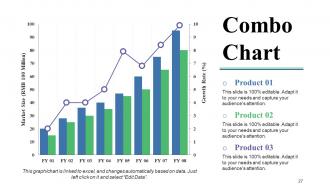
Slide 27: This slide displays Combo Chart. You can use this to compare.
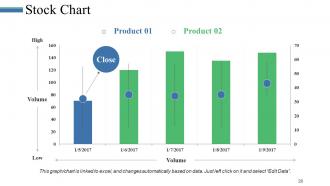
Slide 28: This slide presents Stock Chart.
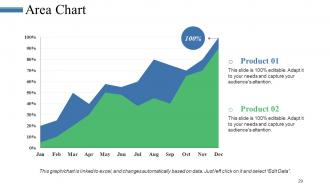
Slide 29: This slide showcases Area Chart. Use this to compare the products.
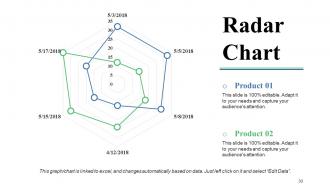
Slide 30: This slide presents Radar Chart. Add the data and use it.
Slide 31: This slide is titled Additional slides.
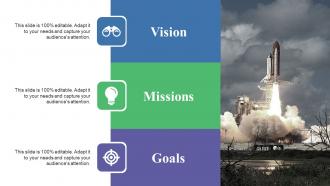
Slide 32: This is a Vision, Mission and Goals slide. State them here.
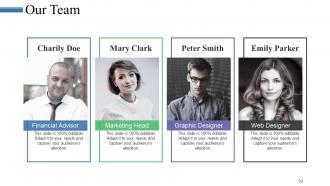
Slide 33: This is an Our Team slide with name, image &text boxes to put the required information.
Slide 34: This is an About Us slide showing Our Company, Value Client, and Premium services as examples.
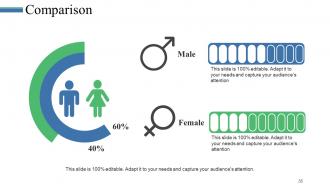
Slide 35: This slide shows Comparison of Positive Factors v/s Negative Factors with thumbsup and thumb down imagery
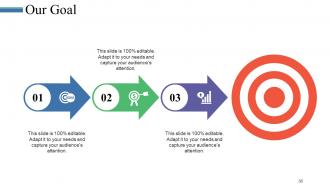
Slide 36: This slide shows Our Goals for your company.
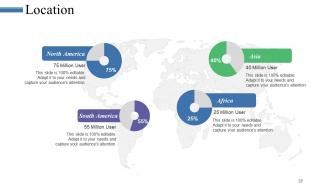
Slide 37: This slide showcases Global Project Locations with a World map and text boxes to make it explicit.
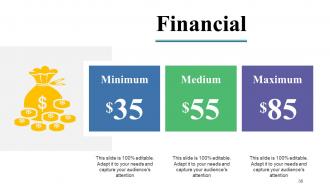
Slide 38: This slide shows Vital financial circles with percentage and text boxes.
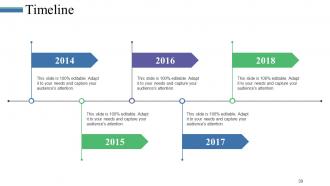
Slide 39: This is a Timeline slide to show milestones, growth or highlighting factors.
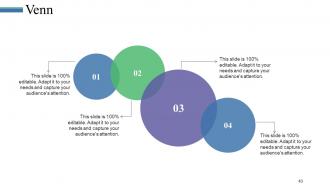
Slide 40: This is a Venn diagram image slide to show information, specifications etc.
Slide 41: This slide showcases a Puzzle with imagery.
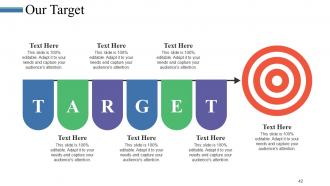
Slide 42: This slide shows Target image with text boxes.
Slide 43: This slide displays a Magnifying Glass with icon imagery.
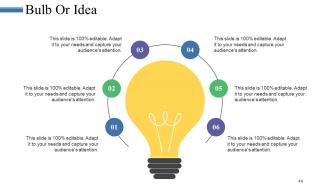
Slide 44: This is a Bulb or Idea slide to state a new idea or highlight specifications/information etc.
Slide 45: This is a Thank You slide with image.
Business Process Management Powerpoint Presentation Slides with all 45 slides:
Explain the jargon with our Business Process Management Powerpoint Presentation Slides. Get folks to comprehend what the expression indicates.


FAQs for Business Process Management
So there are five main pieces to a solid BPM setup. You've got process design - basically mapping out how things actually flow. Process execution is just running those workflows day-to-day. Monitoring comes next, and honestly? This is where most people completely fumble it. Analytics tell you what's working and what isn't. Then there's optimization - tweaking stuff based on your data. Oh, and governance/compliance so nothing goes off the rails. My advice though - pick one important process first and map it from start to finish. Don't try doing everything at once or you'll lose your mind.
First thing - map out what you're currently doing and find the stuff that's driving everyone crazy. Bottlenecks, mistakes, angry customers, whatever's eating your time. Then score each process: big impact but easy to fix? Do those first. Honestly, I'd start with anything customers actually see since that gets noticed fast. Your frontline people are goldmines for this - they deal with the broken stuff daily. Make a simple chart ranking everything by value, how hard it'll be, and urgency. Knock out the easy wins early. Builds momentum and honestly makes the whole thing feel less overwhelming.
Look, tech is what makes BPM actually doable these days. Automation handles all the boring repetitive stuff while dashboards show you where things are breaking down - it's wild how much you can see that was invisible before. Real-time data helps you catch problems you'd never spot manually. Cloud tools let you tweak processes super fast too, no more waiting weeks for IT. Honestly? Just digitize one workflow and you'll find bottlenecks everywhere. I was shocked when we first tried it - suddenly obvious why everything took forever.
So BPM is basically your safety net when everything goes sideways in the market. Map out what you're doing now, find where things get stuck, then tweak from there instead of rebuilding everything. Think of it like - I dunno, maybe this is a weird comparison - but it's like knowing your neighborhood really well so you can take side streets when the main road's jammed. Once you've got your processes nailed down and documented, your whole team can roll with changes way faster. They're not guessing how stuff works. Start with whatever process would hurt most if it broke.
Honestly, the biggest pain points are usually people being stubborn about change and executives who aren't really committed. Plus everyone tries to automate broken processes instead of fixing them first - which is backwards if you ask me. Get leadership visibly on board from day one. Map out what you're actually doing now before changing anything. Loop in the people who'll use this stuff daily, and keep explaining why you're doing it. Communication is huge here. Also grab some easy wins early on to prove it's working. Oh, and don't let management push crazy tight deadlines just because they're excited about it.
Honestly, BPM works great as your main framework - then you just plug in Lean and Six Sigma where they make sense. Map out your processes first with BPM to see the big picture. Then when you spot waste, that's where Lean comes in handy. Got quality issues? Break out Six Sigma's DMAIC approach. I've found it's way more effective than trying to force one methodology everywhere. BPM handles the governance side (which is super boring but necessary), while the other two give you the actual problem-solving muscle. Don't overthink it - start mapping, find your biggest headaches, then pick your tool.
Honestly, don't try to measure everything - that's a rookie mistake I see all the time. Pick 3-4 solid metrics that actually matter to your business goals. Cycle time and cost per process are obvious ones. Error rates too. Customer satisfaction scores will tell you if people notice your changes (hopefully in a good way). Employee productivity matters since you need to know if staff are even following the new processes - spoiler alert, half won't at first. Get your baseline numbers before changing anything, then check monthly progress. Process compliance rates are boring but necessary.
Definitely get people involved from day one - figure out who's actually using these processes, not just the managers. I'd do weekly check-ins or something because nobody wants to be surprised by changes that mess with their daily routine. Listen to what they're saying and actually use their feedback when you can. Honestly, most people just want to feel like they have a voice instead of getting bulldozed by corporate decisions. Oh, and give them real input on solutions - like, let them help design stuff. Trust me, they'll buy in way more if they feel ownership over it.
BPM basically makes you take a hard look at how stuff actually gets done, which is where the magic happens. You start mapping processes and suddenly see all these weird bottlenecks and redundant steps nobody questioned before. It's wild how much dead weight most workflows carry. The cool part is you get real data to back up new ideas instead of just throwing stuff at the wall. Like, you can actually prove what works and what doesn't. My advice? Pick whatever process drives your team most crazy and draw it out step by step. That's usually where you'll find the best opportunities hiding.
Look, BPM isn't something you do once and forget about. Get your leadership on board first - like actually on board, not just nodding along. Pick processes that'll move the needle financially because honestly, optimizing random stuff is just busy work. Your team needs to understand why changes are happening or they'll fight you every step. I can't stress this enough - resistance will torpedo everything. Track what you can measure so you know if things are actually working. Keep tweaking based on what users tell you. Set up regular check-ins to spot problems early and don't forget to celebrate the wins.
So basically, process mapping is like drawing out how work actually moves through your company. You can't fix stuff if you don't know where it's broken, right? It shows every step, handoff, and decision point. Most teams I know skip this part then wonder why nothing improves - drives me crazy honestly. The maps make it super obvious where you've got bottlenecks or people doing duplicate work. Plus everyone finally agrees on how things should actually work. Just pick your most annoying process first and map it out. You'll spot the problems immediately.
So AI and ML are making BPM way smarter than just automating boring stuff. Your processes can actually learn now - like automatically sending angry customer emails to the right team based on tone, or spotting bottlenecks before they happen. Pretty cool, right? Instead of rigid rules, you get intelligent automation that keeps getting better. Honestly, the predictive stuff blows my mind sometimes. Don't go crazy though - just pick one process where you've got tons of data and try some AI features there first. Way easier to prove it works.
Dude, change management is HUGE for BPM - probably bigger than the actual tech stuff. People hate changing how they work, especially if they've been doing it the same way forever. Most projects crash because companies get obsessed with redesigning processes but forget humans are stubborn. You've gotta get people on board early. Explain why you're doing this whole thing in the first place. Training helps too, obviously. Oh, and find those people who are naturally excited about change - they'll sell it to everyone else way better than you can. Trust me on that one.
Start by mapping out what you're actually doing now - that's half the battle right there. Visio and Lucidchart are solid for flowcharts, pretty easy to pick up. Budget tight? Miro or Draw.io work fine for basic stuff. Once you get fancy and want automation, Nintex and Appian are where the magic happens, but honestly they're overkill if you're just figuring things out. ProcessMaker's decent too. Pick something your team won't hate using - I've seen too many expensive tools collect digital dust because nobody wanted to learn them. Match the tool to where you're at, not where you think you should be.
So BPM is basically your compliance safety net - it documents everything and creates those audit trails regulators love to see. You can bake the rules right into your workflows with automatic approvals and checks. Honestly, it's a lifesaver for catching issues before they turn into massive fines. The cool part? Once you've got compliant processes mapped out, you can copy them to other departments without starting from scratch each time. Makes the whole compliance thing way less of a nightmare when auditors show up.
-
Great quality product.
-
Best Representation of topics, really appreciable.