Top 10 Input Data PowerPoint Templates with Professional Designs
Save time and engage your audience with our fully editable PowerPoint PPT Templates and Slides.
-

Building Perception From Sensory Input Data PPT Presentation AT
While your presentation may contain top-notch content, if it lacks visual appeal, you are not fully engaging your audience. Introducing our Building Perception From Sensory Input Data PPT Presentation AT deck, designed to engage your audience. Our complete deck boasts a seamless blend of Creativity and versatility. You can effortlessly customize elements and color schemes to align with your brand identity. Save precious time with our pre-designed template, compatible with Microsoft versions and Google Slides. Plus, its downloadable in multiple formats like JPG, JPEG, and PNG. Elevate your presentations and outshine your competitors effortlessly with our visually stunning 100 percent editable deck.
-

Data Diddling Explained Cybercrime Altering Input Data PPT Presentation AT
Do not compromise on a template that erodes your messages impact. Introducing our engaging Data Diddling Explained Cybercrime Altering Input Data PPT Presentation AT complete deck, thoughtfully crafted to grab your audiences attention instantly. With this deck, effortlessly download and adjust elements, streamlining the customization process. Whether you are using Microsoft versions or Google Slides, it fits seamlessly into your workflow. Furthermore, it is accessible in JPG, JPEG, PNG, and PDF formats, facilitating easy sharing and editing. Not only that you also play with the color theme of your slides making it suitable as per your audiences preference.
-
User Input Data Using Keyboard On Computer PPT Summary AT
Do not compromise on a template that erodes your messages impact. Introducing our engaging User Input Data Using Keyboard On Computer PPT Summary AT complete deck, thoughtfully crafted to grab your audiences attention instantly. With this deck, effortlessly download and adjust elements, streamlining the customization process. Whether you are using Microsoft versions or Google Slides, it fits seamlessly into your workflow. Furthermore, it is accessible in JPG, JPEG, PNG, and PDF formats, facilitating easy sharing and editing. Not only that you also play with the color theme of your slides making it suitable as per your audiences preference.
-
Machine learning description input data ppt powerpoint slides
Presenting this set of slides with name Machine Learning Description Input Data Ppt Powerpoint Slides. This is a two stage process. The stages in this process are Marketing, Business, Management, Planning, Strategy. This is a completely editable PowerPoint presentation and is available for immediate download. Download now and impress your audience.
-
User input data using keyboard on computer
Introducing our premium set of slides with User Input Data Using Keyboard On Computer. Ellicudate the one stage and present information using this PPT slide. This is a completely adaptable PowerPoint template design that can be used to interpret topics like User Input Data Using Keyboard On Computer. So download instantly and tailor it with your information.
-
Input data icon depicting multiple arrows
Introducing our Input Data Icon Depicting Multiple Arrows set of slides. The topics discussed in these slides are Input Data Icon Depicting Multiple Arrows. This is an immediately available PowerPoint presentation that can be conveniently customized. Download it and convince your audience.
-
Using Input Output Data To Analyze Economic Impact PPT Presentation AT
Ditch the Dull templates and opt for our engaging Using Input Output Data To Analyze Economic Impact PPT Presentation AT deck to attract your audience. Our visually striking design effortlessly combines creativity with functionality, ensuring your content shines through. Compatible with Microsoft versions and Google Slides, it offers seamless integration of presentation. Save time and effort with our pre designed PPT layout, while still having the freedom to customize fonts, colors, and everything you ask for. With the ability to download in various formats like JPG, JPEG, and PNG, sharing your slides has never been easier. From boardroom meetings to client pitches, this deck can be the secret weapon to leaving a lasting impression.
-
Introduction To Data Input And Output Models PPT Designs AT
While your presentation may contain top-notch content, if it lacks visual appeal, you are not fully engaging your audience. Introducing our Introduction To Data Input And Output Models Wd PPT Designs AT deck, designed to engage your audience. Our complete deck boasts a seamless blend of Creativity and versatility. You can effortlessly customize elements and color schemes to align with your brand identity. Save precious time with our pre-designed template, compatible with Microsoft versions and Google Slides. Plus, its downloadable in multiple formats like JPG, JPEG, and PNG. Elevate your presentations and outshine your competitors effortlessly with our visually stunning 100 percent editable deck.
-
Data input and output model example ppt presentation
Presenting, data input and output model example PPT presentation. This design is fully editable, you can change the color formats and adjust the image size by editing in any PowerPoint software. Information based PPT slide for creating an impact on the viewer. Compatible with Google Slides and various online and offline options. Available in both standard 4:3 and widescreen format 16:9 after downloading. Download this design in a few seconds and explore all the features. Convertible to pdf/jpeg/png format as required. We have shown a high-quality design which does not deteriorate in quality when edited or projected on a widescreen.
-
Resource optimization data input action implementation
Presenting resource optimization data input action implementation. This is a resource optimization data input action implementation. This is a three stage process. The stages in this process are resource optimization, resource allocation, resource management.
-
Data Flow Input Processing Output Storage PPT Example AT
Do not compromise on a template that erodes your messages impact. Introducing our engaging Data Flow Input Processing Output Storage PPT Example AT complete deck, thoughtfully crafted to grab your audiences attention instantly. With this deck, effortlessly download and adjust elements, streamlining the customization process. Whether you are using Microsoft versions or Google Slides, it fits seamlessly into your workflow. Furthermore, it is accessible in JPG, JPEG, PNG, and PDF formats, facilitating easy sharing and editing. Not only that you also play with the color theme of your slides making it suitable as per your audiences preference.
-
What is unsupervised learning input raw data ppt powerpoint presentation visuals
Presenting this set of slides with name What Is Unsupervised Learning Input Raw Data Ppt Powerpoint Presentation Visuals. The topics discussed in these slides are Unsupervised Learning, Input Raw Data, Algorithm, Output. This is a completely editable PowerPoint presentation and is available for immediate download. Download now and impress your audience.
-
Essential Data Inputs For Material Requirement Planning
The following slide highlights the essential data inputs for material requirement planning. Which illustrated customer demand, bills of material, inventory status and production schedule. Presenting our set of slides with Essential Data Inputs For Material Requirement Planning. This exhibits information on four stages of the process. This is an easy to edit and innovatively designed PowerPoint template. So download immediately and highlight information on Customer Demand, Inventory Status, Production Schedule.
-
Input And Processing Data Processing Cycle PPT Information AT
While your presentation may contain top-notch content, if it lacks visual appeal, you are not fully engaging your audience. Introducing our Input And Processing Data Processing Cycle PPT Information AT deck, designed to engage your audience. Our complete deck boasts a seamless blend of Creativity and versatility. You can effortlessly customize elements and color schemes to align with your brand identity. Save precious time with our pre-designed template, compatible with Microsoft versions and Google Slides. Plus, its downloadable in multiple formats like JPG, JPEG, and PNG. Elevate your presentations and outshine your competitors effortlessly with our visually stunning 100 percent editable deck.
-
Input Output Basics Understanding Data Flow Computing PPT Information AT
Do not compromise on a template that erodes your messages impact. Introducing our engaging Input Output Basics Understanding Data Flow Computing PPT Information AT complete deck, thoughtfully crafted to grab your audiences attention instantly. With this deck, effortlessly download and adjust elements, streamlining the customization process. Whether you are using Microsoft versions or Google Slides, it fits seamlessly into your workflow. Furthermore, it is accessible in JPG, JPEG, PNG, and PDF formats, facilitating easy sharing and editing. Not only that you also play with the color theme of your slides making it suitable as per your audiences preference.
-
Input And Output Data Monotone Icon In Powerpoint Pptx Png And Editable Eps Format
Give your next presentation a sophisticated, yet modern look with this 100 percent editable Input and output data monotone icon in powerpoint pptx png and editable eps format. Choose from a variety of customizable formats such as PPTx, png, eps. You can use these icons for your presentations, banners, templates, One-pagers that suit your business needs.
-
Input output power data system architecture flow with icons and arrows
Presenting this set of slides with name - Input Output Power Data System Architecture Flow With Icons And Arrows. This is a one stage process. The stages in this process are Systems Architecture, Systems Engineering, Software Architecture.
-
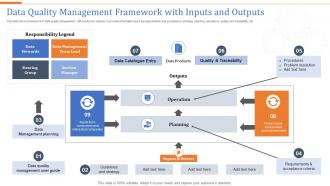
Data Quality Management Framework With Inputs And Outputs
This slide shows framework of data quality management with inputs and outputs. It provides information such as requirements and acceptance, strategy, planning, operations, quality and traceability, etc. Presenting our well-structured Data Quality Management Framework With Inputs And Outputs. The topics discussed in this slide are Operation, Planning, Outputs, Inputs Drivers. This is an instantly available PowerPoint presentation that can be edited conveniently. Download it right away and captivate your audience.
-
Input Applications Research Labs Overview PPT Graphics AT
Do not compromise on a template that erodes your messages impact. Introducing our engaging Input Applications Research Labs Overview PPT Graphics AT complete deck, thoughtfully crafted to grab your audiences attention instantly. With this deck, effortlessly download and adjust elements, streamlining the customization process. Whether you are using Microsoft versions or Google Slides, it fits seamlessly into your workflow. Furthermore, it is accessible in JPG, JPEG, PNG, and PDF formats, facilitating easy sharing and editing. Not only that you also play with the color theme of your slides making it suitable as per your audiences preference.
-
Data steward input quality business rules trending analysis
Presenting this set of slides with name - Data Steward Input Quality Business Rules Trending Analysis. This is an editable two stages graphic that deals with topics like Data Steward, Input Quality, Business Rules, Trending Analysis to help convey your message better graphically. This product is a premium product available for immediate download, and is 100 percent editable in Powerpoint. Download this now and use it in your presentations to impress your audience.
-
Data flow five input arms one output with an outgoing arrow
Presenting this set of slides with name - Data Flow Five Input Arms One Output With An Outgoing Arrow. This is a five stage process. The stages in this process are Data Flow, Data Management, Big Data.
-
Input process output covering data and information
Presenting this set of slides with name - Input Process Output Covering Data And Information. This is a three stage process. The stages in this process are Internal And External Process, Input Process Output.
-
Input icon showing manual data entry
Presenting our set of slides with Input Icon Showing Manual Data Entry. This exhibits information on four stages of the process. This is an easy-to-edit and innovatively designed PowerPoint template. So download immediately and highlight information on Input Icon Showing Manual Data Entry.
-
Input Output Process Flow For Data Analytics PPT Summary AT
Ditch the Dull templates and opt for our engaging Input Output Process Flow For Data Analytics PPT Summary AT deck to attract your audience. Our visually striking design effortlessly combines creativity with functionality, ensuring your content shines through. Compatible with Microsoft versions and Google Slides, it offers seamless integration of presentation. Save time and effort with our pre-designed PPT layout, while still having the freedom to customize fonts, colors, and everything you ask for. With the ability to download in various formats like JPG, JPEG, and PNG, sharing your slides has never been easier. From boardroom meetings to client pitches, this deck can be the secret weapon to leaving a lasting impression.
-
Input output process flow for data analytics
Presenting our set of slides with Input Output Process Flow For Data Analytics. This exhibits information on three stages of the process. This is an easy-to-edit and innovatively designed PowerPoint template. So download immediately and highlight information on Input, Process, Out Put.
-
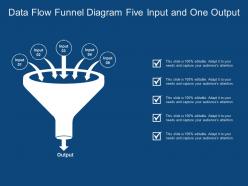
Data flow funnel diagram five input and one output
Presenting this set of slides with name - Data Flow Funnel Diagram Five Input And One Output. This is a five stage process. The stages in this process are Data Flow, Data Management, Big Data.
-
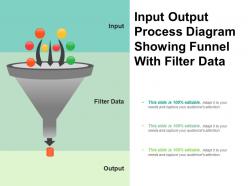
Input output process diagram showing funnel with filter data
Presenting Input Output Process Diagram Showing Funnel With Filter Data PPT template. The slide supports both widescreen and standard screen aspect ratios. Further, it is compatible with Google Slides. You can easily save this template into multiple image formats such as JPEG, PNG or document formats such as PDF. Moreover, high-quality will ensure that there is no room for distortion.
-
Home Loan Approval Process With Data Inputs And Back End Processing
This slide showcases bank home loan processing steps for the information provided by the applicant. It also includes the various stages of the home loan process such as validation of applicant id, validation of applicants financials, assessment of applicants borrowings, etc. Introducing our Home Loan Approval Process With Data Inputs And Back End Processing set of slides. The topics discussed in these slides are Application Process, Data Inputs, Back Processing. This is an immediately available PowerPoint presentation that can be conveniently customized. Download it and convince your audience.
-
Detailed solution assessment and validation model with process tasks and inputs complete deck
Enthrall your audience with this Detailed Solution Assessment And Validation Model With Process Tasks And Inputs Complete Deck. Increase your presentation threshold by deploying this well-crafted template. It acts as a great communication tool due to its well-researched content. It also contains stylized icons, graphics, visuals etc, which make it an immediate attention-grabber. Comprising fourty seven slides, this complete deck is all you need to get noticed. All the slides and their content can be altered to suit your unique business setting. Not only that, other components and graphics can also be modified to add personal touches to this prefabricated set.
-
Data Entry Work Process PPT Graphics VA
Dive into the world of efficient data handling with our meticulously crafted data entry work process PowerPoint graphics. These innovative PPT slides breathe new life into your corporate presentations allowing you to articulate complex concepts through sleek visual storytelling. Featuring modern slide designs and customizable elements this presentation deck enables you to streamline your data processing workflow effectively. Whether youre a virtual assistant or a business analyst these editable slides are a musthave for clear communication and impactful presentations. Capture your audiences attention with dynamic infographic templates and elevate your data visualization game to new heights.
-
Data Entry Playbook PPT Demonstration VA
Dive into the realm of efficiency with the data entry playbook PPT demonstration crafted for virtual assistants looking to elevate their skill set. This engaging presentation deck showcases modern slide designs that blend visually appealing graphics with actionable insights making it indispensable for streamlining workflows. Ideal for corporate training sessions or client pitches these editable slides provide a perfect balance of creativity and professionalism. Enhance your data visualization capabilities and empower your audience to grasp the essential techniques for successful data management. Unlock potential with this dynamic resource tailored for the modern virtual assistant.
-
Computer Operator Data Entry Insights PPT Designs AT
Step up your game with our enchanting Computer Operator Data Entry Insights PPT Designs AT deck, guaranteed to leave a lasting impression on your audience. Crafted with a perfect balance of simplicity, and innovation, our deck empowers you to alter it to your specific needs. You can also change the color theme of the slide to mold it to your companys specific needs. Save time with our ready made design, compatible with Microsoft versions and Google Slides. Additionally, its available for download in various formats including JPG, JPEG, and PNG. Outshine your competitors with our fully editable and customized deck.
-
Data Integration Automation Icon From Multiple Sources
Presenting our set of slides with Data Integration Automation Icon From Multiple Sources This exhibits information on three stages of the process. This is an easy to edit and innovatively designed PowerPoint template. So download immediately and highlight information on Data Integration Automation, Multiple Sources.
-
Cut Costs With Data Entry Automation PPT Information AT
While your presentation may contain top-notch content, if it lacks visual appeal, you are not fully engaging your audience. Introducing our Cut Costs With Data Entry Automation PPT Information AT deck, designed to engage your audience. Our complete deck boasts a seamless blend of Creativity and versatility. You can effortlessly customize elements and color schemes to align with your brand identity. Save precious time with our pre-designed template, compatible with Microsoft versions and Google Slides. Plus, its downloadable in multiple formats like JPG, JPEG, and PNG. Elevate your presentations and outshine your competitors effortlessly with our visually stunning 100 percent editable deck.
-
Reduce Errors Using Data Entry Automation PPT Summary AT
Step up your game with our enchanting Reduce Errors Using Data Entry Automation PPT Summary AT deck, guaranteed to leave a lasting impression on your audience. Crafted with a perfect balance of simplicity, and innovation, our deck empowers you to alter it to your specific needs. You can also change the color theme of the slide to mold it to your companys specific needs. Save time with our ready made design, compatible with Microsoft versions and Google Slides. Additionally, its available for download in various formats including JPG, JPEG, and PNG. Outshine your competitors with our fully editable and customized deck.
-
Case Study On Automating Data Integration
This slide represents case study on data integration automation assisting companies to enhance new customer onboarding effectively. It includes various components such as overview, challenges, solutions, and results. Presenting our well structured Case Study On Automating Data Integration The topics discussed in this slide are Customer Onboarding, Management Company, Data Integration. This is an instantly available PowerPoint presentation that can be edited conveniently. Download it right away and captivate your audience.
-
Improve Accuracy Through Data Entry Automation PPT Graphics AT
While your presentation may contain top-notch content, if it lacks visual appeal, you are not fully engaging your audience. Introducing our Improve Accuracy Through Data Entry Automation PPT Graphics AT deck, designed to engage your audience. Our complete deck boasts a seamless blend of Creativity and versatility. You can effortlessly customize elements and color schemes to align with your brand identity. Save precious time with our pre-designed template, compatible with Microsoft versions and Google Slides. Plus, its downloadable in multiple formats like JPG, JPEG, and PNG. Elevate your presentations and outshine your competitors effortlessly with our visually stunning 100 percent editable deck.
-
RPA Bots Automating Data Entry And System Integration PPT Template AT
Ditch the Dull templates and opt for our engaging RPA Bots Automating Data Entry And System Integration PPT Template AT deck to attract your audience. Our visually striking design effortlessly combines creativity with functionality, ensuring your content shines through. Compatible with Microsoft versions and Google Slides, it offers seamless integration of presentation. Save time and effort with our pre-designed PPT layout, while still having the freedom to customize fonts, colors, and everything you ask for. With the ability to download in various formats like JPG, JPEG, and PNG, sharing your slides has never been easier. From boardroom meetings to client pitches, this deck can be the secret weapon to leaving a lasting impression.
-
Data Entry Automation Portfolio Presentation PPT Graphics AT
Step up your game with our enchanting Data Entry Automation Portfolio Presentation PPT Graphics AT deck, guaranteed to leave a lasting impression on your audience. Crafted with a perfect balance of simplicity, and innovation, our deck empowers you to alter it to your specific needs. You can also change the color theme of the slide to mold it to your companys specific needs. Save time with our ready-made design, compatible with Microsoft versions and Google Slides. Additionally, its available for download in various formats including JPG, JPEG, and PNG. Outshine your competitors with our fully editable and customized deck.
-
AI Data Entry Automation Dashboard PPT Presentation VA
Imagine a world where data entry is a breezewelcome to the AI Data Entry Automation Dashboard PowerPoint Presentation. This dynamic presentation deck is tailored for business professionals eager to streamline their operations and enhance productivity. With expertly crafted slides featuring modern designs and informative infographics your message will resonate powerfully with stakeholders. Showcase the transformative potential of automation in data management backed by compelling visuals and insightful analytics. Ideal for corporate presentations or strategy discussions this tool will engage your audience and elevate your narrative making a strong case for embracing efficient technologies. Unlock the future of data processing today.
-
Architecture Of Automated Data Integration Process
This slide represents an architecture that assists companies in automating data integration effectively for enhancing business intelligence and reporting system. It includes various components such as database, data warehouse, reporting system, etc. Introducing our Architecture Of Automated Data Integration Process set of slides. The topics discussed in these slides are Data Integration, Data Warehouse, File Transfer Protocol. This is an immediately available PowerPoint presentation that can be conveniently customized. Download it and convince your audience.
-
Decision Support System Input Output Activities Reports PPT Designs AT
Ditch the Dull templates and opt for our engaging Decision Support System Input Output Activities Reports PPT Designs AT deck to attract your audience. Our visually striking design effortlessly combines creativity with functionality, ensuring your content shines through. Compatible with Microsoft versions and Google Slides, it offers seamless integration of presentation. Save time and effort with our pre designed PPT layout, while still having the freedom to customize fonts, colors, and everything you ask for. With the ability to download in various formats like JPG, JPEG, and PNG, sharing your slides has never been easier. From boardroom meetings to client pitches, this deck can be the secret weapon to leaving a lasting impression.
-
Data Integration Dashboard Interface PPT Demonstration VA
Dive into the future of analytics with our captivating data integration dashboard interface PowerPoint demonstration. This presentation deck showcases a visually striking layout that easily communicates complex data through modern slide design and engaging infographic templates. Perfect for corporate presentations or strategy meetings it empowers you to illustrate data visualization effectively while keeping your audience enthralled. With customizable editable slides you can tailor the narrative to fit your unique insights. Whether youre pitching innovative solutions or delivering comprehensive reports this versatile tool is your gateway to insightful storytelling. Enhance your workflow presentations and make an impact today.
-
Process Input Metrics Dashboard Overview PPT Template AT
Unlock the potential of your data with the Process Input Metrics Dashboard Overview PPT Template. This meticulously crafted presentation deck is designed to elevate your corporate storytelling, providing a seamless blend of visual aesthetics and functional clarity. Featuring editable slides that showcase key performance indicators, this template empowers you to transform complex data into engaging visuals. Ideal for business analysts and project managers, each slide is tailored for impactful data visualization, ensuring your insights resonate with stakeholders. Whether youre using PowerPoint, Google Slides, or Keynote, this professional PPT will enhance your presentations and drive informed decision-making.
-
Ensuring Data Accuracy Overcoming Integration And Entry PPT Demonstration AT
Elevate your presentations with our Ensuring Data Accuracy Overcoming Integration and Entry PowerPoint template, designed for professionals who demand precision and clarity. This meticulously crafted presentation deck features editable slides that seamlessly integrate data visualization techniques, ensuring your audience grasps complex information effortlessly. With a blend of corporate aesthetics and innovative layouts, each slide serves as a canvas for visual storytelling, making your insights resonate. Perfect for stakeholders and teams alike, this template empowers you to convey critical data with confidence, transforming your pitch deck into a compelling narrative that drives decision-making and fosters collaboration.
-
Innovations In Automated Data Entry Techniques PPT PowerPoint AT
Step up your game with our enchanting Innovations In Automated Data Entry Techniques PPT PowerPoint AT deck, guaranteed to leave a lasting impression on your audience. Crafted with a perfect balance of simplicity, and innovation, our deck empowers you to alter it to your specific needs. You can also change the color theme of the slide to mold it to your companys specific needs. Save time with our ready-made design, compatible with Microsoft versions and Google Slides. Additionally, its available for download in various formats including JPG, JPEG, and PNG. Outshine your competitors with our fully editable and customized deck.
-
Technological Trends To Enhance Data Integration Automation
This slide represents various technological trends that assist companies to automate their data integration for enhancing business insights. It includes trends such as cloud based integration, AI, machine learning, etc. Presenting our set of slides with Technological Trends To Enhance Data Integration Automation This exhibits information on four stages of the process. This is an easy to edit and innovatively designed PowerPoint template. So download immediately and highlight information on Integration Platform, Advanced Machine, Integration Platforms.
-
SCADA Systems Data Acquisition And HMI PPT Template AT
While your presentation may contain top-notch content, if it lacks visual appeal, you are not fully engaging your audience. Introducing our SCADA Systems Data Acquisition And HMI PPT Template AT deck, designed to engage your audience. Our complete deck boasts a seamless blend of Creativity and versatility. You can effortlessly customize elements and color schemes to align with your brand identity. Save precious time with our pre-designed template, compatible with Microsoft versions and Google Slides. Plus, its downloadable in multiple formats like JPG, JPEG, and PNG. Elevate your presentations and outshine your competitors effortlessly with our visually stunning 100 percent editable deck.
-
Data Entry Healthcare PPT Template VA
Unlock the potential of your healthcare presentations with this dynamic data entry healthcare PPT template. Crafted to enhance visual storytelling this customizable presentation deck features modern slide designs that seamlessly integrate data visualization and infographic templates. Perfect for medical professionals or business consultants each slide is tailored to present crucial statistics and insights with clarity and impact. Engage your audience with creative layouts that capture attention while editable slides ensure your message is consistently professional. Whether youre working on a corporate presentation or a strategy deck this template is your goto solution for effectively communicating complex information in a streamlined innovative format.
-
Data Acquisition And Integration PPT Example VA
Dive into the world of data acquisition and integration with our expertly crafted PowerPoint template. This presentation deck is your key to presenting complex ideas in a clear engaging manner. With stunning visuals and dynamic infographic templates youll captivate your audience while showcasing vital data flows and integration strategies. Ideal for corporate presentations or consulting discussions these editable slides allow for easy customization to suit your unique narrative. Elevate your message through modern slide designs that facilitate visual storytelling and effective data visualization. Make an impact with this powerful tool that ensures your insights resonate with your stakeholders.
-
Mastering Input Output Process Essentials PPT Information AT
Step up your game with our enchanting Mastering Input Output Process Essentials PPT Information AT deck, guaranteed to leave a lasting impression on your audience. Crafted with a perfect balance of simplicity, and innovation, our deck empowers you to alter it to your specific needs. You can also change the color theme of the slide to mold it to your companys specific needs. Save time with our ready-made design, compatible with Microsoft versions and Google Slides. Additionally, its available for download in various formats including JPG, JPEG, and PNG. Outshine your competitors with our fully editable and customized deck.
-
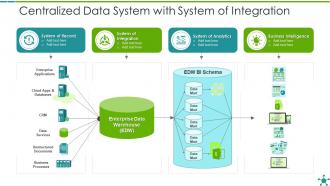
Centralized data system with system of integration
Introducing our Centralized Data System With System Of Integration set of slides. The topics discussed in these slides are System Of Integration, System Of Analytics, Business Intelligence. This is an immediately available PowerPoint presentation that can be conveniently customized. Download it and convince your audience.
-
Data To Highlight Key Insights PPT Sample AT
While your presentation may contain top-notch content, if it lacks visual appeal, you are not fully engaging your audience. Introducing our Data To Highlight Key Insights PPT Sample AT deck, designed to engage your audience. Our complete deck boasts a seamless blend of Creativity and versatility. You can effortlessly customize elements and color schemes to align with your brand identity. Save precious time with our pre-designed template, compatible with Microsoft versions and Google Slides. Plus, its downloadable in multiple formats like JPG, JPEG, and PNG. Elevate your presentations and outshine your competitors effortlessly with our visually stunning 100 percent editable deck.
-
Data Entry Automation Techniques And Benefits PPT Demonstration AT
Do not compromise on a template that erodes your messages impact. Introducing our engaging Data Entry Automation Techniques And Benefits PPT Demonstration AT complete deck, thoughtfully crafted to grab your audiences attention instantly. With this deck, effortlessly download and adjust elements, streamlining the customization process. Whether you are using Microsoft versions or Google Slides, it fits seamlessly into your workflow. Furthermore, it is accessible in JPG, JPEG, PNG, and PDF formats, facilitating easy sharing and editing. Not only that you also play with the color theme of your slides making it suitable as per your audiences preference.
-
Automation Maturity Model For Effective Data Integration
This slide represents automation maturity model that assists companies in tracking and monitoring their data integration automation process effectively. It includes various phases such as low capability, emerging, functional, etc. Introducing our premium set of slides with Automation Maturity Model For Effective Data Integration Ellicudate the five stages and present information using this PPT slide. This is a completely adaptable PowerPoint template design that can be used to interpret topics like Standardized Data, Decision Making Processes, Low Capability. So download instantly and tailor it with your information.
-
Mastering Data Entry Eliminate Costly Mistakes PPT Example AT
Ditch the Dull templates and opt for our engaging Mastering Data Entry Eliminate Costly Mistakes PPT Example AT deck to attract your audience. Our visually striking design effortlessly combines creativity with functionality, ensuring your content shines through. Compatible with Microsoft versions and Google Slides, it offers seamless integration of presentation. Save time and effort with our pre-designed PPT layout, while still having the freedom to customize fonts, colors, and everything you ask for. With the ability to download in various formats like JPG, JPEG, and PNG, sharing your slides has never been easier. From boardroom meetings to client pitches, this deck can be the secret weapon to leaving a lasting impression.
-
Digital Production Report For Accurate Data Entry PPT Mockup AT
Step up your game with our enchanting Digital Production Report For Accurate Data Entry PPT Mockup AT deck, guaranteed to leave a lasting impression on your audience. Crafted with a perfect balance of simplicity, and innovation, our deck empowers you to alter it to your specific needs. You can also change the color theme of the slide to mold it to your companys specific needs. Save time with our ready-made design, compatible with Microsoft versions and Google Slides. Additionally, its available for download in various formats including JPG, JPEG, and PNG. Outshine your competitors with our fully editable and customized deck.
-
Entry Level Data Engineering PPT Mockup VA
Breaking into data engineering feels like staring at a tangled web of pipelines schemas and ETL processes. You need a visual anchor to explain those concepts clearly without overwhelming a junior audience. This entry level data engineering PPT mockup gives you exactly that clean editable slides built around real workflow scenarios not abstract diagrams. Data visualization elements simplify batch processing and storage layers into digestible chunks. Use this corporate presentation to train new hires or present your teams architecture to stakeholders. The modern slide design keeps attention on your data story not cluttered graphics. Each professional PPT layout supports your teaching flow without adding unnecessary complexity.
-
Automated Data Entry Solutions For Business Growth PPT Information AT
While your presentation may contain top-notch content, if it lacks visual appeal, you are not fully engaging your audience. Introducing our Automated Data Entry Solutions For Business Growth PPT Information AT deck, designed to engage your audience. Our complete deck boasts a seamless blend of Creativity and versatility. You can effortlessly customize elements and color schemes to align with your brand identity. Save precious time with our pre-designed template, compatible with Microsoft versions and Google Slides. Plus, its downloadable in multiple formats like JPG, JPEG, and PNG. Elevate your presentations and outshine your competitors effortlessly with our visually stunning 100 percent editable deck.
-
Data integration example chart presentation background images
Presenting data integration example chart presentation background images. This is a data integration example chart presentation background images. This is a five stage process. The stages in this process are metadata management, decision support systems, data warehouse, data governance, enterprise architecture.