


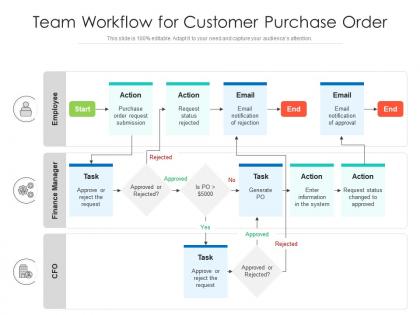
Team workflow for customer purchase order




Try Before you Buy Download Free Sample Product
 Impress Your
 Audience
 100%
100% Editable
 Save Hours
 of Time


Our Team Workflow For Customer Purchase Order are topically designed to provide an attractive backdrop to any subject. Use them to look like a presentation pro.
People who downloaded this PowerPoint presentation also viewed the following :
Team workflow for customer purchase order with all 2 slides:
Use our Team Workflow For Customer Purchase Order to effectively help you save your valuable time. They are readymade to fit into any presentation structure.
FAQs for Team workflow for
Honestly, you just need three things nailed down. First, make sure everyone actually knows what they're supposed to be doing - clear task assignments. Then set up some way to track progress in real time, and don't forget decent communication channels. Pick one platform and stick with it - Asana, Monday, whatever. Just not another tool that'll sit unused. Set realistic deadlines (not the "this seems doable in theory" kind), create workflows people can follow without a manual, and do regular check-ins. Oh, and keep everything simple enough that your team won't try to work around the system.
Track the numbers but don't ignore how your team actually feels. Cycle times and missed deadlines give you the hard data you need. But here's the thing - if everyone's constantly stressed or working around your process instead of with it, those metrics don't mean much. I'd survey people monthly about whether the workflow actually helps or just creates busywork. Honestly, the soft stuff can be more telling than spreadsheets sometimes. Pick maybe 2-3 metrics that actually matter for your specific situation and check them regularly. No point tracking everything.
Dude, communication literally makes or breaks team productivity. I've seen projects crash because nobody knew who was doing what. Daily check-ins are a game changer - even super quick ones in Slack work. You'll catch problems before they snowball, and honestly? It saves everyone from those cringe moments where two people worked on the same thing. My team does these 5-minute standup messages each morning. Nothing fancy, just "here's what I'm tackling today" type stuff. Sounds basic but it prevents so much chaos later. Trust me on this one.
Dude, get a project management tool like Asana or Monday - game changer. Zapier's pretty cool too, connects all your apps so stuff happens automatically. No more endless email threads asking "wait, what's the status on this?" Slack keeps everyone chatting in one place instead of scattered messages everywhere. I swear the amount of time you'll save just on status meetings is insane. Pick one main tool first though and make sure your whole team actually uses it (good luck with that). You'll notice better coordination right away. Trust me, anything that cuts down on those "quick sync" calls is worth it.
Honestly, map out your workflow first instead of guessing where things get stuck. Break big tasks into smaller pieces. Cross-train people so work doesn't pile up waiting for one person - that's usually the worst part. Better communication helps too since half the time people don't even know what's blocking them. Kanban boards are pretty useful for seeing how much work is actually in progress. Oh, and build in some buffer time between tasks that depend on each other. Start with whatever's causing the biggest headache first.
Here's what I'd do - nail down maybe 3-4 things that absolutely can't budge. Deadlines, how people communicate, basic quality stuff. After that? Let teams figure out their own rhythm. One team might love daily check-ins, another does fine with weekly touchbases. Honestly, I've seen this work way better than forcing everyone into the same box. It's kinda like... you set the boundaries but don't micromanage how they work within them. Ask your teams what flexibility would actually help them most. You'll probably be surprised by their answers.
Ugh, most teams mess up because nobody knows who's doing what - I've literally watched projects implode over this! Poor communication kills everything too. Document your process first, then spot where stuff always gets stuck. Set up regular check-ins instead of drowning in emails (seriously, stop that). Don't try fixing everything at once though. Pick one thing, improve it, then move on. Oh and quit micromanaging every little thing - you'll just slow everyone down. Proper project management tools help way more than you'd think.
Honestly, your team setup completely dictates workflow management. With remote teams, you're basically documenting everything since you can't just walk over and ask questions - kind of annoying but necessary. Hybrid's the worst though, because you're constantly making sure remote people aren't missing out on hallway conversations. In-person teams get to rely on those quick "hey, how's it going?" moments and can actually see when someone's drowning in work. The trick is matching your tools to how people actually work together instead of cramming everyone into the same process.
Track cycle time, throughput, and work-in-progress limits - those are your big three. Cycle time shows how long tasks actually take. Throughput is just how much your team finishes each sprint. Most teams go crazy tracking everything under the sun, then wonder why nobody looks at the data. These metrics actually tell you where things are getting stuck. Oh, and definitely track blocked items too - like when work sits there waiting for approvals or whatever. I'd stick with just these four for now. Give it a month, see what jumps out at you, then maybe add more if you need to.
Make improvement feel safe, not like extra work. Ask "what slowed us down this week?" in retrospecs and actually DO something with the answers. Too many teams I've worked with just let suggestions die - drives me nuts. When someone suggests a better process, celebrate it. Be open about trying new stuff. Build time into each sprint for people to experiment with tools or approaches. Show your team that questioning how things work is good, not something they'll get in trouble for. Oh, and make this weekly, not some quarterly exercise nobody remembers.
Honestly, just sketch out your workflow first - flowcharts or bullet points, whatever clicks for you. Write down who does what and when stuff gets passed between people. Don't overthink it though, super detailed docs are basically useless because nobody reads them. Oh, and definitely note what happens when things inevitably go sideways. Put it somewhere everyone can actually find it (not buried in some random folder). The trick is updating it when processes change - I'd set a reminder every few months to review everything. Otherwise you'll end up with outdated info that's worse than having no documentation at all.
Honestly, I'd start by literally drawing lines connecting your team's daily stuff to the bigger company goals - sounds silly but it works. Check in with leadership constantly because priorities shift way more than they'll ever admit (learned that the hard way). Break those huge objectives down into actual measurable things your team can hit. Everyone needs to get why their work matters, not just what they're supposed to do. Monthly reviews help catch when you're veering off course. The whole thing falls apart if people don't see how their piece fits the puzzle.
Honestly, feedback is like having a GPS for your work process. Ask your team regularly what's driving them crazy or slowing things down. I've watched entire workflows get fixed just because someone finally asked "what's the most annoying thing we do?" during a team meeting. Don't wait around hoping people will complain when stuff breaks - be proactive about it. Schedule regular check-ins, maybe weekly or bi-weekly depending on your team size. And here's the thing that actually matters: you have to act on what people tell you, otherwise they'll just stop bothering to share feedback at all.
Pair them up with someone who really knows their stuff - that buddy system thing actually works. You've got those processes documented somewhere, right? Don't throw everything at them on day one though. Instead, walk them through an actual project so they can see how things really happen (spoiler: it's messier than the manual). I'd do check-ins after week one and again at the month mark. Honestly, nothing beats learning by doing when you've got someone watching your back. Way better than just handing them a stack of procedures and hoping for the best.
Oh man, team size totally changes everything with workflow stuff. Small teams like 3-5 people? You can pretty much just talk things through quickly and keep it simple. But once you get to 7+ people it's honestly like herding cats if you don't have solid documentation and clear handoffs. The 6-10 range is weirdly the worst - you're too big for the casual approach but not quite big enough to justify heavy processes yet. My take is just match your complexity to your size, you know? Don't overthink it for tiny teams, but definitely don't wing it when there's a bunch of people involved.
-
Awesome presentation, really professional and easy to edit.
-
Qualitative and comprehensive slides.