

Work breakdown structure ppt presentation examples




Try Before you Buy Download Free Sample Product
 Impress Your
 Audience
 100%
100% Editable
 Save Hours
 of Time


Ensure your agenda continues on course with our Work Breakdown Structure Ppt Presentation Examples. Complete every action as you desired.
People who downloaded this PowerPoint presentation also viewed the following :
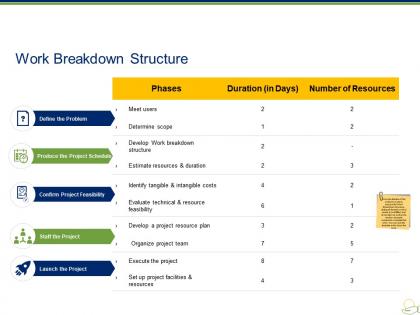
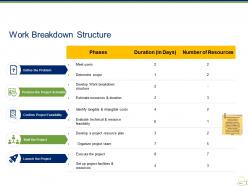
Work breakdown structure ppt presentation examples with all 5 slides:
Drive desire and generate demand with our Work Breakdown Structure Ppt Presentation Examples. They are a good growth catalyst.


FAQs for Work breakdown structure
You'll want to focus on three main things: hierarchical structure, deliverable-focused work packages, and the 100% rule. Break everything down from big deliverables to smaller tasks - like a family tree for your project work. Make sure each level captures all the scope without overlap or gaps. Your lowest-level work packages should be specific enough to estimate time and cost, plus assign to someone. I usually aim for 8-80 hours per task - honestly anything longer gets messy to track. Start with major deliverables and keep breaking them down. Stop when you hit tasks that are concrete and actually assignable to real people.
Honestly, a WBS is a game-changer because it splits your project into bite-sized pieces instead of one giant mess. Makes estimating time and budget way more realistic since you're dealing with actual deliverables. You'll know who's doing what and can track stuff properly. Dependencies become super obvious too. My favorite part? When your boss asks where the money's going, you can literally point to specific work packages. Just make sure each chunk is clear enough that whoever gets it won't bug you every five minutes asking "wait, what am I supposed to do again?"
Honestly, the biggest trap is going way too detailed or staying super vague - find that sweet spot where work packages are actually manageable. Organize by deliverables, not timelines or who's doing what. I get it, Sarah's probably already bugging you about dates, but resist assigning people or deadlines right now. Everything should roll up to your main project scope without tasks overlapping between branches. Each work package needs to be something you can realistically estimate and track later. Oh, and definitely start with your major deliverables then break those down - trust me, it's so much easier than trying to build everything from the bottom up.
So basically, a WBS is like giving your whole team the same map. Everyone can actually see what needs doing and who's doing what - no more of those "wait I thought you were handling that" disasters. Breaking big projects into smaller chunks makes it way easier to talk about what's stuck or falling behind. Your status meetings might even become useful for once (shocking, I know). The trick is getting everyone involved when you're building it out. People are way more likely to stick with something they helped create. Plus when everything's mapped out clearly, you avoid those awkward moments where half the team is working on the wrong thing.
So there's this 100-hour rule that's pretty helpful - just keep breaking tasks down until each one's under 100 hours. You can go top-down starting with big deliverables, then drill into smaller stuff. Or flip it and brainstorm all the tiny tasks first, then group them up. Most people honestly just figure it out as they go (I definitely did on my first project lol). The main thing is making sure each task has a clear outcome and someone owns it. I'd start with your major milestones and work backwards from there.
You want to knock out your WBS right after defining scope but before getting into the nitty-gritty scheduling stuff. It's basically your roadmap from "here's what we're doing" to "here's how we'll actually do it." Seriously, this thing will be your lifeline for cost estimates, resource assignments, progress tracking - the whole nine yards. Don't make my mistake and wait too long to create it. I learned that one the hard way when I had to redo half my planning because the WBS wasn't solid. Gets messy fast.
Honestly, digital tools changed everything for WBS creation. Microsoft Project and Smartsheet are solid choices - drag and drop beats those old whiteboard nightmares where only one person could make changes. Your team can jump in and edit stuff in real-time, which is pretty sweet. You'll be able to assign tasks, watch progress, and the math automatically rolls up from smaller tasks to bigger ones. Oh, and everything exports nicely into your other project tools. If you're just starting out though, maybe try MindMeister first. It's way less intimidating than the heavy-duty options.
Dude, you gotta get stakeholders involved when building your WBS. They know the actual work that needs doing - way better than you do honestly. Get your subject matter experts, sponsors, maybe some end users in workshops early on. They'll spot stuff you miss and tell you how detailed to go with each piece. I've watched so many PMs crash and burn trying to wing it alone. Your stakeholders will flag dependencies and risks you'd never think of, plus their effort estimates are usually more realistic. Oh and run interviews too if workshops get too chaotic. Just don't finalize anything without their input first.
So yeah, every industry does WBS totally differently based on what they actually build. Construction crews think in phases - foundation first, then framing, electrical, plumbing. Makes sense since you can't wire walls that don't exist yet! Software teams flip it completely though - they break down by features or user stories instead of physical steps. Manufacturing zeroes in on components and assembly stuff. Healthcare projects? Those get wild with all the compliance requirements (seriously, the paperwork alone...). Just look at how successful projects in your field structured theirs. That's honestly your best bet for a solid template.
Honestly, go hierarchical if you can. Linear WBS is just a glorified to-do list - works fine for simple projects but turns into chaos quickly. The parent-child relationships in hierarchical structures make tracking dependencies so much clearer. You'll actually see how tasks connect instead of squinting at some random list. Plus your stakeholders get that visual breakdown they love, and rolling up progress reports becomes way less painful. I mean, unless your project is dead simple with zero interdependencies, hierarchical saves you headaches later. Trust me on this one.
So basically, breaking your project down with a WBS makes estimating way less of a guessing game. You're looking at small chunks instead of one huge thing - like, way easier to estimate "design the login page" than "build the entire app," you know? Each piece you can actually compare to similar stuff you've done before. Plus you'll spot things you totally would've missed otherwise. Honestly, grocery shopping is the same deal - you wouldn't just guess your total bill, right? Get your tasks down to 2-3 days each and you'll be golden.
So here's the thing - your WBS should really be built around what you're actually delivering. Start with your big deliverables at the top, then break those down into smaller chunks of work. I always think of deliverables as the "what" and the WBS as showing you all the work to get there. It's kind of like working backwards from your end goal, which honestly makes way more sense than trying to guess what tasks you'll need upfront. List your key deliverables first, then just keep breaking them down until you've got manageable pieces. Works every time.
Yeah totally! Just flip the structure around - instead of those boring waterfall phases, organize by epics, features, and user stories. Top level = your product themes/epics, then break those down into features, then get specific with user stories and tasks. Honestly, it maps to sprint thinking way better than traditional WBS anyway. Keep it loose though - you'll be tweaking and refining constantly as you learn stuff each iteration. I'd start with whatever you know now and just let it evolve. Way more natural than trying to plan everything upfront.
Honestly, just do regular check-ins with your team - weekly when things are crazy, monthly when it's chill. Catch scope changes right when they happen, not three weeks later when nobody remembers what the hell shifted. Keep a change log showing what moved and why (I know, I know, sounds boring but you'll thank me later). Your stakeholders should be in these reviews too since they catch stuff you miss. Oh and don't make updating your WBS some separate thing - just build it into your regular project meetings. Way easier that way.
Honestly, a solid WBS is like having x-ray vision for project risks. Break your work into smaller pieces and you'll spot problems way earlier. Each work package becomes a checkpoint where you can ask "what's gonna mess this up?" You can assign someone to own each risk and actually plan for the worst-case stuff. When things do go wrong - and they will - you won't lose the whole project. The damage stays contained instead of spreading everywhere. I've seen too many projects tank because people skipped this step. Start small, think through what could break, then build your safety nets.
-
Easy to edit slides with easy to understand instructions.
-
Very unique, user-friendly presentation interface.