

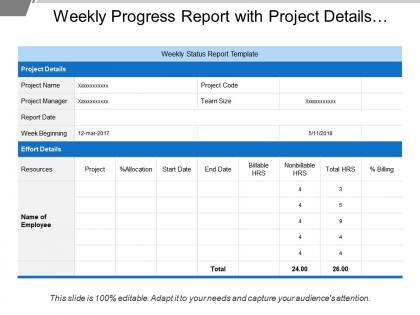
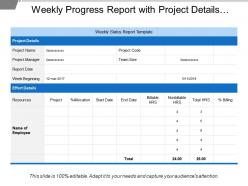
Weekly progress report with project details and release details




Try Before you Buy Download Free Sample Product
 Impress Your
 Audience
 100%
100% Editable
 Save Hours
 of Time


Fill them with glee with our Weekly Progress Report With Project Details And Release Details. The audience will feel extremely fortunate.
People who downloaded this PowerPoint presentation also viewed the following :
Weekly progress report with project details and release details with all 5 slides:
Cement your career with our Weekly Progress Report With Project Details And Release Details. Build it up brick by brick.

FAQs for Weekly progress report with project details
Just focus on the essentials: milestone progress, budget burn, any red flags, and what's happening next week. Oh, and definitely include team capacity - seriously, half the time problems come from people being completely swamped. Your stakeholders mainly want to know if you're hitting deadlines and if there's anything they need to jump in on. Skip the fluff metrics that don't actually matter. Keep everything to 2-3 bullets per section, and throw in specific dates for what's coming up. Makes it way easier for everyone to stay aligned on expectations.
Honestly, weekly progress reports are a game-changer for avoiding those awkward "oh wait, I thought you were doing that" situations. They help you spot problems early before they blow up into bigger headaches. Team members can actually see where they might be able to help each other out too. Instead of endless check-in meetings (ugh), everyone stays on the same page about what matters most. Just keep them short and focus on real results, not fluff. I'd go with something simple: what got done, what's coming up, and any walls you're hitting. Works way better than you'd think.
Honestly, just start with what you actually got done this week - real stuff, not vague "progress" nonsense. I break mine into three parts: wins, roadblocks, and what's next. Your wins need specifics - numbers, deliverables, whatever proves you weren't just spinning your wheels. When you hit problems, don't just whine about them. Say what you're doing to fix it or what help you need. Next week should be 3-5 concrete things, tops. Most people barely read these anyway, so use bullets instead of big paragraphs. Oh, and throw dates on anything with deadlines - people forget that stuff immediately.
Honestly, just figure out what each person actually gives a damn about. Executives want the big picture stuff - budget, major risks, high-level wins. Skip the technical weirdness with them. Your team needs the nitty-gritty: what's blocked, deadlines coming up, who's doing what. Clients? They just want to know if their stuff is on track and when they'll see it. I've learned to write one main report then just pull different pieces for different people - way easier than starting fresh every time. The trick is understanding what stresses each group out most, then hit those points directly.
Honestly, the biggest mistake is being either super vague or way too detailed - both are useless. Show actual progress, not just a task list. Skip the corporate BS nobody reads anyway. Your manager needs to know what's blocking you, so don't pretend everything's perfect when it isn't. I learned this the hard way lol. Mention challenges upfront so they can actually help. Focus on what really matters and always include next week's priorities. Makes everything clearer for everyone involved. Short sentences work. Longer ones with real substance work too, just don't ramble about meaningless stuff.
Honestly, charts and graphs will save you so much time on weekly reports. People just skim text anyway - might as well give them something visual to look at! Bar charts work great for showing task completion, and line graphs are perfect when you want to track progress over time. Your stakeholders can instantly see what's moving along versus what's stuck. I learned this the hard way after sending way too many text-heavy reports that nobody read. The visual stuff gets attention fast, plus it's way easier to spot trends and bottlenecks. Trust me, you'll get better engagement.
Dude, feedback is literally what separates useful reports from total wastes of time. Without it, you're just sending stuff into a black hole. Your manager responds? Great - now you can fix problems before they explode and actually stay on the same page about what matters. Short sentences work. But when teammates engage with your updates, it creates this cycle where everyone's actually communicating instead of just... existing in parallel universes or whatever. Here's the thing though - you can't just send reports and pray someone notices. Ask direct questions! "Does this timeline work?" "Am I missing anything here?" Force them to actually respond to you.
Don't wait until Friday to hunt down updates - that's a recipe for chaos. I'd set up regular check-ins with your team during the week, maybe Tuesday and Thursday? Use whatever project management tool you have to track stuff in real time. Standardized templates are a lifesaver too, otherwise everyone reports different things and you're stuck trying to make sense of it all. Oh, and definitely have team leads double-check their sections before you submit. Honestly, the PMs who just wing it always end up with wonky numbers. Make accuracy part of your routine, not something you scramble for last minute.
Depends what you're going for, really. If people need to reference stuff later or you've got teammates scattered across time zones, written reports are clutch. Quick team check-ins? Just do verbal updates so you can bounce ideas back and forth. Digital presentations work best when you're showing charts or doing demos - way better than drowning people in long emails (learned that the hard way). Oh, and honestly? The complexity of what you're reporting matters too. Match whatever format feels right for your team's vibe.
Weekly is definitely the way to go - same day every time. Don't mess with the schedule or you'll lose people (trust me, I did this and watched my subscribers bail). Consistency beats frequency every single time. Send them randomly and people get annoyed. Skip weeks and they forget you exist entirely. Friday afternoons hit different though - people actually want to see what happened that week before they check out for the weekend. Pick whatever day works for your team's workflow, just stick to it religiously. It needs to become part of everyone's routine, you know?
Ugh, been there! First thing - figure out what's actually causing the delays. Bad estimates? Not enough people? Scope creep? (That one's the worst.) Don't wait around hoping it'll fix itself. Update your stakeholders ASAP with a realistic timeline and show them your plan to catch up. Maybe you can shuffle priorities or ask for more help. The transparency thing is huge - people hate surprises but they're usually cool if you're upfront about problems and have an actual solution.
Okay so the trick is being super specific about what you actually got done, not just "worked on project X." Like say "finished user testing for project X, found three usability problems." Way more helpful. Definitely call out any blockers and what help you need - saves so much back-and-forth later. Oh and don't skip the wins! Even tiny ones matter for team morale. I swear leadership has no clue what's happening half the time, so focus on concrete outcomes instead of just listing activities. Makes such a difference when they can actually see progress.
Here's my take: specific goals in weekly reports are a game changer because you can actually track if you're getting stuff done. Like, saying "work on project X" tells nobody anything useful. But "finish 3 client proposals by Friday"? Now we're talking. Your manager knows exactly what you're up to, and honestly, it makes next week's report so much easier to write since you just check off what got done. I've found measurable stuff works best - numbers don't lie, you know? It keeps you honest about whether you're actually making progress or just looking busy.
Honestly, weekly reports are like having a workout buddy - they keep you honest. You don't want to write "still working on it" for the third week straight, so you actually push yourself to get stuff done. The rhythm helps too. Problems get caught before they blow up into disasters. Your manager can see when you're spinning your wheels and actually help instead of you suffering in silence for weeks. I used to hate writing them, but now I think of my weekly report as making a promise to myself. Way better than just going through the motions.
Honestly, I'd just stick with whatever your team's already using - Notion, Asana, Monday.com are all solid for tracking tasks and spitting out updates automatically. Google Docs works too if you want something dead simple. I probably use a basic Doc template like 60% of the time because I'm lazy and it's fast. Trello's good if your team likes the whole visual card thing (mine doesn't really get it). The trick is getting everyone to actually use the same tool consistently instead of having three different systems running. Start simple with a template you can copy-paste each week. Way less painful than overthinking it.
-
It saves your time and decrease your efforts in half.
-
Illustrative design with editable content. Exceptional value for money. Highly pleased with the product.