


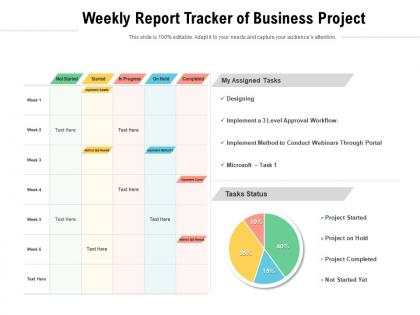
Weekly report tracker of business project




Try Before you Buy Download Free Sample Product
 Impress Your
 Audience
 100%
100% Editable
 Save Hours
 of Time


Our Weekly Report Tracker Of Business Project are topically designed to provide an attractive backdrop to any subject. Use them to look like a presentation pro.
People who downloaded this PowerPoint presentation also viewed the following :
Weekly report tracker of business project with all 2 slides:
Use our Weekly Report Tracker Of Business Project to effectively help you save your valuable time. They are readymade to fit into any presentation structure.
FAQs for Weekly report tracker
Track your milestone progress and budget burn rate first. Team velocity matters too - how much work actually got done vs what you planned. Flag any blockers or risks from the week. Resource utilization is huge when you're juggling multiple projects. Scope changes and client feedback that could mess with your timeline? Definitely include those. Honestly, charts and status indicators work way better than walls of text - people's eyes just glaze over otherwise. The whole point is giving stakeholders a quick snapshot without drowning them in details.
Dude, seriously try adding some visuals to those updates. People's brains just eat up images way faster than reading through paragraphs. Gantt charts are clutch for showing timeline stuff, and those red/yellow/green dots? Perfect for quick status checks. I'd throw in some simple bar charts too for budget tracking. Oh, and progress bars work amazing for milestones - way better than just saying "we're 60% done" or whatever. Before/after screenshots are gold because stakeholders can actually see what you accomplished. Trust me, bullet points put everyone to sleep. Start small with like one chart next week and watch how much more people pay attention.
Honestly, the worst mistake is trying to track every little thing - you'll just get buried in useless data. Pick maybe 3-5 metrics that actually tell you if you're hitting deadlines. Don't just count finished tasks either. Blockers and risks are way more important since those are what mess everything up. Oh, and waiting until Friday for updates is pointless - by then you're just writing a report instead of fixing problems. I learned this the hard way! Do quick check-ins Wednesday or Thursday so you can actually do something about issues.
Honestly, templates are a game changer because everyone finally speaks the same language - no more hunting around for basic info. Those endless "quick sync" meetings? Yeah, they basically disappear when status updates are already right there in front of you. New team members can actually figure out what's going on without asking a million questions. Plus it's way easier to catch blockers and see who's supposed to be doing what. I'd start simple with just a weekly template first. Trust me, your standups will be so much less painful once people know the drill.
Honestly, go with something visual that won't be a pain to update every week. Asana's pretty solid - those progress bars hit different when you're actually making headway. Monday.com has nice timeline views too. Trello's great if your team digs the whole card thing (dragging stuff to "Done" is weirdly satisfying, not gonna lie). Already using Microsoft everything? Project Online plays nice with your existing setup. The real trick though - and I learned this the hard way - is finding something everyone will actually use, not just install and forget about. Try free trials of maybe 2-3 and see what clicks during your weekly meetings.
Honestly, you've got to make people own their stuff and track it publicly. Give everyone specific deliverables with real deadlines. Then use those weekly meetings to go through what actually happened vs what was supposed to happen. Public reporting is weirdly effective - like, nobody wants to be that person who's always behind when everyone else is listening. I'd throw everything in a shared tracker too so there's no "oh I thought you meant..." drama later. The trick is making sure you actually circle back to whatever got missed last week. Otherwise people learn they can just... not do things.
So here's what actually works for weekly updates: lead with any problems or delays right at the top - don't bury that stuff! Then cover what you got done, what's blocking you, and next week's plan. Honestly, stakeholders just want to see progress quickly, so throw in some charts or simple dashboards instead of walls of text. I always send mine the same day each week with real numbers when I can. Oh, and make a template - you'll thank me later. Consistency is everything. People get annoyed when they can't find the info they need.
Start with one solid base template, then tweak it for different project types. Software stuff needs sprint cycles and bug tracking columns. Marketing projects? Add creative review stages and launch dates. Construction is all about permits and inspection checkpoints - totally different beast. Honestly, I'd just make 3 or 4 template versions for whatever project types you do most. Then copy and adjust when something new comes up. Way easier than starting from scratch every time. The key is figuring out what makes each type special and baking those checkpoints right into your setup.
Your tracking meetings are only as good as the feedback you actually get from people. Without real input from your team - like what's blocking them or where they need help - you're basically just collecting meaningless status updates. I've sat through way too many of those dead-end meetings where everyone just reads percentages off a spreadsheet. The good stuff happens when people feel comfortable flagging problems early and sharing what's genuinely working. Short version: create space for honest conversations, not just data collection. Otherwise you're missing the whole point.
Sprint velocity and story points are your best friends here. Track what you actually finish vs what you planned each week - that'll show you real patterns. Cycle time is clutch too (how long stuff sits in each stage). Honestly, don't overthink the vanity metrics though. Focus on whether you're consistently hitting sprint goals and maintaining quality. I'd set up some basic dashboard so you can catch bottlenecks before they bite you. The sustainable pace thing matters way more than looking impressive on paper. Short bursts of crazy productivity usually backfire anyway.
Monthly reviews are what you want for goals - weekly's way too often. Think about it: if you're switching directions every week, you're basically just spinning your wheels. Use those weekly check-ins for the smaller stuff like "are we hitting our targets?" But save monthly for the bigger picture - "is this even the right target?" You need enough time to actually see patterns instead of getting distracted by random weekly ups and downs. Honestly, goals need room to breathe or they don't mean anything. Just block out time monthly and don't skip it.
Honestly, digital templates are such a lifesaver compared to tracking stuff by hand. Everything calculates itself, you can set reminders, and sharing updates is super easy. No more trying to read your terrible handwriting either lol. The best part though? You'll actually start noticing patterns between projects since everything looks the same. Makes finding bottlenecks way easier. Oh, and you can search through old stuff instead of flipping through pages forever. I'd go with a basic spreadsheet or maybe Notion - whatever you pick, just commit to it for like a month so you actually see the difference.
Just throw a "risks and blockers" section into your weekly check-ins - honestly makes such a difference. I always do red/yellow/green to show if things are getting better or worse, way easier to spot patterns that way. Track new stuff that comes up AND how your existing problems are changing week to week. Oh and don't just write down what you're gonna do about risks - actually note what you've already done. Makes it feel less overwhelming somehow. The whole point is making it automatic so nothing catches you off guard later.
Honestly, timelines are what keep projects from turning into complete disasters. Your team needs to know when stuff is actually due, not just "sometime soon." Weekly milestones work great - break everything into chunks with real deadlines and deliverables. Here's the thing: people will spot problems way earlier when they're working toward specific dates. You'll also figure out pretty quickly if your time estimates are totally off (which happens more than you'd think). Without clear deadlines? Good luck getting anything finished on schedule. Start small with weekly goals and see how it goes.
Honestly, digging through your old weekly reports is a goldmine for this stuff. I'd focus on which tasks always take way longer than you think they will - we're all terrible at estimating, let's be real. Also check what external stuff trips you up most and when your team's actually firing on all cylinders vs. dragging. The trick is tracking the same things each time so you're not comparing apples to oranges later. Once you see the patterns, you can build buffers into your timelines and actually catch problems before they blow up your whole schedule.
No Reviews