

 0 Comment
 Customer Reviews

Are you tired of sifting through spreadsheets and emails to prepare project status reports? If yes, you are not alone. Yet, there is a solution at hand.
Try switching to project status report templates to streamline this task.
With a project status report template, you can track your project’s progress and identify any risks at an early stage. across businesses to ensure that the project meets milestones and remains on schedule. Project status reports can be daily, weekly and monthly.
These reports provide monthly project updates, including on accomplishments, plans, and future activities.
Then, we have quarterly status reports that provide an overview of projects over three months, showcasing long-term milestones.
Download our top daily status report templates to document your performance.
Daily project reporting fosters increased transparency, with each team member having a clear view of the project's status, upcoming tasks, and potential issues. It also enhances communication and helps identify risks and issues early on.
Managing daily project status reporting can be overwhelming without the right templates. SlideTeam’s daily project status report templates have been curated to simplify this task for you. These well-designed templates are ideal for project managers and teams who want to track their daily tasks.
Our experts have designed these ready-to-use templates, which are 100% editable. You can customize these templates and modify the elements to suit your project’s unique needs. These team productivity report templates facilitate easy tracking and monitoring of project progress.
This blog post compiles daily project status report templates that are useful for project managers, executives and team members across industries. Download our templates to start creating effective daily project status reports.
Check out our top executive project status report templates to monitor project health.
Template 1: Daily Project Status Report PPT Template Bundles
Use this complete bundle of daily project report PPT Templates to streamline communication and enhance collaboration. The topics covered are daily project status report tracking, daily project status reports of software applications, daily project status reports of HR management tools, and a lot more. Thanks to this comprehensive deck, you can elevate your project management efficiency. These easy-to-understand templates enable seamless project status tracking. Present these templates in team meetings or client presentations to articulate accomplishments, challenges, and milestones.
[product_image id=1118451]
Template 2: Daily Project Status Report
Here is a peek at a construction project status report that is perfect for monitoring daily progress. This slide covers project information, project status, completed work, and upcoming work. With the help of this PPT Layout, track daily progress and analyze the construction project’s overall status. This PPT template includes essential elements to communicate your project updates to your audience. You can streamline reporting and track progress using our well-structured daily construction project status report template. Download this versatile task completion report template to present the daily progress of a construction project effectively.

Template 3: Daily Project Status Report of Software Development
This PowerPoint Slide offers a well-rounded daily project status report of software development. Ensure efficient project tracking with our detailed daily project status report. A software company can use this actionable template, as it includes details such as project name, date, and overall project status. It outlines project status updates, highlights, project plan and status, issues and risks, and the next steps. The purpose of this slide is to ensure transparency in project management.

Template 4: Daily Project Status Report to Enhance Team Productivity
Do you want to enhance your team’s productivity and efficiency? We have designed a daily project status report template to make this task easier. The slide showcases milestone status, including major milestones, target date, and status. Using the project performance metrics mentioned in this well-structured template, project managers can focus on major tasks, ensuring close monitoring. Deploy this template to enhance your team’s overall performance and productivity.

Template 5: Daily Status Report PowerPoint PPT Template Bundle
Use this powerful PPT template bundle to showcase the daily status report to your audience. This deck, in 10 slides, streamlines the tracking process. This bundle covers slides such as the daily project status report with key updates, the daily status report for tasks assigned to employees, the daily status and progress report with key parameters, and a lot more. Use these templates as a tool to communicate and ensure that the project milestones are completed on time.
[product_image id=749721]
Template 6: Daily Status Report for Tasks Assigned to Employees
This PPT Template helps monitor status of tasks assigned to employees on a daily basis. This slide showcases a tracker for everyday activities that departments perform in an organization. This daily status report acts as a vital tool, providing an overview of the project’s health. The effective use of this template can help avoid project delays and business issues. The slide includes a list of tasks, along with other details like days, department, person assigned to, priority, status, and completion. Deploy this PPT Template to plan and monitor tasks and keep employees informed about assigned tasks.

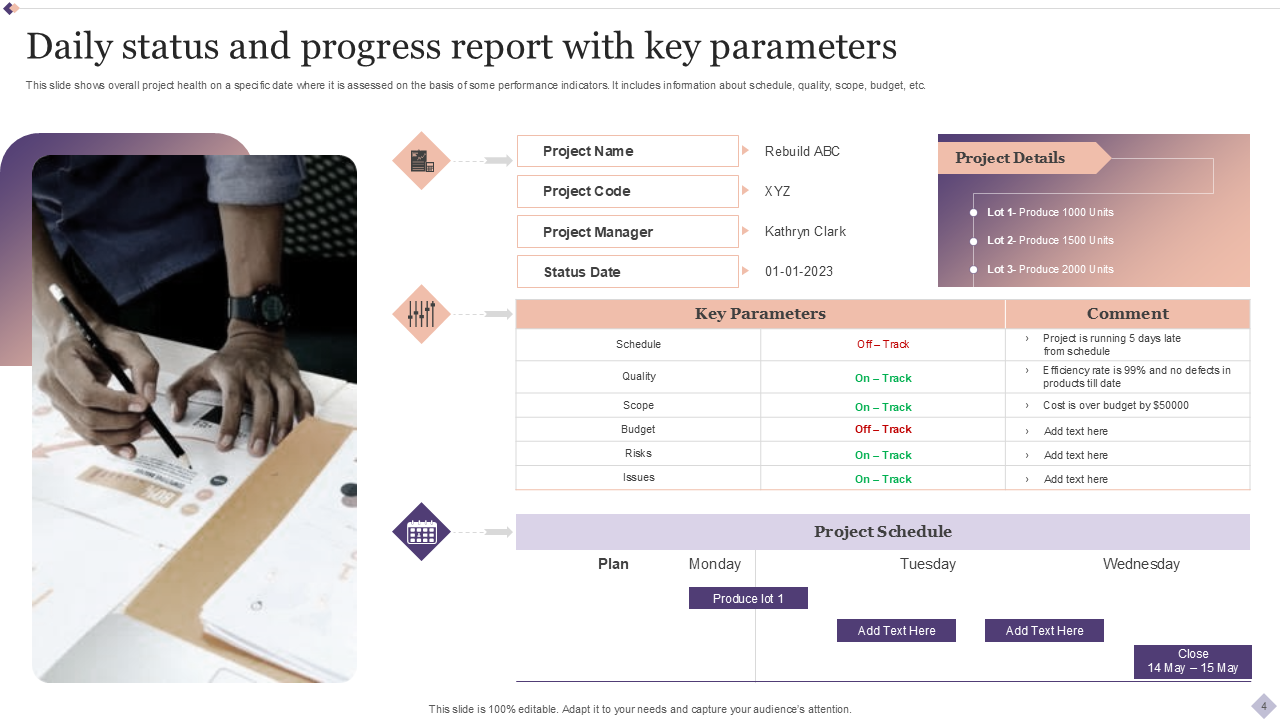
Template 7: Daily Status and Progress Report with Key Parameters
Track project progress with our comprehensive daily status and progress report template. This slide showcases project health on specific dates. This action-oriented template includes parameters, such as information about project schedule, quality, scope, budget, risks, etc. With high-quality content and graphics, this PPT template will grab the attention of your audience. Stay on top of project tracking and monitoring with our visually compelling status and progress report template.
Template 8: Daily Status and Project Progress Report for Construction Company
You can create detailed yet concise daily status and progress reports for your construction projects with this expert-designed template. This slide displays date-wise percentage of activities completed, and others that are still in progress. Using this comprehensive report template, you can evaluate the number of expected delays in operations. It includes details such as task type, start date of work, work remaining and done, etc. It even highlights key takeaways. By deploying this template, you can create effective status reports.

Template 9: Dashboard for Daily Operational Status Report with Tickets Resolved
Enhance your operational efficiency with this detailed PowerPoint Template. This dashboard showcases analytics to track tickets that are solved and escalated. Leverage this presentation design to track credited, open, and unassigned tickets. Use this engaging template to complete business operations in a timely manner. This insightful dashboard also presents details on the first response time across months.

Template 10: Daily Project Status Report with Key Updates
A project status report presents a detailed overview of the project’s status. The purpose of this template is to help streamline a project’s life cycle. It showcases a list of tasks along with the name of the employee assigned to that task. It includes additional information, such as the status of each task and updates. Using this professional template, evaluate your team members and keep them informed of desired targets and goals. Download this template now to make your team members accountable by assigning them tasks and deadlines.

MAKE INFORMED DECISIONS ON PROJECT HEALTH
Our meticulously curated and actionable templates will help you make informed decisions by keeping you apprised of your project’s health. These templates offer clear insights into the project's progress for successful project completion.
PS: Want to explore PMO status report templates? Click here!