

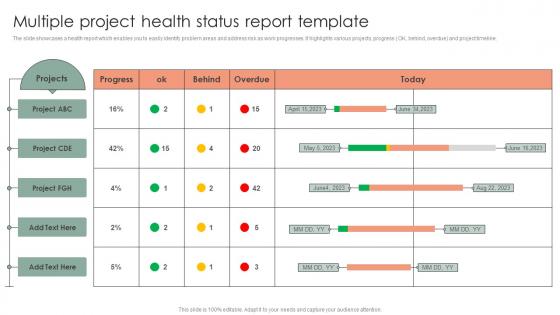
Multiple Project Health Status Report Template




Try Before you Buy Download Free Sample Product
 Impress Your
 Audience
 100%
100% Editable
 Save Hours
 of Time


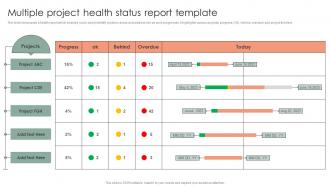
The slide showcases a health report which enables you to easily identify problem areas and address risk as work progresses. It highlights various projects, progress OK, behind, overdue and project timeline.
People who downloaded this PowerPoint presentation also viewed the following :
Multiple Project Health Status Report Template with all 6 slides:
Use our Multiple Project Health Status Report Template to effectively help you save your valuable time. They are readymade to fit into any presentation structure.





FAQs for Multiple Project Health
So for your project health report, definitely include RAG status (red/amber/green stuff), milestone progress, and budget tracking. Blockers and risks are obvious must-haves. I always add a quick wins section because honestly, stakeholders eat that up even when everything's falling apart. Call out what decisions need making and who's gotta make them. Your team probably needs support somewhere - actually say what that is. Oh, and next steps with owners and dates so people aren't left wondering what happens Monday. One page max if you can swing it.
Weekly's usually the way to go, trust me on this. Unless you're dealing with some crazy deadline crunch - then yeah, maybe daily makes sense. Monthly? Way too long between check-ins. I've seen projects go sideways fast when teams wait that long to report issues. Complex projects might need more frequent updates, but honestly most stakeholders don't want to be flooded with constant reports. They've got their own stuff to deal with. Start weekly and see how it feels - you can always dial it up or down based on what your team actually needs. The goal's catching problems before they blow up, not creating busy work.
So the big four are scope, schedule, budget, and quality - that's your foundation right there. Team velocity matters too, plus risk levels and how happy your stakeholders are. Resource utilization is huge but honestly everyone forgets about it until it's too late. I learned that one the hard way! Don't go crazy though - pick maybe 5-7 metrics total or you'll hate your life. Set up a basic dashboard with green/yellow/red status indicators. Weekly team check-ins work great for spotting problems before they explode.
Dude, visual aids totally save the day with project reports. Instead of drowning people in text, use dashboards with those red/yellow/green indicators and timeline charts. Progress bars work great for budgets too. I swear, I've watched execs completely zone out during text-heavy presentations, but add some clean charts? Game over - suddenly they're paying attention. You can spot problems and trends so much faster than reading through paragraphs. Honestly, just grab a simple dashboard template to start. Your team will thank you for making everything way clearer.
Just be straight with them - no sugarcoating the bad stuff because they need real info to make decisions. Raw data dumps are useless though, nobody wants to decode your spreadsheets. Focus on what you actually accomplished, not just busy work (like "finished 50 tasks" when you still blew the deadline). Honestly, the blame game is exhausting and gets you nowhere. Jump straight to solutions instead. If something big happens, don't wait around for your next scheduled update - just send it. Oh, and use the same format every time so people aren't hunting around for basic info.
Your stakeholders totally shape what goes in your health reports. Executives? They want big picture stuff - milestones, budget variance, not technical weeds. Got a risk-averse sponsor? Better load up on potential issues and your game plan to fix them. Some people love spreadsheets and raw numbers, others just want the traffic light system (red/yellow/green). Honestly, half the battle is figuring out who wants what. Next time, just ask them straight up: "What info actually helps you make decisions?" Saves everyone time and you look way more competent.
Think of risk assessment as your project's health checkup - you're basically scanning for problems that could mess things up later. Look at budget stuff, timeline issues, whether you've got enough people, scope creep, all that. Then figure out how likely each thing is to actually happen and how bad it'd be if it did. Honestly, most people skip this step and regret it. You'll want to revisit this regularly too - risks change as your project moves along. It's kinda like checking the weather but for work stuff, if that makes sense.
Honestly, your team knows way more than any dashboard will tell you. They see the real blockers, the technical debt dragging everything down, all that messy stuff that doesn't make it into reports yet. I've watched so many projects look totally fine on paper while the devs were quietly panicking. Quick coffee chats work better than formal surveys - people are more honest when it feels casual. You'll catch problems early and get actual realistic timelines instead of wishful thinking dates.
Honestly, **Microsoft Project** or **Smartsheet** are solid if you want good reporting right out of the box. **Monday.com** has these really nice visual dashboards that execs seem to love - way better than boring spreadsheets. **Asana's** decent too. If you're already stuck with **Jira**, the reporting works but feels clunky as hell. **PowerBI** or **Tableau** are worth it when you're pulling from different systems and need something that looks professional. My advice? Start with whatever your company already pays for. No point fighting for budget on new tools. The fanciest charts don't matter if people can't figure out what they're looking at.
Grab your last 3-5 similar projects and pull the numbers on timeline, budget, and resource usage. Those become your baselines for comparison. When you stack your current project against those averages, problems jump out pretty fast. Honestly, stakeholders hate surprises way more than bad news delivered early. Match projects by scope or team size - that's where you'll get the most realistic benchmarks. The concrete data makes it super easy to show whether you're actually on track or if something needs fixing. Works every time.
So the big ones to watch for are budget overruns, missed deadlines, resource shortages, and scope creep. Team morale tanking is huge too - I've seen that kill projects more than anything else. When you report these, get specific. Don't just say "budget issues" - say "we're 15% over with 3 months left." Use whatever template they want but slap a red/yellow/green rating on there. Oh and always include what you think should be done about it. Honestly, calling out problems early is way better than having leadership find out the hard way later.
Just rip the band-aid off and lead with the bad news - honestly, people respect that way more than dancing around it. Follow up immediately with your fix-it plan and real timelines. I've watched so many PMs try to cushion the blow with tons of backstory first, which just pisses everyone off. You'll want to spell out the actual damage - budget hits, timeline delays, whatever scope changes are coming. Always bring solutions along with the problems (this should be obvious but apparently isn't). Oh, and don't forget to tell stakeholders exactly what you need from them to get things moving again.
Honestly, just stick to the basics: status, risks, and what's next. Red/yellow/green lights work great - people can scan it in like 2 seconds. If something's broken, lead with that instead of burying it on page 3. I've sat through way too many meetings where everyone's phones came out because the PM was rambling about minor details. Same format every time helps too. Oh, and actually put dates and names on action items or they'll just sit there forever. The trick is knowing your crowd - your boss wants bullet points, but the dev team needs actual specifics to work with.
So basically, traditional PM does these heavy monthly/quarterly reports - all about staying on budget and hitting your original timeline. Agile's totally different though. You're checking in way more often but it's lighter stuff - daily standups, sprint retrospectives. Way less "are we sticking to the plan?" and more "are we actually building something useful?" The reports look different too. Burn-down charts instead of those endless status docs nobody reads anyway. Honestly, the conversational vibe works better - people actually pay attention. Just match whatever reporting style fits your team's methodology and you'll be good.
Okay so definitely spell out the exact actions that fix those red flags you found. Start with the urgent stuff first, then tackle the yellow issues. God, I've read so many reports that just dump problems on you with zero follow-up - super annoying! Give each action item a clear owner and deadline that actually makes sense. Don't forget to mention if you need extra resources or have to escalate anything to the bosses. Be specific enough that someone could grab your report two weeks later and immediately know what should've gotten done by then.
-
Wonderful ideas and visuals. I'm really pleased with the templates, which are unique and up to date.
-
Awesome presentation, really professional and easy to edit.