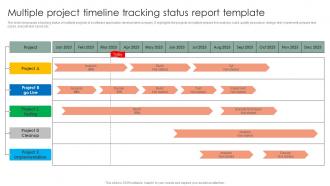
Multiple Project Timeline Tracking Status Report Template

Rating:
100%
Multiple Project Timeline Tracking Status Report Template
Slide 1 of 6
Favourites Favourites

Try Before you Buy Download Free Sample Product

Audience Impress Your
Audience
Editable 100%
Editable
Time Save Hours
of Time
The Biggest Sale is ending soon in
0
0
:
0
0
:
0
0
Rating:
100%
The slide showcases a tracking status of multiple projects of a software application development company. It highlights the projects at multiple phases like analysis, build, quality assurance, design, test, implement, prepare test cases, execute test cases etc. Introducing our Multiple Project Timeline Tracking Status Report Template set of slides. The topics discussed in these slides are Software, Application, Development. This is an immediately available PowerPoint presentation that can be conveniently customized. Download it and convince your audience.

People who downloaded this PowerPoint presentation also viewed the following :

FAQs for Multiple Project Timeline Tracking

Okay so first thing - get everything mapped out on one master timeline. I've been using Monday lately but Asana works too. Color-code each project because it makes spotting conflicts way easier. Here's the thing though - most people set this up and then never touch it again, which is useless. Have someone update it weekly, no exceptions. Track your hard deadlines but also build in buffer time between projects. I always pad things by 15-20% because something will go wrong. Share it with your team regularly and bring it up in standups. Trust me, you'll catch issues before they become disasters.

Dude, you gotta get everything into one project management tool - it's seriously a game changer. I learned this the hard way after missing like three deadlines last year because I was tracking stuff all over the place. These tools show you when projects are gonna crash into each other before it happens. Gantt charts might look intimidating at first but they're actually super helpful for spotting conflicts. You can set up alerts too so you don't have to constantly check everything manually. Just pick one tool and dump all your current projects in there. Trust me, way better than the chaos of random spreadsheets everywhere.

Honestly, resource conflicts are gonna be your biggest nightmare. Same developer suddenly "owning" three urgent deadlines? Classic. Dependencies between projects will blindside you too - one team's delay cascades into everyone else's mess. Stakeholders lose track of what's realistic when everything runs at once. I learned this the hard way last year. Map your shared resources first, then pad those cross-project dependencies with extra time. Sounds boring but trust me, it beats the alternative chaos.

Ugh, dependencies are such a pain but you've gotta watch them like a hawk. So Project A gets delayed? Project B automatically gets pushed back too, then everything spirals. Total nightmare. Map out what each project needs from the others right from the start - I can't stress this enough. Build buffer time between those handoff points because something always goes wrong. Focus on the critical path across your whole portfolio, not just individual projects. Track every single handoff obsessively. Trust me on this one.

Dude, this stuff makes or breaks your whole timeline. Regular check-ins are huge - catch problems when they're small instead of massive disasters later. Make sure people can actually tell you when things go wrong without feeling like they'll get blamed. I swear, half the projects I've worked on failed because someone was scared to mention a delay until it was too late. Weekly calls work well. Your stakeholders need real updates too, not just the sugar-coated version. Bad news early beats pleasant surprises that torpedo everything at the end.

So basically, set up a master Gantt chart that shows all your projects on one screen - total game changer for spotting when deadlines are gonna crash into each other. Color-code everything by project so you don't go cross-eyed staring at it. I used to do this mess in Excel (ugh, never again) but now most PM tools let you filter by team or priority while keeping the big picture visible. Start with your huge projects first, then squeeze in the smaller stuff. You'll catch resource conflicts way faster this way. Just don't forget to actually update the thing regularly or it's useless.

Oh man, Gantt charts are your friend here - Microsoft Project, Smartsheet, Monday.com are all solid. Asana's pretty decent too if you're not dealing with anything crazy complex. I'd avoid trying to DIY this with spreadsheets... trust me, I've watched that disaster unfold way too many times. The real trick is finding something that shows you how your projects connect and lets you shift stuff around easily (because things WILL change). Just pick whatever plays nice with what you're already using - getting people to actually use the tool is honestly the hardest part.

Honestly, you've gotta build buffer time into everything from the start. Priorities will shift - I swear it's like Murphy's law but for projects. Create a priority matrix that everyone actually agrees on upfront, then when things inevitably change, you can quickly decide what gets resources and what waits. Regular check-ins between teams help catch conflicts before they blow up. Oh, and document every trade-off when priorities shift so stakeholders see what they're losing. That part's crucial but people always skip it. Map out your current projects and dependencies this week - it'll save you so much headache later.

Track your on-time delivery rates and budget variance first - those are your bread and butter metrics. Resource utilization matters too, but honestly? The real goldmine is comparing original deadlines to revised ones. That tells you if you're actually getting better at estimating or just pushing dates around constantly. Cross-project delays will absolutely wreck you, so monitor those dependencies. Oh, and team capacity - anything over 85% consistently means burnout city. I learned that one the hard way. Start with these and you'll catch problems way earlier.

Dude, stakeholder involvement makes or breaks timeline tracking. The more they're actually engaged, the better your data gets - simple as that. Active stakeholders catch blockers early before everything goes sideways. But honestly? Too many people giving input can become a nightmare if everyone's switching priorities constantly. You want designated stakeholders who'll stick to regular check-ins and actually answer when you ping them for updates. I've noticed projects with solid stakeholder communication stay on track way more than ones where you're basically hunting people down. Find that sweet spot and you're golden.

Here's what's worked for me - first figure out where your teams and resources actually overlap before things get messy. Those dependency matrices sound boring but they'll save your butt when you can see which projects are fighting over the same people. I know everyone complains about buffer time, but honestly it's worth the pushback. Weekly check-ins between project teams help catch problems early instead of dealing with fires later. You really need some kind of priority framework too, otherwise you're just picking favorites when conflicts happen. Oh and get everything visible in one dashboard - trying to juggle multiple tools is just asking for trouble.

So here's what I'd do - set up a master dashboard that tracks sprint progress across all your projects at once. Weekly "program increment" standups work really well where each team gives quick updates. Portfolio Kanban boards are honestly game-changers once you figure them out (probably took me way too long to try them). Map out which projects share people or have connected deliverables first. That's where things get messy. Build your tracking around those trouble spots while keeping your normal sprint rhythm. The trick is adding that bird's-eye view without losing the day-to-day momentum each team has going.

Honestly, these tools are perfect for seeing what's actually happening with your projects instead of just guessing. Dependencies become super clear, bottlenecks jump out before they mess up your timeline. The comment features are clutch - no more digging through random email threads to figure out why something's delayed. Everyone updates their stuff in real time, so you're not working off stale info from last week's meeting. Oh, and having everything in one dashboard is kind of addictive once you get used to it. I'd start with whatever project stresses you out most, then add others.

Look, if you're missing deadlines by more than a week consistently, that's your first sign. Your team keeps pushing stuff back? Red flag. Scope creep eating your buffer time is another big one - honestly, this happens way too often and people ignore it. Watch out when key people get yanked onto other projects (classic move from management). Dependencies that won't stop shifting are a nightmare too. External blockers that drag on forever? Yeah, time to reassess. If you're explaining delays more than actually getting work done, just call the meeting already. Don't wait until everything's on fire.

Honestly, dig into your old project data - it's like a crystal ball for spotting where things always go sideways. Check out those past timelines and see which phases consistently took way longer than expected. Testing usually kills us, but integration is the real nightmare that everyone underestimates. Once you figure out your team's usual trouble spots, you can actually build realistic buffers instead of those optimistic timelines we always start with. Track what types of tasks or dependencies create the biggest headaches. Then when similar work comes up, you'll know to pad those estimates. Saves so much stress later.

Ratings and Reviews

100% of 100
Review Form
Write a review
Most Relevant Reviews
  1. 100%

    by Cleo Long

    “Excellent service from the customer support team when I wanted a slide that was a bit different from those on their standard menu. Super helpful.”
  2. 100%

    by Darwin Mendez

    “You have the structure in place that are easy to explore new opportunities.I will be recommending your services to other people.”

2 Item(s)

per page: