

Website Development Project Weekly Status Report




Try Before you Buy Download Free Sample Product
 Impress Your
 Audience
 100%
100% Editable
 Save Hours
 of Time


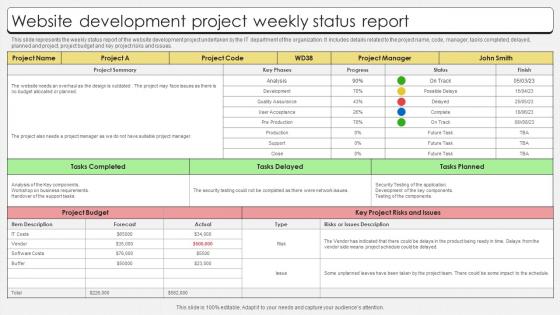
This slide represents the weekly status report of the website development project undertaken by the IT department of the organization. It includes details related to the project name, code, manager, tasks completed, delayed, planned and project, project budget and key project risks and issues.
People who downloaded this PowerPoint presentation also viewed the following :
Website Development Project Weekly Status Report with all 6 slides:
Use our Website Development Project Weekly Status Report to effectively help you save your valuable time. They are readymade to fit into any presentation structure.





FAQs for Website Development Project
So you've got planning/discovery first - that's where you figure out what you actually want to build. Then design happens (wireframes, mockups, all that visual stuff). Development comes next when your devs start coding with HTML, CSS, JavaScript, plus whatever backend they're using. Testing should really happen throughout the whole thing, not just dumped at the end like most people do. Launch obviously comes last, then you're in maintenance mode forever lol. Honestly, set milestones for each phase or your project will just drag on and on. Trust me on that one.
Honestly, just focus on three things: what you're actually building, what your team knows, and how much time you've got. Simple brochure site? Don't overthink it. Complex app with tons of user data? That's different. Here's the thing though - I've seen teams pick shiny new frameworks and then spend half their timeline just figuring out basic stuff. Not fun when deadlines hit. Also factor in hosting costs and who's gonna maintain this thing later. My take? Go with what you can actually ship confidently. The "cool" framework can wait.
Honestly, UX can make or break your whole site. I've watched beautiful websites completely bomb because users couldn't figure out basic navigation - like, what's the point of looking amazing if nobody can buy anything? Good UX means people actually stick around and find what they need without wanting to throw their phone. Bad UX? They're gone in seconds, probably to your competitor's site. My advice: make it work smoothly first, worry about the fancy design stuff later. And definitely test it with actual humans before you launch.
Yeah so Agile will definitely get you launched faster - like 2-3 months sooner than waterfall. You're basically shipping working pieces every few weeks instead of waiting to build the whole thing. Downside is you'll be tweaking stuff constantly after launch. Waterfall takes forever (we're talking 6+ months) but honestly? You feel way more "finished" when you're done. I'm pretty biased toward Agile for web stuff though - getting real user feedback early is huge. Way better than guessing what people want for months. Plus if something's not working, you can actually change direction without wanting to cry.
Start with semantic HTML and proper headings - that's your foundation. Add alt text for images and make sure color contrast is good. Screen readers are way pickier than my code reviews! Everything needs to work with keyboard navigation too. Test with actual accessibility tools like WAVE or axe-devtools instead of just winging it. Focus on the big wins first: proper form labels, descriptive link text, logical tab order. Oh and definitely try navigating your whole site using only the Tab key - if you get lost or confused, your users will too. Trust me on that one.
Dude, mobile responsiveness isn't negotiable anymore. Most people browse on their phones now - like 60%+ of traffic. If your site looks terrible on mobile, you're literally losing half your audience. Google ranks mobile-friendly sites higher too, which... yeah, that matters a lot for getting found. Honestly? I made this mistake on a project last year and we had to rebuild the whole thing because we treated mobile as secondary. Such a pain. Just start with mobile-first from the beginning and you'll save yourself so much frustration later.
Honestly, start with your team's skill level - don't pick WordPress if everyone's gonna freak out over plugins. What kind of content are you dealing with? Custom fields, multiple languages, selling stuff? Performance matters big time if you're planning to grow. Security's non-negotiable, especially for client work, so check how often they push updates. Budget-wise, think beyond the initial cost - hosting and maintenance add up fast. Oh, and actually test 2-3 options with real content instead of just reading reviews. That's where you'll know if something clicks or feels clunky.
Honestly, you need both technical stuff and business numbers to know if things are working. Page load times and uptime are obvious - nobody waits around for slow sites anymore. Then look at bounce rates, time on site, conversion rates. Google Analytics will handle most of this for you. Set up goals based on what you actually want people to do - signups, purchases, whatever matters to your project. I'd check weekly at first since you'll probably be tweaking things, then switch to monthly once you're not constantly changing stuff.
Weekly standups are a lifesaver for keeping everyone on the same page. Use Figma for design handoffs and create dedicated Slack channels - email chains are honestly the worst. Get stakeholders looking at prototypes early instead of springing everything on them at the end. Oh, and definitely keep a shared project brief and style guide somewhere everyone can find it. The biggest thing though? Set up your feedback process and who makes final decisions before you even start. Trust me, you don't want to be figuring that out mid-project when everything's chaotic.
Honestly, don't try to add security after you've built everything - it's a nightmare. Input validation is huge, sanitize everything users can touch. Use HTTPS everywhere, set up proper auth controls. SQL injection stuff should be automatic by now but I swear people still mess this up constantly. Security headers are clutch too. Keep your dependencies updated (I know, boring but whatever). Run vulnerability scans while you're developing, not at the end. The best thing though? Make security part of your normal code reviews. Catches problems early when they're actually fixable instead of expensive disasters.
Honestly, just build SEO in from the start - way easier than fixing it later. Use semantic HTML and make sure your site loads fast on mobile. Clean URLs are clutch. Add alt text to images (I always forget this one lol), set up proper heading tags, and throw in schema markup if it makes sense. Oh, and don't skip the boring technical stuff like XML sitemaps and robots.txt. Trust me, scrambling to retrofit SEO after launch is the worst. Your page speed matters more than people think these days.
Dude, scope creep will kill you every time - clients always want "just one more thing." Poor communication is honestly worse than any coding bug I've dealt with. Make sure you nail down super specific requirements upfront or you'll be rebuilding stuff constantly. Also, test on mobile from day one, not as an afterthought. Browser testing and page speed matter way more than people think. Oh, and set up staging early so clients can actually see what you're building instead of freaking out in the dark. Regular check-ins save your sanity.
Start with a brain dump of everything stakeholders want, then use MoSCoW to rank it all - Must have, Should have, Could have, Won't have. Core user needs come first, obviously. What actually drives business value? I've watched so many teams chase flashy features that sit unused later. Technical dependencies matter too since some stuff has to get built before other things work. Simple spreadsheet works great - just do impact vs effort scoring. Oh, and talk to real users constantly to validate you're not totally wrong before developers start coding. That part's huge.
So basically analytics show you what's actually happening on your site versus what you think is happening. You can see which pages people bail from immediately (spoiler: it's usually more than you'd expect). Also tracks how visitors found you and what they're clicking on. I got weirdly obsessed with checking mine once I set it up - there's something satisfying about seeing the patterns. Google Analytics is free and pretty easy to install. Check it weekly instead of daily though, you'll drive yourself nuts otherwise. Way better than just guessing what changes to make next.
Look at how often people mentioned the same problems and how badly those issues mess with what users are trying to do. Sort everything into must-fix, should-fix, and nice-to-have piles. Some feedback will totally contradict other feedback - honestly that's just how user testing goes. Look for patterns instead of getting hung up on random one-off complaints. Make sure you document stuff clearly so your devs actually know what to change. But here's the thing - you can't fix everything or you'll be stuck in revision hell forever. Just tackle the changes that'll make the biggest difference for users first.
-
Love how there are no boring templates here! The design is fresh and creative, just the way I like it. Can't wait to edit and use them for my extended projects!
-
Been using SlideTeam for some time now…can’t imagine why I wasted all that time in front of the screen trying to make the perfect presentation.