Website development monthly project plan

Rating:
90%
Website development monthly project plan
Slide 1 of 9
Favourites Favourites

Try Before you Buy Download Free Sample Product

Audience Impress Your
Audience
Editable 100%
Editable
Time Save Hours
of Time
The Biggest Sale is ending soon in
0
0
:
0
0
:
0
0
Rating:
90%
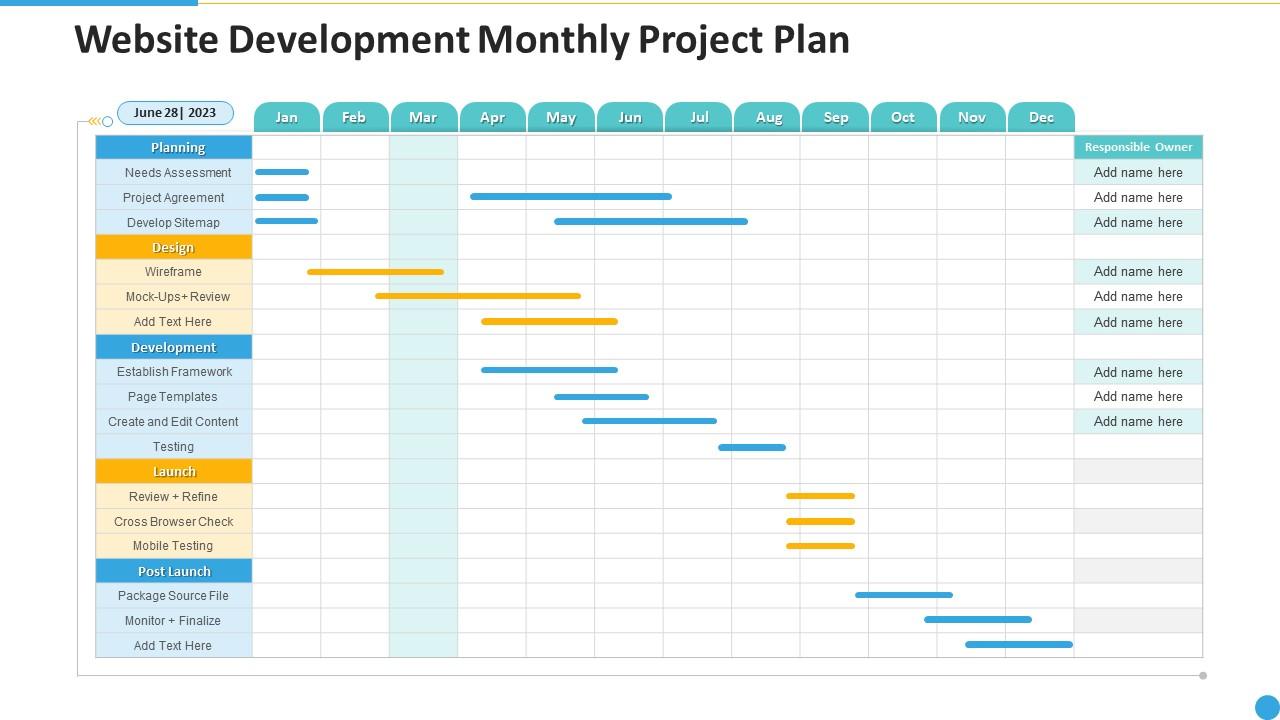
Presenting our well structured website development monthly project plan. The topics discussed in this slide are Website Development Monthly Project Plan. This is an instantly available PowerPoint presentation that can be edited conveniently. Download it right away and captivate your audience.

FAQs for Website development

Clean navigation is huge - people shouldn't feel like they're solving a riddle just to find your contact page. Fast loading times and responsive design are non-negotiable since everyone's on mobile anyway. White space is your friend, and stick to consistent fonts throughout. Put your main call-to-action buttons where people actually see them right away. Honestly, I always sketch layouts on paper first (sounds old school but whatever) - saves me from redesigning everything three times later. Visual hierarchy matters too - guide people's eyes from top to bottom in a way that actually makes sense.

Dude, responsive design just means your site actually works on phones, tablets, whatever. Users won't get pissed off trying to pinch and zoom around your desktop-only layout. I mean, nothing's worse than landing on a site where the text is microscopic on mobile. Google gives you SEO points for it too, which is nice I guess. But honestly? The real win is people can actually use your site without rage-quitting. Test yours on your phone right now - bet you'll find something janky. Better conversions, longer visits, happy users. It's worth fixing.

Dude, images are usually what's killing your site speed - compress them and switch to WebP if you can. Also minify your CSS/JS files and set up browser caching. A CDN helps too since it serves stuff from closer servers. Oh, and lazy loading is clutch for anything below the fold. Your hosting matters more than people think, honestly. Just run it through PageSpeed Insights first though. That'll show you exactly what's broken instead of guessing. I've seen sites obsess over tiny optimizations while ignoring massive image files that are the real problem.

Okay so accessibility isn't as scary as it sounds. Start with screen reader stuff - proper headings and alt text for images. Color contrast matters too so people can actually read your text. Everything needs to work with just a keyboard, no mouse required. The WCAG guidelines look like a nightmare but they're actually pretty logical once you get into them. Don't forget captions for videos and write actual link descriptions instead of lazy "click here" text. Oh and run WAVE or axe on your site first - those tools will catch the obvious problems and basically tell you exactly what to fix.

Dude, you gotta build SEO right into your code from the start - don't just slap it on at the end like I did (what a nightmare that was). Fast load times, clean URLs, proper headings, mobile-first design. Search engines eat that stuff up. Your site structure needs to actually make sense too - both for users clicking around and for Google's bots crawling through everything. Honestly, once I started thinking of SEO as a dev requirement instead of some marketing thing, projects got way smoother. Get the technical foundation solid and your content people won't hate you later.

Dude, seriously just go with a CMS. You won't have to mess with code every time you want to change something basic. WordPress is probably your best bet - I mean, it runs like 40% of websites so there's gotta be something to that. Your clients can actually update their own stuff instead of bugging you constantly. There's literally thousands of plugins for whatever weird feature they want. Built-in SEO tools are decent, plus you get automatic backups and security updates. Oh, and everything's mobile-friendly by default now. Honestly saved me so much headache on my last few projects.

Dude, personas are game-changers for design decisions. They're like having your actual users right there with you. So if you know Sarah's a busy mom scrolling on her phone during lunch, you'll focus on quick load times instead of some flashy animation that takes forever. I totally used to roll my eyes at personas - thought they were just BS marketing stuff. But honestly? They stop you from designing for yourself, which we all do without realizing it. Better navigation choices, smarter content layout, even colors make more sense. Build 2-3 good ones before wireframing starts.

Input validation is huge - sanitize everything to avoid SQL injection and XSS attacks. Use prepared statements for database stuff and hash passwords with bcrypt. SSL certificates are basically required now (nobody trusts sites without that little lock). Set up decent error handling so you don't accidentally leak system details when things break. Rate limiting on forms and APIs helps block brute force attempts too. Oh, and HTTPS from the start, not something you bolt on later. These basics will save you from most of the dumb mistakes that catch people.

Okay so CTAs basically tell people exactly what to do next - sounds obvious but you'd be shocked how many sites mess this up. Use words that actually make people want to click, like "Get Started" beats "Submit" every time. Make them pop with bright colors too. Put them where it makes sense - top of the page, after you've sold them on the benefits, wherever someone's like "okay I'm interested, now what?" Oh and test different versions because honestly what works for one audience totally bombs with another. Quick check: look at your current CTAs and ask yourself if you'd actually click that thing. If not, you've got work to do.

Think of visual hierarchy as your page's roadmap - it tells people where to look first. Size matters most here. Make your headline huge, then scale everything else down by importance. Colors and contrast work magic too. Ever notice how your eye gets pulled to that bright button? That's intentional. Without this stuff, websites become total chaos. People literally don't know where to look, so they just... leave. I've done this myself on messy sites - it's overwhelming. Here's what works: pick your top 3 elements, then make sure they actually look important in that order. Spacing helps separate things too.

Colors can make or break your site, honestly. Reds and oranges pump up energy - perfect for those "buy now" buttons. Blues and greens? They scream trustworthy and calm. I once watched a client's conversions tank just from picking the wrong green shade (still bugs me). You need good contrast so people can actually read stuff, but don't go overboard or it looks aggressive. Playful startups can rock bright colors that'd kill a law firm's vibe. Oh, and definitely test different options with real users first - saves you from epic fails later.

Honestly, AI integration is huge right now - everyone's cramming it into their apps. Next.js and React are dominating, and TypeScript's pretty much become the standard because nobody wants to debug messy JavaScript anymore. Serverless architecture is taking over too. PWAs are still doing well since they feel like native apps but aren't. JAMstack and headless CMS setups are everywhere now. The whole API-first thing has basically become how everyone builds stuff by default. My advice? Pick one area and actually get good at it instead of bouncing around. I made that mistake early on.

Honestly, analytics are like getting x-ray vision for your website. You'll see exactly where people bail out and which pages are total duds. The bounce rate numbers always shocked me when I first started looking at them - way higher than you'd expect! Focus on fixing your worst-performing pages first, then speed up anything that loads slow. Double down on content that's actually converting people. Oh, and set up goal tracking in Google Analytics so you can tell if your tweaks are working. Check back monthly to see what's moving.

Honestly, time management is brutal - you'll burn way more hours than you think. Your code will be a mess too and need serious cleanup later. Security stuff is scary because you miss obvious holes when you're just trying to make things work. SEO is weirdly complicated! Don't even get me started on making sites look decent on every random phone and browser combo. My take? Keep it stupid simple at first. Use existing frameworks instead of reinventing everything. And seriously budget like double the time for all the debugging and testing nightmare.

Dude, mobile-first totally changes how you build stuff. You start with the tiniest screen instead of trying to squeeze a desktop design onto phones later (which is honestly such a pain). Focus on what really matters first - your core content and features. Then add more complexity as screens get bigger. Your CSS actually makes sense this way too. I swear it's way cleaner than working backwards. Oh, and sites load faster naturally since you're not carrying around a bunch of desktop bloat. Just sketch your ideas on mobile first and you'll get it immediately.

Ratings and Reviews

90% of 100
Review Form
Write a review
Most Relevant Reviews
  1. 80%

    by Denny Salazar

    Nice and innovative design.
  2. 100%

    by Clement Patel

    Out of the box and creative design.

2 Item(s)

per page: