

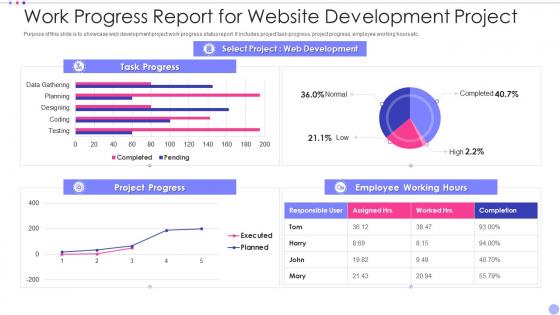
Work Progress Report For Website Development Project




Try Before you Buy Download Free Sample Product
 Impress Your
 Audience
 100%
100% Editable
 Save Hours
 of Time


Our Work Progress Report For Website Development Project are topically designed to provide an attractive backdrop to any subject. Use them to look like a presentation pro.
People who downloaded this PowerPoint presentation also viewed the following :
Work Progress Report For Website Development Project with all 7 slides:
Use our Work Progress Report For Website Development Project to effectively help you save your valuable time. They are readymade to fit into any presentation structure.





FAQs for Work Progress Report For
So you've got planning/wireframing (1-2 weeks), design mockups (1-3 weeks), development (3-8 weeks), content stuff (1-2 weeks), then testing and launch (1-2 weeks). Honestly, planning is where everything goes sideways if you rush it - learned that the hard way. Development always takes forever because that's where the real technical headaches hit. Timeline can easily jump from 6 to 16 weeks since delays just pile up. Oh, and definitely pad your estimates by like 25-30%. Trust me on this one. Lock down client feedback at each stage before moving on or you'll be doing circles.
Honestly, good planning just stops you from dealing with that "wing it as we go" mess that always turns into a disaster. Map out your site structure and what content you need before developers start coding - they'll thank you for it. You'll spot problems early too, like when your fancy design looks terrible on phones (ugh, the worst). The tricky part? Getting everyone to actually stick to what they agreed on instead of changing everything halfway through. I swear, stakeholders have the worst timing. Write a solid project brief first and don't let people derail it later.
Dude, UX will literally make or break your site. I've watched beautiful websites completely tank because users couldn't figure out basic stuff. People bounce so fast if they're confused - like, why would they stick around to solve puzzles just to buy something? Good UX keeps folks engaged and actually converting instead of rage-quitting. Plus you'll get way fewer "how do I..." support emails later. My advice? Test with real users early on, not just your team who already knows how everything works. Trust me, catching issues upfront beats scrambling to fix a broken launch.
Talk to each stakeholder one-on-one first - way more honest that way. Map your current user flows and spot the biggest pain points. I used to dive straight into features (classic mistake), but spend real time on the core business goals instead. How will you measure success? Document everything - tech constraints, budget limits, the works. Oh, and definitely audit existing content plus analytics if you've got them. The sweet spot is connecting user needs directly to business objectives. Make that link super clear before you do anything else.
Yeah, responsive design will slow you down at first - you're basically designing for like 3+ screen sizes instead of just one. Testing becomes a pain too since you've gotta check everything works on mobile, tablet, desktop... the whole thing. But trust me, it beats trying to fix a desktop-only site later - that's a special kind of hell. Go mobile-first if you can. Forces you to focus on what actually matters instead of cramming everything in. Your users will thank you for it, and honestly your bounce rates will be way better. Short-term headache, long-term sanity saver.
Dude, you gotta think about SEO from day one - seriously can't stress this enough. I've watched so many developers completely ignore it during the build phase and then panic later when nothing ranks. Your URL structure, page speed, mobile design - all that stuff matters way more than people realize. Clean URLs are huge, plus you need proper heading tags and fast load times baked right into your architecture. Oh and definitely do an SEO audit of your site plan before you even start coding. Trust me, fixing structural problems after launch is a nightmare. Way easier to build it right the first time.
Honestly, good collaboration saves so much headache. You skip all those annoying rounds where devs build something totally off from what you designed. Talk early and often - that way you catch technical issues before they turn into expensive do-overs. Developers actually have great ideas too, like simpler ways to get the same visual result. I learned this the hard way on a project last year. Weekly design reviews work really well. Both sides can spot problems before they spiral into delays. Trust me, it's worth the extra meetings!
Honestly, just grab Jira or Trello first - something to track your stories and bugs. GitHub's perfect for watching code progress, commits, all that stuff. Linear's interface is incredible though, way cleaner than the others if you don't mind paying a bit more. Once you get those basics down, throw in some monitoring like New Relic for performance stuff. GitHub Actions can automate your deployments too, but don't stress about that initially. Start basic with project management and git tracking. The fancy monitoring can wait until you're not drowning in other setup tasks.
Honestly? Scope creep will destroy you every time. Clients always want "just one more thing" and suddenly your two-week project is a month behind. Testing takes way longer than you think - I learned this the hard way. Plus client feedback is brutal... they'll promise a quick turnaround then disappear for weeks. Third-party stuff breaks constantly too, especially APIs that worked fine yesterday. My advice: get everything in writing first. Build in extra time for testing and revisions. Set actual deadlines for their feedback or you'll be waiting forever. Do your homework on integrations early so you're not googling error messages at 2am.
Dude, feedback loops are a lifesaver. They catch problems early instead of letting you build the totally wrong thing for months. I've watched teams pour everything into features literally no one wanted - it's brutal. Show people prototypes constantly, test your assumptions, and actually listen to what they tell you. Course-correcting as you go means your final product won't suck. Weekly stakeholder check-ins should be non-negotiable from your next sprint onward. Trust me, those "oh shit we messed up" moments at launch? Way less likely when you're getting input the whole time instead of crossing your fingers at the end.
Track your core web vitals first - load times, mobile stuff, site performance. Google Analytics will be your lifeline for user behavior: bounce rates, time on site, conversions. Don't forget to watch for 404s and broken features that testing missed. Honestly, the first month is just about getting your baseline numbers down. After that, look at monthly trends instead of freaking out over daily changes (learned that one the hard way). Set up automated reports so you're not pulling data manually every single week like some kind of masochist.
Honestly, agile is a game changer for web dev. You break everything down into these 2-4 week sprints instead of one massive project that drags on forever. Getting working features every few weeks keeps everyone sane - plus you can actually test stuff and fix problems before they become disasters. I've seen too many teams build for months only to launch something nobody wants. Daily standups help too, though they can feel weird at first. Start with 2-week sprints and see how much faster things move. Your team will actually hit deadlines for once.
Honestly, frameworks are a lifesaver. You'll get pre-built components and security stuff without building everything from scratch - saves so much time. Development goes way faster since you're not coding basic functionality over and over. Documentation is usually solid too, plus there's always someone on Stack Overflow who's hit the same weird bug you're dealing with. The downside? Less control and sometimes more bloat than you actually need. But unless you have super specific requirements, I'd probably go with a framework. Custom builds are cool but they're a pain.
Dude, CI/CD is a game changer - it handles all the boring deployment stuff automatically. Push your code and boom, tests run, bugs get caught early, everything deploys itself. No more of that "works on my machine" nightmare we've all been through lol. Instead of those huge releases that always seem to break everything, you're shipping tiny changes constantly. Way less stressful. My team deploys like 5 times a day now when we need to. GitHub Actions is pretty straightforward to set up, though honestly the config syntax still trips me up sometimes. Even a basic pipeline will save you so much time.
So basically a CMS is like your website's dashboard - you can update stuff without knowing any code. Change text, add blog posts, throw in some photos, whatever. It's kind of like editing a Google Doc but for your whole site. Your clients will thank you because they won't have to bug you every time they want to tweak something small. WordPress is the obvious choice, but Webflow's pretty slick if they're more design-focused. Shopify if they're selling stuff. Just pick whatever won't make their heads spin - some people still get confused by anything more complex than email, honestly.
-
Definitely a time saver! Predesigned and easy-to-use templates just helped me put together an amazing presentation.
-
They saved me a lot of time because they had exactly what I was looking for. Couldn’t be happier!