Website design and development project timeline

Rating:
100%
Website design and development project timeline
Slide 1 of 2
Favourites Favourites

Try Before you Buy Download Free Sample Product

Audience Impress Your
Audience
Editable 100%
Editable
Time Save Hours
of Time
The Biggest Sale is ending soon in
0
0
:
0
0
:
0
0
Rating:
100%
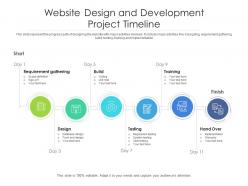
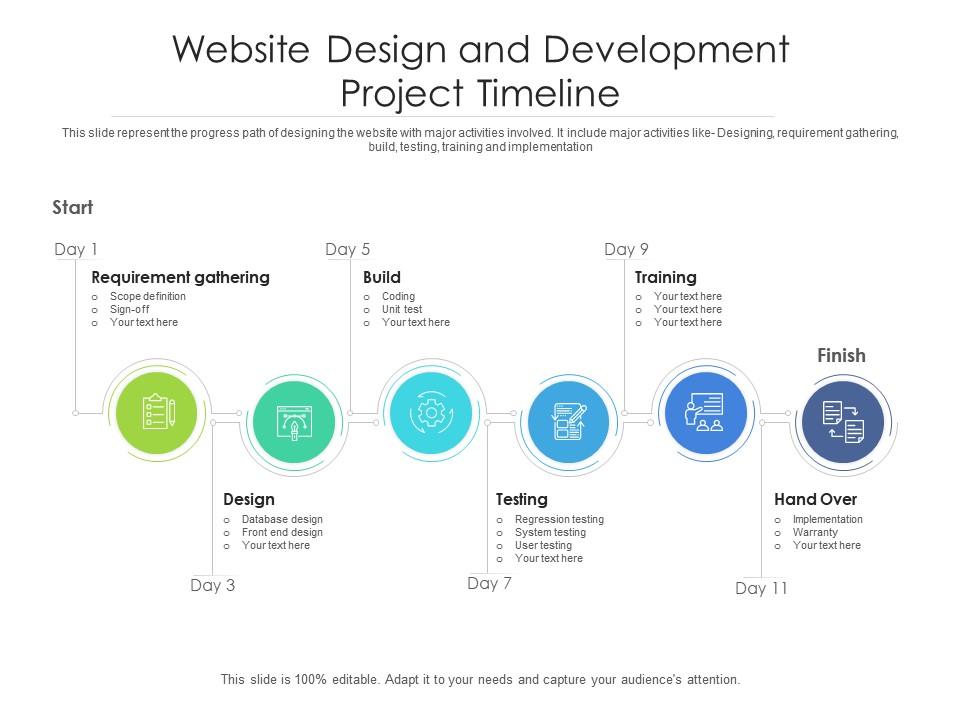
This slide represent the progress path of designing the website with major activities involved. It include major activities like Designing, requirement gathering, build, testing, training and implementation Presenting our set of slides with name Website Design And Development Project Timeline. This exhibits information on six stages of the process. This is an easy-to-edit and innovatively designed PowerPoint template. So download immediately and highlight information on Requirement, Development, Timeline.
FAQs for Website design and

So you've got discovery/planning first - gather requirements, map out the structure. Then wireframes to nail down how stuff actually works. Visual design comes next and honestly that's when it gets exciting because everything finally looks real. Development is where designers pass it off and developers build the whole thing out. Testing runs throughout but gets crazy intense right before launch. Don't rush that first discovery phase though - I've seen people skip proper planning and it bites them hard later. Whole thing usually takes 6-12 weeks depending on how complex you're going.

Okay so here's what saved my sanity - set up feedback checkpoints from the start. Like after wireframes, initial designs, that stuff. Tell clients upfront when you need their input so they don't randomly show up later with "tiny tweaks" (spoiler: they're never tiny). Be super specific about what kind of feedback you want at each stage. Also? Give them actual deadlines to respond or you'll be waiting forever while your whole timeline falls apart. I always put everything in writing too because people have selective memory about what they said they wanted. Trust me on this one.

User research upfront is a total game-changer - it stops you from building something nobody wants. I've watched so many projects crash and burn because teams skipped talking to actual users first. Big mistake. You need to dig into your target users' goals and pain points before touching any wireframes. Honestly, guessing at what people want is just expensive wishful thinking. Start with interviews or surveys to test your assumptions, then use what you learn to shape your site structure and features. Way better than pivoting halfway through development when you realize you got it all wrong.

So first thing - map out discovery/planning, wireframing, visual mockups, development, content integration, testing, then launch. The discovery phase is honestly make-or-break for the whole project. Most teams mess this up and pay for it later. Build in feedback rounds after each milestone because clients will definitely want changes. I learned this the hard way lol. Development to launch? Always add a buffer week for those random last-minute requests. Figure out your team's realistic timeline for each phase, then tack on 20% extra time. You'll thank me later.

Honestly, project management tools have saved my butt so many times on web projects. You'll actually see who's supposed to be doing what instead of just hoping things get done. Set up those automated reminders because people forget stuff - I do it too. Dependencies between tasks become super obvious, and you can catch problems way before they blow up your deadline. Clients eat up those real-time updates too. Makes them feel like they're part of the process or something. Once you build a template workflow, future projects basically run themselves. I'd start with Asana or Trello - they're pretty straightforward to figure out.

So planning and discovery usually take 1-2 weeks. Design mockups are another 2-3 weeks after that. Development's where things get tricky - anywhere from 3-6 weeks depending on how complex stuff gets. Then you've got testing and revisions, which is another 1-2 weeks. Here's the thing though - development ALWAYS takes longer than you think it will. There's inevitably some random browser issue or the client decides they want to change everything at the last second. How fast your stakeholders give feedback makes a huge difference too. I'd honestly just add 20% buffer time to each phase. Especially with new clients who take forever to get back to you.

Oh man, design revisions will absolutely wreck your timeline - I'm talking 2-4 weeks easy, sometimes way more. Here's the thing: each round eats up like 3-5 days minimum. You show concepts, then you wait... and wait for feedback. Then comes the fun part where they ask for stuff that wasn't even in the original brief. Classic, right? Honestly, I'd build buffer time into your schedule from day one. Cap major revisions at 2-3 rounds max in your contract - trust me on this. Also, get everyone reviewing at the same time instead of passing it around like hot potato. That trick alone saves so much headache.

Ugh, content delays are the absolute worst. Clients will promise you copy "by Friday" then ghost you for three weeks. Scope creep kills you too - suddenly that "quick homepage update" becomes a full rebrand because Karen from marketing had "just one tiny idea." Technical stuff can blindside you late in the game, especially integrations nobody mentioned upfront. Oh, and the revision cycles? Brutal. Someone always wants "just one more round" of changes. Set hard deadlines from day one and stick to them. Also be super specific about what's actually included - saves you so many headaches later.

Dude, seriously - nail down your goals before you touch anything else. I'm talking specific stuff like "boost conversions 20%" not vague nonsense like "make it better." Trust me, it'll save you from redesigning the same damn page over and over because nobody could agree on what they actually wanted. Your design choices become obvious when you know what you're shooting for. No more hour-long meetings debating button colors (those are the worst). Stakeholders can still try switching directions mid-project, but at least you've got something in writing to point to. Write down 3-5 measurable goals first.

Honestly, it comes down to three things: how complex your project is, how involved the client wants to be, and whether your timeline can bend. Simple brochure site with everything locked down? Sure, Waterfall's fine. But most web projects get messy - clients change their minds, requirements shift, you know how it goes. That's where Agile shines. You'll also want to think about your team's comfort level and if the client can actually show up for regular check-ins. My take? Default to Agile unless you've got a rock-solid reason not to iterate.

Look, team collaboration can totally make or break your timeline. Good communication and clear roles? You'll spot problems early and get way faster feedback. But throw too many people into the mix without any structure and you're screwed - endless revisions and scope creep everywhere. I learned this the hard way on my last project, honestly. What really works is picking one person to make final calls and setting up specific review points. Don't let everyone weigh in constantly or you'll never finish anything.

Oh man, watch out for missed deadlines and scope creep without any timeline updates - those are huge red flags. Radio silence is another bad one. When feedback takes forever or "quick fixes" keep multiplying, you're in trouble. The worst part? Everyone assumes someone else has it covered (spoiler: they don't). Also if your developer keeps saying "just a few more days" or content keeps getting delayed... yikes. Weekly check-ins help, but honestly trust your gut - it's usually right about this stuff.

Dude, it's such a weird paradox. New AI tools and design systems can totally slash your dev time - like, seriously speed things up. But then clients see all this shiny tech and suddenly want everything integrated into their project. Scope creep becomes a real nightmare. Your team's gonna need time to figure out these tools too, which kinda defeats the purpose initially. I'd say pad your timelines while everyone's learning, but don't skip investing in the new stuff. It's frustrating short-term but you'll be glad you did it later.

Dude, seriously don't skip the testing phase - I've watched launches go sideways because of broken contact forms and sites that look terrible on phones. Super embarrassing. You'll catch weird browser issues and links that go nowhere, plus users always find problems you never thought of. Even if you just ask a couple people to mess around with it, that helps tons. Oh and mobile testing is huge now, like half your traffic's probably mobile anyway. Budget at least 20% of your time for this stuff. Trust me, fixing things after launch is way more stressful than catching them beforehand.

Honestly, just bake in extra time from day one - like 20-30% per phase. Otherwise you're screwed when things inevitably go sideways. Set up specific checkpoints where they can request changes, not just whenever they feel like it (learned this the hard way). Your client needs to get that scope creep = delayed deadlines and more money. Period. During kickoff, spell all this out so there's no drama later when you have to push dates back. And yeah, document everything when changes happen - new timeline, budget tweaks, all of it. Covers your ass and keeps everyone on the same page.

Ratings and Reviews

100% of 100
Review Form
Write a review
Most Relevant Reviews
  1. 100%

    by Devon Ferguson

    Use of icon with content is very relateable, informative and appealing.

1 Item

per page: