


Product project implementation plan and timeline




Try Before you Buy Download Free Sample Product
 Impress Your
 Audience
 100%
100% Editable
 Save Hours
 of Time


Our Product Project Implementation Plan And Timeline are topically designed to provide an attractive backdrop to any subject. Use them to look like a presentation pro.
People who downloaded this PowerPoint presentation also viewed the following :
Product project implementation plan and timeline with all 2 slides:
Use our Product Project Implementation Plan And Timeline to effectively help you save your valuable time. They are readymade to fit into any presentation structure.

FAQs for Product project implementation
Honestly, start with your timeline and milestones - that's like your backbone. Map out who's doing what (roles matter more than you think), figure out your resources, and have some way to measure if this thing actually worked. Communication is huge though - I've watched projects crash just because nobody told people what was happening. Oh, and definitely have a backup plan if everything goes to hell. Risk assessment sounds boring but it'll save you later. Don't overcomplicate it from the start. Get your critical path down first, then add the other stuff as you go.
Dude, you've gotta make them feel like they're part of it, not just watching from the sidelines. Weekly updates are clutch - but don't just blast emails at them. Set up actual meetings where they can ask questions and complain if needed lol. Create ways for them to give feedback that aren't a pain to use. I've watched so many projects crash because people felt completely left out of the loop. Give them small tasks or roles if you can swing it. Even tiny stuff helps. Oh and set up some kind of dashboard thing where they can check progress themselves - saves you from answering "what's the status" emails every day. Two-way communication beats one-way every time.
Dude, you absolutely need a solid PM from the start - don't wait until everything's chaos. They'll keep your timelines on track and stop teams from doing their own thing in separate bubbles. Scope creep is real and will murder your budget if nobody's watching. Plus someone has to deal with all the stakeholder drama (trust me on this one). Risk management alone makes it worth it. Short version: get a good project manager day one or you'll regret it later when deadlines are flying by and nothing's coordinated.
Honestly, the worst thing you can do is be super unrealistic about timing. I learned that the hard way lol. Map out all your dependencies first - seriously, this step saves your ass later when everything starts connecting. Get your key people involved early or you'll be scrambling when they throw curveballs at you. Buffer time is huge too. Your plan should have enough detail to actually work with but stay flexible because stuff always changes. Oh, and list out literally every task, even the dumb obvious ones. Trust me on that.
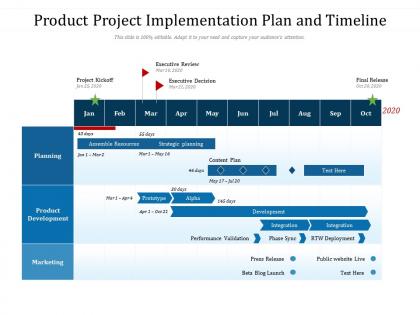
Honestly, Gantt charts are lifesavers for product launches. They show everything laid out visually - tasks, deadlines, what depends on what. Super helpful when you're trying to figure out if one delay will mess up your whole timeline (spoiler: it usually does). Your team can actually see their progress instead of just hoping they're on track. Include the big stuff like beta testing and go-live dates. I'd start by brain-dumping all your tasks first, then figure out realistic timeframes. Way easier to explain problems to your boss when there's a chart showing exactly why everything's behind schedule!
So you'll need both adoption stuff and business metrics to really see what's working. Start with user onboarding rates and how fast people find value in your product. Revenue impact and customer satisfaction are obvious ones to track too. Oh, and support tickets - if those go down, you're probably doing something right. The deployment and performance metrics are super boring but honestly? They matter more than people think. I'd grab maybe 4-5 key metrics first instead of going crazy with data. You can always add more later. Also worth having actual conversations with stakeholders since numbers don't tell the whole story.
Honestly, user feedback is what should be driving your whole timeline. People tell you what's broken or what they need, and you've gotta work that into your roadmap somehow. Sometimes that means pushing certain releases up or completely changing direction - I've watched teams throw out entire phases just because of beta feedback. Pretty wild how much one round of testing can shift everything. Build in those feedback checkpoints at major milestones so you're not just guessing what works. The tricky part is figuring out what users actually want versus sticking to your original plan. Regular check-ins help, but you need to stay flexible.
Honestly, daily check-ins are a game changer - even just 10 minutes to sync up. Make sure everyone's crystal clear on who's doing what, because that's where things usually fall apart. I'm obsessed with using Slack or Teams so people can't just disappear into their own little bubbles. Nothing's worse than finding out someone's been stuck for days and didn't say anything. Set up a shared doc where everyone updates their progress. Oh, and create a culture where asking for help early is totally normal - maybe start meetings by having people share what they're struggling with? Trust me, it works way better than everyone pretending they've got it handled.
Don't treat risk assessment like some boring checkbox you deal with later - weave it right into your timeline from day one. During planning, list out what could go wrong: tech issues, budget problems, market shifts, whatever. Give each risk a probability score and impact rating, then figure out who's handling what if things go sideways. Here's the thing though - you've got to actually review this stuff at every milestone meeting because new problems always pop up. I learned this the hard way on a project last year. Make sure everyone knows their piece of the puzzle so nothing gets forgotten.
Start with Asana, Monday, or Jira for tracking your milestones. I've watched so many teams get completely stuck choosing tools for like 3 weeks straight - don't do that. ProductPlan and Roadmunk are solid for roadmapping if you need the visual timeline stuff. Miro works great when you're doing those collaborative sessions where everyone's mapping workflows together. But honestly? Sometimes a basic spreadsheet handles resource planning better than fancy tools. The key is picking one main tool everyone will consistently use, then add others if you actually need them.
So basically, product development is the whole "let's build this thing" phase - research, design, testing, all that stuff. Implementation comes after and it's more like "okay cool, now how do we actually get people using it?" Development = making the product. Implementation = launching it right. The implementation part covers your launch strategy, onboarding flow, support docs, training people need. Most teams crush the building part but then kinda fumble the rollout (I've seen it happen so many times). Pro tip: start thinking about your implementation plan while you're still building. Trust me on this one.
Honestly, timelines are what keep everyone from going completely off the rails. Without clear deadlines, stakeholders will keep throwing in "just one tiny thing" until your project becomes a monster. You'll spot problems way earlier too - like when that API work is taking forever and you realize your launch is screwed. I always pad my estimates because literally nothing ever goes as planned. It also makes it way easier to push back when people have unrealistic expectations. Trust me, those milestones become your best friend when things get crazy.
Don't wait until launch day to train people - that's a recipe for disaster, trust me. Get your power users onboard first so they can help everyone else later. Break training into small chunks that align with each rollout phase. Set up different ways for people to get help: maybe a Slack channel, some office hours, quick guides they can actually use. Oh, and definitely plan follow-up sessions a few weeks after launch. That's when the real questions come up once people start using it daily. Makes such a difference.
Honestly, start small with a pilot group - way smarter than jumping in headfirst and dealing with chaos later. Once that's running smooth, you can roll out to bigger segments. Your infrastructure needs to be ready before the users hit though, because nothing's worse than everything crashing when you're finally getting traction. Oh, and don't forget about your team - they'll need backup or you need to automate more stuff. I learned this the hard way lol. Map out where you might hit roadblocks now so you're not scrambling later. Trust me on this one.
Oh man, culture stuff will totally torpedo your rollout if you're not careful. Honestly, I've seen teams completely tank implementations just because leadership didn't have their trust - and half the time they don't even realize they're doing it! Speed of decisions, how much risk people can stomach, whether departments actually talk to each other... all of that directly hits your timeline. If what you're rolling out clashes with how people already work? Good luck with that uphill climb. Map out where the potential disasters are hiding first, then build your change strategy around those trouble spots.
-
Designs have enough space to add content.
-
Awesome presentation, really professional and easy to edit.