


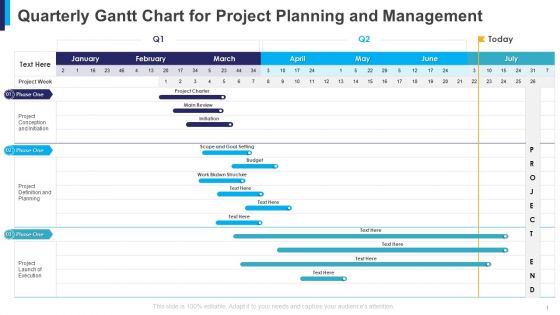
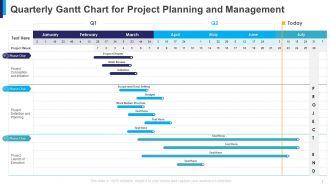
Quarterly Gantt Chart for Project Planning and Management




Try Before you Buy Download Free Sample Product
 Impress Your
 Audience
 100%
100% Editable
 Save Hours
 of Time


Interact closely with the audience through our Quarterly Gantt Chart for Project Planning and Management. Be able to establish intimate connections.
People who downloaded this PowerPoint presentation also viewed the following :
Quarterly Gantt Chart for Project Planning and Management with all 5 slides:
Consensus evolves with our Quarterly Gantt Chart for Project Planning and Management. Bobbing heads will express their agreement.

FAQs for Quarterly Gantt Chart for Project
So you've got task bars showing how long stuff takes and when it's scheduled. Dependencies are huge - they show which tasks have to wrap up before others can even start. Your timeline gives you the full picture of project duration (seriously saves my butt every time). Milestones mark your big deadlines and deliverables. All this helps you catch bottlenecks early and keep resources flowing smoothly. Oh, and everyone stays on the same page timing-wise. I'd start with mapping your critical path first, then build everything else around that framework.
Honestly, Gantt charts are game-changers for team clarity. Your whole crew can see who's doing what and when everything's due. Dependencies become super obvious - like when Sarah can't start her part until Mike finishes his. Progress tracking happens in real-time, so no more awkward "uh, what's everyone working on?" moments in meetings. The visual timeline thing really helps with planning too. I'd update it weekly (though sometimes I forget and do it every two weeks, oops). Make sure everyone can actually access it - becomes your go-to project bible. Way better than those endless email chains!
Dude, Gantt charts are seriously a game changer. You get this visual timeline where everything's laid out - what's done, what's lagging, what's next. Those progress bars make it painfully obvious when something's going sideways. I swear, the dependency arrows are the best part because you can see exactly how one delayed task will mess up everything else downstream. Spotting bottlenecks becomes way easier too. Just update it weekly (I know, sounds boring but trust me) and you'll catch issues before they snowball into total chaos. It's like finally having project visibility that actually works.
Microsoft Project is the classic choice, but Asana and Monday.com are way more user-friendly. Smartsheet's pretty solid too. Most tools now have Gantt charts built in - drag-and-drop scheduling, dependencies, resource tracking, the whole deal. Trello and ClickUp work great if you don't need every feature under the sun. They've got timeline views and progress tracking without being overwhelming. Honestly? Start with free versions of Asana or Monday.com first. Figure out what you actually use before paying for premium features you might never touch.
Honestly, Gantt charts are lifesavers for this stuff. They show you exactly when people are needed and for how long. You'll spot disasters before they happen - like when Sarah ends up on three projects at once (been there!). The timeline makes it super obvious which tasks depend on each other too. If someone gets behind, you can see right away what else gets screwed up. I always do a quick resource check every week and move things around before everything goes to hell. Way better than panicking when deadlines start crashing down.
Yeah, so Gantt charts get messy really fast - like, surprisingly fast. They're terrible with uncertainty too. Plus they go stale the second anything changes, which is basically always. Here's what actually works: keep them super high-level for the big picture stuff. Rolling wave planning is your friend - add details as you go instead of trying to map out everything upfront. I'd pair them with Kanban boards for daily work. Oh, and update regularly but don't go crazy about it. Some teams I know literally spend half their time fiddling with the chart instead of getting stuff done. Use them more for communication than rigid scheduling.
Oh yeah, Gantt charts are super customizable! Map out your typical project phases first - that's your starting point. Construction teams might use "permits, foundation, finishing" while software folks track sprints and testing phases. Colors and labels? Totally flexible. I've seen marketing teams go crazy with color-coding by campaign type (honestly looked like a rainbow but it worked for them). You can adjust timelines from hours to years depending on what you're tracking. Manufacturing companies often organize theirs by production line. Just build your template around whatever milestones actually matter for your workflow.
So dependencies are basically arrows showing which tasks have to wrap up before others can kick off. Four types exist - finish-to-start is the big one, then start-to-start, finish-to-finish, and start-to-finish (that last one's kinda weird tbh). The cool part? Your timeline updates automatically when stuff gets delayed. I learned this the hard way on a project last year - you've gotta nail down your critical dependencies first. Don't get distracted by all the minor connections right away. Those arrows are literally what make or break your whole schedule.
Yeah, totally works! Just don't get caught up in the weeds with it. Use your Gantt for the big stuff - sprint schedules, release dates, epic dependencies. Honestly, it's a lifesaver when you're presenting to executives who don't get the whole sprint board thing. Keep it high-level though, or you'll spend forever updating every little change. Day-to-day work stays on your usual boards. I actually like using them for release planning since stakeholders can actually understand what's happening when. Worth trying on your next big milestone planning session.
Honestly, less is more with Gantt charts. Focus on the big stuff - critical path and major milestones. Don't dump every tiny subtask on there or you'll lose people immediately. Color coding helps but keep it simple - red for late stuff, green for done. I learned this the hard way when a whole meeting got sidetracked because my chart looked like a rainbow explosion. Walk them through dependencies that actually affect their decisions. Oh, and definitely prep for timeline questions beforehand. You don't want to be caught off guard explaining why everything's suddenly two weeks behind. Include a legend if you're using symbols - saves awkward questions mid-presentation.
Oh man, Gantt charts are game-changers! I used to be awful at project timelines until I discovered these. Basically you plot everything on a visual timeline so you can see what's actually doable vs total fantasy. The cool part is spotting task dependencies - like when one thing absolutely has to finish before another starts. Saves you from those "oh crap" moments later. You'll also notice if someone's drowning in work or if there's wiggle room. Honestly, stakeholders love them too since it's way easier to explain visually than just talking through dates. Map out your tasks and dependencies first - that's the secret.
Honestly, just set up weekly check-ins from day one and stick to them. That's when you'll shift timelines around and move people to different tasks based on what actually happened. Scope changes are inevitable - when they hit, figure out how it messes with everything else before you touch the chart. Save versions so you can show stakeholders exactly what changed (they always want receipts). Your team needs to know about updates too, otherwise they're working off old info which is basically useless. Don't stress about making it perfect every time - better to update it regularly even if some details are rough.
So here's the deal - Gantt charts are like the hardcore version of project planning. Kanban boards? Great for seeing what's happening right now, super flexible. But Gantt charts show your whole timeline plus how tasks connect to each other. I'll be honest, they look intimidating at first. Once you get it though, they're amazing for complex stuff where one delay screws up everything else. Kanban works better for ongoing work without crazy deadlines. My take? Go with Gantt when you need to see the domino effect of delays hitting your project.
Gantt charts get way easier to read when you color-code them right. Your brain just picks up patterns faster than reading through a bunch of labels. I usually go with something simple - blue for development work, green for testing, red for anything on the critical path. Don't make it look like a crayon explosion though, I've seen some truly awful ones. Progress bars and milestone markers help you catch problems before they blow up your timeline. Dependencies are clutch too - those little arrows show you exactly where things'll get stuck if someone's running behind.
Oh absolutely! Used one for my kitchen remodel and honestly it kept me sane. Wedding planning is another perfect example - you can see how booking the venue comes before ordering invitations, stuff like that. Home renovations too since there's always that order where things have to happen (can't paint before patching holes, obviously). Even fitness goals work if you're tracking multiple habits over months. The visual aspect is what makes it click - suddenly all those overwhelming tasks feel manageable. Google Sheets works fine to start, or Trello if you want something fancier. Game changer for big projects, seriously.
-
Good
-
best
-
Great product with highly impressive and engaging designs.
-
Easily Editable.