


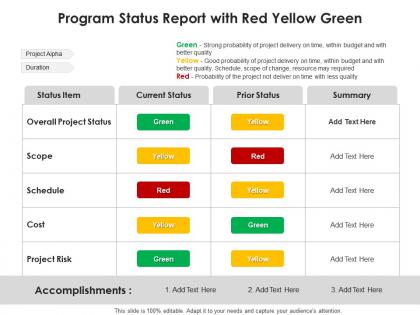
Program status report with red yellow green




Try Before you Buy Download Free Sample Product
 Impress Your
 Audience
 100%
100% Editable
 Save Hours
 of Time


Our Program Status Report With Red Yellow Green are topically designed to provide an attractive backdrop to any subject. Use them to look like a presentation pro.
People who downloaded this PowerPoint presentation also viewed the following :
Program status report with red yellow green with all 2 slides:
Use our Program Status Report With Red Yellow Green to effectively help you save your valuable time. They are readymade to fit into any presentation structure.
FAQs for Program status report with
Hey! So for weekly updates, definitely cover where you stand on milestones, budget stuff, and any roadblocks slowing you down. Next steps are crucial too. I always add a quick wins section - honestly, stakeholders eat that up because it shows things are actually moving. Keep the same format each week so people aren't hunting around for info. Oh, and be super clear about what decisions you need from leadership. Resource issues? Call them out. The trick is staying concise but hitting everything important. One page max, and throw in some color coding or status indicators. Makes it way easier to scan through quickly.
Honestly, I'd go with weekly or bi-weekly depending on how crazy your program is. If things are moving fast or it's super high-stakes, weekly keeps everyone in the loop. For more chill, long-term stuff? Bi-weekly works fine. Monthly reports are kinda pointless IMO - by then people have already forgotten what happened and lost interest. Whatever you pick, just be consistent about it. I always tell people to start weekly and see how it feels, then maybe dial it back if your stakeholders think it's overkill. The predictable rhythm matters more than you'd think.
Ugh, the data thing is such a nightmare - every team tracks stuff completely differently so you're constantly trying to make sense of conflicting numbers. Stakeholders will definitely change their minds about what they want to see, usually right when you think you're done. Oh and good luck getting everyone on the same timeline... some people update weekly, others whenever they feel like it apparently. Start with a standard template from day one, that'll save you so much headache later. Set hard deadlines but honestly, build in extra time because someone's always gonna be late. Trust me on that one.
Honestly, visuals are a game-changer for status reports. Nobody wants to wade through dense paragraphs when they could just glance at a chart instead. Progress bars work great for completion percentages, and those red/yellow/green indicators are perfect for flagging risks. Timeline stuff really shines when you're showing milestones - way better than describing it in text. Gantt charts are clutch for schedules too, though they can look overwhelming if you're not careful. Start with just one visual element in your next report. Trust me, stakeholders will actually pay attention for once instead of skimming past all those numbers.
Honestly, just focus on the big four: schedule progress, budget burn, milestones, and any roadblocks. Team capacity is huge too - that's where things usually go sideways. Show actual percentages for schedule stuff, not just "we're good" because that's useless. Budget should be real spend vs what you planned. Oh, and throw in whatever your boss actually cares about - could be quality metrics or user numbers or whatever keeps them up at night. Charts make everything easier to digest. I learned the hard way that stakeholders zone out if you just dump numbers at them.
Honestly, just ask each group what they actually want to see first - saves so much headache later. Executives care about big picture stuff: budget, major risks, business impact. Keep it short or they'll zone out. Your team needs the nitty-gritty details about blockers and what's next. Other departments? They mostly just want to know if you're going to mess up their timelines lol. I make one master report then cherry-pick sections for different audiences. Way easier than starting from scratch every time, and people don't get buried in stuff that doesn't matter to them.
Look, risk assessment is what keeps your program reporting honest. Identify what could mess up your timeline or budget early on. Rate how likely each risk is and how bad it'd hurt. Then actually tell your stakeholders about it - don't sugarcoat things. I've watched way too many projects crash because people were scared to mention the real problems in their updates. Highlight your top 3-5 risks, explain what you're doing about them, and call out any new ones. Trust me, being upfront about risks now beats scrambling to explain disasters later. Plus it helps everyone make smarter decisions.
Honestly, just get a good project management tool - Monday or Asana work great. They'll pull all your data automatically instead of you chasing people down for updates (which is seriously the worst). Set up your templates once with the right connections, then you're basically just adding context instead of building everything from scratch. The visual dashboards are clutch - you can literally screenshot them into reports. I'd start by figuring out what metrics you track most, then find tools that handle those on autopilot. Way less painful than doing it manually every time.
Make your data visual - charts beat dense spreadsheets every time. Nobody wants to dig through tables to find the important stuff. Start with RAG status right up top so people know immediately if there's a crisis brewing. I made the mistake once of burying terrible news halfway through a report... never again! Focus on outcomes over activities. Show how you're hitting business goals instead of just rattling off what your team accomplished. Oh, and always end with the "so what" - spell out what those numbers actually mean for decisions. Executives need that context or they're just staring at pretty graphs.
Check what feedback you got on past reports - that's your goldmine. See which parts got the most questions or confused people. I swear, we always overthink the technical stuff when execs just want to know about risks and timeline hits. Three people asked about budget? Make it way more obvious next time. After submitting each report, jot down what worked and what bombed. Those recurring themes in feedback will save you so much time when you're writing the next one. Focus on what they actually asked for versus all the extra details you thought they'd want.
Look, being upfront about everything just makes your life easier. People can actually help when they know what's really going on - both the good stuff and the messy parts. I've seen too many programs crash because someone was sugarcoating problems until it was too late. You'll build way more credibility by saying "here's the issue AND here's how we're fixing it" instead of pretending everything's perfect. Nobody likes those surprise disasters anyway. When stakeholders trust your updates, they stop second-guessing every little thing you tell them.
Sort your issues by how bad they are - red/yellow/green works great. Always include who owns it and when you expect it fixed. When you escalate stuff up the chain, tell them exactly what decision or resource you need. Don't just throw problems at leadership without context, that never goes well. I can't tell you how many reports I've seen where everything's buried in these massive paragraphs and nothing actually gets done. Bullet points or simple tables are your friend here. People need to scan quickly and figure out what needs their attention. Oh, and always include your recommended next steps or you'll get hit with the classic "let's circle back on this."
Honestly, Asana and Monday.com are lifesavers for this stuff - they pull all your project data automatically. Jira's great too if you're doing software work. Microsoft Project handles the really complex timeline stuff, though it can be overkill sometimes. Don't overthink it though. A good Excel template works fine when you're starting out. PowerBI makes those fancy real-time dashboards if you want to impress people (which, let's be real, sometimes you do). My take? Just use whatever your team's already comfortable with first. You can always get fancier later when things get more complicated.
Honestly, status reports are like a health check for your project. They keep everyone on the same page about what's actually happening. The best part? You catch problems early instead of getting blindsided later. I've seen too many projects crash because nobody was paying attention to the warning signs. Your stakeholders will trust you more when they see consistent updates - it shows you're on top of things. Don't just treat them as boring paperwork though. Use them strategically to communicate wins and flag issues. Makes a huge difference in how smoothly everything runs.
Accuracy and data privacy are your main concerns here. Don't share sensitive client stuff or proprietary info without getting approvals first - that's where most people mess up. Are you in finance, healthcare, or gov contracting? Those have their own reporting rules you'll need to follow. Quick thought - double-check that your status report doesn't accidentally expose legal problems or compliance issues that haven't been escalated yet. Honestly, I'd run anything sensitive past legal or compliance before sharing it with outside stakeholders. Better safe than sorry.
-
Best Representation of topics, really appreciable.
-
Much better than the original! Thanks for the quick turnaround.
-
Awesome use of colors and designs in product templates.
-
Easy to edit slides with easy to understand instructions.