

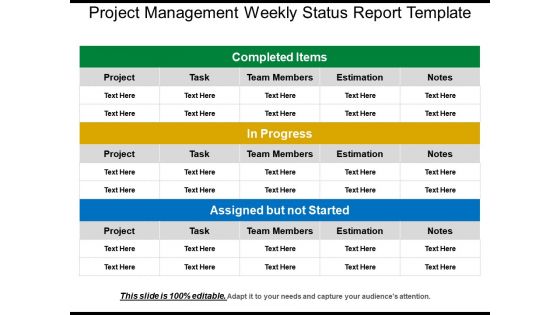
Project management weekly status report template




Try Before you Buy Download Free Sample Product
 Impress Your
 Audience
 100%
100% Editable
 Save Hours
 of Time


Maintain all your business reports with our Project Management Weekly Status Report Template. Use this project management weekly status template to describe the status reports of different tasks. With the help of this status report, you can divide all your task into three different categories which include the items or tasks that are completed, those items which are in progress and the tasks which are assigned but not yet started. Weekly status report slides can be made within no time. It can give a clear understanding of your business plans to your employees. This template is divided into five columns with the help of which you can describe the status of your projects, tasks, team members and all the other related aspects on a weekly basis. It is difficult to maintain such records using a pen and a paper. Use this weekly status report template and maintain all your records in just one slide. Don't waste your time click on the download button now.
People who downloaded this PowerPoint presentation also viewed the following :
Content of this Powerpoint Presentation
Milestones, challenges, and triumphs are three crucial factors that drive employees toward hard work and excellence. Setting milestones and achieving those will help you feel accomplished and work will flow efficiently. Since a number of projects run simultaneously within an organization, knowing the status and group-wise project responsibility is important. Project management plays a crucial role in tracking the status of the project, updating risks to the stakeholders, and communicating the risks and mitigation strategies.
SlideTeam has brought you a ready-to-use creative PPT Template with innovative visuals and graphics. This presentation template is specifically designed for managers who want to track their projects weekly and stay up-to-date about ongoing and completed projects. There are several benefits of our project management weekly status PPT Template. These include highlighting project accomplishments, upcoming tasks, and challenges that need to be addressed. Using this PPT Design you can provide regular updates and ensure transparency and accountability among various teams and team members.
Click to get Weekly Progress Dashboard for project report and timeline.
Product 1:Project Management Weekly Status Report Template
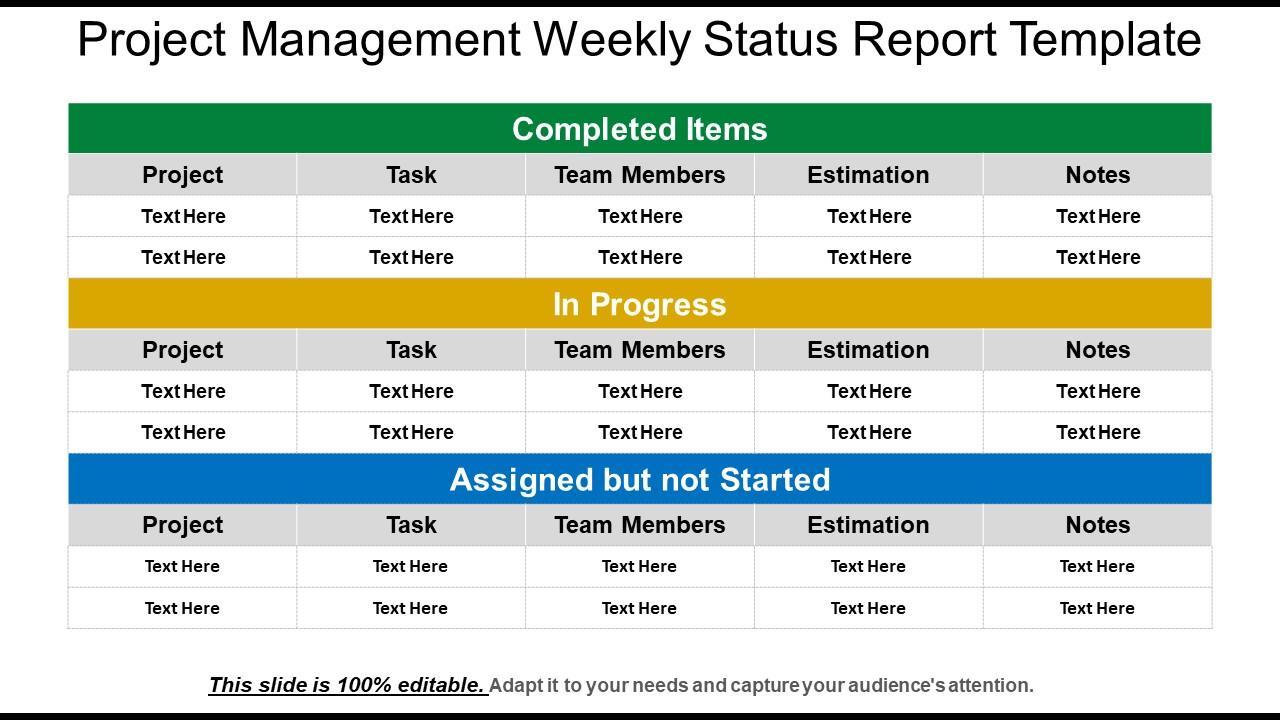
The Weekly Project Management report template is specially designed to track the various projects of the company, whether they are in progress, completed, or not started yet. This presentation template features 100% editable columns and rows demonstrating the names of your projects, tasks, team members, the estimated date to complete the tasks, and a particular column to mention the notes if there are any changes or improvements to be made in the project. Through this PPT Preset, you will get the opportunity to divide the projects into three categories: completed items, in progress, and yet to be completed. The color scheme that has been used in this PowerPoint Dashboard makes this template attractive and captivating.
Thus, the weekly project management report templates will serve as proof of the team's hard work and progress on various projects. If an organization strives for transparency and keeps track of the development or progression of various projects, it must have access to these templates. This presentation template will inspire employees to work in collaboration and contribute effectively to project success. If you want transparency and alignment across your team, download this expert-design PPT Layout now!
P.S. Explore our exclusive software team weekly project status report templates for the IT Team.
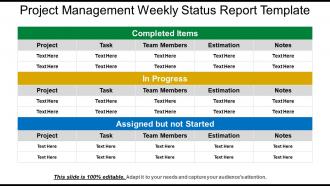
Project management weekly status report template with all 5 slides:
Initiate the discussions with our Project Management Weekly Status Report Template. Inform folks about the agenda.


FAQs for Project management weekly
Okay so there's five main phases you gotta know about. First is initiation - basically defining what you're actually doing and getting everyone on board. Then planning, which is where you map out timelines, resources, all that stuff. Don't skip this part, trust me, it'll save you so much pain later. Execution is the meat of it - where things actually get done (or completely blow up). While that's happening, you're monitoring everything and tweaking as needed. Finally there's closure - wrapping things up, documenting what went wrong or right. Oh and celebrating if it didn't crash and burn!
Dude, you gotta nail down exactly what you're delivering before anything else starts. Write out the specific stuff - what you're making, when it's due, what's NOT included. I got burned so bad once when a "quick website tweak" became this massive redesign from hell. Get everyone to actually sign off on these details first. Document it all and make people go through official approval for ANY changes. Those "tiny" additions? They're evil - seem harmless but they'll destroy your timeline faster than you think. Being the bad guy who says no is way better than working weekends for free, trust me.
Think of stakeholder analysis as figuring out who can torpedo your project before they actually do it. List everyone who's affected or has any pull - sponsors, users, that random person from accounting who somehow matters. Then rank them by how much power they have and whether they care. I learned this the hard way when a "low priority" stakeholder completely blindsided my last project because I didn't realize they golfed with the VP every weekend. Do this early and check back periodically since office politics shift. Focus your communication on the high-power, high-interest folks first.
Okay so the project triangle is basically a balancing act - mess with one side and the others get wonky. Compressed timeline? You're either throwing more money at it or cutting scope. I learned this the hard way on a project last year, honestly. Be super upfront about trade-offs from the start because stakeholders hate surprises. Keep checking your priorities as things change. Document everything so people can't later claim they didn't know why you made certain calls. Pick your battles though - not every constraint shift is worth fighting over.
Look, spot risks early but don't just dump them in some spreadsheet to die. Figure out which ones could actually wreck your project - likelihood vs impact stuff. Too many PMs I know treat this like homework they have to turn in, which is completely pointless. Build real plans to handle your worst-case scenarios and get people to own watching them. Actually talk about risks in meetings regularly, not when everything's already on fire. Oh, and tell your stakeholders about problems early - they hate expensive surprises way more than bad news delivered upfront.
Don't just focus on deadlines - that's only part of the picture. Budget variance and stakeholder satisfaction scores are huge indicators too. Quality matters a ton - how many bugs popped up after launch? I've watched so many projects finish "on time" but totally whiff on what users actually wanted. Team satisfaction is worth tracking, plus whether you stayed in scope. The real question: did this thing actually move the needle on your original business goals? Honestly, that's what separates successful projects from checkbox exercises. Set these success criteria upfront so you're not scrambling later trying to figure out if it worked.
Asana and Trello are pretty solid choices - most people figure them out fast. Monday.com's good too. Honestly though, I've watched teams spend forever arguing over which tool to use instead of just picking one and getting started. Jira's great if your team's more technical, but it can be a pain to learn. Google Workspace works fine for basic stuff too. The thing is, it doesn't really matter if you get the "best" tool if nobody ends up using it consistently. Just grab free trials of like 2-3 options and see what feels right for how your team actually works.
Dude, agile is honestly a game-changer for handling projects that are all over the place. You break everything into these short 2-week chunks instead of trying to map out the entire thing upfront. Way less stressful. Daily check-ins keep everyone on the same page, and you're constantly getting feedback so you won't end up with some disaster at the end. When requirements change (which they always do), you can pivot fast. Oh, and those retrospective meetings? They're actually useful for catching issues before they blow up. Trust me, once you start thinking in sprints, traditional project management feels painfully slow.
Dude, communication seriously makes or breaks everything. I've watched so many projects completely implode just because people stopped talking to each other - it's wild how fast things can spiral. Set up those regular check-ins from day one and actually stick to them. Don't wait for problems to surface before you start communicating properly. Make sure everyone knows when they'll get updates, and honestly? Create an environment where your team won't hesitate to flag issues early. Being ahead of problems beats scrambling to fix them later every single time.
Oh man, cultural stuff will absolutely destroy your international projects if you're not careful. Some teams want super direct feedback, others get offended by it - I've seen this blow up so many times. Germans think everything's urgent while Brazilians are way more chill about deadlines. Meeting styles are totally different too. Honestly, the whole "time is money" thing doesn't translate everywhere, which threw me off at first. You've got to figure out these differences upfront and create communication rules that actually work for your specific mix of people. Otherwise you're just asking for chaos.
Honestly, start with better communication - like, actually talk to your team instead of just dumping tasks on them. Weekly check-ins are clutch, but not those boring status updates. Real conversations about what's blocking them. Be upfront about deadlines and why things matter. People prioritize way better when they get the full picture. Let them figure out the "how" while you nail down the "what" and "when." Oh, and confirm everyone's top priorities each week - sounds obvious but you'd be surprised how often this gets skipped. Just make sure they have what they need to actually get stuff done.
Honestly, you gotta be super specific about what you want and when. None of that "get it to me soon" nonsense - actual dates and deliverables. Check in regularly so people can't just disappear into the void. When someone screws up, call it out but don't be a dick about it. Here's the thing though - you have to own your mistakes first. Like if you miss something, just say it straight up. Makes everyone else way more likely to be real with you about their stuff too. Maybe start by picking one thing each person needs to deliver next week?
Dude, it's almost always one of three things: fuzzy requirements, terrible communication, or completely insane deadlines. Get your stakeholders to actually spell out what "done" looks like before you start - way harder than it should be, but whatever. Set up regular check-ins so nobody goes rogue for weeks. Scope creep will murder your project, so write everything down and make people go through proper channels for changes. Oh, and build padding into your timeline because something always goes sideways. Planning feels boring but you'll thank yourself later when you're not scrambling.
Don't wait until the end to ask for feedback - that's where I always screwed up before. Build it right into each phase instead. Weekly team check-ins work great, plus those quick pulse surveys after you hit major milestones. Stakeholder meetings too, obviously. Here's the thing though - collecting feedback is pointless if you don't actually do anything with it. Document what people tell you, pick what you'll change, then circle back so they know you listened. Honestly, just start with one feedback thing per phase. You can always add more once it doesn't feel weird anymore.
Look, continuous improvement stops you from making the same dumb mistakes repeatedly. Learn from what worked and what didn't, then apply that to your next project. Think of it like debugging - spot the issue, fix it, boom, everything runs smoother. Skip this step? You'll hit identical roadblocks every single time. Same missed deadlines, same team drama, same headaches. The trick is doing regular retrospectives (I know, sounds corporate but bear with me) and actually using that feedback instead of letting it collect digital dust. Otherwise you're just spinning your wheels.
-
Great product with highly impressive and engaging designs.
-
Great designs, really helpful.