


IT Team Software Development Project Weekly Status Report





Try Before you Buy Download Free Sample Product
 Impress Your
Audience
 100%
Editable
 Save Hours
of Time


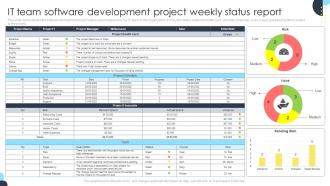
This slide demonstrates the software development project status report prepared by the IT team of the organization. It includes details related to health card, schedule, financials, risks, issues and pending items related to the project.
People who downloaded this PowerPoint presentation also viewed the following :
IT Team Software Development Project Weekly Status Report with all 7 slides:
Use our IT Team Software Development Project Weekly Status Report to effectively help you save your valuable time. They are readymade to fit into any presentation structure.






FAQs for IT Team Software Development Project
Track your project milestones and completion rates first. System uptime matters too - log any outages or incidents. How fast are tickets getting resolved? Budget vs actual spend is always a big one. Team capacity is critical - figure out who's drowning and who can take on more. Security stuff like patch compliance and breach reports, obviously. I'd add a wins section because IT teams need some love, honestly. Any major blockers or risks that need executive buy-in should go at the top. Keep it tight though - one page max or they won't read it.
So for project visuals, mix progress bars with those red/amber/green status dots - way easier to scan than walls of text. Timeline charts work great too, showing planned vs actual dates. Gantt charts are my weakness but they're honestly too much for most status updates. Dashboard layout is clutch - key metrics up top, then details underneath. Risk stuff? Simple matrix or bullet points with severity levels work fine. The whole point is making it super scannable so people get the picture fast without having to read through paragraphs of boring updates.
Honestly, go with a visual dashboard - way better than walls of text. Start with an exec summary up top, then hit the key metrics and project updates. Green/yellow/red status dots are your friend here. I used to write these novel-length reports until I realized nobody actually reads past the first paragraph anyway. Bullet points and charts will save you. One page is ideal, two if you absolutely have to. Oh, and throw in a "what we need from you" section at the bottom - makes it crystal clear what you're waiting on from them decision-wise.
Weekly reports work best for most IT teams, honestly. Daily updates are way too much unless something's on fire or you're doing sprints. You need enough time to actually get stuff done that's worth mentioning, right? Monthly is too long though - people forget what happened or things change too much. With weekly, you can cover what got finished, any roadblocks, and what's up next. Keeps everyone in the loop without being annoying. I'd start there and see how it feels. Being consistent matters more than the exact timing anyway.
Ugh, the worst thing you can do is be super vague - like saying "database stuff is happening" when everything's actually on fire. Be specific about what's broken and your timeline for fixes. And honestly? Bad news upfront beats surprises later. Trust me on this one. I've watched teams bury major problems in paragraph after paragraph of fluff, then act shocked when stakeholders flip out. Break your reports into clear chunks - what got done, what's blocking you, what's next. Makes it way easier when your boss inevitably asks "remind me what's going on with that thing again?"
Honestly, the trick is speaking their language - skip the tech speak and talk business impact. Like instead of "migrated 500GB to new servers," say "upgraded the system so we'll have 30% less downtime." Analogies work too, even though they feel dumb sometimes. Comparing network security to door locks actually clicks with people. Structure matters - what you did, current problems (and how they hurt operations), what's next. Always start with the "so what" - why should they care? Business folks need to see how your work helps them. Oh, and end with real timelines and what resources you need. Makes their decisions way easier.
Dude, you HAVE to get feedback on your status reports or they're basically useless. Ask people stuff like "Is this too technical?" or "Need more details on what's blocking us?" Then actually change things based on what they say. I've watched teams just copy-paste the same boring template forever without checking if anyone even reads it (spoiler: they don't). Mix up your format and detail level depending on what stakeholders actually want. Oh, and set up some kind of monthly check-in to keep improving them. Trust me, it makes such a difference.
Always write for whoever's least technical on your team - that's your starting point. Plain English first, then maybe add the technical stuff in parentheses like "server crashed (database timeout error)." Trust me, I've been in those awkward meetings where execs are completely lost! Start with simple status updates. Red/yellow/green is perfect - everyone gets it instantly. Then your technical people can dig into the details below. Oh, and always throw in next steps that actually make sense to non-tech folks. Keeps everyone on the same page instead of nodding along pretending they understand what's happening.
You want to hit the wins first - sets a good vibe right off the bat. Then pivot to the messy stuff but don't call it "problems" or whatever. I usually say "blockers" or "focus areas" so it sounds less doom-and-gloom. Here's the thing though - never just dump issues without explaining what you're actually doing about them. Leadership hates that. Get specific with numbers too. "Deployed 15 patches" sounds way better than some vague "improved security" nonsense. Oh, and always end with next steps. Shows you're on top of everything instead of just reporting chaos.
For incident docs, grab the basics: quick description, how bad it was, what you did to fix it, and how long it took. Oh and the root cause if you figured it out - super helpful for catching patterns down the road. I always throw in a lessons learned bit because that's honestly the most valuable part. Make it detailed enough so someone reading it later won't be confused, but don't write a novel. Document any process changes too, not just the technical stuff. Get your team using the same template - makes everything way cleaner and you'll actually want to reference these later.
So many ways to handle this! Jira and Monday.com are pretty solid for tracking stuff and spitting out automated reports. Confluence or Notion work better if you want more of a story-style update. Honestly though, sometimes a simple Google Doc or Slack setup does the trick - no need to overcomplicate it. You can automate distribution through Slack channels or email templates in Outlook. Tableau's cool if you're into fancy metrics but that might be overkill. I'd just start with whatever your team's already using daily. Way less headache when people don't have to learn new tools from scratch.
Try adding a "User Impact" section with real quotes from support tickets or feedback surveys. Those hit way harder than just numbers, trust me. Track stuff like response times and satisfaction scores from their actual perspective. Also get your support team to throw in a quick summary of what they're hearing - trending complaints or wins. Oh and be specific about it! Don't just say "users love it" but give actual examples. Makes your work feel real instead of just internal team stuff. Do it regularly and you'll start seeing patterns that actually matter.
Honestly, just dig into what your team actually shipped before - not the pie-in-the-sky estimates. That's your real baseline. Then tack on 10-15% extra because stuff always goes sideways somehow. Break everything into weekly chunks instead of monthly goals, trust me on this one. Your devs should help set these targets too since they're the ones who'll hit the weird technical roadblocks you never see coming. Oh and next week, pull up your last few status updates - you'll probably spot some patterns in where you're always off.
Status reports are actually pretty great for this! When people know they'll have to document their progress and blockers each week, they naturally stay more on track. I've seen teams do really well with simple weekly check-ins that cover what you did, what's stuck, and what's next. The trick is making sure it's not just paperwork hell - it should help people think through their own productivity. Honestly, reviewing them together in meetings keeps everyone way more engaged than just sending reports into the void. Just use a basic template and you're good.
You know how you're always scrambling to pull numbers from like five different systems every week? Just automate that stuff - ticket counts from your help desk, uptime metrics, deployment stats. Seriously cuts down on errors too since you're not copy-pasting wrong numbers at 5pm on Fridays (been there). Set up templates that pull the data automatically, then you just add your commentary and insights. I probably save 3-4 hours a week this way. Pick one metric and automate it this week - you'll wonder why you didn't do this sooner.
-
Love how there are no boring templates here! The design is fresh and creative, just the way I like it. Can't wait to edit and use them for my extended projects!
-
The visual appeal of the templates is just unparalleled! I was so worried about the design of my presentation but SlideTeam made it all so easy.