


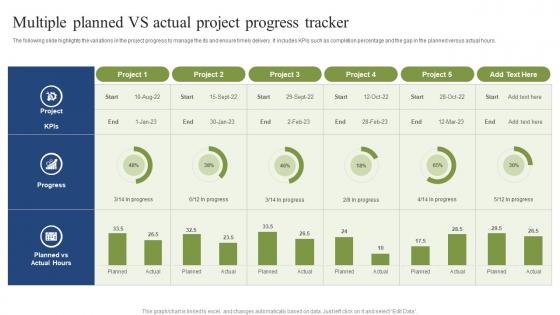
Multiple Planned VS Actual Project Progress Tracker




Try Before you Buy Download Free Sample Product
 Impress Your
 Audience
 100%
100% Editable
 Save Hours
 of Time


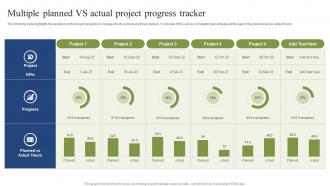
The following slide highlights the variations in the project progress to manage the its and ensure timely delivery. It includes KPIs such as completion percentage and the gap in the planned versus actual hours.
People who downloaded this PowerPoint presentation also viewed the following :
Multiple Planned VS Actual Project Progress Tracker with all 7 slides:
Use our Multiple Planned VS Actual Project Progress Tracker to effectively help you save your valuable time. They are readymade to fit into any presentation structure.





FAQs for Multiple Planned VS Actual
Track your schedule variance first - are you ahead or behind? Budget variance is obvious but critical. Then watch for scope creep because that stuff sneaks up on you fast. Resource utilization tells you if your team's drowning or twiddling their thumbs. Quality metrics like defect rates matter too, plus stakeholder satisfaction scores. Honestly? Start with milestone completion percentage - everyone instantly gets what that means. Don't go crazy tracking every possible metric though. Pick maybe 3-4 that actually apply to your project. I've seen people drown in spreadsheets trying to measure everything.
Honestly, Gantt charts are total lifesavers for project tracking. You get this visual timeline where everything's laid out at once - no more digging through a million emails to figure out what's happening. Delays become obvious right away, plus you can see how one task falling behind might screw up everything else downstream. Dependencies and resource conflicts? Way easier to spot. I mean, I used to hate project management until I started using these things. Start simple though - maybe try Monday or even just Excel if you want to test it out first. Your team will definitely appreciate the clarity.
So I'd definitely try Asana or Monday.com first - both have solid milestone tracking. Asana's timeline view is perfect for smaller stuff, but Monday.com handles complicated dependencies way better. Microsoft Project works too if you're already using their other tools. Honestly though? Pick whatever your team will actually update consistently. I've watched so many teams get excited about all these bells and whistles they end up ignoring completely. Both Asana and Monday have free trials, so maybe just test drive them and see which one doesn't make everyone groan when they have to use it.
Honestly, think of status reports as your project insurance policy. They catch problems while you can still do something about them instead of scrambling at the last minute. I've watched so many teams crash and burn because nobody wanted to speak up when things started going wrong. Keep your reports short but real - what's actually happening, where you're stuck, and what help you need. It sounds boring but it keeps everyone on the same page. Way better than those awkward conversations later when deadlines get missed and everyone's pointing fingers.
Honestly, good communication can make or break your project. Seriously - I've watched so many teams crash because someone assumed everyone else was on the same page. Regular check-ins help you spot problems early and figure out who's doing what. Without it? You get that awkward "wait, weren't you handling this?" moment right before a deadline. Dependencies between tasks get messy fast when people aren't talking. Just make it stupid easy for your team to raise red flags immediately. Trust me on this one.
Honestly, tracking your project is like having a heads up before everything falls apart. I always tell people to watch for patterns - maybe tasks keep running late or your team's getting swamped. Weekly check-ins are a lifesaver for this stuff. You'll catch problems while you can still fix them instead of scrambling later when it's a total mess. Oh, and don't just freak out over one missed deadline. Look at the bigger picture and your critical path metrics. That's where the real warning signs show up, and you can actually do something about it.
Dude, iterative tracking is a game changer compared to waterfall. Short sprints mean you catch problems early instead of finding out everything's broken at the end - which honestly saves your sanity. Your team actually stays motivated because they see real progress every few weeks instead of working in the dark for months. Daily standups are clutch for this. Burndown charts help too, though they look scary at first. The best part? Stakeholders can't complain about being left out since you're showing them tangible stuff constantly. Way less stressful overall.
You need different communication layers for different people. Executives? Monthly high-level stuff is usually enough. Project sponsors want weekly updates with the actual numbers. Most folks would rather get fewer, focused updates than daily spam - learned that the hard way. Dashboards work great, or just do one-pagers that put the important stuff (issues, milestones, blockers) right at the top. Honestly, the best thing is just asking each group what they actually want to see and how often. Then tweak it based on what they tell you.
Look, focus on the stuff that actually matters: budget vs what you're spending, whether you're hitting timeline milestones, and how well you're using your resources. Task completion rates are huge too, plus any blockers or risks. Quality metrics if they apply to your project. Honestly? Skip the fancy metrics that just look good on paper but don't help you decide anything - total waste of space. Keep it simple so people can look at it and instantly know if something's broken. I'd start with maybe 5-7 key things, then tweak based on what your team actually cares about when making calls.
Honestly, integrations are a game changer for tracking stuff accurately. No more manually updating everything and forgetting half your tasks. Your PM tool talks directly to GitHub, time trackers, whatever - so data updates in real time without you lifting a finger. Way fewer "crap, I never marked that as done" situations too. Your dashboards actually show what's happening now instead of last week's stale info. I'd start with whatever tools you're already glued to daily and connect those first. You'll see better accuracy pretty much immediately. Trust me on this one.
Just ask your team straight up what's working and what sucks about how you're tracking stuff right now. Do mini retrospectives every couple weeks - people will definitely tell you if something's annoying them, lol. Monthly check-ins work great to start. Then actually change things based on what they say! Maybe simplify those crazy dashboards or add metrics you didn't think about. I learned this the hard way - you gotta keep doing it regularly, not just once. Start small and keep tweaking from there.
Honestly, it's always the same three things that mess people up. Nobody reports consistently, the metrics are confusing, and everyone just... forgets to update stuff until panic mode hits. Classic, right? Pick maybe 2-3 metrics that actually tell you something useful - not just busy work numbers. Set automatic reminders because people won't remember otherwise. Quick weekly check-ins work way better than those soul-crushing status meetings we all hate. And here's the thing - use whatever tool your team will actually touch regularly. A basic shared doc that gets updated beats some expensive fancy dashboard that collects digital dust.
Honestly, managing remote teams is all about being way more intentional with communication. I'd grab something like Asana or Trello - those visual boards are lifesavers. Trust me, I've had projects completely disappear into the void because nobody updated anything for weeks. Super frustrating. Daily status updates become non-negotiable, even if it feels like overkill at first. Those quick 15-minute video check-ins work wonders too. Set up some automated reports so your stakeholders aren't constantly pinging you with "what's the status?" messages. You'll find your groove pretty fast once everyone gets into the habit.
Okay so first thing - stop with the "team responsibilities" BS and actually assign names to stuff with real deadlines. Like Sarah owns the report, due Friday. Done. Check-ins are clutch too. Daily standups or weekly reviews where people have to say what they did out loud - there's something about that public element that just works. Oh and visibility helps a ton. When everyone sees who's lagging behind on a shared dashboard or whatever, they don't want to be that person. Honestly I'd throw in some stakes if you can - rewards or consequences tied to hitting milestones. Just pick one thing to try this week and watch how fast things change.
Weekly check-ins are usually your best bet, but it really depends on what you're dealing with. For sprints or crazy deadlines, daily makes sense. Longer projects? Maybe monthly works. I've watched so many things go sideways because people got lazy about tracking progress - it's honestly painful to see. You don't want to annoy everyone with endless meetings though. That sweet spot is tricky to find. Start weekly and see how it feels. If your team's rolling their eyes, dial it back. Set up those calendar blocks now or you'll forget.
-
The templates are easy to get, and the chat customer support is excellent.
-
It saves your time and decrease your efforts in half.