New Software Development Project Timeline

Rating:
100%
New Software Development Project Timeline
Slide 1 of 6
Favourites Favourites

Try Before you Buy Download Free Sample Product

Audience Impress Your
Audience
Editable 100%
Editable
Time Save Hours
of Time
The Biggest Sale is ending soon in
0
0
:
0
0
:
0
0
Rating:
100%
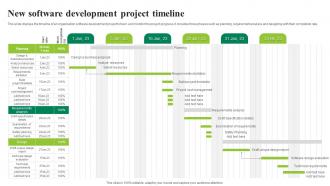
This slide displays the timeline of an organization software development project to track and monitor the project progress. It includes three phases such as planning, requirement analysis and designing with their completion rate. Introducing our New Software Development Project Timeline set of slides. The topics discussed in these slides are Design, Planning, Requirements Analysis. This is an immediately available PowerPoint presentation that can be conveniently customized. Download it and convince your audience.

FAQs for New Software

So basically you've got planning (figure out what you're even building), design, coding, testing, and deployment. Oh, and maintenance forever because stuff always breaks after launch. Planning's where you nail down requirements - seriously, don't skip this or you'll hate yourself later. Design covers the whole user experience and technical setup. Then comes the actual coding work, followed by testing to catch all the bugs you definitely introduced. Finally deployment gets everything live. Timeline's all over the place depending on scope, but think weeks or months per phase, not days. Requirements first though - that's your lifesaver.

Look, Agile basically flips the whole timeline thing on its head. You're not stressing about one huge deadline anymore - instead you work in these 1-2 week chunks where you actually ship features people can see. Way better than waterfall IMO. The question shifts from "when's it done?" to "what can we get you by this date?" You can tweak things as you go instead of being locked into some plan from six months ago. Just start by figuring out your core MVP features first. Rank them by what matters most and boom - there's your realistic timeline foundation.

Dude, scope creep will absolutely destroy you - I've seen it happen so many times. Also unclear requirements and not leaving enough time for testing. Integration stuff is always way more complex than you think it'll be. Bug fixes eat up tons of time too, so honestly just double whatever you planned for testing. Communication breakdowns between teams create these awful bottlenecks. Oh, and dependencies on other teams or third-party stuff? Total nightmare because you can't control any of it. Build in buffer time everywhere, get those requirements locked down super early, and do daily check-ins. Don't let anyone slip in "one tiny feature" halfway through - that's how projects die.

Honestly, project management tools are a game changer for dev timelines. No more of those awkward "uh, what was I supposed to be doing?" moments in standups. Real-time progress tracking helps you spot bottlenecks before they become disasters, and coordinating between team members doesn't turn into endless Slack threads. The automation stuff is clutch too - tickets move themselves through stages, deadline reminders pop up automatically. I probably save like 3-4 hours a week just on manual updates. Just make sure whatever you pick plays nice with your current setup, and you'll notice the difference pretty much immediately.

Honestly, stakeholder feedback is like your sanity check for timelines - shows you when you're totally off base or priorities just shifted. You'll get hit with new feature requests, changes to stuff you already built, or sometimes (the best days) they'll admit something isn't actually needed. Always pad your timeline with buffer time because changes are coming whether you like it or not. Don't wait until the end to check in - that's just asking for chaos. Regular touchpoints let you pivot early instead of panicking later. Trust me, saves everyone a headache.

Dude, automated testing saves you SO much time. Bugs get caught early instead of you panicking at 2am before launch. Every code change triggers tests automatically - no more manually clicking through everything like a robot. Honestly? The setup is kind of annoying at first, but once it's running it's incredible. Way less time debugging, way more time actually coding cool stuff. My advice: don't go crazy initially. Pick one main user flow, write tests for just that, then slowly add more. You'll never want to go back to the old way.

Honestly, the trick is breaking everything down into tiny tasks first. I always throw in at least 25-50% buffer time because something random always pops up - learned that the hard way lol. Don't estimate based on your best day ever, use realistic examples from past projects. Your team will catch stuff you totally missed, so ask them. Oh, and actually track how long things take vs what you guessed. I used to be terrible at this but now my estimates are pretty solid. It's annoying to do at first but worth it.

Ugh, technical debt is such a productivity killer. You end up spending forever just trying to understand what that messy code from six months ago actually does. Then you're tiptoeing around it like it might explode if you change anything. Simple features suddenly become these massive headaches because you can't build on anything solid. It's honestly like trying to add a room to a house with terrible wiring - everything just takes way longer than it should. I'd start keeping track of where this stuff is costing you time so you know what to fix first.

Honestly, version control is a game changer. Your team can work on stuff at the same time without breaking everything. Branching lets you mess around with new features - then just merge when it works. Something crashes? Roll back instantly instead of panicking about what you changed. The commit history is like having notes from your past self, which saves your butt when debugging later. Git's probably your best bet to start with. Even on solo projects it's worth it - I was stubborn about learning it for way too long and regretted waiting.

Oh man, compliance will absolutely wreck your timeline - we're talking 20-40% longer, sometimes way more. Healthcare and finance? Those are just painful. I watched one project literally double because of all the hoops they had to jump through. You've got security audits, endless documentation, testing protocols, then review cycles that go on forever. The trick is planning for this nightmare upfront instead of scrambling later. Map out what regulations you're dealing with early and pad your schedule big time. Trust me, there's always more back-and-forth with auditors than you think.

Oh milestones are lifesavers! Think of them as checkpoints that keep you sane. Break down those massive features into specific, measurable chunks - not vague stuff like "finish login" but "users can actually log in AND see their dashboard." This way when your boss inevitably asks what you've been doing, you've got real proof. Plus stakeholders love seeing concrete progress (honestly makes everyone less anxious). Set them at natural stopping points in your dev cycle. Trust me, you'll thank yourself later when everything isn't falling apart at once.

Honestly, cross-functional teams are a game changer because they cut out all those annoying handoffs between departments. Instead of waiting around for weeks while your project sits in someone else's queue, you've got developers, designers, and QA folks all working together daily. Decisions happen way faster. Problems get spotted early before they become major headaches. I've seen so many projects get derailed by miscommunication between teams - this fixes that. Plus you get way better solutions when everyone's throwing their expertise into the mix from the start. Look at where your biggest delays happen. Bet they're between teams, not within them.

Honestly, you've gotta be ruthless about boundaries from day one. Set up a proper change control process - nothing new gets added without going through approval and impact assessment first. Write everything down because I swear stakeholders forget half of what they agreed to! Make a "parking lot" for all their bright ideas so they don't feel ignored. Regular check-ins help too since people love feeling involved. Master this phrase: "that's perfect for version 2.0." You'll use it constantly but it actually works. Oh, and don't feel bad about being the bad guy sometimes - someone has to protect the timeline.

Dude, you gotta start tracking stuff instead of just winging it every time. I used to be awful at estimates too - like embarrassingly bad. But once you measure cycle time, story points, and how long features actually take vs what you predicted, patterns start jumping out. Bug rates are huge too. Honestly, seeing where your bottlenecks happen is a game changer. Historical data beats gut feelings every time when you're planning sprints. Don't overcomplicate it though - pick maybe 2-3 metrics and stick with them for a few sprints. You'll get way better at building in realistic buffers.

Honestly, team size is weird - it doesn't always work how you'd think. With 2-5 people, you'll fly through simple stuff since nobody's stepping on each other's toes. Complex projects though? They'll drown fast. Big teams can handle the heavy lifting but god, those meetings become a nightmare. I've found 6-8 developers hits that sweet spot where you get decent speed without total chaos. Oh and those 12-person standups you mentioned? Yeah, pure torture. Start small and only add people when your current crew is actually maxed out, not just because you think more = faster.

Ratings and Reviews

100% of 100
Review Form
Write a review
Most Relevant Reviews
  1. 100%

    by Coleman Henderson

    I didn’t expect such a good service for the money I am paying. But, they exceed my expectations. Great work SlideTeam.
  2. 100%

    by Darrin Porter

    A library of engaging, customizable and content-ready templates. 

2 Item(s)

per page: