


Application Health Monitoring Kpi Dashboard IT Operations Automation An AIOps AI SS V




Try Before you Buy Download Free Sample Product
 Impress Your
 Audience
 100%
100% Editable
 Save Hours
 of Time


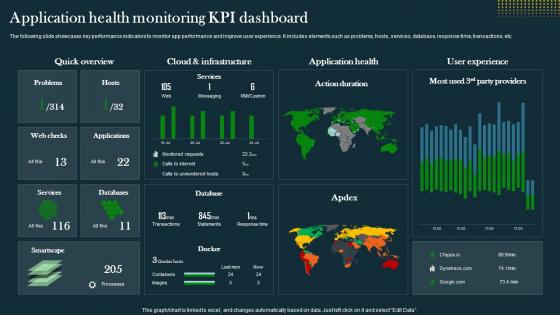
The following slide showcases key performance indicators to monitor app performance and improve user experience. It includes elements such as problems, hosts, services, database, response time, transactions, etc.
People who downloaded this PowerPoint presentation also viewed the following :
Application Health Monitoring Kpi Dashboard IT Operations Automation An AIOps AI SS V with all 10 slides:
Use our Application Health Monitoring Kpi Dashboard IT Operations Automation An AIOps AI SS V to effectively help you save your valuable time. They are readymade to fit into any presentation structure.








FAQs for Application Health Monitoring Kpi Dashboard IT Operations Automation An AIOps
Focus on the big four: response time, error rates, throughput, and how much CPU/memory you're burning through. Uptime is obviously huge too - can't have users hitting a dead site. Business stuff matters just as much though, like are transactions actually going through or are people bouncing after 10 seconds? Honestly, the alerting part is where most people mess up. Set those thresholds right so you know about problems before your users start blowing up your inbox. Oh, and don't try to track everything at once - start simple and add more as you figure out what actually breaks.
So APM tracks how fast your app runs - like response times and user experience stuff. Health monitoring? That's just checking if everything's actually working at all. Health monitoring = "is this thing even alive?" APM = "okay it's alive, but is it fast enough?" You'll want health checks first because honestly, what's the point of optimizing speed if your app keeps crashing? Though most tools nowadays do both anyway, which is pretty convenient. But yeah, start with the basics. Make sure it works, then worry about making it work better.
Dude, New Relic and Datadog are probably your best bets for real-time monitoring - both have solid free tiers you can mess around with first. AppDynamics is great too but gets pricey fast. If you're feeling more hands-on, Prometheus + Grafana works well though you'll be doing way more setup yourself (I went down that rabbit hole last year). Really depends on your budget and how much time you want to spend configuring stuff. All of them do the important bits - real-time alerts, decent dashboards, and help you figure out what's broken when your app inevitably crashes at 3am.
So instead of setting those annoying static thresholds that always seem wrong, you can train ML models to learn what your app normally does. Way better approach honestly. The models pick up on subtle patterns in response times, error rates, all that stuff - then flag you when something's actually weird. I'd start with unsupervised detection since you don't need training data. Just dump your historical metrics in there and it figures out "normal" on its own. Really good for catching performance issues before they blow up into full outages.
Honestly, user experience is like your north star for app health. Sure, your servers might be humming along perfectly, but if people can't figure out how to use your app or pages take forever to load, you're screwed. I've watched teams get obsessed with backend metrics while users are literally abandoning their site left and right. Pretty frustrating to see. Focus on page load times, error rates that users actually see, and whether people can complete basic tasks. That stuff tells the real story. Those green dashboards don't mean much if nobody wants to use your product.
Don't just pick random numbers - dig into your historical data from the past few weeks to see what's actually normal. Your app probably acts totally different at 3am vs during the day, so make your thresholds smart enough to know that. Trust me, I've been woken up by "urgent" CPU alerts that were completely fine for that time of night. Really annoying. Set up alert suppression during maintenance windows and make sure you need a few consecutive breaches before anything fires off. Start loose with your thresholds then dial them in once you've got a better feel for your baseline patterns.
Three things to nail down: synthetic monitoring, anomaly detection, and smart alerts. Synthetic transactions are clutch - they test your critical user flows before real customers hit problems. Machine learning for anomaly detection is where it gets interesting, honestly took me forever to tune it right but now it catches weird patterns I'd never spot manually. Dynamic thresholds beat static ones every time since they adapt to your actual traffic patterns. Monitor everything - infrastructure, app performance, business metrics. Oh and start with your most important flows first, don't try to boil the ocean right away.
Look, monitoring basically watches for weird stuff that screams "something's wrong." Failed logins piling up? Traffic going crazy out of nowhere? Your app suddenly eating way more resources than usual? That's probably bad news. I've seen it catch malware and compromised systems before things got really messy. You can set alerts for login failures and weird API responses - honestly saves your butt when attackers are probing around. It'll also flag outdated dependencies and services with too many privileges. The real-time alerts are clutch for stopping small problems from turning into full-blown security disasters.
Definitely go with JSON format for your health logs - way easier to search through than plain text when something breaks. Make sure you're capturing timestamps, service names, and severity levels consistently. I'd set up something like ELK stack for centralized logging, honestly saves so much headache down the line. Track both your wins and failures, not just errors. Oh and set up automatic alerts on your dashboards instead of manually checking everything like some kind of masochist. Don't forget log rotation policies too, especially if you've got compliance stuff to worry about.
So DevOps totally changes how you handle monitoring. Instead of tacking it on at the end, you build it right into your code from the start - way less painful that way. Your CI/CD pipelines catch problems before they go live, which is honestly a lifesaver. Infrastructure as Code lets you version control all your monitoring stuff too, so no more "wait, what config were we running last week?" moments. The feedback loops get way faster, and dev/ops teams actually work together instead of pointing fingers when stuff breaks. Oh, and that whole "shift left" thing? Game changer for catching issues early.
Honestly, cloud apps make health monitoring way more complex - you're suddenly tracking microservices, containers, APIs, databases spread across different regions instead of just one server. It's like herding cats sometimes. But the upside is cloud platforms actually give you decent monitoring tools built-in, plus auto-scaling and alerts that don't suck. The big shift is stopping the obsession with server metrics like CPU usage. Focus on what users actually experience and how your business transactions perform. That's what really matters anyway. Way more useful than staring at memory graphs all day.
Oh man, monitoring architecture is wild. Monoliths are way simpler - just one app to watch, though good luck figuring out what broke when things go sideways. Microservices? Total opposite. You'll need distributed tracing, service mesh stuff, health checks everywhere. Honestly feels like juggling sometimes. But here's the thing - you get crazy good visibility into failures. I'd map out your service dependencies first (seriously, do this), then build monitoring around whatever's most critical. Way more complex but worth it when you can actually see what's dying.
Before you deploy, grab your baseline numbers - response times, error rates, throughput, user happiness scores. After release, watch those metrics like a hawk for at least 24-48 hours. Honestly, I've watched so many teams pop champagne only to wake up to alerts the next morning! Set up automated monitoring that'll ping you when things go sideways. A/B testing helps too if you can roll out gradually. Oh, and define what "good" looks like ahead of time - you don't want to be googling "is 500ms response time bad" at 3am during an outage.
Dude, the worst thing is setting up way too many alerts - your phone will blow up constantly and you'll just start ignoring everything, even the actually important stuff. Most teams I know chase fake problems for weeks because their thresholds are garbage. Don't just track CPU and memory either - your app might look "healthy" while users can't even log in. Business metrics matter way more than vanity numbers. Honestly? Start with monitoring like 3 key things really well, then add more later. Way better than having a million noisy alerts you can't trust.
Honestly, stop making monitoring just the ops team's headache. Get each dev team to actually own their app's health metrics - like, real ownership with SLAs they're on the hook for. I've watched this totally work when you connect monitoring performance to team goals and actually recognize people for it. Do post-mortems but skip the blame game, just focus on learning from the mess-ups. Share those dashboards everywhere, celebrate teams who catch problems early, and make sure leadership can see the data too. Once people feel like it's theirs and can see the real impact, they'll genuinely care about keeping things running smooth.
-
The best collection of PPT templates!! Totally worth the money.
-
If you are looking for satisfactory PowerPoint services, SlideTeam is your go-to place. I am fully contented with their research and development team.