


Artificial Intelligence Ai Chatbot Performance Dashboard




Try Before you Buy Download Free Sample Product
 Impress Your
 Audience
 100%
100% Editable
 Save Hours
 of Time


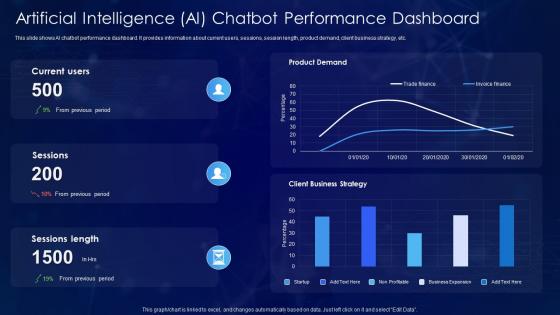
This slide shows AI chatbot performance dashboard. It provides information about current users, sessions, session length, product demand, client business strategy, etc.
People who downloaded this PowerPoint presentation also viewed the following :
Artificial Intelligence Ai Chatbot Performance Dashboard with all 7 slides:
Use our Artificial Intelligence Ai Chatbot Performance Dashboard to effectively help you save your valuable time. They are readymade to fit into any presentation structure.





FAQs for Artificial Intelligence Ai
Focus on conversation completion rates and user satisfaction scores first - those tell you the real story. Response accuracy matters too, obviously. Track how long people wait for answers because that's super annoying when it's slow. Also watch your escalation rate to human agents. I'd throw in intent recognition accuracy and how often the bot has to use fallback responses. Peak usage times help you plan capacity, which honestly gets overlooked a lot. Start simple with these on your dashboard, then add more specific stuff once you see what patterns emerge. Mix the operational metrics with user experience ones.
Dude, visualization tools are a game changer for chatbot dashboards. You'll see patterns instantly instead of drowning in spreadsheet hell. Heat maps show exactly where users bail out, and those flow diagrams? Pure gold for tracking conversation paths. I started with basic stuff like response times and satisfaction scores - way less overwhelming that way. Real-time metrics give you that instant "oh crap" or "nice!" moment when something's happening. It's honestly night and day compared to staring at raw numbers. My eyes used to glaze over before, but now I actually get what's going on.
Focus on conversation history first - search and filtering are clutch. Real-time monitoring's huge too so you can hop in when things go sideways. Analytics help you see what's actually frustrating users (trust me, it's never what you think). Don't forget easy bot training tools or you'll hate your life later. Keep the interface clean though - some dashboards look like NASA built them lol. Your team needs to spot problems fast and update stuff without clicking through a million screens. Start simple, add features once you know what actually gets used.
So you can totally customize your chatbot dashboard around whatever industry you're in. Like if you're doing e-commerce, track cart abandonment and product questions. Healthcare? Focus on appointments and patient tickets. Most platforms let you build custom widgets and set alerts for your KPIs - honestly there's almost too many options which is kinda overwhelming but also great. My advice? Pick your top 3 business goals first. Then just build the dashboard around tracking those specific things. Oh and don't forget to connect it with your CRM or booking system if you've got one.
Start with your conversation logs - that's where the gold is. User intent, satisfaction scores, how conversations actually flow. Your CRM data shows which customers are hitting the bot and what happens after. Google Analytics tracks web behavior before/after interactions, which is pretty telling honestly. API logs catch performance issues and errors you might miss otherwise. Knowledge base connections show which articles get referenced most. The tricky part? Getting all these systems to actually talk to each other so you're not stuck with scattered data that doesn't tell the real story.
Dude, real-time data is a game changer. You catch problems while they're happening instead of discovering them three days later like "oh great, now what." Conversation drops? You'll see it immediately. Users getting confused about something specific? It shows up right away. Quick adjustments become possible - fix responses, escalate the urgent stuff, or just turn off whatever's broken. I learned this the hard way honestly. The trick is setting alerts for stuff your users actually care about, not just the numbers that look impressive in reports.
Your users are literally telling you what's broken - listen to them! Half the stuff we developers think is crucial gets completely ignored. When someone says they can't find conversation history or the analytics make no sense, that's pure gold for fixing your dashboard. I'd start collecting feedback through surveys or just watching how people actually use it. Track which requested changes actually make users happier afterward. It's way better than guessing what they want. Plus you'll stop building features that look cool but nobody touches. Focus on what makes their day easier, not just prettier.
So basically you wanna track a few things - resolution rate is huge (like how often your bot actually fixes stuff without passing to humans). User satisfaction scores are obvious but super telling. Response time's critical too because people get annoyed waiting. I always check escalation rates to see when folks bail to human agents, plus how long conversations last. Honestly, the automated alerts are a game-changer when metrics tank. Oh and definitely benchmark where you're at now - otherwise you're just shooting in the dark trying to measure if things actually got better.
Focus on visual hierarchy first - put your big metrics like completion rates at the top, then break down specific conversation paths below. Flowcharts work way better than boring data tables, trust me. Color-code everything by outcome (successful, abandoned, escalated) so problems pop out right away. You'll also want time period and user segment filters since conversation patterns shift constantly. Sankey diagrams are clutch for showing actual user journeys. The whole point is making it scannable - you need to spot issues fast and tweak your bot without digging through endless data.
Dashboards show you exactly what people are asking your chatbot - like which questions keep coming up over and over. You'll see topics users struggle with most and where your bot just completely fails them. Honestly, the visual stuff makes it pretty obvious when certain phrases trip up your bot every single time. Once you spot those patterns, you can actually train it on real problems instead of randomly guessing what's broken. Oh, and definitely check the "unresolved queries" section first - that's usually where you'll find the easiest fixes.
Start with role-based access - only show people what they need to see. Encrypt everything (transit and at rest, obviously). Session timeouts are crucial because everyone leaves their computer unlocked at some point. Data masking for SSNs and credit cards is a must. Audit logs help you track who's accessing sensitive stuff, which honestly saves your butt during compliance reviews. MFA isn't optional anymore - I learned that the hard way. First though, figure out what counts as "sensitive" for your situation. Then build layers around it. Short sentences work. But mixing in longer explanations keeps it natural.
So basically you'll want to start tracking conversation patterns and see when people actually use your bot most. Mine always gets slammed around lunch for some reason. Look at which responses work and which ones make people bail - that data's gold. Once you've got some history, you can predict traffic spikes and even guess what knowledge base stuff needs updating. The really neat part? You can catch when someone's about to rage-quit a conversation before it happens. Just begin with simple trend analysis on whatever chat data you already have.
Honestly, the biggest pain points are model updates, data drift, and integration headaches when systems change. Performance monitoring gets weird too - your metrics might look perfect but users are complaining (been there). Set up automated alerts for key stuff and do regular data reviews. Document your integrations or you'll hate yourself later. Getting actual user feedback is clutch - catches problems before they explode. Oh, and monthly health checks are a lifesaver. Sounds boring but trust me on this one.
Set up side-by-side comparisons with your key metrics - response accuracy, user satisfaction, completion rates, that stuff. Color-coded charts work great (green for winners, red for losers). Honestly, the visual contrast makes such a difference when you're trying to quickly scan results. Add real-time confidence intervals so you'll know when the data actually means something statistically. User flow charts help too - shows you exactly where people bail out with each version. Just keep it simple enough that anyone can glance at it and immediately tell which chatbot variant is crushing your main KPIs.
So for your chatbot dashboard - React or Vue.js are your best bet upfront since real-time stuff is their thing. Backend wise, I'd go Node.js or Python with Flask/Django. Chart.js is honestly way easier than D3.js unless you're doing something really fancy (which you probably don't need right away). Socket.io handles the real-time streaming pretty smoothly. PostgreSQL or MongoDB for storing chat logs and metrics. My advice? Start simple with React + Chart.js + basic REST API first. Get that working, then add the fancy real-time features after. Way less headache that way.
-
It's always a delight to see new templates from you! I am extremely pleased with the fact that they are easy to modify and fit any presentation layout in seconds!
-
The slides are remarkable with creative designs and interesting information. I am pleased to see how functional and adaptive the design is. Would highly recommend this purchase!