

Knowledge Transfer Plan Progress Tracker Sheet




Try Before you Buy Download Free Sample Product
 Impress Your
 Audience
 100%
100% Editable
 Save Hours
 of Time


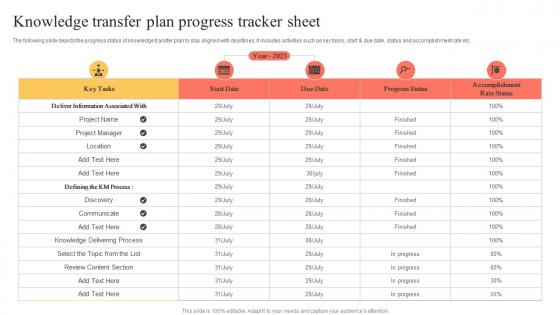
The following slide depicts the progress status of knowledge transfer plan to stay aligned with deadlines. It includes activities such as key tasks, start and due date, status and accomplishment rate etc.
People who downloaded this PowerPoint presentation also viewed the following :
Knowledge Transfer Plan Progress Tracker Sheet with all 6 slides:
Use our Knowledge Transfer Plan Progress Tracker Sheet to effectively help you save your valuable time. They are readymade to fit into any presentation structure.





FAQs for Knowledge Transfer Plan
So knowledge transfer is basically how your org gets smarter over time. Your team shares what they know through mentoring, docs, or even just coffee chats - and boom, that wisdom stays put even when people bounce. Prevents everyone from learning the same painful lessons over and over (seriously, I've watched this happen way too many times). Don't just hope it happens naturally though. Make it systematic. Figure out where your knowledge gaps are first, then set up regular times for your experienced people to actually pass stuff down to newer folks.
Honestly, good knowledge sharing is a game-changer for teams. Your people stop reinventing stuff constantly (so annoying when that happens). Problem-solving gets way faster since everyone builds off what already exists. Different perspectives start mixing together, and that's where the magic happens - you get those breakthrough moments. Documentation helps, but I'd start with regular sharing sessions first. Gets people talking more naturally. Short ones work better than marathon meetings, trust me. When expertise flows around freely, collaboration just clicks better.
Okay so for remote knowledge sharing - Loom is seriously a lifesaver for screen recordings, way better than trying to explain stuff over text. Documentation-wise, Notion or Confluence work well, and Slack threads are perfect for those ongoing conversations. Miro's solid for when you need to brainstorm together. Here's the thing though - don't go crazy with too many tools or people will just ignore them. Pick maybe 2-3 max and actually stick with them. I'd start by figuring out what knowledge disappears most often (usually it's the random processes nobody writes down), then grab tools that fix those specific problems.
Oh man, cultural stuff totally derails knowledge transfers if you're not careful. Communication styles are huge - some places want super direct feedback, others think that's incredibly rude. Then you've got hierarchy issues and completely different learning preferences. Honestly, the deadline thing alone can drive you nuts depending on the culture. Visual aids work great for high-context cultures, but low-context ones need way more explicit detail. My advice? Map out their preferences first and build in relationship time before jumping into technical stuff. Trust me, it'll save you so many problems down the road.
Honestly, people won't share stuff if it feels like more work piled on top of everything else. So make it rewarding - call them out in meetings when they help others, put it in newsletters, whatever works. Lunch-and-learns are pretty low-key, or maybe just start a Slack channel for random tips. The trick is making it feel normal instead of this big formal thing. Oh, and definitely share your own screwups first - people love knowing they're not alone in making mistakes. Once folks see that sharing knowledge actually makes them look good instead of giving away their "secret sauce," they'll do it naturally.
Honestly, it's mostly time and people hoarding info. Everyone's drowning in their regular work, so knowledge sharing feels like this annoying extra task on top of everything else. Communication between teams is usually terrible too - I swear some people treat their expertise like it's classified intel or something. What works is actually scheduling transfer sessions into project timelines instead of hoping it'll happen naturally. Make it feel collaborative, not like you're extracting secrets. Try mixing up formats - some docs, some hands-on stuff. Oh, and create that safe space where people actually want to help. Start with whoever knows the most critical stuff and get regular brain dumps before they disappear.
Stories just hit different than boring lists, you know? People actually remember stuff when there's context and emotion behind it. Like, tell them about that project that went sideways last year - they'll remember those lessons forever. War stories from the trenches are honestly the best way to share knowledge. Your brain creates these little frameworks around stories that make the "why" and "when" super clear, not just the what. Next time you're sharing something, wrap it around a real project experience instead of just throwing concepts at people. Trust me, you'll actually see them lean in.
Honestly, mentorship programs are pretty smart when you set them up right. Pair your experienced people with newer hires for regular meetings and projects together. The old-timers share their knowledge and industry tricks, while the younger folks bring fresh ideas and tech skills - it's actually a two-way street. What I've seen work best is having formal pairings with clear goals instead of just crossing your fingers that knowledge sharing will happen naturally. Oh, and bonus - you won't lose all that critical know-how when your senior people retire.
Honestly, good docs are a game-changer for getting people up to speed quickly. Instead of tracking down the one person who knows how something works, your team can just search for what they need. I always start with the questions people ask me most - saves so much time later. Step-by-step guides with screenshots work best, especially for new hires who'd otherwise need constant help. You know those panic moments when everyone's forgotten how you handled something before? Yeah, proper documentation kills those dead. Just make sure you actually update the stuff and put it somewhere people will find it.
Honestly, I'd start with just 2-3 metrics that actually matter to you - don't go crazy trying to track everything. Training completion rates are obvious but useful. Time-to-competency for new people tells you a lot too. Employee surveys are gold though - they'll straight up tell you if your knowledge transfer stuff is working or just annoying everyone. Track how much your knowledge base gets hit and whether experts are fielding the same questions over and over (that's a bad sign). The real proof is in business results: fewer mistakes, faster problem-solving, better project timelines. Those are harder to measure but way more convincing when you need to justify the effort.
Honestly, good knowledge transfer is a game changer for keeping new hires around. People quit when they're drowning in confusion for weeks - I've seen it happen so many times. But when you actually document stuff and have decent mentoring? New people hit the ground running instead of flailing around. They feel way more confident too. Most companies are terrible at this though, which blows my mind because it's not rocket science. Figure out what newbies actually need to know, then make it dead simple to pass that info along. Skip the fancy systems - just focus on getting critical knowledge into their heads fast.
Honestly, your best bet is getting those experienced people to actually walk through real scenarios they've dealt with - like proper storytelling sessions. Record the *how* they think through problems, not just what happened. Mentoring programs work amazing for this... pair veterans with newbies and document those chats (ask first though lol). Job shadowing helps too since people don't realize what they know until they're explaining it. Don't make it a huge one-time thing. Monthly "war stories" sessions where teams share their problem-solving tricks? That's where the real gold is.
Honestly, gamification works way better than you'd expect. Add some points and badges to your training - people get weirdly competitive over the dumbest stuff, but hey, if it works! Leaderboards are great for teams that like showing off. You could do knowledge challenges or reward folks for finishing modules and actually helping their coworkers. The trick is making it fun instead of feeling like homework. Don't go overboard though - start with maybe just points and a progress bar, then see what your people actually care about.
Think of collaborative platforms as that one place where everyone's random knowledge actually lives instead of disappearing into the void. Your team can set up shared workspaces, wikis, discussion threads - basically dump everything they know and build off each other's ideas. Everything's searchable too, which honestly saves so much time when you're not hunting down Jim from accounting who's the only one who knows how the system works. Conversations turn into documentation without anyone really trying. Just pick one platform everyone will actually use (good luck with that) and move your most important stuff there first.
Dude, case studies work because they give your brain something real to grab onto. Abstract stuff just floats away, you know? When you show how something actually went down - the good, bad, and ugly parts - people remember it way better. Stories beat bullet points every single time. You can see the actual decisions people made and why things worked or totally bombed. I'd start saving examples from your own work or crazy industry stories you hear about. Even the disasters are gold - maybe especially those ones since they show you exactly what not to do.
-
Amazing slides! Unique, attractive, and easy to understand.
-
Great designs, Easily Editable.