

Project Software Test Plan Document




Try Before you Buy Download Free Sample Product
 Impress Your
 Audience
 100%
100% Editable
 Save Hours
 of Time


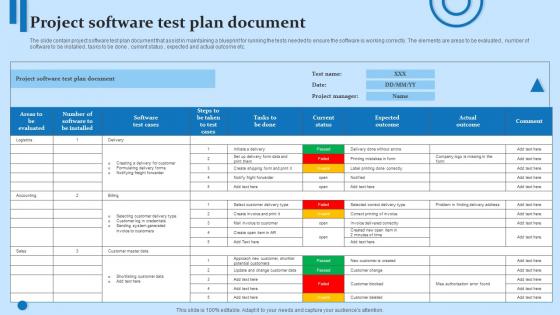
The slide contain project software test plan document that assist in maintaining a blueprint for running the tests needed to ensure the software is working correctly. The elements are areas to be evaluated, number of software to be installed, tasks to be done, current status, expected and actual outcome etc.
People who downloaded this PowerPoint presentation also viewed the following :
Project Software Test Plan Document with all 6 slides:
Use our Project Software Test Plan Document to effectively help you save your valuable time. They are readymade to fit into any presentation structure.






FAQs for Project Software
For a solid test plan, you'll need test objectives and scope first. Then map out your testing strategy and who's handling what. Timeline with milestones is crucial - trust me on this one. Entry and exit criteria help keep things focused. Risk assessment saves headaches later. Don't skip the test environment and data requirements (I've seen teams get burned here). Include your deliverables, assumptions, and any dependencies that might mess with your schedule. Make it detailed enough so your team isn't guessing, but honestly? If it's too wordy, people won't read it. Start with a template and tweak it for whatever you're working on.
Honestly, test plans are lifesavers for avoiding those awkward "I thought you were handling that" conversations. They get dev and testing teams speaking the same language about what needs testing and when. Both sides can catch problems early since everything's written down - your assumptions, deadlines, success metrics, all of it. The best part? Writing one forces teams to hash out edge cases together upfront. Oh, and definitely get everyone in the same room when you're planning it out. Those discussions always reveal stuff you'd miss otherwise. Way better than trying to coordinate over Slack later.
You really need those testing objectives written down - trust me on this one. Your whole team stays on the same page about what you're actually trying to accomplish. When deadlines get crazy (which they will), clear objectives help you figure out which tests are worth your time and which ones can wait. Honestly, they're lifesavers when you're talking to stakeholders too. You can show concrete progress instead of just saying "yeah, we're testing things." Plus they help you decide what NOT to test, which might be even more valuable. Write them early and keep checking back - stops that scope creep before it kills you.
Start with your requirements and user stories - that's your baseline. Map out the critical user workflows and integrations that need coverage. Honestly, talk to stakeholders early because they'll tell you what actually breaks the business if it fails. Consider your timeline and resources too (obviously). Risk and business impact should drive your priorities. Oh, and definitely spell out what you're NOT testing - saves headaches later. I usually list everything testable first, then ruthlessly cut based on what matters most. Sometimes you've gotta make tough calls about scope.
Test planning works with pretty much any methodology, just gotta tweak your approach. Waterfall means doing all your detailed planning upfront - lots of docs, everything sequential. Agile's the opposite though. You're doing quick planning each sprint and updating docs as you go. There's also V-Model where your tests mirror whatever the devs are building. DevOps makes everything continuous and automated, which is honestly pretty nice once you get used to it. Most teams I know just mix and match these days anyway. The trick is figuring out what actually fits how your team works instead of forcing some textbook approach.
Figure out what could break and how bad that'd be for your users. Payment stuff, login flows, data handling - those are your main priorities. Spend way more time testing those vs something like... I dunno, the about page footer. Makes zero sense to split your effort equally across everything. Short bursts on the low-risk features work fine. Document why you're focusing where you are so your team gets it. Honestly, most bugs in critical paths are way more expensive to fix later than catching some random typo. You'll save yourself major headaches by being picky about where your testing hours go.
Honestly, start with what your team already knows and what you can actually afford. The fanciest testing tool is useless if nobody knows how to use it properly. Check if it plays nice with your current setup - your CI/CD stuff, whether you're doing web or mobile, all that. Learning curves matter way more than people think. Maybe try it out on something small first? Don't commit to expensive licenses right away. Oh, and definitely think about scaling later if you're planning to hire more people. Integration headaches aren't worth it.
Check your test plan monthly at minimum, but honestly if your project's moving fast you'll need to do it more often. Sprint reviews are perfect timing. Scope creep happens (it always does) so whenever requirements shift, revisit the plan. Don't just wait for something to break - that's when you realize you're testing outdated stuff. Set a calendar reminder to ask yourself: are these scenarios still making sense? Any new features I'm missing? Oh and definitely bring it up during retrospectives. Keep that thing alive, not just sitting there collecting digital dust.
Dude, you absolutely need stakeholders involved or you're basically flying blind. They're the only ones who actually know what success looks like for the business. Get them to spell out requirements and priorities upfront - trust me on this one. Business users, product owners, anyone getting hit by this system change. Without their approval on scope and timeline, your test plan becomes this fancy paperweight nobody cares about. Oh and definitely do a stakeholder review session early. Those last-minute scope changes? They'll kill you every time.
Look at your defect detection rate and test coverage - those are your main indicators. Track how many bugs you're catching in testing vs what customers find later. That ratio tells you everything. Meeting your testing deadlines matters too, obviously. I'd compare defects found during testing against post-release issues over a few cycles to see patterns. Short sentences work here - are your test cases catching the right problems? Are you finding issues before users do? Honestly, the data will show you where to tweak your approach. Don't overthink it.
Honestly, the worst thing you can do is be super vague about what you're actually testing. Skip the risk assessment and you're screwed. Unrealistic timelines? Ugh, I've watched entire teams implode over that mistake. Also don't just copy-paste your last project's plan - that never works out. You gotta set clear entry and exit criteria upfront, and loop in stakeholders early or you'll be fixing expectations at the worst possible time. Trust me on this one. Spend an extra hour being specific about your objectives and how you'll measure success.
Honestly, you've gotta tie your testing schedule right into the project timeline from the start. Figure out the big milestones first, then work backwards to see when each round of testing needs to wrap up. Always pad your deadlines though - trust me, stuff will break or get delayed. Map out how your test phases connect to when dev hands things off to you. Weekly check-ins are clutch for staying on track. And seriously, flag any timeline issues to stakeholders ASAP before they become disasters. Oh, and don't treat your test plan like it's carved in stone - it'll change as the project does.
So you'll want to track both coverage stuff and quality metrics. Coverage means test cases executed vs what you planned, requirements tested, code coverage percentages - the usual suspects. Quality side is where it gets interesting though. Defect trends are honestly way more useful than just counting bugs. Track pass/fail rates and severity breakdowns too. Oh and don't forget time stuff like execution velocity per sprint. That one always bites people. Pick maybe 4-5 metrics that actually matter to your specific project instead of drowning in spreadsheets you'll ignore anyway.
So automation totally changes how you write test plans. You'll need separate chunks for automated vs manual cases, plus all the technical specs for your framework and tools. Manual testing gets way easier since bots handle the boring repetitive stuff. But honestly, the upfront planning gets more intense - you're dealing with test data, environment configs, maintenance schedules, all that jazz. The whole thing becomes more technical too. You're documenting APIs, test harnesses, CI/CD hookups. My advice? Don't just slap automation on at the end - bake it into your planning from day one.
Dude, definitely dig into your old test cycles - they're pure gold. I always look at which areas kept breaking or got totally missed. Bug reports show you patterns you'd never notice otherwise. Honestly, I started keeping this messy "lessons learned" doc because my memory is trash for this stuff. One thing that drives me crazy - integration testing ALWAYS takes longer than you think, so just plan for that disaster from the start. The trick is actually writing this stuff down instead of thinking you'll magically remember it next time. You won't.
-
Like always a great experience with you guys. Always there on the drop of hat to help.
-
Their products can save your time, effort and money. What else you need. All in one package for presentation needs!