


Project Management Timeline For Software Development Plan




Try Before you Buy Download Free Sample Product
 Impress Your
 Audience
 100%
100% Editable
 Save Hours
 of Time


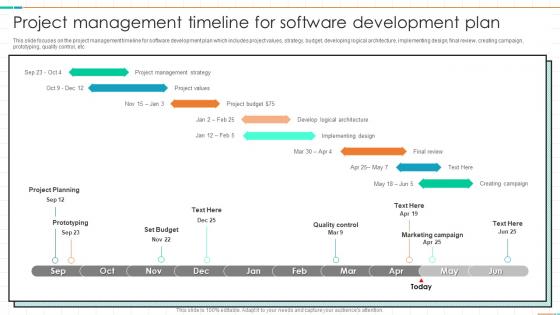
This slide focuses on the project management timeline for software development plan which includes project values, strategy, budget, developing logical architecture, implementing design, final review, creating campaign, prototyping, quality control, etc
People who downloaded this PowerPoint presentation also viewed the following :
Project Management Timeline For Software Development Plan with all 6 slides:
Use our Project Management Timeline For Software Development Plan to effectively help you save your valuable time. They are readymade to fit into any presentation structure.





FAQs for Project Management Timeline For
So you'll want to hit these main phases: initiation, planning, execution, monitoring, and closure. Initiation is where you nail down scope and get buy-in from everyone. Then planning - map out your resources, timeline, all that fun stuff. Execution is obviously the meat of it, usually takes forever too. But here's what people always mess up - you can't just set it and forget it during execution. Monitor constantly, track changes, stay on top of things. Closure ties up loose ends and captures what you learned. Oh, and break each phase into smaller chunks so your team doesn't lose their minds.
Honestly, Gantt charts are a game changer for messy projects. They show all your tasks as bars on a timeline - when stuff starts, ends, and what depends on what. Way better than drowning in endless spreadsheet rows (been there!). You get this bird's eye view that makes bottlenecks super obvious. Plus stakeholders actually understand them, which is rare. I swear by them now. Build one for your next project and you'll see what I mean - everything just clicks into place visually.
Depends what you're dealing with honestly. Microsoft Project or Asana are solid if you've got complex stuff with dependencies - Gantt charts and all that. Trello's super clean for basic timelines though. Monday.com too. You know what? I've watched people build perfectly good timelines in plain old Excel. Sometimes that's all you need. If your team's scattered everywhere, ClickUp or Smartsheet are clutch since everyone can jump in and update things. My advice? Start with whatever tool your team already knows, then switch later if you're missing features.
Ugh, scope changes are the worst but here's what I do. First figure out what this does to your timeline and who you need working on what. Map out dependencies because that's where everything falls apart if you're not careful. Then have that awkward conversation with stakeholders about what's actually critical vs what would just be nice. Push non-essentials to phase two or ask for more resources. Be super clear about trade-offs - bigger scope means longer timeline or bigger budget, no magic here. Update your plan right away and tell everyone the new dates so nobody's surprised later.
Honestly, start by breaking everything down into smaller pieces - you can't estimate something you don't really understand. Check if you've done similar stuff before and use that data. Always pad your timeline though, because trust me, weird stuff happens. Talk to whoever's actually doing the work - they know way better than you how long things take. I'm a fan of the three-point thing: best case, worst case, realistic case, then average it out. Oh and don't feel locked into your first estimate. You'll learn more as you go, so adjust accordingly. Better to be conservative at first than scrambling later.
Oh man, stakeholder feedback will totally flip your timeline upside down. They'll look at your plan and be like "actually we need this other thing first" or point out stuff you completely missed. I learned the hard way to always pad my timelines - like 10-15% buffer after any big review meetings. You'll thank yourself later when they inevitably want changes. Get their input early and often though, because catching issues before you're locked into dates is way better than scrambling last minute. Trust me on this one - scope creep is real and it's coming for your deadline.
Ugh, we're ALL terrible at guessing how long stuff takes - seriously, it's like a universal human flaw. Always throw in extra time because random crap will definitely pop up. Talk to whoever's actually doing the work first though, they'll give you way better estimates than whatever you're thinking. Dependencies are sneaky too - like waiting for approvals or vendors who move at turtle speed. Oh and don't jam-pack every single day, people burn out fast. I usually take whatever estimate I get and add 20% on top. Sounds excessive but trust me, you'll need it.
You totally can mix timelines with Agile! Just think in ranges instead of hard dates. Map your big milestones to sprint ends and pad some buffer time between them. Stakeholders will still bug you for exact dates (ugh), but you can give them realistic windows instead of pretending you know exactly when things'll be done. I'd start by figuring out your must-haves first. Then count backwards - how many sprints do you actually need? Your team keeps working in short cycles while you report up with broader release timelines. Works way better than trying to force everything into rigid deadlines.
Honestly, your timeline is only as good as knowing who's actually available to do the work. Like if Sarah's your only designer and she's swamped for three weeks, well... there goes your optimistic schedule, right? I'd start by figuring out what your team's capacity actually looks like - who has what skills, existing commitments, all that stuff. Then build your timeline around those real constraints instead of just hoping it'll work out. Trust me, it's way better than scrambling later when you realize everyone's overbooked. Resource planning isn't the fun part, but it'll save you major headaches.
Ugh, delays are the worst because they mess up everything downstream. Your critical path tasks - those are the ones that directly affect your end date - will push your whole deadline back if they slip. Even the "safe" tasks can bite you later if they delay long enough to suddenly become critical too. Resources get stuck on delayed stuff when they should be moving to the next thing. It's honestly like dominoes falling. My take? Figure out your critical path first thing and watch those tasks obsessively. I learned this the hard way on a project last year.
Honestly, just pick 2-3 metrics and stick with them - checking weekly works best. Schedule variance is huge - basically are you ahead or behind your milestones? Then track what percentage of deadlines you're actually hitting. Resource utilization shows if your team's drowning or bored (both suck). Scope creep measurement catches those sneaky timeline killers early. Oh and definitely get stakeholder satisfaction scores because if they think your timeline's unrealistic, you'll hear about it eventually anyway. I probably obsess over these more than I should, but they've saved my butt multiple times.
Honestly, cloud tools like Asana or Monday changed everything for me. Your team updates their stuff, and boom - everyone sees it instantly. No more "hey what's the status on..." emails flooding your inbox (thank god). Set up notifications so people actually know when deadlines shift or milestones get hit. I'm always checking project updates on my phone between meetings - probably looks weird but whatever. Microsoft Project works too if you're into that. Just pick one tool and make your team update tasks daily. Once people get in the habit, the real-time thing becomes pretty addictive.
Honestly, just chop everything into smaller chunks with extra time padding - those "30 minute" tasks will eat your whole afternoon, I swear. Do weekly check-ins to catch problems before they explode. Everyone needs crystal clear deadlines, not some vague "by end of week" nonsense. Tools like Asana help but aren't magic fixes. When something goes sideways, speak up immediately instead of crossing your fingers it'll work out. Oh, and before you even start - figure out the three things most likely to go wrong and have backup plans ready.
Always pad your timeline with extra time upfront - I throw in like 15-20% buffer for each big chunk. Figure out your critical path stuff early too, so you'll know which delays actually matter vs the ones that don't break everything. Trust me, something ALWAYS goes wrong (it's just the universe being the universe), so those buffers literally save your sanity. Set up regular check-ins where you can shift things around if needed. Oh, and tell people about timeline changes right away instead of crossing your fingers that you can somehow make it up later.
Think of milestones as your project's victory laps - they mark when you finish big chunks of work. Super helpful for tracking where you're at and showing your boss actual progress instead of just "yeah, still working on it." Without them, projects feel like this never-ending slog with no wins to celebrate. I learned this the hard way on my last big project, honestly. Set them at natural stopping points where you can point to something concrete you've accomplished. Makes status updates way less awkward too since you've got real stuff to talk about. They're basically your sanity savers.
-
The PPTs are extremely simple to modify. Thank you for providing the slides that are ready to be used. They assist me in saving a lot of time.
-
A big thanks to SlideTeam! An incredible and diverse library of templates helped me with my business project presentation.