


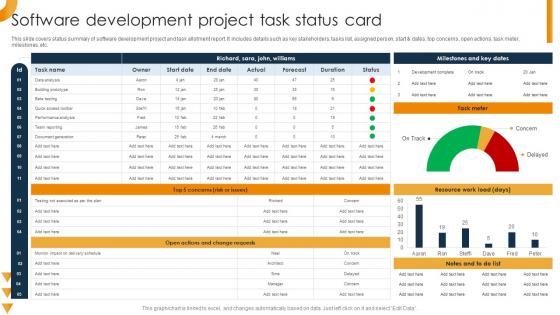
Software Development Project Task Status Card




Try Before you Buy Download Free Sample Product
 Impress Your
 Audience
 100%
100% Editable
 Save Hours
 of Time


This slide covers status summary of software development project and task allotment report. It includes details such as key stakeholders, tasks list, assigned person, start and dates, top concerns, open actions, task meter, milestones, etc.
People who downloaded this PowerPoint presentation also viewed the following :
Software Development Project Task Status Card with all 6 slides:
Use our Software Development Project Task Status Card to effectively help you save your valuable time. They are readymade to fit into any presentation structure.





FAQs for Software Development Project
Okay so first thing - try the Eisenhower Matrix. Basically you sort tasks into urgent vs important quadrants. Hit the urgent+important stuff first, then tackle important but not urgent. Most people think literally everything is urgent (it's not lol). Time-blocking works too. Oh and there's this 2-minute rule - if something takes under 2 minutes, just knock it out instead of adding it to your endless list. Trust me, your brain gets tired carrying around a million tiny tasks. Tomorrow morning just dump everything onto paper and sort it into those four boxes. Game changer.
Honestly, these tools are lifesavers once you get everyone on board. Everything lives in one place - who's doing what, deadlines, files, the whole mess. No more digging through email threads trying to figure out if Sarah finished that report or not. Real-time updates mean you actually know when stuff gets done or if someone's hitting roadblocks. The comment features are clutch too - way better than playing phone tag. Most send push notifications so tasks don't just... disappear into the void. Oh, and pick ONE tool and make everyone actually use it consistently. That's honestly the hardest part but makes all the difference.
Okay so time blocking is literally a game changer - you just assign chunks of time to specific tasks instead of jumping around randomly. What I love about it is you stop wasting mental energy on "what now?" every five minutes. Plus you get way more realistic about how long stuff actually takes (spoiler: always longer than you think). I know it sounds like scheduling your life to death, but it's more like blocking out 2-3 big chunks. Try it tomorrow and you'll probably be shocked at how much more you get done. Way less scattered brain, way more actual progress.
Oh dude, the Eisenhower Matrix is a game changer! Basically you sort your tasks into four boxes: urgent + important (do now), important but not urgent (schedule for later), urgent but not important (delegate if you can), and stuff that's neither (just delete it honestly). I kick myself for not learning this sooner. Every morning I spend like 5 minutes sorting my to-do list this way. The trick is being real about what's actually important vs what just *feels* urgent - most of us get trapped doing busy work that doesn't matter. Try it for a week!
Honestly, chunking big projects into smaller pieces is a game changer. I get weirdly excited checking things off my list - those little dopamine hits keep me going when everything feels endless. You'll spot problems way earlier too, and timelines actually make sense instead of being total guesswork. Oh, and it's so much easier to hand off specific tasks to other people. The trick is figuring out your big milestones first, then working backwards. Sounds boring but it works. You end up focusing on stuff that actually matters instead of spinning your wheels on random busy work.
SMART goals are a game-changer, trust me. You stop with the vague "make website better" nonsense and actually pin down what you want—like "boost homepage conversions 15% in 3 months." Way less overwhelming when you know exactly what you're shooting for. The deadline part is clutch too because otherwise projects just... exist forever, you know? I actually thought the whole framework was corporate BS at first, but it genuinely makes everything clearer. Next time you've got something big, just try it. You'll actually know what steps to take instead of staring at your computer wondering where to even start.
Okay so first thing I'd do is get all those deadlines on paper (or whatever) so you can actually see what's overlapping. Break everything down into smaller pieces - some stuff you can probably multitask on, other things need your brain fully there. Time-blocking is honestly a lifesaver for this because it makes you face reality about how much you can actually handle. Definitely give people a heads up early if you think there might be issues. Way better than scrambling later. Also check if any of those deadlines are actually flexible or if you can pass off some tasks to someone else.
Okay so delegation seriously changed everything for me. You stop trying to do it all and actually give tasks to people who are good at that stuff. Focus on what matters most while your team handles the rest - but here's the thing, you HAVE to be super clear about deadlines and what you want. I totally bombed this last quarter by being vague lol. When you nail the communication though? Your team crushes more work and actually enjoys it. My advice - grab one thing you do every week and hand it off with really detailed instructions.
Honestly, the worst thing you can do is say yes to everything - I'm still recovering from that mistake lol. Also don't skip planning because you think it's faster. It's not. Break your big scary projects into tiny pieces so they don't make you want to hide under a blanket. Buffer time is crucial since literally everything takes twice as long as you think. That Eisenhower matrix thing actually works for sorting what's urgent vs what just feels urgent. Oh, and review your week every Sunday or Monday - whatever works for your schedule.
Dude, you've gotta do those weekly task reviews - I know, I know, sounds boring as hell but hear me out. They're lifesavers for catching stuck projects before they spiral. Plus you'll notice patterns like spending three hours on emails that could take 30 minutes (been there). I used to think reviews were pointless busywork until I started actually doing them. Now I just block 10 minutes every Friday afternoon. It's wild how much clarity you get on what's actually moving the needle vs what's just keeping you busy. Also nice excuse to pat yourself on the back for wins!
Honestly, proper task management is like a shield against burnout. Your team actually knows what they're doing and when stuff's due, so stress drops big time. But when it's a mess? Total nightmare - deadlines come out of nowhere, priorities flip every day, and people can't figure out what to tackle first. I've seen teams fall apart from this exact thing. You've got to be real about what your team can handle and push back on impossible requests. Maybe start by looking at who's swamped right now and where things are getting stuck.
So basically you'll want to connect your automation tools through APIs or whatever integrations they already have built-in. Zapier works great with most platforms like Asana or Trello - honestly saved me tons of time. Start with simple stuff first. Maybe auto-create tasks from emails or move things between project stages when status updates happen. I'd test one basic automation before going crazy with complex workflows, but once you get the hang of it you won't want to go back to doing everything manually. The setup time is annoying at first but totally worth it.
Honestly, I'd start with completion rates and how long stuff actually takes vs your estimates - that gap tells you everything. Backlog size matters too, plus tracking when deadlines get blown (which happens more than we'd like to admit). The revision thing is huge though - tasks that keep bouncing back are the worst. Queue time's another good one since things just sitting there usually means you've got a bottleneck somewhere. Team utilization helps you spot if someone's drowning or bored. But seriously, pick like 2-3 max or you'll drown in spreadsheets.
Honestly, remote work means you'll be doing way more documentation than you think. Can't just pop over to someone's desk anymore to see what's up. You need decent project management tools and regular check-ins - plus deadlines that are actually clear (shocking concept, I know). The upside though? You get really good at planning stuff out and working async, which is pretty efficient once you're used to it. Office life depends on all those random hallway conversations and being able to tell who's drowning just by looking around. My advice: over-communicate your progress at first. Feels awkward but prevents so much confusion down the road.
Honestly, feedback is like a reality check for your whole system. You think you've got everything figured out, then your team tells you those "quick 30-minute tasks" actually take 2 hours. Ouch. Regular check-ins help you catch stuff before it becomes a disaster - like realizing certain project types always slip through the cracks. I learned this the hard way when I kept underestimating design reviews. Don't wait for things to blow up to ask for input. Pick one thing that's bugging you this week and track it. You'll probably spot patterns pretty quickly.
-
Very unique and reliable designs.
-
They guys always go the extra mile to meet the expectations of their customers. Almost a year has been associated with them.