


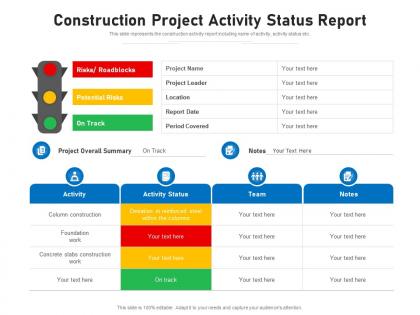
Construction project activity status report




Try Before you Buy Download Free Sample Product
 Impress Your
 Audience
 100%
100% Editable
 Save Hours
 of Time


This slide represents the construction activity report including name of activity, activity status etc.
People who downloaded this PowerPoint presentation also viewed the following :
Construction project activity status report with all 2 slides:
Use our Construction Project Activity Status Report to effectively help you save your valuable time. They are readymade to fit into any presentation structure.
FAQs for Construction project
Honestly, start with the basics - are you hitting your milestones? That's usually the first sign something's off. Budget variance is next - compare what you're spending versus original estimates plus any approved changes. Quality stuff matters too, like how often you're redoing work or failing inspections. Safety incidents are a no-brainer red flag. Resource utilization tells you if you're burning through people too fast. Oh, and permit issues - those can totally tank your timeline if you're not watching them. Just throw these into a simple dashboard and check weekly with your team. Catches problems before they get ugly.
Honestly, good communication is what makes or breaks project reporting. When people feel safe sharing bad news, you actually know what's going on instead of getting those polished updates that hide problems. I've watched projects crash because nobody wanted to admit things were going sideways - could've been totally avoided. Set up regular check-ins and stick to the same reporting format so everyone knows what to expect. Make it clear that flagging issues early is way better than surprises later. Your reports will actually mean something instead of just being paperwork nobody trusts.
Dude, project management software will save your sanity. Tools like Procore or Smartsheet let your crew log updates right from the field - way better than those ancient spreadsheets we all hate. You'll get automated reports, photo tracking for each milestone, plus alerts before deadlines hit. The cool part is stakeholders can check progress anytime instead of sitting through boring weekly meetings. Honestly, pick whatever tool seems easiest and just make sure your team actually uses it. That's the hard part - getting everyone on board consistently.
Ugh, budget overruns are the worst - your project status instantly goes from green to yellow or red. More meetings, more reports, more explaining yourself to executives who suddenly care about your project. You'll need revised forecasts in every status update now, plus how it affects your timeline and scope. The recovery plan becomes everything. Pro tip though - update your risk register and get out in front of this mess before they find out on their own. Trust me, proactive communication beats getting called into someone's office. That overrun will haunt every meeting until you fix it.
Honestly, Critical Path Method is your friend here - it'll show you which tasks can't slip without screwing your whole timeline. MoSCoW works too (Must have, Should have, etc) but I've seen people overcomplicate this stuff. Simple urgency vs impact grids work fine most of the time. Got equipment or crew scheduling headaches? Factor in resource availability when you're prioritizing. My approach: start with CPM to nail down your critical tasks, then add your resource constraints on top. That gives you realistic daily priorities instead of some perfect-world task list that ignores reality.
Honestly, just pick a day and send the same update format every week - progress, what's coming up, any issues, budget stuff. Don't skip weeks! I made that mistake once and people freaked out thinking the project was dying. Most folks are visual, so dashboards help too. Beat them to it instead of waiting for them to bug you for info. I always set recurring meetings and bring actual numbers, not vague "everything's fine" nonsense. Oh, and those calendar invites? Game changer for keeping everyone in the loop without constant back-and-forth emails.
Definitely go with progress photos and timeline overlays - those work great. Gantt charts showing planned vs actual are clutch too. Before/after shots are honestly my favorite because people get excited seeing the transformation happen. If your stakeholders are into tech stuff, interactive dashboards are amazing, but sometimes a basic photo slideshow with completion percentages actually works better than all the fancy bells and whistles. Heat maps by zone are solid for bigger projects. Oh, and always throw in one dramatic progress shot that really shows the change - keeps everyone pumped about the project.
Oh man, regulatory approvals are such a pain - they can add weeks or even months to your timeline. Each permit has its own review process, and honestly, half the time they're just sitting around waiting for someone to make a follow-up call. The really annoying part is how they stack up - if one gets delayed, everything else gets pushed back too. I'd start submitting applications way earlier than you think you need to. Build in extra time for delays because trust me, there will be delays. Also maybe check in periodically on where things stand - sometimes a quick call actually moves things along.
Real-time data is honestly the worst part - everyone reports differently and half the subs are way too optimistic about their timelines. Weather screws everything up, materials get delayed, change orders mess with your baseline. Oh and don't get me started on outdated drawings that make measuring progress impossible. The paperwork becomes a total mess. I'd set up weekly check-ins with each trade, same format every time. Photo documentation helps too since you can actually see what's done vs what they claim is done. Saves you from those awkward "where's the work?" conversations later.
Just make risk tracking part of your regular status updates - add a dedicated section for current risks, probability, and where you stand on mitigation. I throw in a simple matrix showing what's moved up or down since last time. Makes trends super obvious. Update weekly and call out new stuff that pops up, plus celebrate the ones you've killed off. Way better than only thinking about it when everything's on fire, you know? Red/yellow/green works great for quick visual status. Honestly, stakeholders actually read reports when they don't have to decode paragraphs of text.
Honestly, start simple with just 2-3 metrics or you'll drive yourself crazy tracking everything. SPI tells you if you're running behind schedule, CPI shows whether you're burning through budget too fast. Labor productivity is probably your biggest win - like how many hours it takes to finish X square footage or complete certain tasks. Don't forget quality stuff either. Rework rates will kill your timeline, and safety incidents are just expensive headaches nobody needs. There's this thing called Earned Value Management that rolls it all together, but tbh that might be overkill depending on your project size. Pick what actually matters for your specific situation.
Honestly, stakeholder engagement is everything when it comes to how people judge your project. Even if construction's running perfectly, bad communication will tank your reputation fast. I've seen minor delays turn into total disasters just because nobody told the stakeholders what was happening first - they heard it through rumors instead. Keep everyone in the loop with regular updates. Address their concerns right away. Be upfront about problems before they find out elsewhere. That transparency? It's what keeps people trusting you can actually deliver. Weekly check-ins work great for this.
Honestly, the biggest thing is watching your critical path stuff every single day - when that slips, everything else falls apart. Weather's massive too, especially if you've got concrete or outdoor work planned. I'd definitely keep an eye on material deliveries and maybe have a backup supplier ready because supply chains are still kinda nuts. Your subs can screw you over if they're stretched thin across other jobs, so stay on top of their schedules. We do weekly check-ins with the crew to catch problems early. Oh, and build in some buffer time from the start - way easier than trying to fix things later when you're already behind.
Dude, just dig into your old project reviews when you're setting up new timelines. We're terrible at learning from our mistakes honestly - always getting too optimistic about the same stupid stuff. Weather delays, permit headaches, flaky subcontractors... it's like groundhog day sometimes. Instead of following the original schedule for check-ins, set your status meetings based on where things actually fell apart before. That's where you'll spot the red flags early. Similar projects hit the same snags, so use those patterns to build better benchmarks this time around.
Templates are honestly a lifesaver for construction reports. Your stakeholders know exactly where to find budget updates and timeline stuff every single time. Makes prep way easier too since you're not reinventing the wheel each week. I always include overview, milestones, budget, risks, and next steps - covers everything without missing safety incidents or delays. Executives can scan straight to what they care about instead of digging through walls of text (which they hate). Trust me, once you start using one consistently, you'll wonder how you survived without it.
-
Excellent work done on template design and graphics.
-
Design layout is very impressive.
-
Illustrative design with editable content. Exceptional value for money. Highly pleased with the product.
-
Easy to edit slides with easy to understand instructions.