


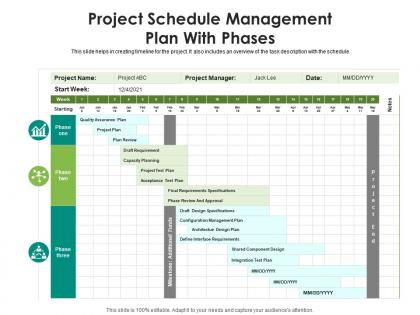
Project schedule management plan with phases




Try Before you Buy Download Free Sample Product
 Impress Your
 Audience
 100%
100% Editable
 Save Hours
 of Time


This slide helps in creating timeline for the project. It also includes an overview of the task description with the schedule.
People who downloaded this PowerPoint presentation also viewed the following :
Project schedule management plan with phases with all 2 slides:
Use our Project Schedule Management Plan With Phases to effectively help you save your valuable time. They are readymade to fit into any presentation structure.
FAQs for Project schedule management
Start with your big deliverables and break them into smaller pieces. You need realistic time estimates for each task, plus who's doing what and when. Map out which tasks depend on others - this stuff matters more than people think. Don't skip buffer time (learned that the hard way). Set up milestones so you can track progress and have something to measure against. Critical path identification is key too. Make sure your team can actually read and use whatever format you choose. Oh, and honestly? Keep it simple - fancy project management tools are useless if nobody opens them.
Dude, Gantt charts are seriously a lifesaver for project management. You get this visual timeline that shows task dependencies and helps you catch bottlenecks before they mess everything up. I honestly don't know why anyone tries managing complex projects without them anymore - it's like trying to build IKEA furniture without the instructions (which I've definitely done and regretted). Real-time progress tracking is clutch too. Plus your team and stakeholders can actually understand what's happening timeline-wise instead of getting confused by spreadsheets. Try one on your next project - you'll see the difference immediately.
So milestones are basically your big project checkpoints - you know, when you finish major chunks of work. I always think of them as the moments worth celebrating (pizza party time!). They're super helpful for breaking your timeline into pieces that don't feel overwhelming. Place them at natural stopping points like wrapping up the design phase or getting that client sign-off. Honestly, they make tracking progress so much easier, plus stakeholders love seeing clear progress markers. My approach? Figure out your key deliverables first, then work backwards to set dates that actually make sense.
Okay so first thing - grab any historical data you have from similar projects. Get your team involved too since they're the ones actually doing the work and know what's realistic. I always do three-point estimates: best case, worst case, and most likely, then average them out. Honestly? Add 10-20% buffer time because something always goes sideways. Don't forget about dependencies either - like if Sarah's on vacation or you're waiting on approvals. Write down your assumptions so you can look back later and see where you went wrong (or right!). Gets easier with practice.
Honestly, start by just talking to people - your team, clients, vendors. Ask them what they need before they can actually start their work. Those dependency mapping sessions are super helpful too (we usually just throw everything on a whiteboard, or use Miro if we're all remote). Walking through your entire workflow step-by-step will catch stuff you missed. Oh, and don't forget to look back at old projects - you'd be surprised what patterns show up. I always try to mix at least two of these methods because relying on just one never gives you the full picture.
Update your schedule weekly if you can, or every couple weeks minimum. Track real progress vs what you planned - don't fall into that "90% done" trap where tasks live forever at almost-finished. Log actual dates in whatever tool you're using. Quick team check-ins help catch problems before they snowball. Honestly, the communication part is huge though. When dates shift, tell your stakeholders right away so they're not blindsided. Don't just quietly move deadlines around and hope nobody notices.
So CPM uses one fixed time estimate per task - pretty straightforward math from there. PERT's different though, you're plugging in three scenarios: best case, worst case, and realistic. Then it does weighted averages to handle uncertainty (gets kinda messy with the calculations tbh). If you've got solid historical data and predictable work, CPM's your friend. But when you're facing something new or risky where timing could go anywhere? That's when PERT actually shines. I'd say stick with CPM for routine stuff, save PERT for those projects that keep you up at night.
Oh man, Microsoft Project is the "standard" but it's honestly kind of a nightmare when you're starting out. I'd skip that headache and try Asana or Trello first - way easier to figure out. Monday.com is solid too. If you need something beefier, Smartsheet's pretty decent without being totally overwhelming. ClickUp has tons of features but can get cluttered (learned that one the hard way). Just grab whatever free trial looks good and mess around with it for a week. You'll know pretty quick if it works with how your brain operates.
Your project timeline lives or dies by who you've got doing the work. Got your A-team on the critical stuff? You'll probably wrap up early. But if your star developer is buried in three other projects, good luck hitting those deadlines. I learned this the hard way last year - doesn't matter how perfect your Gantt chart looks if key people aren't available. The bottleneck thing is real. Match your team's bandwidth to what you actually need done, and honestly? Pad your timeline because something will definitely break.
Buffer time is your best friend - build it into everything critical. Honestly, I've seen too many projects crash because people skip the upfront risk assessment thinking they'll figure it out as they go. Bad idea. When you're already behind, try fast-tracking stuff (running tasks parallel) or throw more people at it to speed things up. Weekly check-ins are clutch for catching problems early. Also, have backup plans ready so you're not panicking and making terrible decisions under pressure. Track your actual vs planned progress every week - you'll start seeing patterns before they bite you.
So Agile basically throws out that whole "plan everything perfectly upfront" approach. You work in these short 1-4 week chunks instead, tackling your most important stuff first. Way better than stressing about predicting what'll happen six months from now, honestly. The schedule stays flexible because you're always checking in - did priorities shift? What's the feedback telling us? I'd say just embrace the uncertainty (I know, easier said than done). Pick your absolute must-haves and maybe plan like 2-3 sprints ahead max. Don't overthink it.
So your baseline is basically the original plan you locked down at the beginning - like "we promise to deliver X by Y date." That stays frozen for comparison. Your actual schedule? That's the messy reality of what's actually happening - delays, changes, people calling in sick, you know how it goes. I always keep both because when stakeholders start breathing down your neck asking why things are behind, you can point to the baseline and show exactly what changed. It's honestly saved me so many awkward conversations. Short version: baseline = the promise, actual = what really happened.
Ugh, tell everyone RIGHT AWAY - don't make my mistake of waiting two weeks to announce a major slip! Shoot out a quick message explaining what changed and why. People need to know how it affects their stuff and what they should do differently now. Use whatever channel they actually read - email, Slack, whatever. I swear, being upfront saves you so much drama later. Include the new timeline too. Better to over-communicate than have someone find out by accident and get pissed. Trust me on this one.
So the big ones you want are Schedule Variance (SV) and Schedule Performance Index (SPI) - they'll tell you if you're on track or falling behind. Critical Path stuff is crucial since any delays there mess with your whole timeline. I'm a bit of a nerd about milestone completion rates because honestly, stakeholders eat that up when they see progress. Resource utilization is solid too, plus task completion percentages help you spot where things are getting stuck. Oh, and set up some kind of weekly dashboard - catching problems early beats scrambling later when everything's on fire.
Look, automation is a lifesaver for schedule management. It handles all the boring stuff - tracking tasks, allocating resources, updating progress. No more chasing people down for updates or playing deadline cop (which honestly nobody wants to do anyway). The best part? You'll spot delays and bottlenecks way earlier, before they mess up your entire timeline. My advice is start with whatever manual process takes you the longest each week. Once you automate that first thing, you'll wonder why you waited so long to do this.
-
Topic best represented with attractive design.
-
Very unique, user-friendly presentation interface.
-
Best Representation of topics, really appreciable.
-
Innovative and Colorful designs.